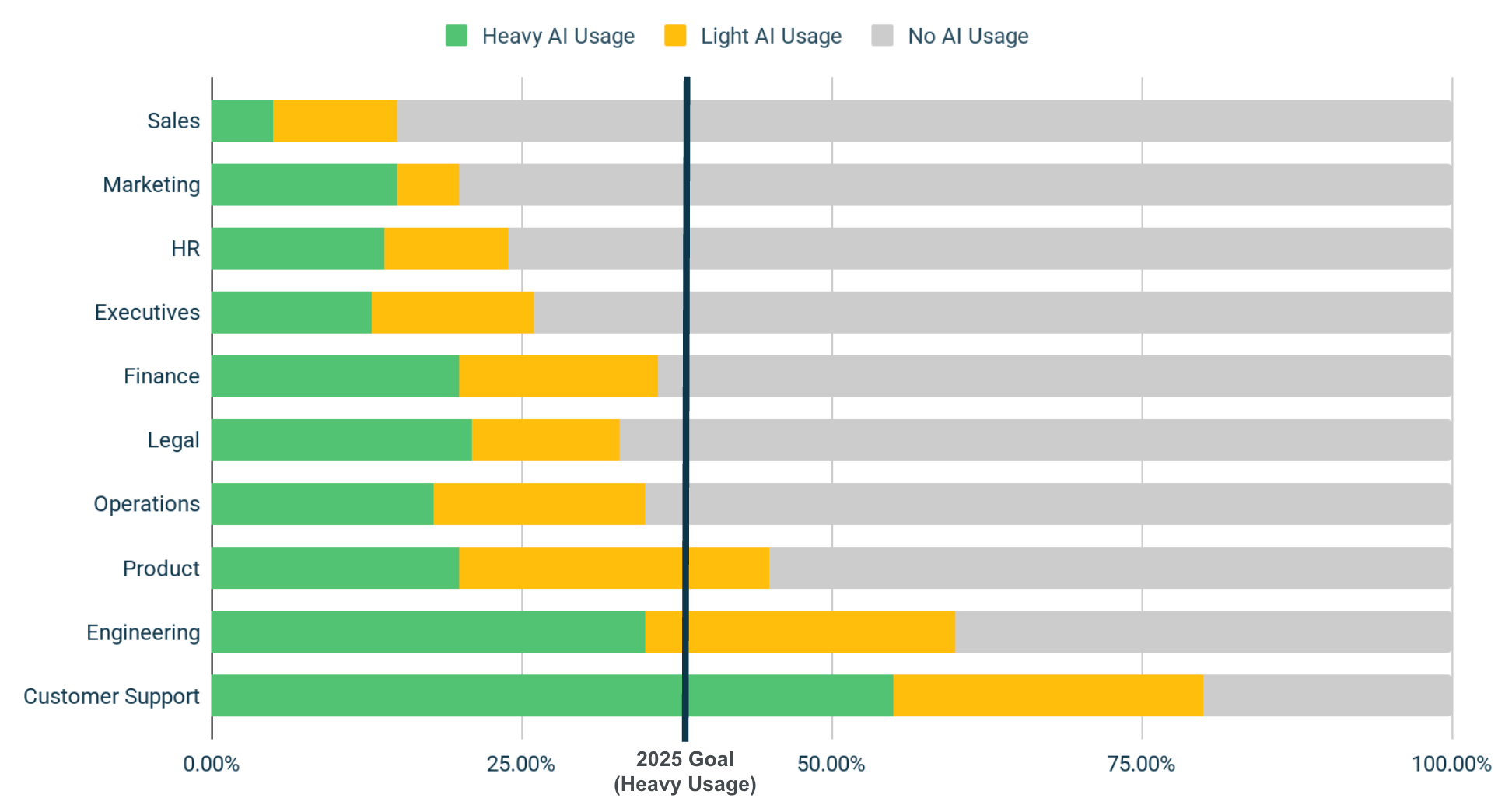
AI adoption in companies surged to 72% in 2024, up from 55% in 2023, yet many organizations struggle to quantify their actual usage patterns and ROI (Worklytics AI Adoption). Just as you wouldn't invest in a new initiative without tracking its ROI, AI adoption needs to be quantified through objective telemetry data rather than subjective surveys (Worklytics AI Adoption Tracking). Microsoft 365 Copilot is not just a single platform or app accessed through one interface, but an intelligent assistant that manifests in different facets of the Microsoft technology stack (Microsoft Inside Track). Meanwhile, executive urgency to incorporate AI tools into business operations has increased 7x over the past six months, yet more than two-thirds of desk workers have never used AI at work (Slack Workforce Index).
This comprehensive guide walks IT and HR analytics teams through building an end-to-end telemetry pipeline that captures Copilot and Slack AI agent events, streams them into analytics platforms, anonymizes identifiers for GDPR/CCPA compliance, and surfaces real-time adoption dashboards. You'll get practical code snippets, sample visualizations, and troubleshooting tips for missing signals—all without relying on surveys that suffer from response bias and incomplete participation.
Measuring AI adoption provides several benefits: it quantifies the baseline (e.g. how many employees used an AI tool this month) and illuminates the breadth of usage across teams, roles, and locations (Worklytics AI Adoption Tracking). Traditional survey approaches face several critical limitations:
Telemetry data from collaboration platforms provides objective, comprehensive, and real-time insights into actual AI usage patterns. Among desk workers who use AI tools, 81% say it's improving their productivity, but nearly 2 in 5 say their company has no AI usage guidelines (Slack Workforce Index). This makes accurate measurement even more critical for establishing baselines and tracking progress.
Before diving into implementation, it's essential to understand which metrics provide the most actionable insights. Six key AI usage metrics that business and tech decision-makers should track are Light vs. Heavy Usage Rate, AI Adoption per Department, Manager Usage per Department, and New-Hire vs. Tenured Employee Usage (Worklytics AI Adoption Tracking).
| Metric | Definition | Why It Matters |
|---|---|---|
| Light vs. Heavy Usage Rate | Users with <5 AI interactions/week vs. >20 interactions/week | If a large chunk of users remain light users, it signals untapped potential—perhaps due to lack of training or unclear value of the AI Agent |
| AI Adoption per Department | Percentage of department members using AI tools monthly | Low adoption in a department could mean the AI tools available aren't well-suited to that function's work, or perhaps that team's leadership isn't encouraging experimentation |
| Manager Usage per Department | AI usage rates among people managers vs. individual contributors | A lack of leadership engagement can stall broader adoption |
| New-Hire vs. Tenured Employee Usage | AI adoption rates by tenure cohort | 85% of employees hired in the last 12 months use AI weekly versus only 50% of those with 10+ years at the company |
Microsoft 365 Copilot requires a unique adoption process because it integrates across multiple applications in the Microsoft technology stack (Microsoft Inside Track). Microsoft Digital, the company's IT organization, has been leading internal Copilot adoption and provides valuable insights for measurement approaches.
First, register an application in Azure AD and configure the necessary permissions:
# PowerShell script to register app and set permissions
$appName = "AI-Usage-Analytics"
$requiredPermissions = @(
    "Reports.Read.All",
    "AuditLog.Read.All",
    "Directory.Read.All"
)

# Register the application
$app = New-AzADApplication -DisplayName $appName

# Add required permissions
foreach ($permission in $requiredPermissions) {
    Add-AzADAppPermission -ObjectId $app.ObjectId -ApiId "00000003-0000-0000-c000-000000000000" -PermissionId $permission
}

# Generate client secret
$secret = New-AzADAppCredential -ObjectId $app.ObjectId
Write-Host "Client ID: $($app.AppId)"
Write-Host "Client Secret: $($secret.SecretText)"
Microsoft Graph provides several endpoints for Copilot usage data:
import requests
import json
from datetime import datetime, timedelta

class CopilotUsageExtractor:
    def __init__(self, tenant_id, client_id, client_secret):
        self.tenant_id = tenant_id
        self.client_id = client_id
        self.client_secret = client_secret
        self.access_token = self._get_access_token()

    def _get_access_token(self):
        url = f"https://login.microsoftonline.com/{self.tenant_id}/oauth2/v2.0/token"
        data = {
            'grant_type': 'client_credentials',
            'client_id': self.client_id,
            'client_secret': self.client_secret,
            'scope': 'https://graph.microsoft.com/.default'
        }
        response = requests.post(url, data=data)
        return response.json()['access_token']

    def get_copilot_usage_reports(self, period='D30'):
        """Extract Copilot usage for the last 30 days"""
        headers = {
            'Authorization': f'Bearer {self.access_token}',
            'Content-Type': 'application/json'
        }

        # Get Copilot usage summary
        url = f"https://graph.microsoft.com/v1.0/reports/getM365AppUserDetail(period='{period}')"
        response = requests.get(url, headers=headers)

        if response.status_code == 200:
            return self._parse_usage_data(response.text)
        else:
            raise Exception(f"API call failed: {response.status_code} - {response.text}")

    def _parse_usage_data(self, csv_data):
        """Parse CSV response and extract Copilot-specific metrics"""
        lines = csv_data.strip().split('\n')
        headers = lines[0].split(',')

        copilot_usage = []
        for line in lines[1:]:
            values = line.split(',')
            user_data = dict(zip(headers, values))

            # Extract Copilot-specific usage
            if any('copilot' in key.lower() for key in user_data.keys()):
                copilot_usage.append({
                    'user_id': user_data.get('User Principal Name', ''),
                    'copilot_word_used': user_data.get('Copilot Word Used', '0') == 'Yes',
                    'copilot_excel_used': user_data.get('Copilot Excel Used', '0') == 'Yes',
                    'copilot_powerpoint_used': user_data.get('Copilot PowerPoint Used', '0') == 'Yes',
                    'copilot_outlook_used': user_data.get('Copilot Outlook Used', '0') == 'Yes',
                    'last_activity_date': user_data.get('Last Activity Date', '')
                })

        return copilot_usage

# Usage example
extractor = CopilotUsageExtractor(
    tenant_id="your-tenant-id",
    client_id="your-client-id",
    client_secret="your-client-secret"
)

usage_data = extractor.get_copilot_usage_reports()
print(f"Extracted usage data for {len(usage_data)} users")
For more granular tracking, use the Microsoft 365 Audit Log:
def get_copilot_audit_events(self, start_date, end_date):
    """Extract detailed Copilot events from audit logs"""
    headers = {
        'Authorization': f'Bearer {self.access_token}',
        'Content-Type': 'application/json'
    }

    # Search for Copilot-related activities
    search_query = {
        "StartDate": start_date.isoformat(),
        "EndDate": end_date.isoformat(),
        "Operations": [
            "CopilotInteraction",
            "CopilotSuggestionAccepted",
            "CopilotSuggestionRejected",
            "CopilotPromptSubmitted"
        ],
        "RecordType": "MicrosoftCopilot"
    }

    url = "https://graph.microsoft.com/v1.0/security/auditLog/queries"
    response = requests.post(url, headers=headers, json=search_query)

    if response.status_code == 201:
        query_id = response.json()['id']
        return self._poll_audit_results(query_id)
    else:
        raise Exception(f"Audit search failed: {response.status_code}")

def _poll_audit_results(self, query_id):
    """Poll for audit search results"""
    headers = {'Authorization': f'Bearer {self.access_token}'}
    url = f"https://graph.microsoft.com/v1.0/security/auditLog/queries/{query_id}"

    while True:
        response = requests.get(url, headers=headers)
        query_status = response.json()

        if query_status['status'] == 'succeeded':
            # Download results
            results_url = f"{url}/records"
            results_response = requests.get(results_url, headers=headers)
            return results_response.json()['value']
        elif query_status['status'] == 'failed':
            raise Exception("Audit query failed")

        time.sleep(30)  # Wait 30 seconds before polling again
Slack's AI features have seen significant adoption growth, making measurement critical for understanding organizational AI maturity. Despite AI enthusiasm, more than two-thirds of desk workers have never used AI at work, highlighting the importance of accurate tracking (Slack Workforce Index).
import slack_sdk
from slack_sdk import WebClient
from slack_sdk.errors import SlackApiError

class SlackAIUsageTracker:
    def __init__(self, bot_token, user_token):
        self.bot_client = WebClient(token=bot_token)
        self.user_client = WebClient(token=user_token)

    def get_ai_usage_events(self, start_date, end_date):
        """Extract AI-related events from Slack audit logs"""
        try:
            # Get audit logs for AI-related events
            response = self.user_client.admin_logs_get(
                start_time=int(start_date.timestamp()),
                end_time=int(end_date.timestamp()),
                action="ai_*"  # Filter for AI-related actions
            )

            ai_events = []
            for entry in response['entries']:
                if self._is_ai_event(entry):
                    ai_events.append({
                        'user_id': entry.get('user_id'),
                        'action': entry.get('action'),
                        'timestamp': entry.get('date_create'),
                        'channel_id': entry.get('channel_id'),
                        'details': entry.get('details', {})
                    })

            return ai_events

        except SlackApiError as e:
            print(f"Error fetching audit logs: {e.response['error']}")
            return []

    def _is_ai_event(self, entry):
        """Check if audit log entry is AI-related"""
        ai_actions = [
            'ai_workflow_step_completed',
            'ai_assistant_invoked',
            'ai_summary_generated',
            'ai_thread_summary_viewed',
            'ai_search_performed'
        ]
        return entry.get('action') in ai_actions
Slack's AI features include thread summaries, search assistance, and workflow automation:
def track_ai_assistant_usage(self):
    """Track usage of Slack's AI assistant features"""
    try:
        # Get conversations where AI assistant was used
        conversations = self.bot_client.conversations_list(
            types="public_channel,private_channel,mpim,im",
            limit=1000
        )

        ai_usage_summary = {
            'total_ai_interactions': 0,
            'unique_users': set(),
            'channels_with_ai': set(),
            'ai_features_used': {}
        }

        for channel in conversations['channels']:
            channel_id = channel['id']

            # Get messages with AI assistant interactions
            messages = self.bot_client.conversations_history(
                channel=channel_id,
                limit=100
            )

            for message in messages.get('messages', []):
                if self._contains_ai_interaction(message):
                    ai_usage_summary['total_ai_interactions'] += 1
                    ai_usage_summary['unique_users'].add(message.get('user'))
                    ai_usage_summary['channels_with_ai'].add(channel_id)

                    # Track specific AI features used
                    ai_feature = self._identify_ai_feature(message)
                    if ai_feature:
                        ai_usage_summary['ai_features_used'][ai_feature] = \
                            ai_usage_summary['ai_features_used'].get(ai_feature, 0) + 1

        # Convert sets to counts for JSON serialization
        ai_usage_summary['unique_users'] = len(ai_usage_summary['unique_users'])
        ai_usage_summary['channels_with_ai'] = len(ai_usage_summary['channels_with_ai'])

        return ai_usage_summary

    except SlackApiError as e:
        print(f"Error tracking AI usage: {e.response['error']}")
        return {}

def _contains_ai_interaction(self, message):
    """Check if message contains AI assistant interaction"""
    # Look for AI assistant mentions or specific patterns
    ai_indicators = [
        'assistant_thread_context',
        'ai_summary',
        'workflow_step_executed',
        'ai_generated_content'
    ]

    message_text = message.get('text', '').lower()
    message_subtype = message.get('subtype', '')

    return any(indicator in message_text or indicator in message_subtype
              for indicator in ai_indicators)

def _identify_ai_feature(self, message):
    """Identify which AI feature was used"""
    if 'thread_summary' in message.get('text', ''):
        return 'thread_summary'
    elif 'workflow' in message.get('subtype', ''):
        return 'ai_workflow'
    elif 'search_assistant' in message.get('text', ''):
        return 'search_assistant'
    else:
        return 'general_ai_assistant'
Built with privacy at its core, analytics platforms use data anonymization and aggregation to ensure compliance with GDPR, CCPA, and other data protection standards (Worklytics). Over 58% of the workforce now engages in some form of remote work, increasing reliance on employee monitoring tools, while 86% of employees believe it should be a legal requirement for employers to disclose if they use monitoring tools (Worklytics Compliance).
import hashlib
import hmac
from datetime import datetime

class DataAnonymizer:
    def __init__(self, secret_key):
        self.secret_key = secret_key.encode('utf-8')

    def anonymize_user_id(self, user_id):
        """Create consistent anonymous hash for user identification"""
        return hmac.new(
            self.secret_key,
            user_id.encode('utf-8'),
            hashlib.sha256
        ).hexdigest()[:16]

    def anonymize_usage_data(self, usage_records):
        """Anonymize user identifiers while preserving analytics value"""
        anonymized_records = []

        for record in usage_records:
            anonymized_record = {
                'anonymous_user_id': self.anonymize_user_id(record['user_id']),
                'department': record.get('department', 'unknown'),
                'role_level': record.get('role_level', 'individual_contributor'),
                'tenure_months': record.get('tenure_months', 0),
                'ai_interactions_count': record.get('ai_interactions_count', 0),
                'ai_features_used': record.get('ai_features_used', []),
                'session_duration_minutes': record.get('session_duration_minutes', 0),
                'date': record.get('date', datetime.now().isoformat())
            }

            # Remove any remaining PII
            anonymized_record = self._scrub_pii(anonymized_record)
            anonymized_records.append(anonymized_record)

        return anonymized_records

    def _scrub_pii(self, record):
        """Remove any potential PII from record"""
        pii_patterns = ['email', 'name', 'phone', 'address']

        for key, value in record.items():
            if isinstance(value, str):
                for pattern in pii_patterns:
                    if pattern in key.lower():
                        record[key] = '[REDACTED]'
                        break

        return record

# Usage example
anonymizer = DataAnonymizer(secret_key="your-secret-key")
anonymized_data = anonymizer.anonymize_usage_data(raw_usage_data)
class DataRetentionManager:
    def __init__(self, retention_days=90):
        self.retention_days = retention_days

    def apply_retention_policy(self, data_records):
        """Remove records older than retention period"""
        cutoff_date = datetime.now() - timedelta(days=self.retention_days)

        filtered_records = []
        for record in data_records:
            record_date = datetime.fromisoformat(record['date'])
            if record_date >= cutoff_date:
                filtered_records.append(record)

        return filtered_records

    def aggregate_expired_data(self, expired_records):
        """Aggregate expired records for long-term trend analysis"""
        aggregated = {
            'total_users': len(set(r['anonymous_user_id'] for r in expired_records)),
            'total_interactions': sum(r['ai_interactions_count'] for r in expired_records),
            'average_session_duration': sum(r['session_duration_minutes'] for r in expired_records) / len(expired_records) if expired_records else 0,
            'department_breakdown': {},
            'period_start': min(r['date'] for r in expired_records) if expired_records else None,
            'period

## Frequently Asked Questions

### Why should I measure AI usage through telemetry instead of surveys?

Telemetry data provides objective, real-time insights into actual AI usage patterns without relying on subjective employee responses. With AI adoption surging to 72% in 2024, organizations need accurate data to measure ROI and optimize their AI investments. Surveys often suffer from response bias and don't capture the full picture of how employees interact with AI tools like Microsoft 365 Copilot and Slack.

### What specific AI usage metrics can I track across Microsoft 365 Copilot and Slack?

Key metrics include frequency of AI feature usage, time spent with AI tools, types of AI interactions (chat, document generation, code assistance), user adoption rates by department, and productivity improvements. For Microsoft 365 Copilot, you can track usage across different apps like Word, Excel, and Teams. For Slack, you can monitor AI-powered search, message summarization, and workflow automation usage.

### How do I ensure GDPR compliance when collecting AI usage telemetry?

GDPR compliance requires transparent data collection practices, employee consent, and data minimization principles. You must clearly communicate what AI usage data is being collected, why it's needed, and how it will be used. Implement data anonymization techniques, establish data retention policies, and provide employees with the right to access and delete their data. Consider using aggregated metrics rather than individual-level tracking where possible.

### What are the key steps to build an AI usage telemetry pipeline?

Start by identifying data sources from Microsoft 365 Copilot APIs and Slack's analytics endpoints. Set up data ingestion processes to capture AI interaction events, implement data cleaning and standardization procedures, and create dashboards for visualization. Ensure your pipeline can handle real-time data processing and includes proper error handling and monitoring capabilities.

### How can I measure the ROI and business impact of AI adoption?

Track metrics that matter for AI proficiency including time saved per user, task completion rates, and productivity improvements across different use cases. According to Worklytics research on AI adoption metrics, focus on measuring both usage frequency and the quality of AI interactions. Compare productivity metrics before and after AI implementation, and correlate AI usage patterns with business outcomes like project completion times and employee satisfaction scores.

### What challenges should I expect when implementing AI usage measurement?

Common challenges include data integration complexity across multiple platforms, ensuring data quality and consistency, managing privacy concerns, and interpreting usage patterns correctly. Microsoft 365 Copilot is "not just a single platform but an intelligent assistant that manifests in different facets of the Microsoft technology stack," making measurement more complex. Plan for data standardization, employee communication about monitoring, and iterative refinement of your measurement approach.


## Sources

1. [https://slack.com/blog/news/the-workforce-index-june-2024](https://slack.com/blog/news/the-workforce-index-june-2024)
2. [https://www.microsoft.com/insidetrack/blog/measuring-the-success-of-our-microsoft-365-copilot-rollout-at-microsoft/](https://www.microsoft.com/insidetrack/blog/measuring-the-success-of-our-microsoft-365-copilot-rollout-at-microsoft/)
3. [https://www.worklytics.co/ai-adoption](https://www.worklytics.co/ai-adoption)
4. [https://www.worklytics.co/blog/key-compliance-laws-for-remote-employee-monitoring-data-protection](https://www.worklytics.co/blog/key-compliance-laws-for-remote-employee-monitoring-data-protection)
5. [https://www.worklytics.co/blog/tracking-employee-ai-adoption-which-metrics-matter](https://www.worklytics.co/blog/tracking-employee-ai-adoption-which-metrics-matter)
6. [https://www.worklytics.co/get-started](https://www.worklytics.co/get-started)