Generative AI has rapidly become an integral part of how we work. From AI pair programmers that suggest code to smart assistants that draft emails, employees across industries are embracing new AI tools to boost productivity. A striking example comes from Coinbase, where the CEO issued a strict mandate that engineers start using AI coding tools – even firing those who failed to onboard within a week. His goal? To have 50% of the company’s code generated by AI by the end of the quarter.
This anecdote highlights the seriousness with which organizations are approaching AI adoption. But beyond high-profile cases, many workplaces are grappling with a common question: How are our employees utilizing AI tools, and how do we effectively track their use?
We'll explore Cursor AI as a prime example of an AI tool in the workplace, and discuss how to track its usage among employees. Cursor AI is a popular AI-driven coding assistant, but the lessons here apply broadly to AI tools across roles. We’ll cover why employees use such tools, why organizations should monitor usage, what metrics to look at, and how to do it in a way that’s both effective and employee-friendly. By the end, you’ll see how a solution like Worklytics can provide the insights needed to maximize the value of AI in your organization.
While traditional engineering metrics often focus on "output" (commits and tickets), Cursor’s Team and Enterprise analytics provide a more granular view of the "process." By analyzing how developers interact with the IDE, leaders can move from guessing about AI adoption to understanding exactly how it shifts the development lifecycle.
The Cursor dashboard synthesizes data from several interaction points to provide a comprehensive view of team engagement:


For organizations looking to understand the nature of the work being performed, Cursor provides "Conversation Insights." This feature uses on-device classification to categorize work without compromising privacy:
A critical distinction in Cursor’s approach is that AI detection is performed on-device. The IDE stores signatures of AI suggestions locally and compares them to Git diffs before ever sending the metadata to the dashboard. This ensures that while leadership gains visibility into productivity gains, the actual source code remains secure and never leaves the developer's machine for the sake of analytics. Engineers reviewing this metadata stream often need to inspect encoded payload parameters — utilities like URL-Decode help quickly translate percent-encoded strings back to readable form when debugging integrations.
Cursor’s built-in analytics give valuable insights into how developers interact with the tool. But when it comes to understanding AI adoption across the entire organization, there are some important gaps. Here are three big limitations to keep in mind:
Developers rarely use only one AI tool. While Cursor may be the official coding assistant, other employees might lean on ChatGPT Enterprise, Notion AI, Codex, GitHub Copilot, or Claude Code. Each platform might have its own stats, but they live in silos.
This fragmented view makes it difficult for leaders to see the bigger picture. For example, you might see strong Cursor usage in engineering, but have no visibility into how other departments are engaging with AI. Without a unified lens across tools, executives risk missing organization-wide trends, adoption patterns, and best practices.
Cursor reports on activity inside the IDE, but it does not explain the business impact. You can see an acceptance rate climb from 25% to 35%, which looks promising, but does that improvement translate into faster release cycles, fewer bugs, or happier employees?
Answering those questions requires connecting Cursor data with broader business metrics like sprint velocity, defect counts, or delivery timelines. The cursor does not perform that correlation automatically. As a result, many organizations either export the data manually and combine it with other sources or rely on external analytics platforms that integrate usage data with productivity outcomes.
Finally, Cursor’s analytics are designed for engineering oversight, not enterprise-wide monitoring. Compliance teams may need alerts if employees use unapproved AI tools or a centralized view of AI activity for audits. A cursor alone cannot flag off-platform usage, such as employees experimenting with ChatGPT outside approved channels, nor can it enforce AI usage policies across different systems. Companies with these requirements often turn to external solutions that track AI usage at the organizational level, rather than just within a single application.
In short, Cursor’s built-in analytics are necessary but not always sufficient for enterprise AI governance. They give excellent insight into how engineers use Cursor itself, which is great for engineering managers measuring team adoption and coding impact. But strategic decision-makers (IT leadership, HR analytics, etc.) often require a more holistic and correlated dataset: one that spans multiple tools and ties usage to outcomes like productivity, quality, or even cost savings. This is where third-party analytics platforms come into play.
Anthropic has moved in this direction too — Claude Enterprise now exposes audit logs and conversation-level access through its Compliance API, covered in our Claude Enterprise tracking guide.

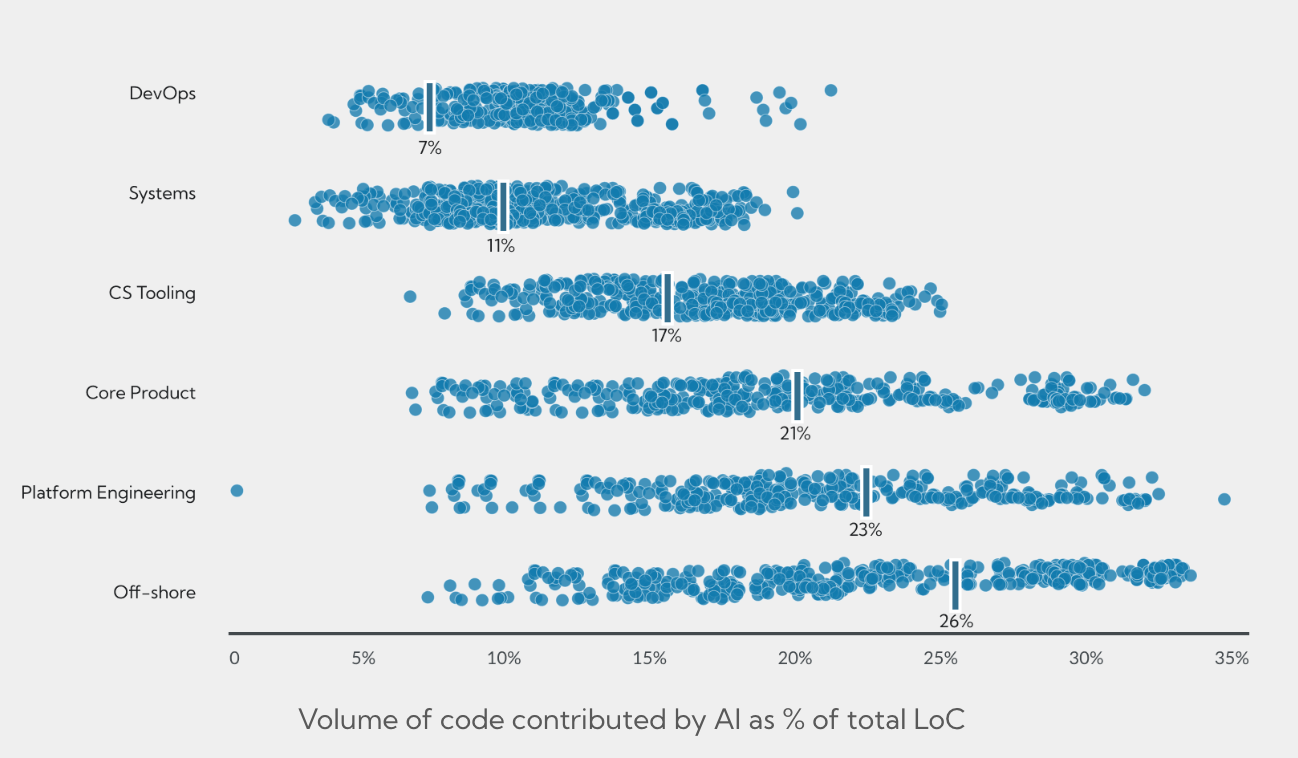
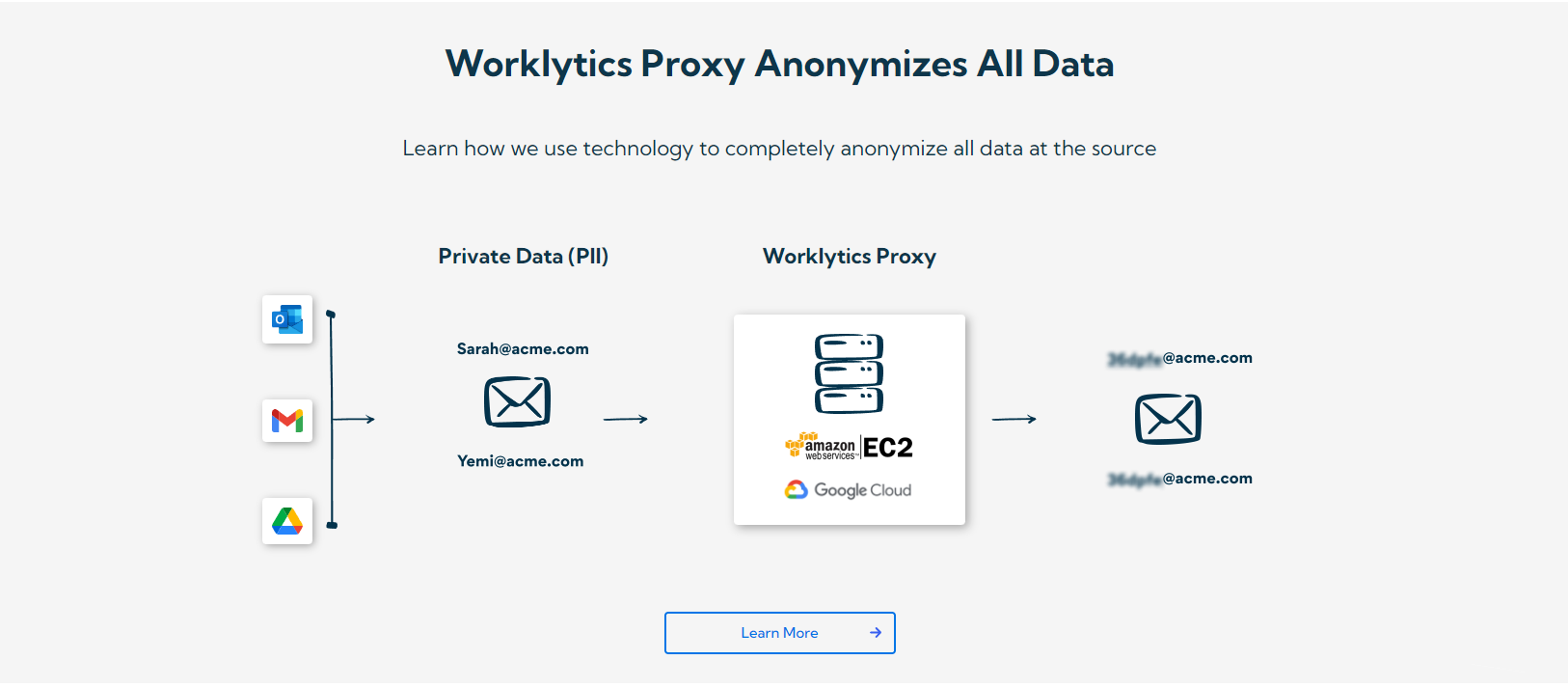
In conclusion, tracking how employees utilize Cursor AI (and other AI tools) is about more than just monitoring activity – it’s about understanding and maximizing the value of these tools in your organization. By carefully measuring adoption, encouraging usage through support and best practices, and leveraging platforms like Worklytics to gather meaningful insights, you can ensure that AI assistance becomes a true asset rather than a black box. The era of AI in the workplace is here, and those who manage its adoption with clarity and purpose will lead the way in productivity, innovation, and employee empowerment. Worklytics can be the partner that helps you chart this course, turning AI usage data into smarter decisions and real business value.