.jpeg)
Codex has evolved from an autocomplete experiment into a full agentic coding platform - a CLI, an IDE extension, cloud tasks that run autonomously, and automated code review on pull requests. If your organization runs ChatGPT Enterprise with Codex enabled, your engineers are probably already using it. The questions leadership asks next are predictable: who is actually using it, what is it costing us, and is it making the team faster?
The good news is that OpenAI now ships a substantial analytics stack for Codex. The less good news is that, like every vendor-native dashboard, it only sees its own tool. This guide covers what you get out of the box, how to pull the data programmatically, and how to put Codex usage in context alongside the rest of your AI stack.
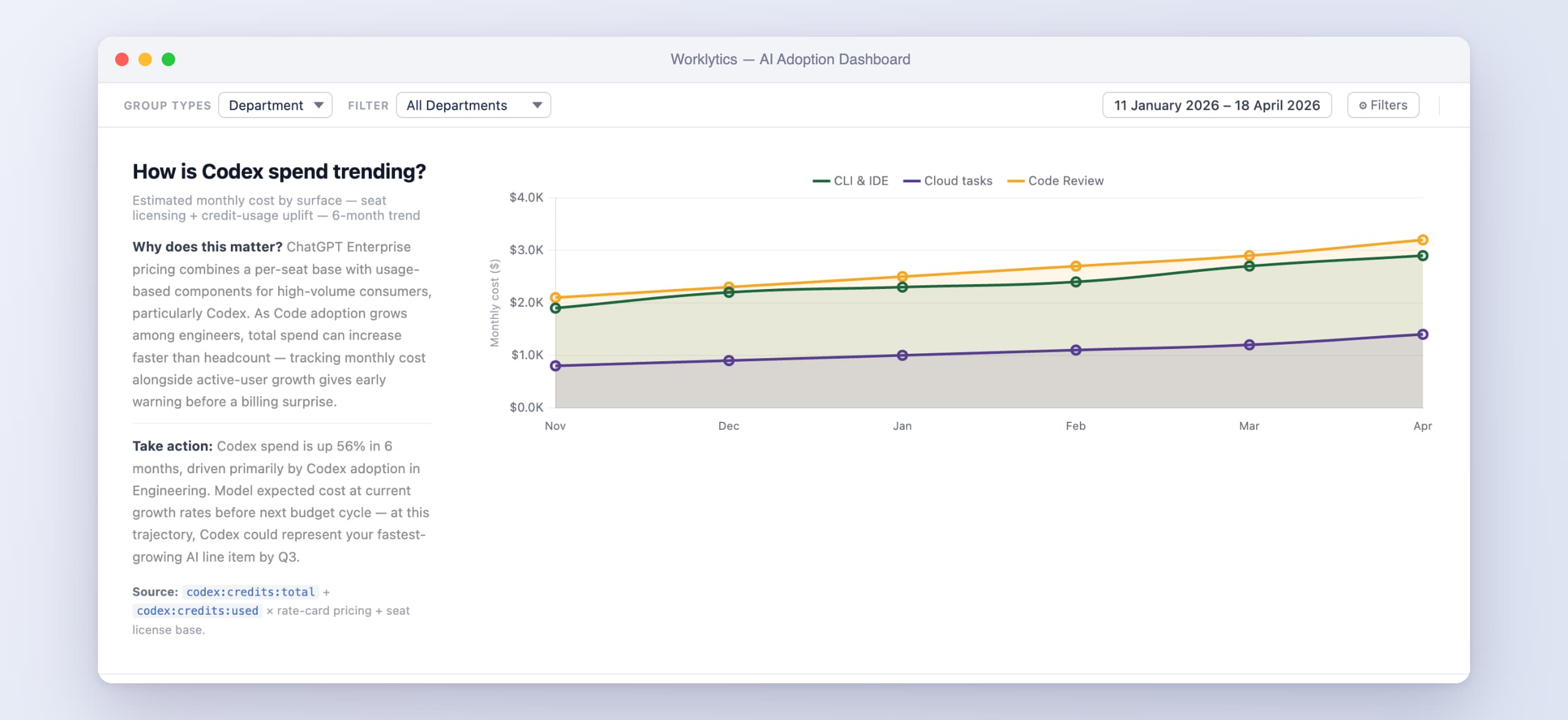
Credits are real money. Codex usage on enterprise plans consumes credits, and agentic workloads - long-running cloud tasks, automated code review on every PR - consume them much faster than chat ever did. Without per-team visibility, the first signal you get is the invoice.
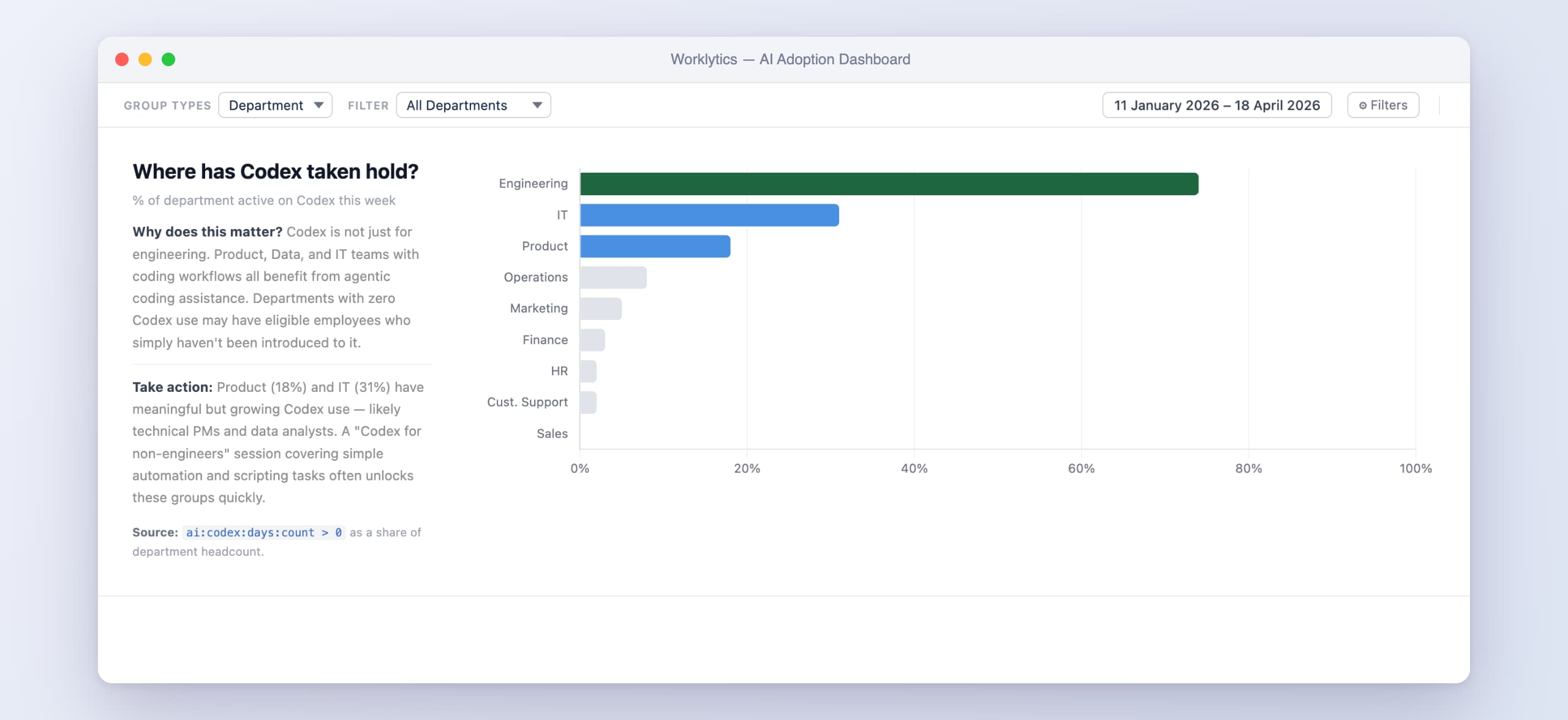
Adoption is always uneven. In most organizations a minority of developers generate the majority of AI-assisted output, while a long tail barely touches the tools they're paying for. Knowing which teams are ahead lets you spread what's working instead of guessing.
Agentic tools change the governance picture. A tool that autonomously edits code, opens pull requests, and comments on reviews needs an audit trail. Security and compliance teams will ask for one — better to know where it lives before they do.
Workspace administrators and analytics viewers in ChatGPT Enterprise get a self-serve Codex analytics dashboard. As of mid-2026 it covers:
Two practical caveats: usage data can lag by up to 12 hours, and the dashboard is scoped to your ChatGPT workspace — usage through raw API keys is governed separately.
For anything beyond eyeballing charts, OpenAI exposes the same data via an Analytics API at api.chatgpt.com/v1/analytics/codex, authenticated with an API key scoped to codex.enterprise.analytics.read. It returns daily or weekly UTC buckets with up to 90 days of lookback, across three endpoint groups: workspace usage (threads, turns, credits, per-client token breakdowns), code reviews (PRs reviewed and comment counts by priority), and code review responses (how engineers react and reply to Codex's comments).
This is the right layer if you want Codex metrics in your own BI stack - joining usage against your HR system's team structure, or against delivery data from your issue tracker. If you're already exporting LLM telemetry, this slots in alongside the token and cost tracking pipelines you may have built for API workloads.
For audit and governance, the Compliance API exports activity logs - prompt text, Codex responses, user and workspace identifiers, timestamps, token usage - designed to feed eDiscovery, DLP, and SIEM systems. Logs are retained for up to 30 days, and coverage is limited to ChatGPT-authenticated usage. If your security team needs to answer "who did what, when, with which model," this is where that answer comes from.
The dashboard answers "how much Codex?" thoroughly. It can't answer three questions engineering leaders actually get asked:
How does Codex compare to the other tools we pay for? Most engineering orgs now run two or more coding assistants - Codex alongside Claude Code, Cursor, or GitHub Copilot. Each ships its own dashboard, each with different metrics and definitions, and none of them will show you the others. Deciding where to consolidate spend requires a view none of the vendors provide.
Is usage translating into outcomes? Threads and turns measure activity, not impact. Whether high-Codex teams actually ship faster, review quicker, or collaborate differently requires joining usage data with delivery and collaboration signals - which lives outside any single vendor's scope.
What about everyone outside engineering? Codex is one surface of your AI investment. The same leadership deck that asks about Codex will ask about ChatGPT usage in sales and marketing, Copilot in the Microsoft stack, and Gemini in Workspace.
The same gap shows up outside engineering, for example when you track Gong usage across a sales team.
This is the gap Worklytics fills. Worklytics aggregates usage signals across your AI stack - Codex, Claude Code, Cursor, Copilot, ChatGPT, Gemini - into one privacy-first dashboard, broken down by team and department, and correlates adoption with the collaboration and productivity signals already flowing through your organization. Metadata only: who used what and how often at the team level, never the content of prompts or code.
A practical starter set of metrics, whether you build it yourself from the Analytics API or use a platform:
Does OpenAI provide a built-in way to track Codex usage?
Yes. ChatGPT Enterprise workspaces with Codex enabled get an analytics dashboard showing active users by surface (CLI, IDE, cloud, desktop, Code Review), credit and token consumption by model, threads and turns, user rankings, and Code Review activity. Data can lag by up to 12 hours, and admins can export it as CSV or JSON.
Can I see Codex usage per developer?
Yes. The dashboard includes a per-user ranking table sortable by credits, threads, turns, and tokens, and the Analytics API returns per-user usage in daily or weekly buckets. Per-user exports include email addresses where workspace settings permit.
How do I track what Codex is costing us?
The analytics dashboard breaks credit and token consumption down by product surface and model, and the Analytics API exposes the same data for up to 90 days of lookback. For team-level cost accountability, join per-user credits against your org structure - natively the dashboard ranks individuals, not teams.
Can our compliance team audit Codex activity?
Yes, through the Compliance API, which exports prompts, responses, identifiers, timestamps, and token usage for integration with eDiscovery, DLP, and SIEM tooling. Note the limits: logs are retained for up to 30 days and only ChatGPT-authenticated usage is covered.
How do I compare Codex usage against Claude Code or Cursor?
There's no native way - each vendor's dashboard only sees its own tool, with different metric definitions. Cross-tool comparison requires either building a pipeline from each vendor's export or API, or using a platform like Worklytics that aggregates usage across all your AI tools into one consistent, privacy-first view.