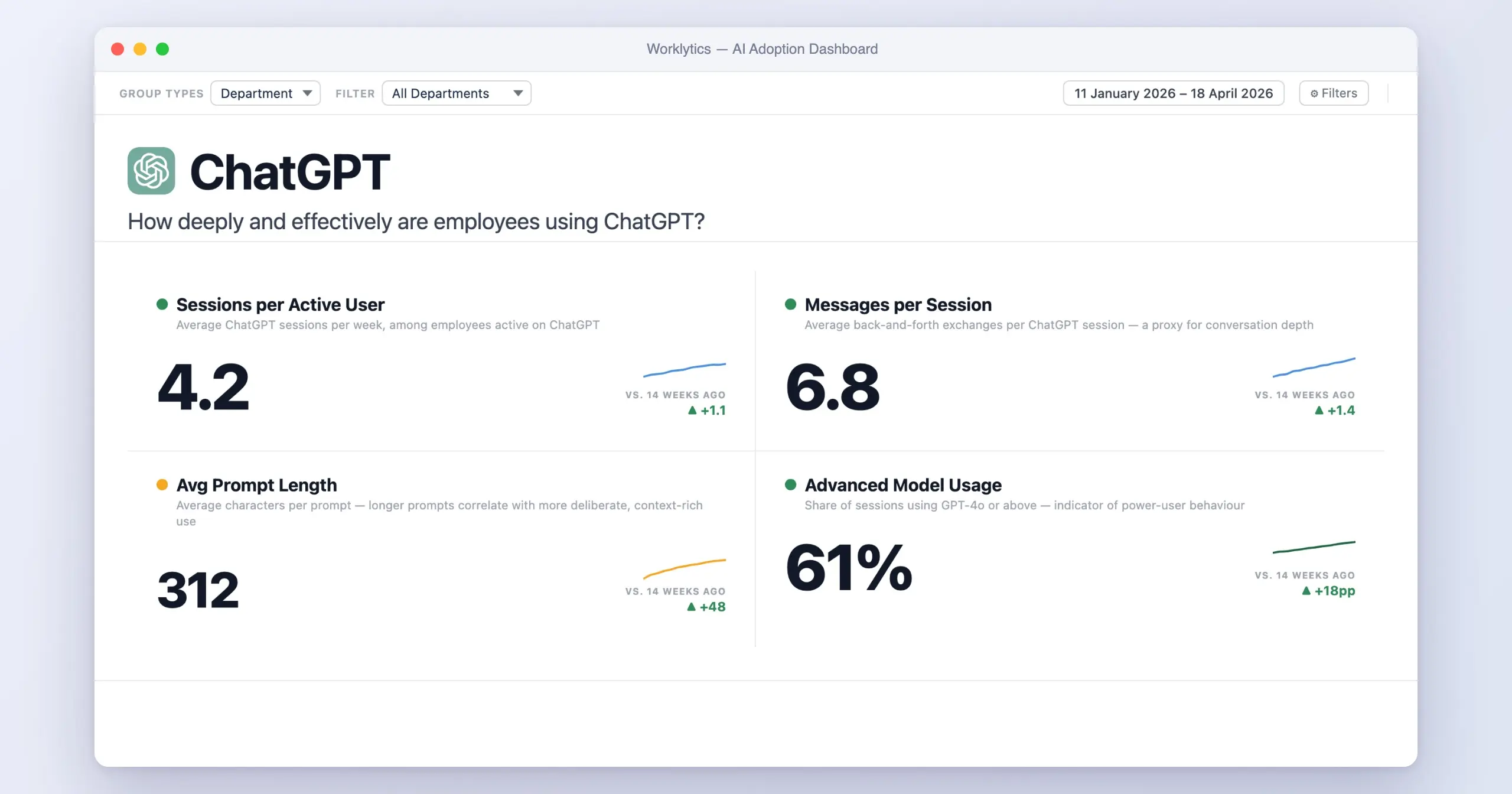
To track employee ChatGPT use, start with the admin data you already have: in ChatGPT Enterprise, workspace analytics, the Analytics API and audit logs show who uses your company workspace and how much. Then fill the gaps with network logs for unsanctioned use, API gateway logs for developers, anonymous surveys for personal accounts, and a cross-tool analytics layer if you run more than one AI tool.
The six methods differ in what they see, how much work they take, and how much privacy risk they carry. Here is the short version.
| Method | What it shows | Effort | Privacy risk |
|---|---|---|---|
| 1. Network and firewall logs | Which managed devices connect to ChatGPT, and how often | Low if you already run a firewall or secure web gateway | Low (connection metadata only) |
| 2. Endpoint monitoring | App and browser activity on the device, sometimes content | High | High |
| 3. ChatGPT Enterprise analytics, Analytics API and audit logs | Active users, messages and per-user daily usage on your company workspace, plus audit records | Low (built in) to medium (API) | Low for analytics. High if conversation logs are used for anything beyond compliance |
| 4. API key auditing and proxy logs | API calls from apps and developers, models, tokens and cost by team | Medium | Low |
| 5. Employee surveys | Personal-account use, tasks and blockers | Low | Low if anonymous |
| 6. AI adoption analytics | Adoption by team and manager across ChatGPT and your other AI tools | Medium | Low (aggregated and pseudonymized) |
This post is about choosing methods. For what to put on screen once you have the data, see our guide to building a ChatGPT usage dashboard. To act on it by cutting unused seats, see how to optimize ChatGPT Enterprise usage.
In March 2023, Samsung engineers pasted proprietary semiconductor source code into ChatGPT to fix an error. Within about 20 days of the company allowing ChatGPT, it had found three separate incidents of sensitive data leaving through the chatbot, including the contents of a recorded internal meeting (Cybersecurity News). In May 2023, Samsung told staff it was temporarily restricting the use of generative AI tools (CSO Online).
Stories like that are no longer unusual. Cyberhaven research found that 11% of the content employees pasted into ChatGPT was confidential (ISACA). A 2023 Fishbowl survey of nearly 12,000 professionals found that 68% of those using AI tools at work had not told their boss (HR Dive). Most leaders underestimate how much ChatGPT use is happening inside their company, and how much business-sensitive information is going with it.
For broader context, see our overview of ChatGPT adoption in the enterprise.
Three pressures are pushing this issue up the priority list for IT and HR leaders in 2026.
These three goals are often treated as one project, but they require different data. Data loss prevention needs content-level visibility. Shadow AI detection needs network-level visibility. Adoption and ROI measurement need aggregated team-level visibility, and they specifically do not need individual prompt content. The methods below map to different combinations of these goals.
The most straightforward starting point is to have your network team log connections to ChatGPT domains (chat.openai.com, api.openai.com) and any other AI endpoints. Most modern firewalls, secure web gateways, and cloud access security brokers (Zscaler, Netskope, Cloudflare Gateway, Palo Alto Prisma) can do this without any new tooling.
Network logs tell you which corporate users or devices are connecting to ChatGPT, how often, and roughly how much data they are exchanging. Combined with DNS filtering, you can also detect connections to alternative chatbots like Claude, Gemini, Perplexity, Copilot, and known wrapper services.
Strengths
Limitations
Use it for: baseline visibility and shadow-AI detection on managed devices. Treat it as the floor of your tracking program rather than the whole thing.
Endpoint agents (Microsoft Defender for Endpoint, CrowdStrike, ActivTrak, Teramind, Veriato, and others) sit on the employee device and can record application usage, web browsing time, and in some cases keystrokes, clipboard activity, and screen content. Most can be configured to flag ChatGPT usage or block uploads above a certain size.
This is the most powerful technical option and also the one most likely to backfire. Endpoint monitoring at this level is what most employees mean when they talk about surveillance, and the research on its consequences is consistent: an American Psychological Association survey found that 56% of workers who are monitored by their employer typically feel tense or stressed at work (APA). As we covered in our analysis of how employee tracking hurts morale and productivity, invasive monitoring usually produces performative work rather than the actual productivity gains it promises.
Strengths
Limitations
Use it for: data loss prevention in industries where the regulatory bar requires content-level inspection. Do not reach for it just to count who is using ChatGPT.
If your company runs ChatGPT Enterprise or Edu, most of the tracking is built in. OpenAI gives admins three separate tools, and each one answers a different question.
OpenAI offers the Compliance Platform for Enterprise and Edu workspaces, not for ChatGPT Business, the plan formerly called ChatGPT Team (OpenAI).
Strengths
Limitations
Use it for: the foundation of any sanctioned-AI measurement program. If you have bought Enterprise, start here. To turn this data into a view leaders will use, see our guide to building a ChatGPT usage dashboard.
If your organization runs on Anthropic's models instead, we cover the equivalent admin tooling in our guide to tracking Claude Enterprise usage.
For developers and data teams, the largest volume of AI usage often is not in the ChatGPT web app. It is in API calls from internal applications, IDE plugins, GitHub Actions, and one-off scripts. Tracking this requires governance on the API key itself: route all calls through a corporate gateway or proxy (Cloudflare AI Gateway, Portkey, AWS Bedrock guardrails, or a self-hosted reverse proxy), enforce that every API key is registered to a service or human owner, and log request volume, model used, and approximate token counts.
Strengths
Limitations
Use it for: any organization where engineering or data science is a significant share of AI consumption, which is most of them.
Surveys are the lowest-friction option and the one most organizations underestimate. A well-designed quarterly pulse can capture three things that technical tracking misses: usage on personal devices and accounts, what tasks employees use AI for, and the qualitative obstacles such as training gaps, policy confusion, or fear of getting in trouble.
The accuracy depends entirely on whether employees believe they will not be punished for answering honestly. The Fishbowl finding that 68% of AI users had not told their manager is the baseline you are working against. Make surveys anonymous, run them through a third party where possible, and pair them with a clear acceptable-use policy that frames AI use as encouraged within guardrails rather than as something to confess.
Strengths
Limitations
Use it for: complementing your technical tracking with the why. Never as your only data source.
The sixth option sits one layer above the others. An AI adoption analytics platform connects to ChatGPT Enterprise, Microsoft 365 Copilot, Google Gemini, GitHub Copilot, Slack AI, and your other AI tools through their admin APIs, anonymizes the data at ingestion, and reports adoption metrics at the team and department level without exposing individual prompts or conversations. Worklytics is one such platform, and the broader category is sometimes called an AI adoption dashboard.
The job of this category is different from the other five methods. The first five answer "who is using ChatGPT and how often." Aggregated analytics answers three harder questions:
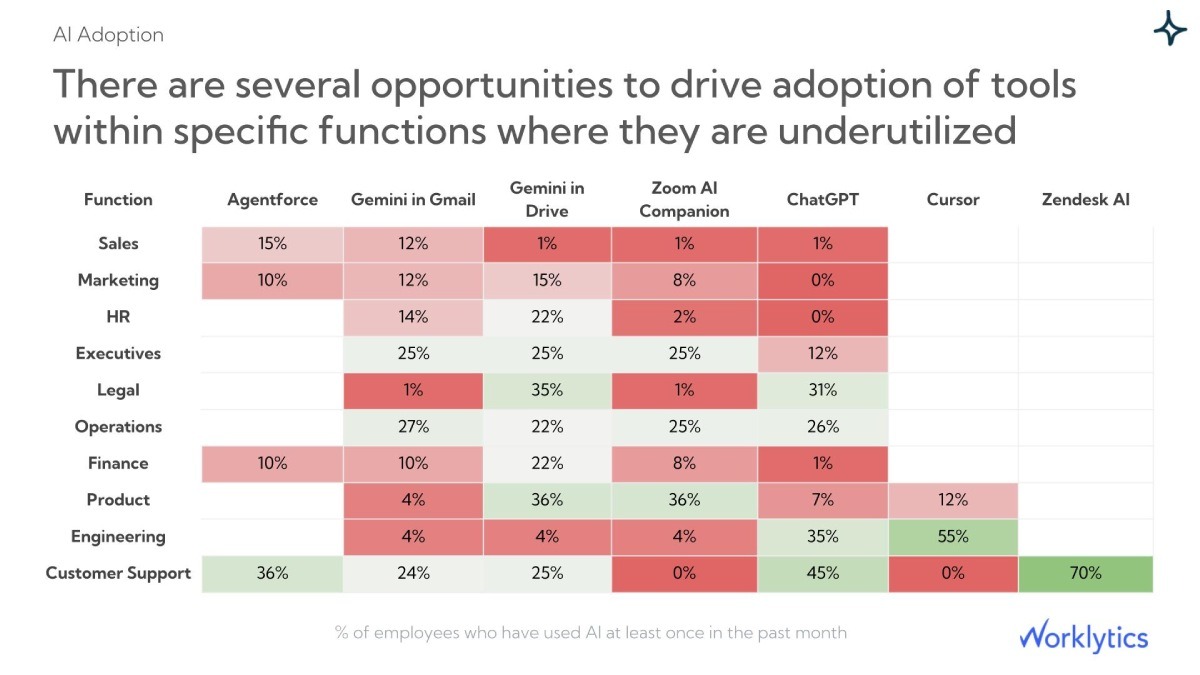
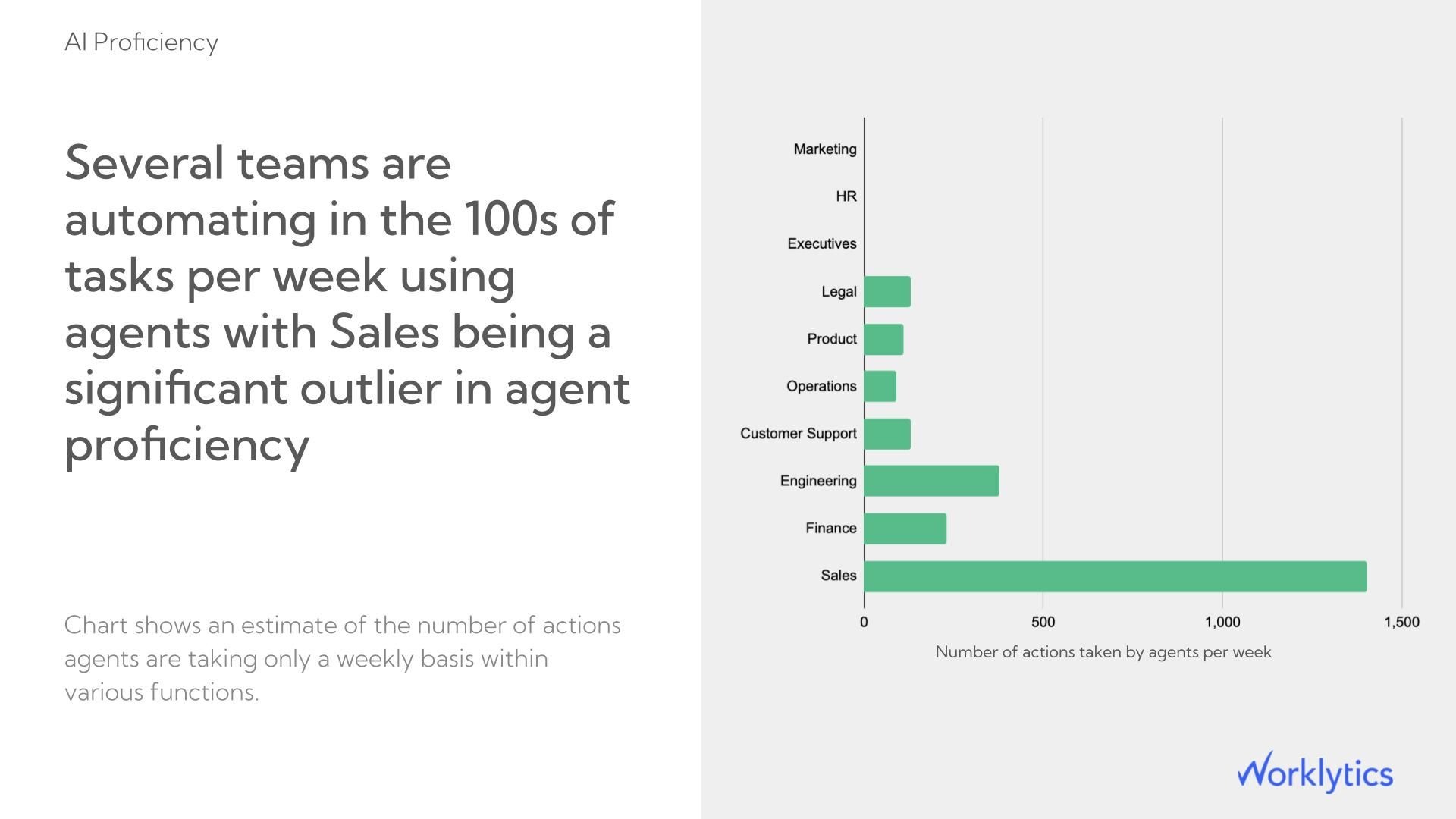
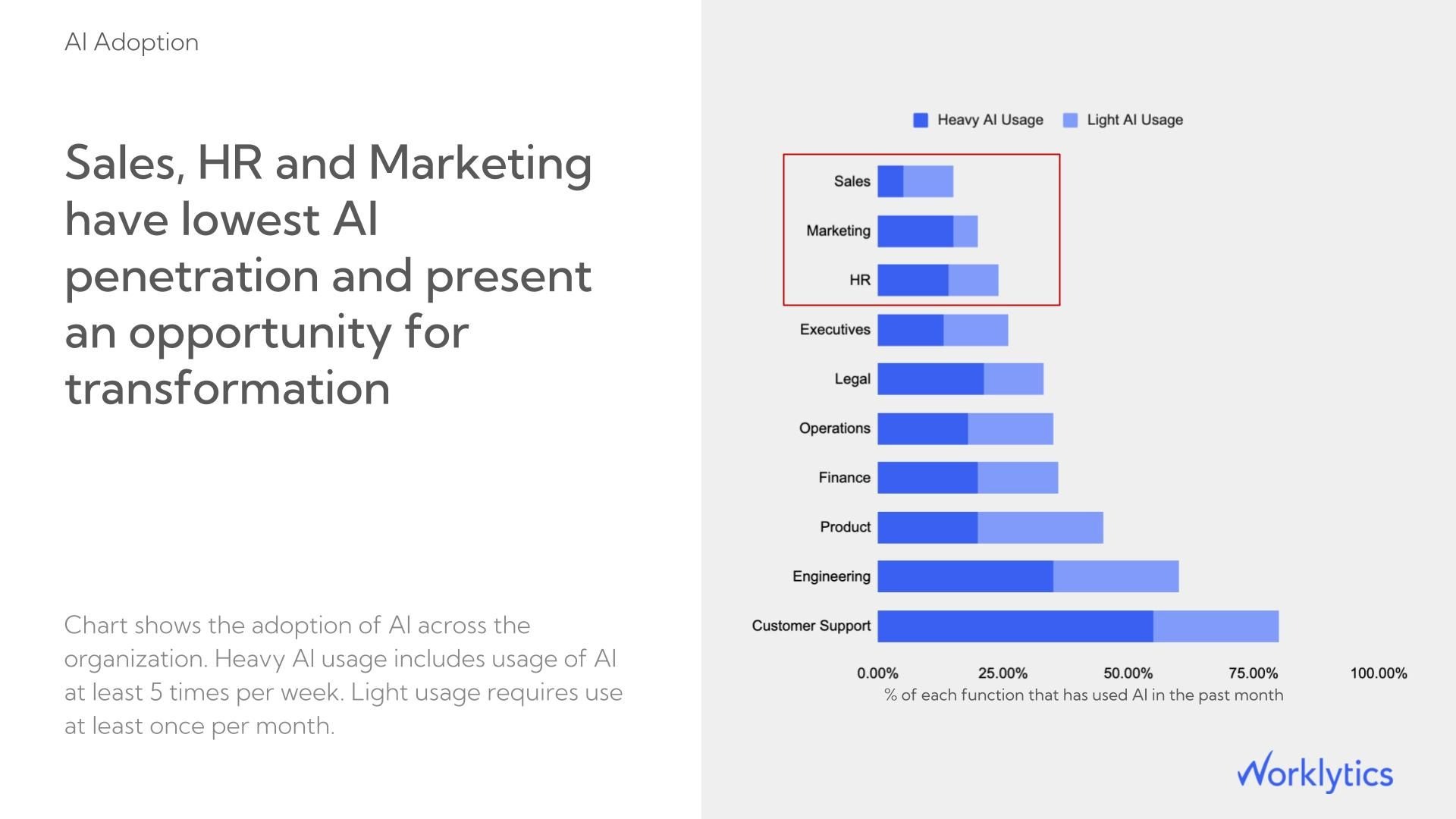
Three principles define a tracking program that produces honest adoption numbers and avoids drifting into surveillance.
For a full breakdown of what to measure and how to roll the data into actionable benchmarks, see our guide on how to measure employee AI usage without invading privacy, and our department-level walkthrough for tracking ChatGPT Enterprise usage by department.
Strengths
Limitations
Use it for: measuring adoption, business impact, and ROI across your full AI stack at scale, without the trust costs of endpoint monitoring.
The right tracking program is almost never a single tool. It is a set of layers where each method covers what the others miss and where the most invasive option is reserved for cases that genuinely require it. The layering that works for most mid-sized and enterprise organizations looks like this.
For OpenAI's agentic coding tool specifically, see tracking Codex usage.
The order matters. Most organizations skip Layers 1 through 4 and reach straight for endpoint monitoring because it sounds the most thorough. They end up with a surveillance system that catches the cases everyone already knew about, misses everything that matters, and creates a measurable retention problem in the process.
Three example views from Worklytics. Each one keeps individual employees anonymous and reports at the team or department level.
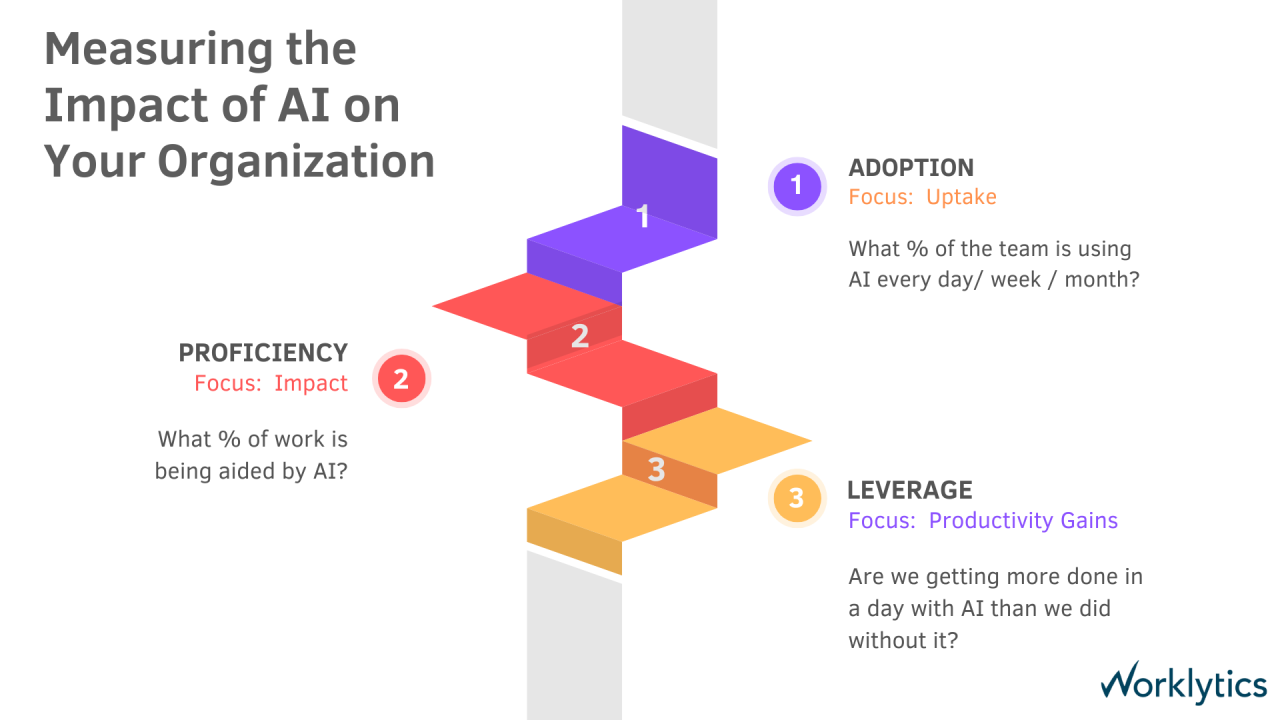
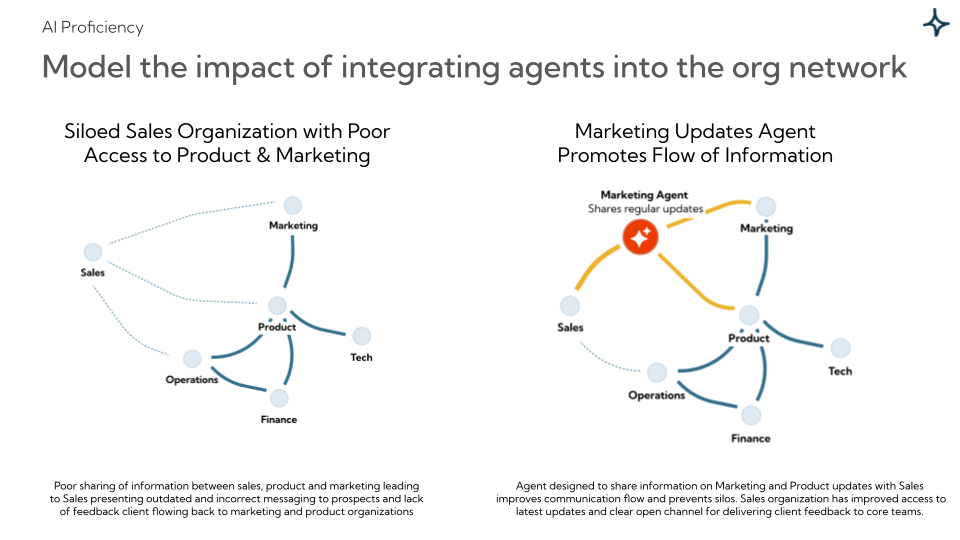
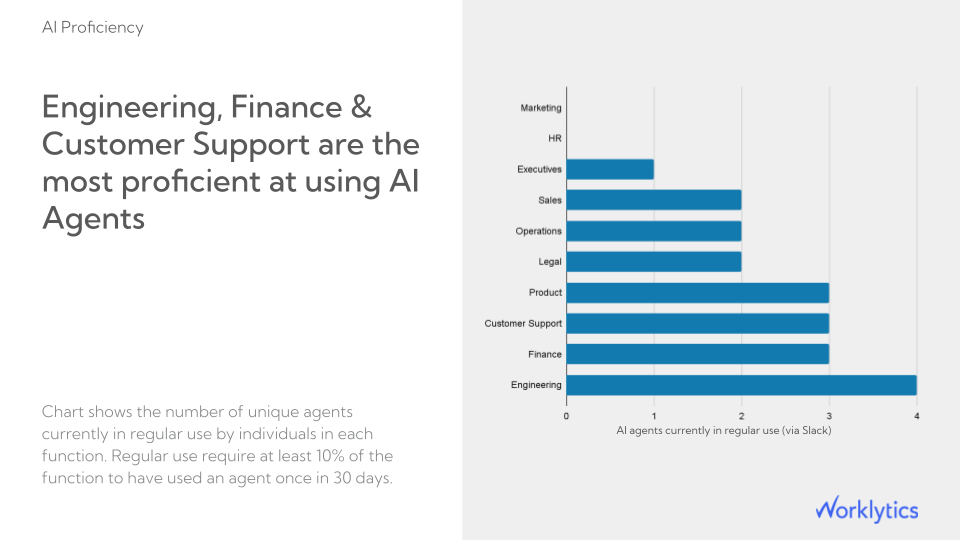
If employees are using personal ChatGPT accounts, it is usually because the sanctioned tools are missing, slow to approve, or perceived as inferior. Surveillance does not fix that. It pushes the behavior further underground. Make the sanctioned option faster and better than the consumer option first.
You can measure adoption, identify shadow AI, and prove ROI without ever seeing a single prompt. Most leaders who think they need to see prompt content do not, once they articulate what decision they are actually trying to make.
AI tool usage is changing every quarter. Models change, capabilities expand, and what looks like high adoption today is the baseline next year. Whatever tracking you set up should be designed to run continuously and benchmark against itself over time.
Gartner research found that 30% of employees were comfortable with their employer monitoring their email in 2018, and more than 50% were when the employer explained the reasons (Gartner). The same pattern applies to AI tracking. Telling people what you measure, why you measure it, and what you do not measure is the single highest-ROI thing you can do for adoption and trust.
On a personal ChatGPT account, your employer cannot see your chats through OpenAI. On ChatGPT Enterprise or Edu, authorized admins can export conversation messages through OpenAI's Compliance Platform, which is built for eDiscovery, data loss prevention and security tools. The workspace analytics dashboard itself shows usage counts, not message text. On a company device or network, IT may also see that you visited ChatGPT, but not what you typed.
In most jurisdictions, yes. Workplace monitoring is legal when it is proportionate, transparent, and serves a legitimate business interest. The specific requirements vary. The US is broadly permissive at the federal level with state-by-state variation (California, Connecticut, Delaware, and New York have specific notification laws), while the EU requires explicit transparency, data minimization, and a documented lawful basis under GDPR. The safer approach everywhere is to disclose monitoring in writing through your employee handbook or acceptable-use policy and to minimize what you actually collect.
No, not by default. OpenAI says it does not train its models on business data from ChatGPT Business, ChatGPT Enterprise, ChatGPT Edu or the API Platform by default. Personal Free and Plus accounts are covered by different terms, which is one reason to give employees a company workspace.
The honest answer is imperfectly. The most reliable signals are network and DNS logs showing connections from corporate devices to AI domains, combined with anonymous employee surveys that capture personal-account use. If shadow AI is a major concern, the fastest mitigation is usually to make the sanctioned alternative obviously better, with faster approval, better models, and integration into the tools employees already use.
The difference is scope and granularity. Surveillance focuses on individual behavior at high resolution: what each person typed, when, and for how long. Tracking AI adoption focuses on aggregate patterns at the team or department level: how many people are using sanctioned tools, how frequently, in which departments, and what business outcomes correlate with usage. The first question is whether one person is performing. The second is whether your AI investment is working. The technical implementations are different, the privacy implications are different, and the impact on employee trust is different.
The most defensible approach is to combine three data sources. Use the ChatGPT Enterprise admin dashboard for tenant-level usage volume. Use an AI adoption analytics layer to correlate usage with productivity signals such as meeting time, focus time, and project cycle time. Use a quarterly survey to capture the qualitative time savings employees report. Triangulating across these three gives you a number defensible enough to put in front of finance. For a breakdown of exactly which metrics belong on that dashboard, see our guide to building a ChatGPT usage dashboard.
For organizations that already run ChatGPT Enterprise and a modern firewall or CASB, the foundational layer costs nothing extra. Both are already capturing the data. Adding API governance through a gateway typically runs in the low thousands per month at enterprise scale. Aggregated AI adoption analytics is generally priced per employee per month. Endpoint monitoring software is the most expensive option and the one that comes with the largest soft costs in employee trust.
Tracking employee ChatGPT use is no longer optional. The question is whether you do it as a surveillance project that erodes trust and misses most of the actual usage, or as a measurement program that gives you the visibility you need on adoption, business impact, and ROI without surveilling anyone.
The Samsung incident showed what happens when there is no visibility. The American Psychological Association data shows what happens when there is too much. The organizations that get this right sit in the middle. They combine the data their AI platforms already collect with privacy-first analytics that aggregate at the team level, supplemented by clear policy and an honest conversation with employees about what is being measured and why.
Generative AI is going to keep expanding inside your company whether you measure it or not. Measuring it well is how you turn that expansion from a risk into a competitive advantage. If you want to see what cross-tool AI adoption analytics looks like in practice, you can explore the Worklytics AI adoption dashboard or read our walkthrough on tracking AI usage by team and role.