To measure the business impact of ChatGPT Enterprise, combine two kinds of evidence: what employees say (the ChatGPT Enterprise value survey, which OpenAI calls the Impact survey) and what they do (active users, messages, seat use and adoption by team). Neither is enough on its own. Survey answers are self-reported, and usage data shows activity, not value.
ChatGPT Enterprise now has a built-in Impact survey. It asks members how ChatGPT affects their productivity, how many hours a week it saves them, and whether it improves work quality, satisfaction and stakeholder service. Results appear in the Impact section of workspace analytics (OpenAI Help Center).
This guide explains what the value survey asks and when it runs, where to find usage and seat data, which metrics to track, and how to tie them to business outcomes.
Investing in generative AI at enterprise scale is a significant decision, and executives want to see a return. A BCG study found that 74% of companies have yet to show tangible value from their use of AI.
This shows that simply deploying AI tools doesn’t guarantee positive outcomes. Without clear metrics and continuous monitoring, companies risk not getting the efficiency gains they hoped for – or worse, introducing new inefficiencies.
Measuring impact is important for several reasons:
In short, you can’t manage what you don’t measure – and that adage holds true for enterprise AI initiatives. Let’s explore what exactly we should be measuring and how to do it.
If you are searching for the "ChatGPT Enterprise value survey", you are most likely looking for one of two things: the Impact survey built into ChatGPT Enterprise, or a survey your own company sends to measure the value of its rollout.
In Enterprise workspaces, OpenAI's survey asks members two questions (OpenAI):
Members then rate their agreement with four statements: ChatGPT has improved the quality of their work, increased their satisfaction at work, increased their ability to complete new tasks or activities, and improved their ability to serve customers, partners or stakeholders.
Because the built-in survey runs on fixed days after workspace creation, a survey named after a fiscal quarter (for example "FY25 Q3") is most likely one your own company runs. OpenAI Academy publishes a baseline survey template to send before rollout and an impact survey template to send 6 to 8 weeks after launch, then quarterly.
Responses typically appear within 1 to 2 days. The Impact section shows the share of respondents reporting a positive effect on productivity, time saved, work quality, satisfaction, new tasks and stakeholder service, the distribution of answers for each question, and the participation rate. Individual responses are not displayed, and owners can export the Impact survey as a CSV (OpenAI).
OpenAI is clear about the limits: these are self-reported signals for directional analysis, not a causal ROI measurement. To make survey answers useful, compare them with usage data for the same teams and the same period.
Owners, admins and members with the analytics viewer role can open workspace analytics at Workspace settings > Workspace analytics (OpenAI). The parts that matter most for impact and cost:
The data refreshes every 1 to 24 hours, typically within 6 to 12 hours. For a step-by-step guide to turning this data into a dashboard, read how to build a ChatGPT usage dashboard. To act on unused seats, see how to track and optimize ChatGPT Enterprise usage.
What should you measure to know if ChatGPT Enterprise is truly delivering value? The answer will vary by organization, but several core categories of metrics have emerged as most useful. Below, we break down key metrics that map to the benefits and challenges discussed. These metrics will help quantify the impact in terms that resonate with both technical teams and business stakeholders:
How many people are actually using ChatGPT Enterprise? Active usage metrics include the number of AI sessions or prompts per user per week. Higher usage indicates that the tool is becoming increasingly embedded in daily workflows. Low or dropping usage could signal issues (lack of awareness, poor UX, or users not finding good use cases).
These metrics measure the impact of ChatGPT Enterprise on the pace and volume of work. They often require comparing baseline performance (before AI or without AI) to performance with AI. Examples include:
Remember that not all metrics will be equally important to every stakeholder. An executive might focus on ROI and high-level productivity statistics, while a people analytics leader will be interested in adoption patterns and employee engagement. The key is to select a balanced set of metrics that, together, paint a comprehensive picture of ChatGPT Enterprise’s impact from multiple angles.
Identifying metrics is half the battle – you also need a strategy to collect and analyze the data consistently. Here are some strategies and best practices to effectively measure the business impact of ChatGPT Enterprise:
Before (or as) you roll out ChatGPT Enterprise, capture baseline data for the metrics of interest. For example, what is the average resolution time in support before AI, or how many blog posts can Marketing write per month pre-AI?
Baselines provide a comparison point so you can quantify improvement. If you’ve already launched without baselines, don’t worry – you can use historical data or even run a small control group without AI for a short period as a proxy.
Rather than deploying to everyone on day one, some organizations roll out AI to a pilot group or specific departments first. This creates a natural experiment – compare the pilot group’s metrics to those of a control group that hasn’t yet adopted ChatGPT.
If the pilot group shows significantly faster or better work outputs, that’s strong evidence of impact. This phased approach also helps iron out issues before company-wide deployment.
Many companies utilize analytics platforms to automate this process. For example, Worklytics is one such platform that specializes in aggregating workplace tool usage (including AI tools) into meaningful metrics.
Worklytics connects to the ChatGPT Enterprise Compliance API and counts each prompt a person sends, along with conversations and prompt length, without storing message content. It combines this with your other AI tools and work data, so dashboards update automatically instead of relying on manual reporting or surveys alone. Whichever approach you use, keep it continuous: weekly data lets you spot trends and react quickly.
As you collect data, be transparent about what you are measuring and why. Emphasize that measurement is about aggregate trends and business outcomes, not individual surveillance or evaluating someone’s performance. Use techniques like anonymization and aggregation (e.g. metrics by team, not by person) to protect privacy.
By designing your measurement approach with privacy in mind from the start (much like how Worklytics employs a privacy-first design), you both comply with regulations and gain employee buy-in. When people understand that the goal is to help them succeed with AI, they are more likely to participate honestly in surveys and embrace measurement as a positive thing.
Whenever possible, connect the ChatGPT metrics to broader business KPIs. For instance, if you notice a 20% reduction in document drafting time in R&D, did product development timelines also speed up?
Making these connections will strengthen the narrative of AI’s value. It also helps in identifying any lag indicators – maybe you improved an efficiency metric, but it takes a quarter or two to see the financial results.
Treat the measurement process itself as something you can improve. As you gather data, you might discover that some metrics aren’t telling the full story or that teams are gaming a metric at the expense of something else.
Don’t be afraid to refine your KPIs.
You might consider adding a new metric, such as “percentage of client deliverables that had AI involvement,” as your usage matures.
By following these strategies, measuring the impact of ChatGPT Enterprise becomes an ongoing part of your AI adoption journey, rather than a one-time audit. The goal is to create a feedback loop: use insights from the metrics to continually optimize how your organization uses ChatGPT, which in turn will improve those metrics over time.
Rather than building custom dashboards from scratch, Worklytics provides an out-of-the-box platform to monitor how generative AI is being used across your company and what results it’s driving.
So what can Worklytics offer in the context of ChatGPT Enterprise? In a nutshell, Worklytics connects to the software tools your employees use – from messaging apps to code repositories – and extracts insights about collaboration, productivity, and now AI usage.
For AI specifically, Worklytics offers an AI adoption analytics dashboard that brings data from your AI tools (such as ChatGPT Enterprise, Microsoft 365 Copilot, Gemini, Claude and Slack AI) into one view. You can track usage by team and role, and see which departments are embracing ChatGPT and how often it is used.
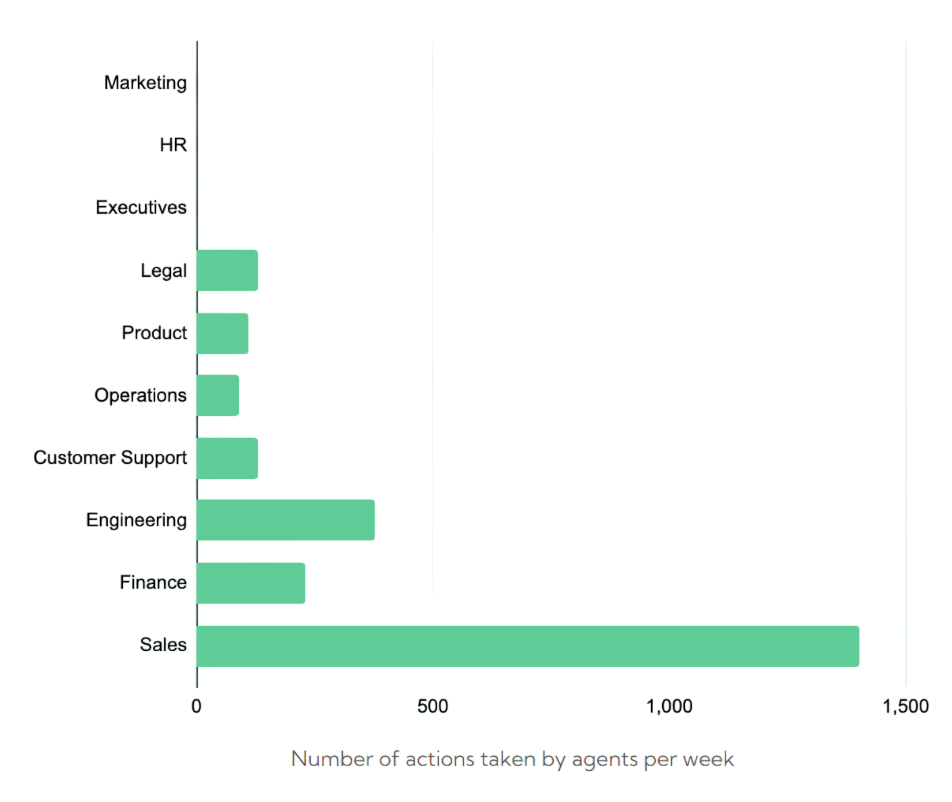
Worklytics also helps you show ROI from AI. It reports activation, frequency of use and power users, and lets you compare output and collaboration patterns between high-adoption and low-adoption teams over the same period.
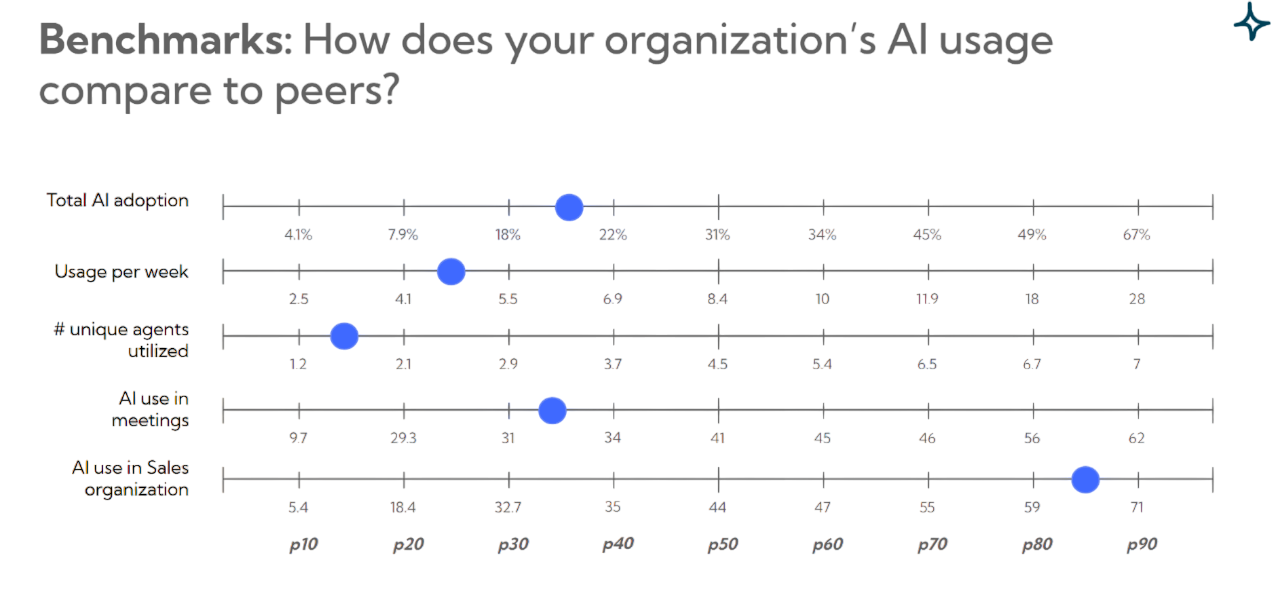
Peer benchmarking, which compares your AI adoption with similar organizations, is available in beta.
Worklytics measures AI workflow penetration: the share of 15-minute blocks in a person's working day in which a conversational AI app such as ChatGPT was used, reported for teams. It shows whether ChatGPT has become part of daily work or is still an occasional tool, which is a better signal of impact than message counts alone.
Crucially, all of this is done with privacy in focus. Worklytics pseudonymizes personal identifiers (hashed with SHA-256) before analysis, shows results only for groups above a minimum size (typically 5 to 8 people), and never stores the text of prompts or responses. For example, it might report that "Team A had a 60% increase in ChatGPT usage month over month" without showing what anyone asked ChatGPT.
In essence, Worklytics serves as a deeper measurement tool for ChatGPT Enterprise. ChatGPT provides the AI capabilities to transform how work gets done, and Worklytics provides the measurement and analytics to ensure those changes are positive and aligned with business goals.
By using a platform like Worklytics, organizations can move beyond gut feel or isolated anecdotes – they gain a data-driven, real-time understanding of their AI adoption. This enables continuous improvement: doubling down on successful use cases, identifying and removing obstacles to adoption, and ultimately achieving the maximum return on their AI investments.
It is a short survey that measures how ChatGPT Enterprise affects employees' work. OpenAI's built-in version, called the Impact survey, asks about productivity, weekly hours saved, work quality, job satisfaction, new tasks and stakeholder service. Results are aggregated in the Impact section of workspace analytics. Many companies also send their own quarterly value survey based on OpenAI's templates.
OpenAI-created surveys appear on day 120 and day 240 after a workspace is created, each open for 30 days. Workspace owners can also push an admin-created survey at any time from the Impact tab. Owners can turn off OpenAI-created surveys in workspace settings.
No. Admin-created surveys let you choose the name and launch timing, but they use the same predefined questions and answer choices. For custom questions, run your own survey with a tool such as OpenAI Academy's impact survey template, and compare the answers with usage data for the same teams.
Start with adoption: activation rate, weekly active users, messages per active user and power users. Add outcome metrics such as task completion time, output per person, error rates and cost per active user. Survey answers on time saved are useful context, but OpenAI notes they are not a causal ROI measurement.
Open Workspace settings > Workspace analytics and go to Users to compare seats purchased, seats enabled and active users. Export the Users report as a CSV for a custom date range of up to 12 months. Divide your spend by active users rather than seats to find cost per active user.
Discover how Worklytics can help you measure and maximize the real impact of ChatGPT Enterprise, start your insights journey today.