Hidden AI power users are employees who use AI far more often and more deeply than their teammates, yet appear on no manager's list or tool report. Find them in five steps:
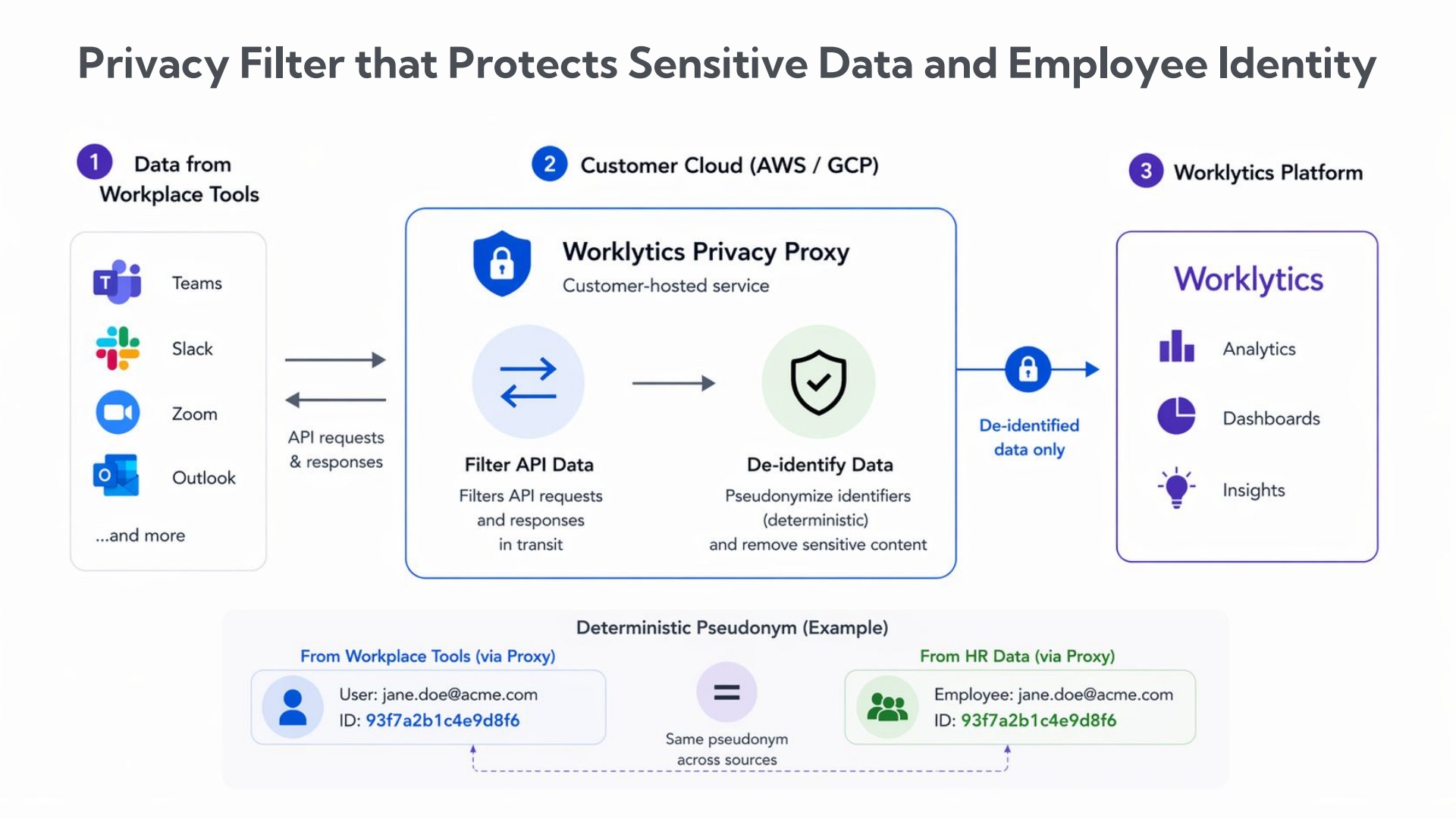
Worklytics measures every step from usage metadata, never prompt content.
A nomination form surfaces only the people someone has already noticed. Microsoft researchers argue in Harvard Business Review that top-down messaging, broad access, and formal training are no longer enough, and that adoption stalls because learning stays invisible. This playbook first finds power users in usage data, then turns them into champions and measures the result.
To find hidden AI power users, measure AI usage across every tool, score each team on frequency, depth, and range, look where averages hide people, and check that heavy users produce better outcomes. Worklytics reports by team, role, and tenure, so the data shows where to look and an invitation confirms who.
In its Viva Insights Copilot usage segments, Microsoft defines a power user as someone who used Copilot in at least 9 of the past 12 weeks and averaged at least 15 actions a week. That standard cutoff suits rollouts 3 to 12 months old; Microsoft raises it to 50 weekly actions once a rollout passes a year and 60% of users already qualify. A license report cannot test any version of this, because it counts who has access, not how often or how deeply they use it.
The second problem is spread. LayerX's 2026 usage report found that half of employees had 12 or fewer AI conversations while the top 5% had 144 or more, and that 47.11% of enterprise AI conversations ran through personal accounts. One tool's admin page therefore shows only a slice of the activity of the people you want to find.
Worklytics measures frequency and depth, and joins usage from Microsoft Copilot, Google Gemini, ChatGPT Enterprise, Claude, and Cursor through its integrations into one AI adoption view by team and role.
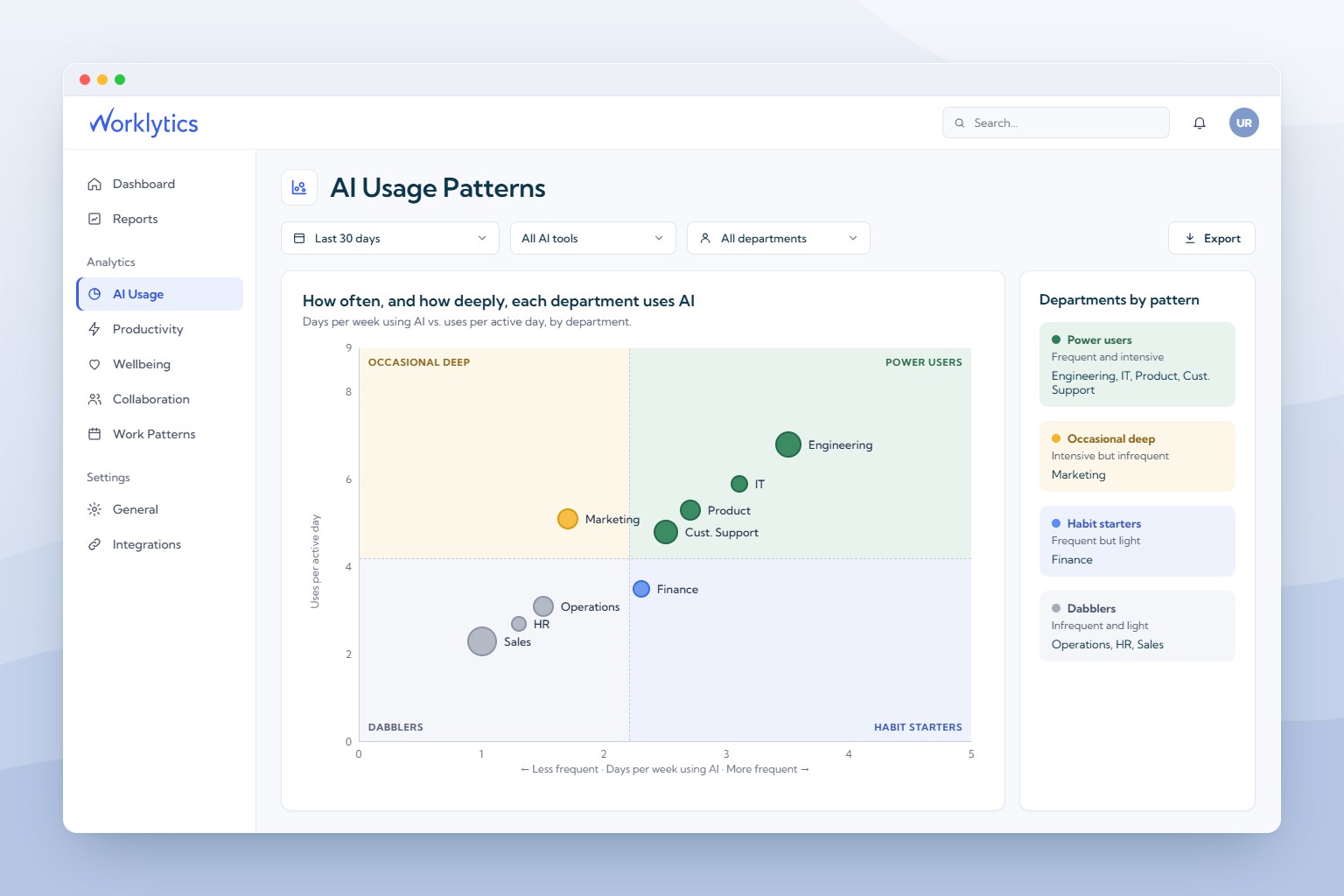
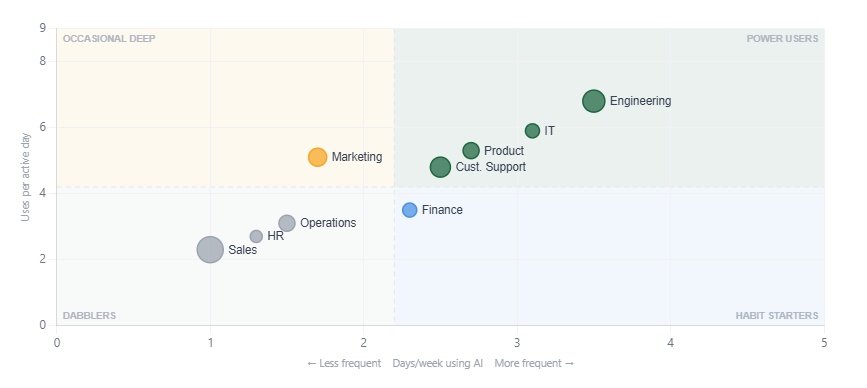
Score each team on three questions. Frequency: how many days a week do people use AI? Depth: how many uses per active day? Range: how many kinds of work does AI touch? Worklytics plots frequency against depth and sorts teams into four groups, shown below with illustrative data.
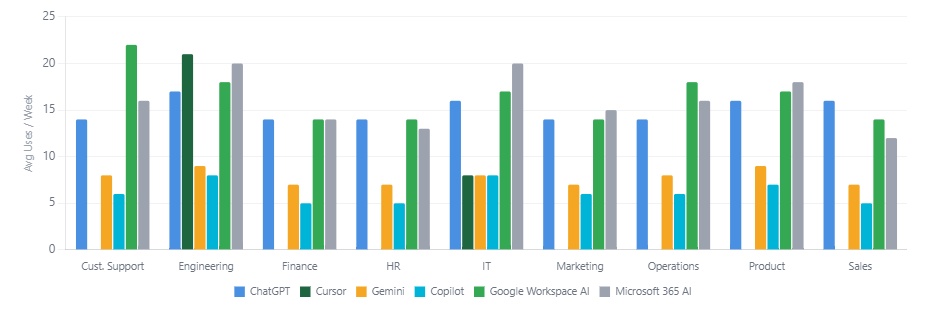
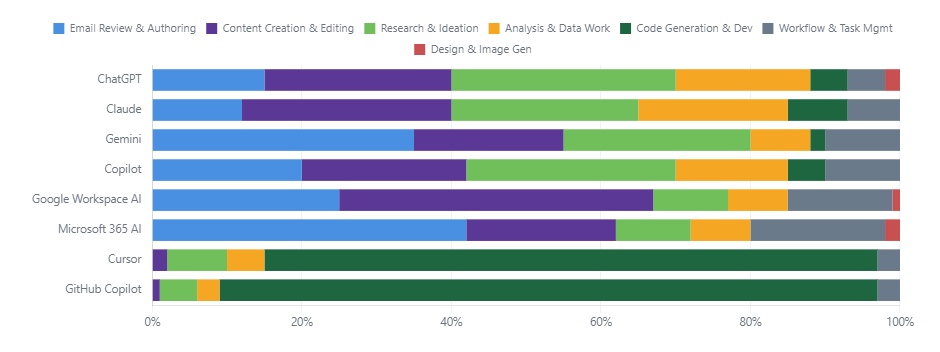
Range needs a view of tasks. Worklytics sorts activity into task types from usage metadata, such as email, content creation, research, analysis, and code generation, so you can see whether a team's heavy use is one repeated task or several. Cutoffs do not transfer between tools, since 15 Copilot actions and 15 ChatGPT conversations are different amounts of effort. Without a published cutoff, use the top quarter of users in the same job family; comparing an engineer with a salesperson flags the engineer every time. See the AI adoption metrics guide for more KPIs.
A team average hides two groups of people. The first is the heavy users inside a weak team. In the illustrative sample, Sales has the largest share of people not using AI in a typical week, yet its bar still shows a slice using it 4 or more days a week. Worklytics shows how AI use is distributed within each group: not using, light at 1 to 2 days a week, moderate at 2 to 3, and heavy at 4 or more.

The second group is newer hires. In the same sample, employees with 0 to 2 years of tenure use AI more than colleagues with 3 to 5 or more years in all nine functions. Tenure is a cut a nomination form never makes, so these employees are easy to miss.

Ask those teams' managers for names, open the invitation to volunteers, then confirm each person with a 15-minute demonstration of a real task.
High usage can mean busywork. Before you copy a group's habits, compare its heavy users with non-users in the same role and tenure band on one outcome. Worklytics productivity and impact measurement sets AI usage beside outcomes such as fragmented time, the focus time lost to a broken-up calendar. In the illustrative sample below, heavy AI users in Sales averaged 1.83 hours of fragmented time a day against 2.03 for non-AI users. Operations, Support, and Executives show the same direction, with gaps of 0.13 to 0.26 hours.
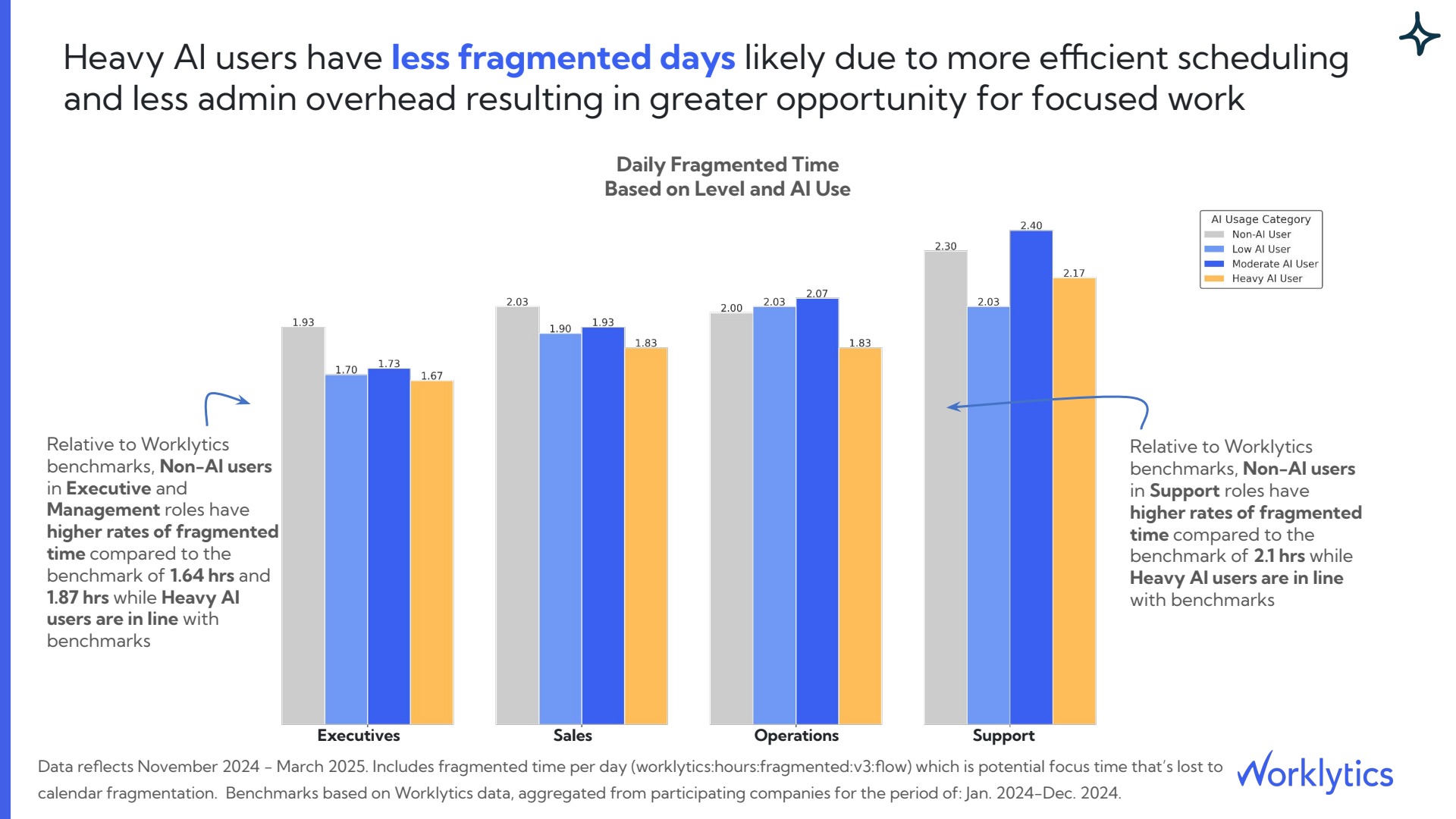
Across the four roles, the gaps equal 8 to 16 minutes a day, and they appear only for heavy users: moderate users in Support and Operations had slightly more fragmented time than non-users. The gap does not prove AI caused it, because people with more control over their calendars may also be the ones who try AI sooner. Treat it as a screen: a group with no gap is a poor model to copy.
For engineering teams, use shipped work. A July 2026 Microsoft preprint covering tens of thousands of engineers found that adopters of command-line coding agents merged about 24% more pull requests than they would have otherwise, and the lift held across four months. Fix the outcome per function before you start, so nobody can pick the comparison after the results are in.
A champion helps only if colleagues can see them working. In the same Microsoft study, when more than 25% of an engineer's skip-level peers (the people under the same manager's manager) had used Copilot CLI in the prior 14 days, that engineer had 216% higher odds of trying it than one with no using peers, and an active direct manager added 82%. The study covers engineers and one kind of tool, and it measured peer use rather than champions, so treat 25% as a coverage target, not a promise. A single champion in a 40-person group reaches 2.5% of it, so judge a network by coverage per group.
Worklytics adoption driver research shows the same pattern. In the illustrative sample below, having at least one power-user teammate was associated with a 15% higher probability of heavy AI use, and a heavy-using manager with a 75% higher probability.

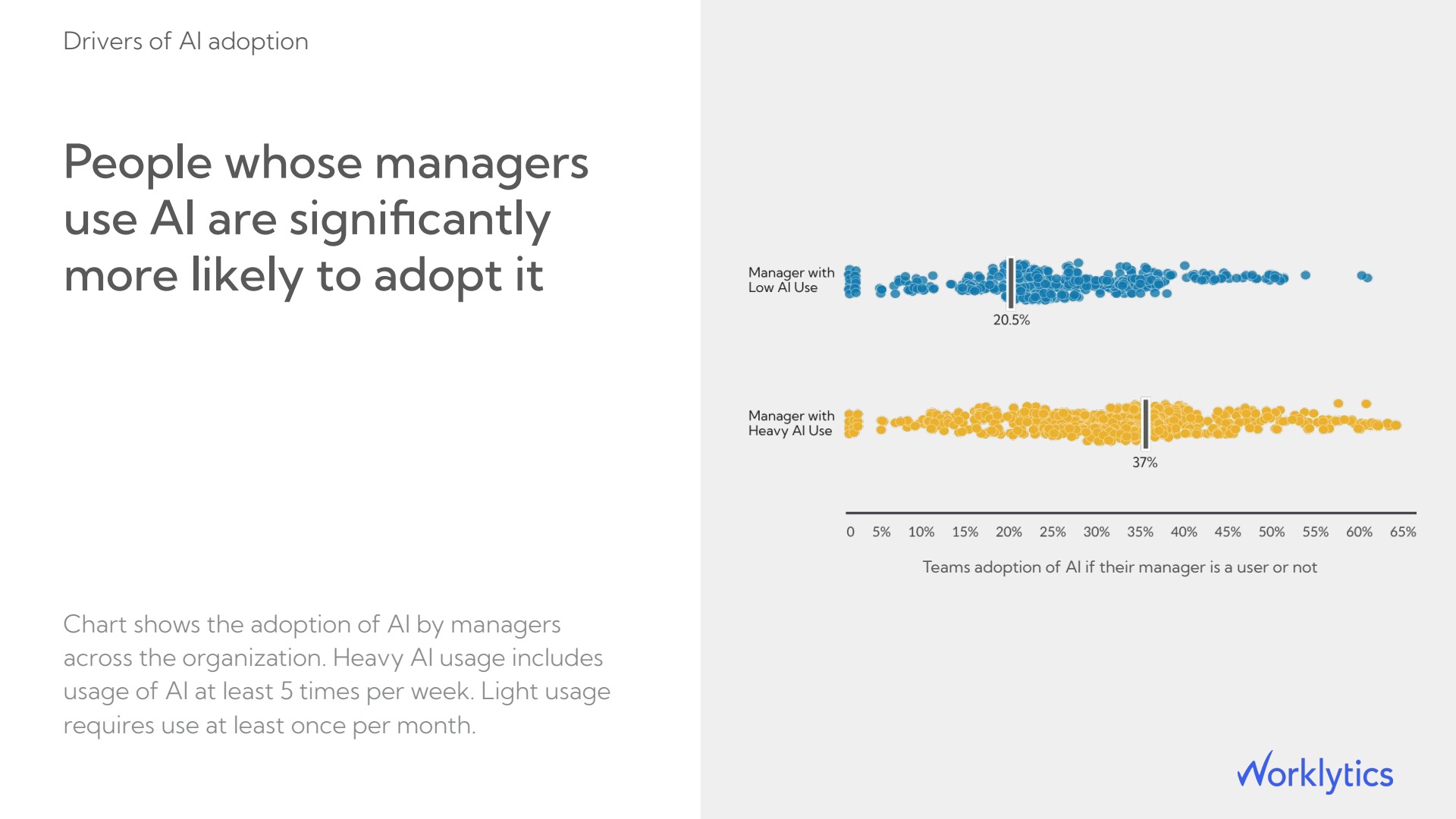
The manager chart shows the same link: adoption in teams with a heavy-using manager centered on 37%, against 20.5% for teams whose managers used AI lightly. The Worklytics manager scorecard shows how managers compare, so you can enlist the right managers first.
Place champions where the gap is widest and the work resembles theirs. Rank teams by employees not yet using AI weekly. The Worklytics workplace insights dashboard reports adoption by team and role. In the illustrative sample below, 853 employees were not yet using AI weekly, 68% of automatable work was not yet AI-assisted, and the estimated untapped value was $5.2M a year.

Then pair by task, not by title. A champion who mostly writes code cannot teach a team that drafts proposals, because the task mix decides what transfers. Match each gap team to a champion who uses the same tool for the same main tasks. If a gap team has no heavy users, borrow one from the closest function and give them one task to demonstrate.
Use the data to decide where to ask, then let people choose. Citi invited employees to volunteer as AI Champions, offering training, early access to approved AI systems, and internal badges, and kept the role to a local point of contact in the champion's own team, not a formal trainer. AI News, citing Business Insider, reported a roughly 4,000-person internal AI workforce in January 2026, with more than 70% of Citi's 182,000 employees using firm-approved AI tools. Microsoft's Copilot Champs community reached nearly 10,000 members by August 2024 through open recruitment, with a badge awarded after baseline training.
Put four terms in the invitation:
Check the load after launch. The Worklytics burnout and well-being view shows time worked outside normal hours by group. If a champion's group moves past the rest of the company, cut their commitments.
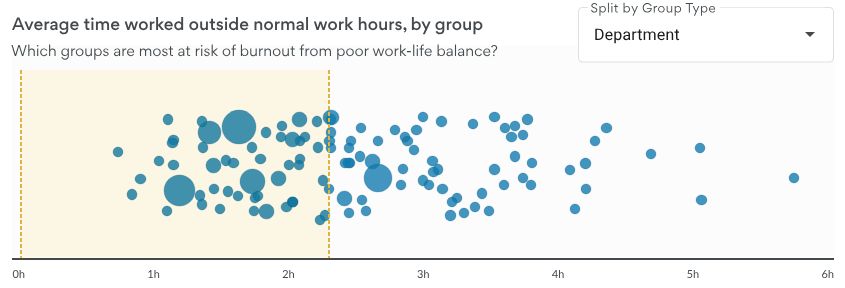
Set a baseline for each champion's team before the invitation goes out: the share using AI weekly, the share using it 4 or more days a week, and uses per active day. Re-measure at 12 weeks, the window Microsoft uses to define a habitual user, and compare against similar teams without a champion. Count first use and staying power separately; the Microsoft engineering study called an engineer retained after 5 active days in the first 14.
Watch the trend by team, not only the company line. In the illustrative sample below, company-wide adoption climbed after ChatGPT rolled out in April 2025, then flattened from about October 2025; a flat company line can hide a champion team that is still rising.

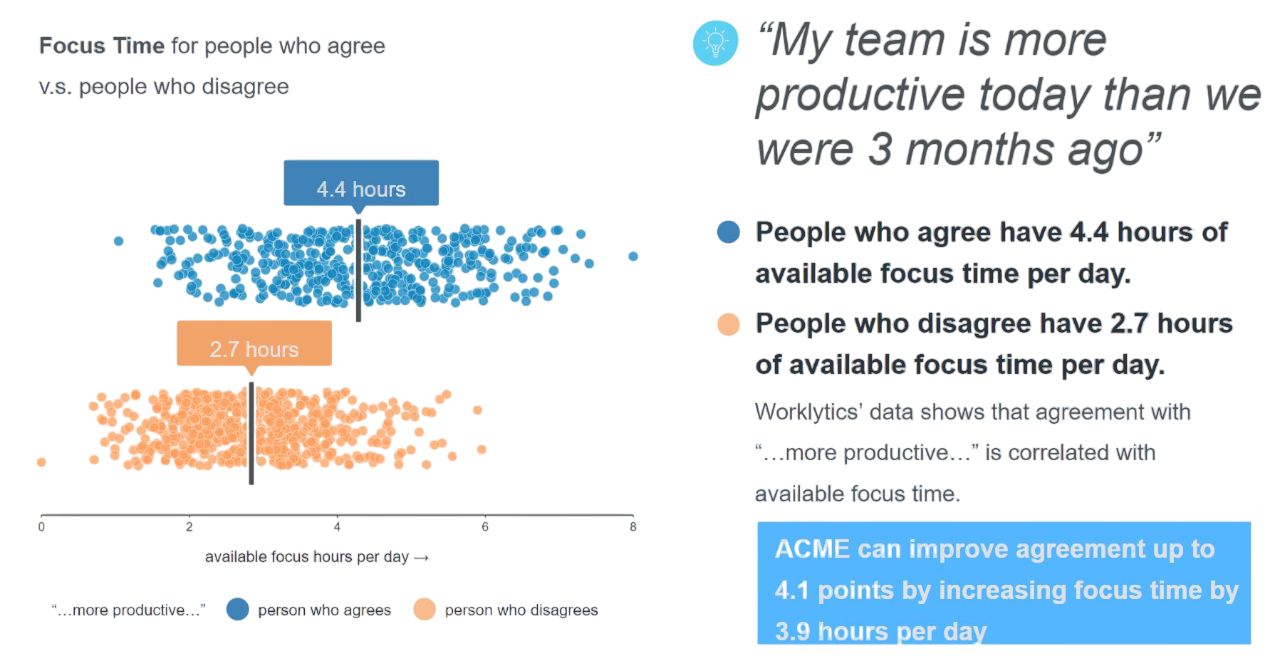
Usage does not show whether colleagues feel helped. Add one survey question to champion teams, such as whether people get help when stuck with AI, and compare answers with usage. Worklytics lines survey answers up with engagement and behavior data; in the illustrative example below, people who agreed their team was more productive had 4.4 hours of available focus time a day against 2.7 for those who disagreed.
Then tie adoption to output. Worklytics estimates hours saved per active user; in the illustrative sample, the median was 1.5 hours a week, or 1,240 hours a week organization-wide and $2.4M a year. Estimate your own return with the AI ROI calculator. If a champion's team shows rising adoption but no change in the outcome you fixed earlier, the champion is spreading the habit but not the skill.

Worklytics shows where your hidden AI power users are, whether their work improves, and whether the champions you pick move adoption, without reading a single prompt. Request the AI adoption sample report to see these views in full.
An employee who uses AI as often and as deeply as the company's top users but appears on no champion list and in no single-tool report.
There is no verified ratio. Citi's roughly 4,000-person AI workforce is about 2.2% of its 182,000 employees, but coverage is the better target: in Microsoft's study, first use rose most when more than 25% of a person's skip-level peers had used the tool in the prior 14 days. Add champions until each group heads toward that level.
Yes. Usage metadata such as how often, how many days, and which tool is enough. Worklytics reports by team, role, and tenure, so individuals are confirmed by invitation, not by monitoring.
Work-data tools cannot see them. Ask volunteers which tools they use, then consider approving the useful ones as company tools so their usage becomes measurable.
Measure at 12 weeks against similar teams without a champion, using weekly users, heavy users, and the work outcome you fixed in advance. A shorter window cannot separate habit from a first try, since Microsoft's habit test needs 9 of 12 weeks.