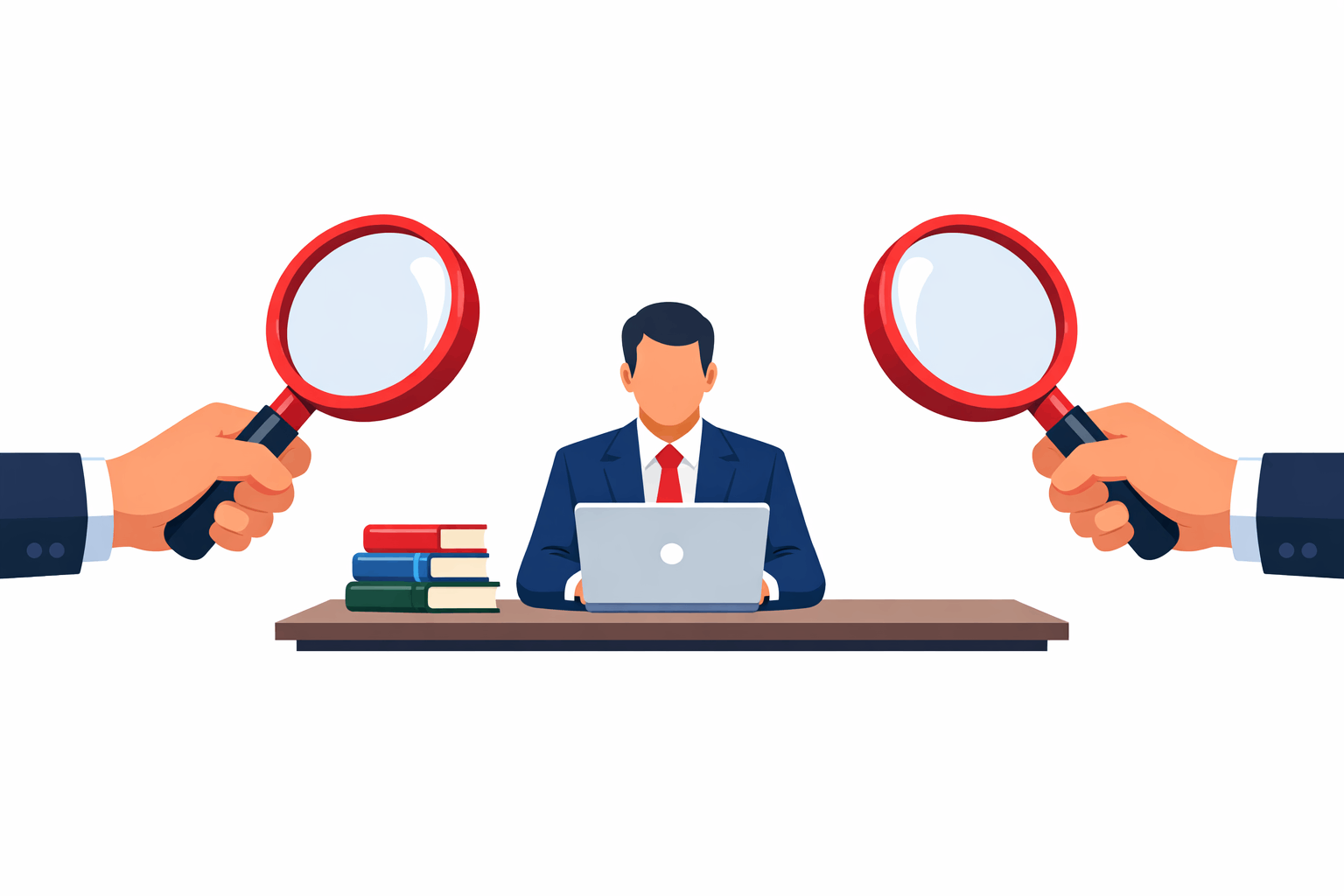
In an era of widespread remote and hybrid work, many organizations have turned to employee productivity tracking tools. Leaders want assurance that work is getting done outside the office.
The question is, does tracking employees actually improve productivity? It’s a critical concern for HR professionals and executives balancing performance goals with employee morale.
To answer whether employee tracking improves productivity, we must examine how it’s implemented. Monitoring is not inherently good or bad – it can yield positive results when done responsibly, or cause harm when overdone.
This blog will explore the potential benefits of employee tracking, its hidden downsides, and how to strike a balance that genuinely improves productivity. We’ll also discuss privacy-first solutions like Worklytics as a way to get actionable insights without sacrificing trust. Let’s dive in with a look at why companies track productivity in the first place.
Employers have long measured productivity to achieve higher performance. With distributed teams and flexible schedules becoming common, traditional management by direct supervision has given way to digital tracking tools.
Employee productivity tracking typically involves software that records indicators like hours worked, tasks completed, computer activity, or communication patterns.
Research literature shows mixed findings: some studies find no effect or even negative effects from monitoring on performance. This suggests that how employees perceive the monitoring is critical. If they view it as supportive and fair, it might help; if they view it as punitive or spying, it can backfire.
So, while the intent behind employee tracking is to improve productivity and efficiency, the outcome depends on implementation and perception. Next, we’ll explore the darker side: how excessive or poorly executed surveillance can hurt productivity more than help.
Despite its promised benefits, intensive employee surveillance often carries hidden costs that directly undermine productivity. One major issue is the impact on employee trust and morale. Monitoring every mouse click or minute online can send a signal to employees: “We don’t trust you.” And trust is a cornerstone of a productive workplace.
Excessive tracking tends to erode trust between employees and management. Harvard Business Review aptly noted that constant surveillance “erodes trust” and puts managers in a difficult position. When workers feel untrusted, their engagement plummets.
Slack’s Future of Work study of over 10,000 workers found that feeling trusted by one’s employer has the greatest impact on productivity – trusted employees were 2× more productive on average. Conversely, those who feel untrusted experience 2.3× higher stress and are more than twice as likely to be job-hunting elsewhere.
In short, surveillance that breeds distrust can spur good people to disengage or quit, clearly hurting productivity.
Worse yet, heavy surveillance can provoke not just disengagement but active resistance.
In the 15Five survey mentioned earlier, one-quarter of managers reported that monitoring prompted employees to seek new jobs, and 20% observed employees “acting out” or sabotaging as a result of being monitored.
When people feel overly controlled, some rebel – whether by deliberately evading tracking, working slower, or undermining the system. Clearly, such outcomes are the opposite of improved productivity.
A striking consequence of intrusive monitoring is “productivity theater.”
This term describes employees performing meaningless or superficial actions just to appear busy under watch, instead of focusing on truly valuable work.
When workers know every idle minute or Slack status is tracked, many respond by gaming the system – for example, leaving their laptop active so they look online, responding to emails at odd hours to signal presence, or logging extra hours not because work demands it but to impress the tracker.
Recent surveys confirm this is widespread. According to a Visier survey of U.S. workers, 43% of employees admitted to spending over 10 hours per week on performative work – essentially, wasting time to look busy. The study attributes this directly to increased surveillance and pressure for visibility in the post-pandemic workplace.
This phenomenon not only negates the intended productivity gains but can create new inefficiencies.
Time spent on appearance is time not spent on real output. As Fortune summarized, monitoring tends to backfire – it makes workers more likely to break rules, resent their managers, and ultimately quit.
Instead of motivating better performance, surveillance can drive employees to focus on the wrong things (like staying green online) or find ways to cheat the system.
This aligns with what Microsoft’s VP Jared Spataro cautioned:
Relying on “productivity theater” through monitoring is a dead end; leaders should focus on impact and results instead.
Another hidden cost is the potential stifling of quality and creativity.
If employees are under constant watch, they may stick strictly to safe, trackable tasks to “look productive,” avoiding the risk-taking or creative thought that leads to innovation.
They might rush through work to meet metrics (e.g., keystroke counts or hours logged) at the expense of quality. This is especially detrimental in knowledge work, where output isn’t easily quantifiable by simple metrics. The stress of surveillance can also decrease cognitive performance – anxious employees have lower concentration and problem-solving capacity.
In sum, over-monitoring can create a culture of fear and formulaic work. People do the minimum to avoid flags from the tracking system, rather than experimenting or going above and beyond. It’s a classic case of measuring the wrong thing and getting the wrong behavior.
Given these drawbacks, it’s clear that employee tracking is a double-edged sword. Used injudiciously, it can erode trust, encourage time-wasting behaviors, and push talent out the door – all of which harm productivity in the long run.
Does that mean companies should never track anything? Not quite. The key is identifying productivity without invading any employee’s privacy. In the next section, we discuss how organizations can strike a balance: gaining insights to improve productivity while maintaining employee trust and respect.
To truly improve productivity, companies must shift from surveillance to smart analytics. The goal should be to support employees and optimize work processes, not to play Big Brother. Here are strategies to make productivity tracking effective and ethical:
The most meaningful productivity measures are about results – work completed, goals met, quality maintained – rather than raw hours online or random activity metrics. Instead, follow Microsoft’s advice and focus on impact: define clear performance goals and measure success against those.
Productivity data should surface patterns that lead to better decisions, not raw surveillance signals. Focus on insights that explain how work actually happens, such as where collaboration breaks down, where focus time is consistently interrupted, or where workloads are becoming unsustainable. These insights help leaders address structural issues instead of individual behavior, enabling smarter changes to processes, meeting norms, and team design.

To avoid damaging trust, productivity analytics should use aggregated and anonymized data, not individual-level monitoring. Anonymization ensures employees are not singled out, judged, or compared against each other. Be clear about how the data is anonymized and who can access it. When employees understand that analytics exist to protect privacy and improve working conditions (not to micromanage), they’re much more likely to support and engage with productivity initiatives.
Monitoring can be helpful if it’s used to find bottlenecks and support better work, not to punish people. Share team-level productivity metrics and ask, “How can we improve this together?”
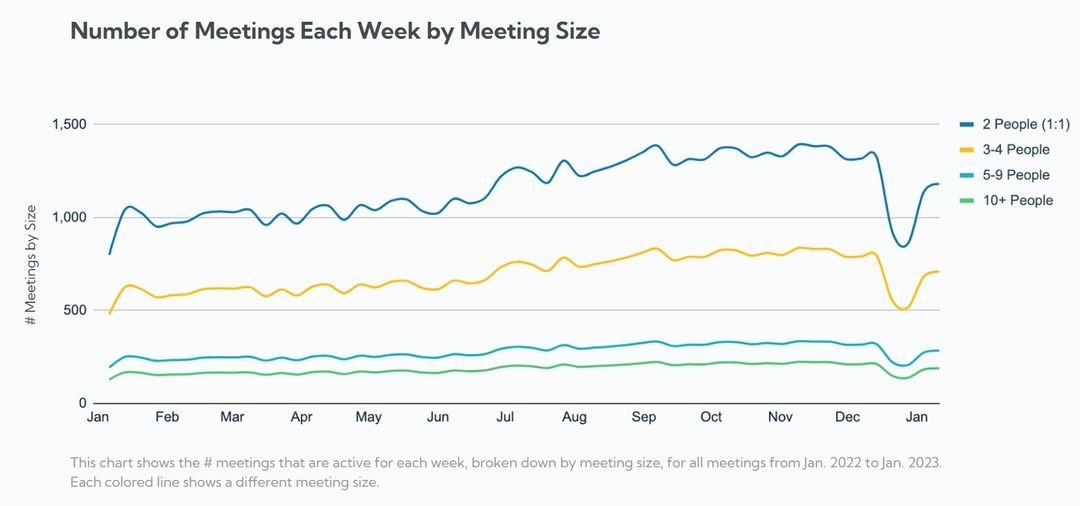
For example, if data shows a team spends 30 hours a week in meetings, that can start a discussion about reducing or streamlining meetings so everyone benefits. When employees see tracking leading to real improvements (like fewer unnecessary meetings or better workload balance), they’re more likely to buy in.
But if data is mainly used to identify and punish “slackers,” trust disappears quickly. Focus on developmental monitoring, using insights to provide feedback, training, and resources that help employees succeed. This kind of approach improves performance by building confidence and capability.
Secret monitoring almost always backfires. Be upfront about what you’re tracking and why, and explain clearly how the data will and won’t be used. Even better, involve employees in the process: ask them what they consider fair metrics and how they feel about the tools being considered.
This turns monitoring from something suspicious into a shared effort to improve work. Transparency also means setting firm boundaries, such as: “We track email response times, but we don’t record keystrokes or use webcam monitoring.” Clear limits help employees feel respected and protected. Trust works both ways. When management shows trust through privacy and openness, employees are more likely to return it.
Finally, let’s look at how these ideas come together in practice by considering an example of a privacy-first productivity analytics solution.
One solution that embodies the balanced approach to employee tracking is Worklytics. Worklytics is a workplace analytics platform designed to boost productivity using data from everyday work tools – but critically, without resorting to invasive surveillance. For HR leaders and executives, Worklytics offers a way to answer the productivity question with real insights while preserving employee trust and privacy. How Worklytics Differs from Traditional Monitoring:
Worklytics does not use keystroke logging, screenshots, or webcam activation. It also does not read the content of emails or chats. Instead, it analyzes metadata and collaboration patterns (for example, meeting durations, email response times, and project updates) to gauge productivity. This means employees are not being watched in a creepy “over-the-shoulder” way, and their privacy is respected.
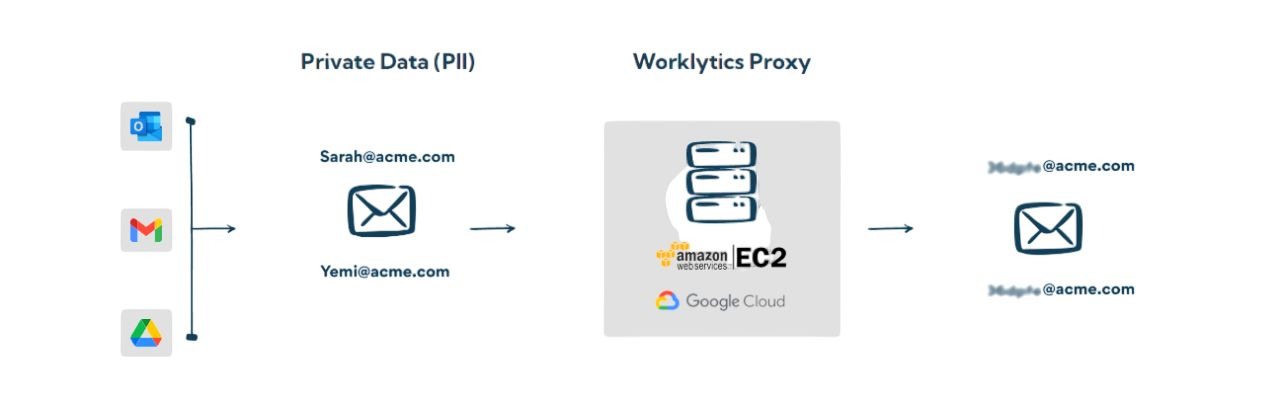
Worklytics is built with privacy at its core. Personal identifiers can be hashed or removed, and data is aggregated so reports focus on team and organizational trends rather than singling out individuals. For example, a manager might see that the marketing team had 15% more focus time this quarter, not that “Alice was idle at 2:30 PM on Tuesday.” This approach delivers insights without exposing individual employees and aligns with GDPR, CCPA, and other privacy regulations by design.
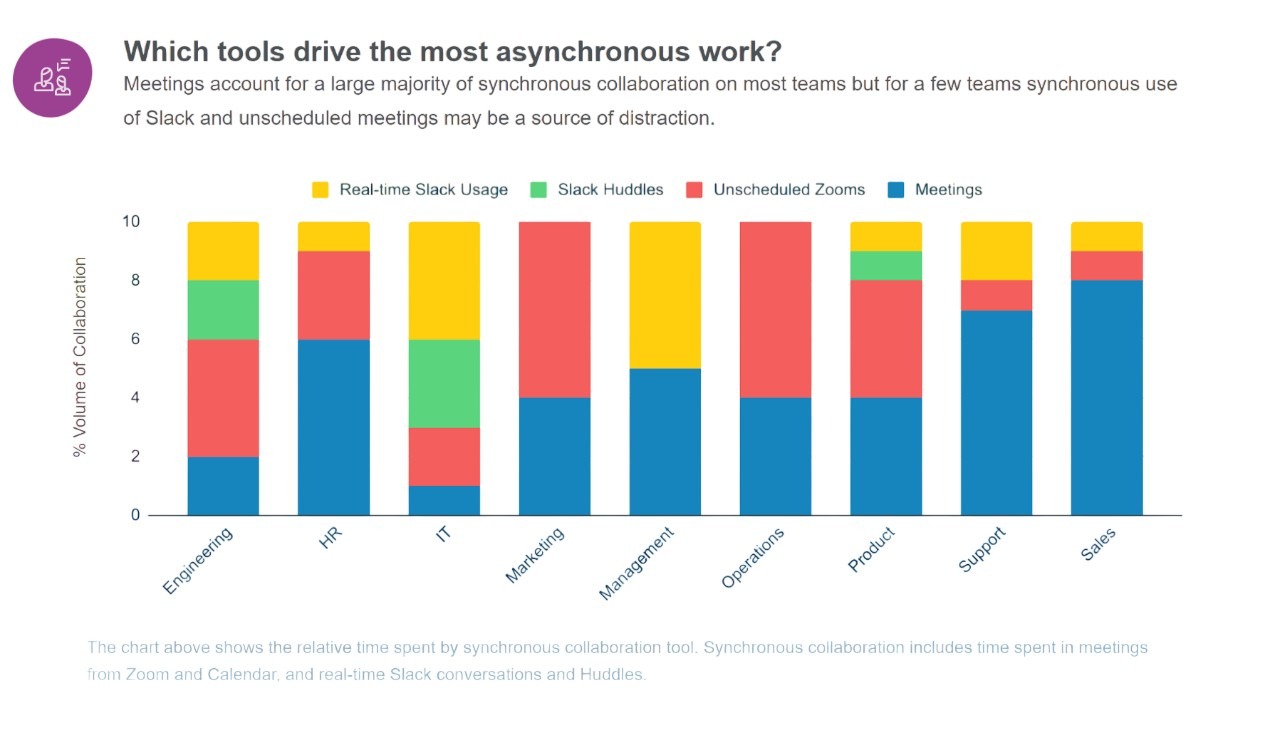
Worklytics goes beyond simple time tracking. It provides analytics on how work is done across tools such as Office 365, Google Workspace, Slack, Jira, Asana, and more. This can reveal bottlenecks and opportunities for improvement, such as identifying that engineers are stuck in too many meetings or that cross-team communication is weak. Features like Focus-Time Ratios and Meeting Load Analysis highlight how much uninterrupted work time teams have versus meeting time, helping spot overload and constant interruptions. These insights help managers make meaningful changes, such as reducing unnecessary meetings or balancing workloads, which improves productivity and well-being.
Because Worklytics connects to existing work systems, it can generate real-time dashboards of productivity KPIs (key performance indicators). Managers and HR can monitor metrics like project throughput, turnaround times, and engagement levels as they change, rather than waiting for quarterly reports. Importantly, these KPIs are presented in a positive, solution-oriented way.
For example, Worklytics might show that a team’s deep work hours increased after a Wednesday no-meeting policy, directly connecting data to outcomes. The focus stays on continuous improvement, not catching people doing something wrong.
Worklytics can support a transparent productivity initiative. Companies can clearly communicate that the tool is used to identify process improvements and support teams, not to micromanage individuals. Worklytics reinforces this by not offering clandestine monitoring capabilities. Everything is above board. Some organizations even share selected dashboard metrics openly with employees, such as team-average focus time or overall collaboration scores. This kind of openness builds trust because employees can see that the data is being used fairly and constructively.
Worklytics also provides strong compliance and privacy protections, which is especially important for HR leaders. It supports alignment with GDPR and other data protection requirements. Features like a DLP (Data Loss Prevention) proxy and role-based access controls help ensure only authorized individuals can access specific data. These safeguards reduce the risk of misuse and reinforce that employee information is handled responsibly. In short, Worklytics supports productivity tracking without sacrificing privacy or ethics, which is increasingly expected by both employees and regulators.
In summary, Worklytics demonstrates that productivity gains and employee trust are not mutually exclusive. You can gain deep insights into work patterns and efficiency (the original promise of employee tracking) while actually strengthening the employer-employee relationship through a privacy-first philosophy. For HR leaders and executives, this approach offers a path to improved performance that is sustainable and ethical – a win-win scenario in the modern workplace.
Q1. Is employee productivity tracking legal and ethical?
A: Often yes, but only with limits. Many laws allow tracking on company systems if employees are informed and personal privacy is respected. Ethically, tracking should be transparent, minimal, and focused on work outcomes, not personal behavior. Best practice is to collect only what’s necessary and avoid intrusive surveillance.
Q2. What types of employee tracking actually improve productivity?
A: Outcome-focused tracking helps. Metrics like project completion, meeting load, and response times can reveal real improvements. Activity-level tracking like keystrokes or screenshots usually creates stress without improving results. Productivity improves when data is used to remove obstacles, not to police behavior.
Q3. How can we introduce productivity tracking without harming morale?
A: Be transparent and collaborative. Explain why tracking is being used, what will and won’t be tracked, and how employees benefit. Invite feedback, start with a pilot, and use privacy-safe, aggregate data. Trust comes from clarity and consistency.
Q4. Can employee monitoring backfire even if productivity rises at first?
A: Yes. Short-term gains often come from fear, not engagement. Over time, heavy monitoring can reduce trust, increase stress, and hurt performance. Sustainable productivity depends on motivation and culture, not constant oversight.
Q5. How is Worklytics different from other monitoring tools?
A: Worklytics is analytics-driven, not surveillance-based. It does not track keystrokes, screenshots, or content. Instead, it analyzes anonymized workflow patterns to highlight issues like meeting overload or lack of focus time. The goal is better processes, not micromanagement.