In today’s digital workplace, focus time has become one of the most valuable and most threatened resources for knowledge workers. With remote and hybrid work now the norm, teams are more connected than ever. But connection doesn’t always mean productivity. Between endless meetings, nonstop pings, and multitasking across tools, true focus has become a rare commodity.
For organizations striving to improve performance and well-being, learning how to measure and protect focus time is no longer optional, it’s a strategic imperative.
Focus time refers to uninterrupted, cognitively deep periods of work where employees can think, create, and solve complex problems without distraction. Research shows that knowledge workers need at least four hours of focused work daily to perform at their best.
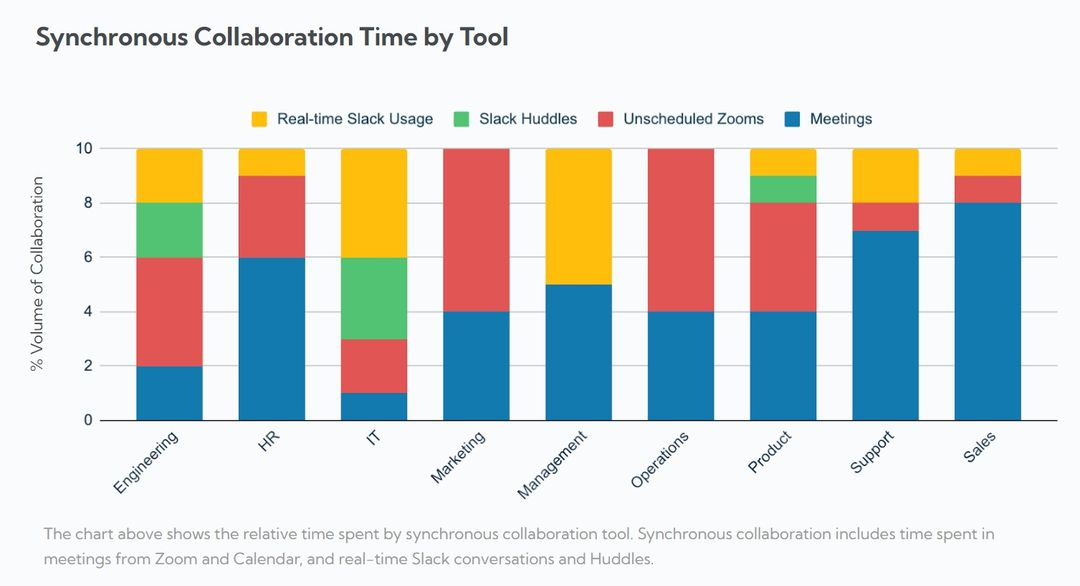
Yet, since the shift to remote collaboration, the typical workday has been consumed by meetings, Slack messages, and email threads. While communication tools were designed to make teamwork easier, they’ve often led to collaboration overload—a state where workers are constantly “on” but struggle to make meaningful progress.
Collaboration is vital for innovation, but too much of it can crush productivity.
This pattern, collaborating endlessly during the day, focusing alone at night is not sustainable. To unlock productivity, organizations need to rebalance collaboration with concentration.
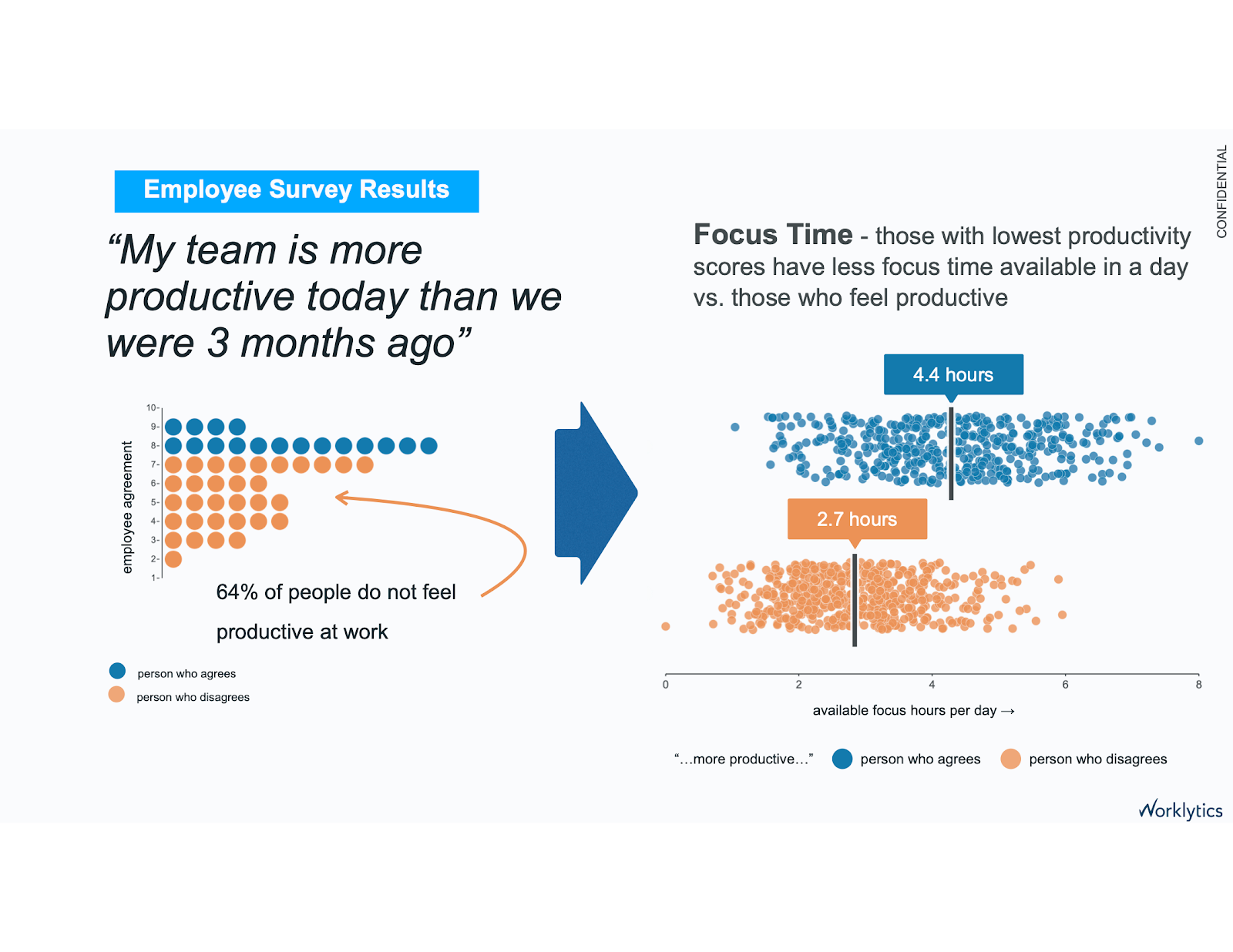
1) Calendar fragmentation. You might technically have “free” time, but five open 30‑minute slots scattered between meetings don’t add up to meaningful focus. This fragmentation keeps the brain in a semi‑reset state.
2) Message reactivity. Always‑on responsiveness raises perceived throughput while lowering actual output. It also pushes real work into nights and weekends an unhealthy trade. Microsoft’s telemetry shows late‑night meetings up and off‑hours chats increasing year over year.
3) Meeting sprawl. Recurring meetings multiply; agendas fade; attendance swells. People exit with action lists and no time to execute. (If your team adds meetings faster than it retires them, you’re accruing scheduling debt.)
Without data, improving focus time is guesswork. By measuring focus time, organizations can identify when and why focus is being lost. Metrics might include:
This data helps leaders recognize patterns, for example, a team with high meeting density and low focus time may be at higher risk of disengagement or turnover.
Tracking these insights also empowers employees to take control of their schedules, helping them build healthier work habits that protect both their output and energy.
Encourage teams to block two-hour focus sessions daily. This might mean scheduling shared “quiet hours” where no meetings or pings are allowed. Over time, this reinforces the cultural importance of deep work.
Set aside one or two afternoons per week for uninterrupted work. Meeting-free days give teams predictable windows to dive into demanding tasks that require full attention.
Adopt policies like:
These boundaries foster psychological safety and reduce the pressure to always be online.
Audit recurring meetings. Could a 60-minute meeting be replaced with a 15-minute async update? Could a daily standup become an every-other-day check-in?
Reducing unnecessary meetings is one of the most immediate ways to reclaim focus time.
Use workplace analytics tools like Worklytics, Microsoft Viva Insights, or Clockwise to quantify and visualize focus time. These tools help leaders track:
With these insights, organizations can make data-driven adjustments that improve both efficiency and employee well-being.
Employees who feel they have time to focus report higher satisfaction and lower burnout. When companies protect focus time, they:
Ultimately, prioritizing focus time isn’t just about productivity, it’s about sustaining a healthier, more balanced workplace.
The hardest part isn’t guessing what to try; it’s proving what works. That’s where Worklytics excels: it turns collaboration signals you already generate (calendars, email, chat, project tools) into privacy‑safe, real‑time insights leaders can act on.
Worklytics integrates data from 25+ collaboration and productivity platforms (e.g., Google Workspace, Microsoft 365, Slack, Jira) so you’re not flying blind outside one vendor’s ecosystem. You get a unified, apples‑to‑apples view of meetings, messages, and work patterns.
Why this matters for focus: Focus time dies by a thousand cuts spread across calendars, chat, and ticket systems. Cross‑platform visibility lets you spot fragmentation and overload wherever it originates.
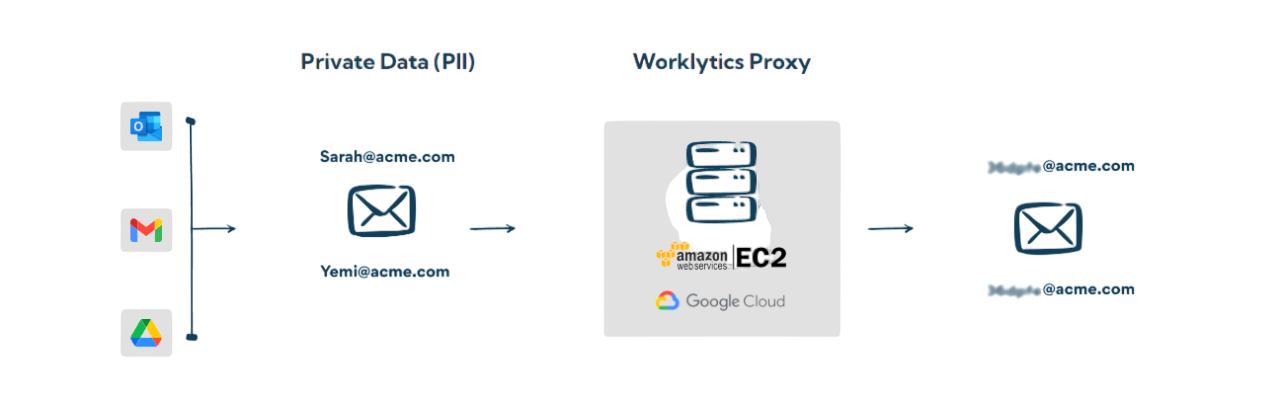
Worklytics focuses on behavioral metadata (when/where collaboration happens), not content or keystrokes. That enables objective, repeatable KPIs for focus hours, meeting load, responsiveness, and more.
Why this matters for trust: You can measure what is happening, enough to improve the system, without reading private messages or tracking individuals.
Worklytics emphasizes aggregation and anonymization, with controls aligned to GDPR/CCPA. Insights are delivered at team or cohort level; raw message content isn’t analyzed. That’s how you maintain employee confidence while still getting decision‑quality data.
It’s hard to improve what you can’t contextualize. Worklytics provides peer benchmarks so you can see whether your meeting load, focus hours, or responsiveness look healthy compared to similar teams and companies.

Don’t wait a quarter to see if “meeting‑free Wednesdays” helped. Worklytics delivers near real‑time dashboards so you can validate changes quickly, double down on wins, and sunset ideas that don’t move the needle.
Prefer to analyze in your own BI stack? Worklytics can stream processed metrics to your data warehouse or visualization tools, so People Analytics and Ops can blend with performance, attrition, or revenue data.
Compared with ecosystem‑bound telemetry (e.g., Microsoft’s Adoption/“Productivity” Score), Worklytics provides broader coverage (Google + Microsoft), calendar analytics across platforms, and a large, customizable metric library—useful when you want to go beyond basic usage counts.
Step 1 Baseline. Use Worklytics to capture team‑level focus hours, block length, meeting density, and after‑hours activity. Identify hotspots: teams with heavy back‑to‑back meetings, or late‑night spikes.
Step 2 Set guardrails. For example:
Step 3 Interventions. Implement your three from above (daily two‑hour blocks, no after‑hours email, meeting‑free afternoons). Socialize the “why,” and train managers to renegotiate meeting habits.
Measure Focus Time to Improve P…
Step 4 Measure weekly. Watch for increased focus hours, longer block lengths, reduced after‑hours activity, and stable or improved cycle times. Microsoft’s reports suggest shrinking off‑hours collaboration is a sign that load is re‑balancing.
Step 5 Benchmark and iterate. Compare your metrics to peer benchmarks in Worklytics; celebrate teams that hit the mark and coach those still overloaded.

.png)