This guide gives a nine-step method for Tracking AI Spend across tools, using Claude, OpenAI, and Copilot as the examples.
AI spend is hard to see because each vendor reports its own spend, in its own unit, on its own schedule, and none of them report on the others. In the FinOps Foundation's State of FinOps 2026 survey of 1,192 technology-cost practitioners, 98% of respondents now manage AI spend, up from 63% in 2025 and 31% in 2024. Managing the spend and seeing all of it in one place are separate problems.
Each of the three names covers two products with two bills. Claude has the API, which is the connection developers use to call the model, and the Claude Enterprise workspace. OpenAI has the API and ChatGPT, which have separate billing systems. Copilot has Microsoft 365 Copilot and GitHub Copilot. That makes six reporting sources:
| Source | What you pay for | What the report shows | Where it lives |
|---|---|---|---|
| Claude API | Tokens | Token counts and US dollars, with daily cost data | Usage and Cost API |
| Claude Enterprise | Seats plus usage | Active members, seat assignments, spend by model, and spend per user | Analytics page |
| OpenAI API | Tokens | US dollars by project, line item, and API key | Costs API |
| ChatGPT workspace | Seats plus credits or metered usage, depending on the contract | Seats bought, seats enabled, and active users | Workspace analytics |
| Microsoft 365 Copilot | Seats at $30 per user per month | Enabled users and active users | Copilot usage report |
| GitHub Copilot | Seats plus AI credits | AI credits used per user | Billing documentation |
A token is a small chunk of text, about three-quarters of a word, and API plans bill by the token. Three billing models, six reports, and at least three delivery speeds make a hand-built total slow and easy to get wrong. Anthropic says API usage and cost data typically appears within five minutes. Claude Enterprise spend data refreshes daily with a one-day delay. Microsoft says its Copilot report typically arrives within 48 hours of the end of each day.
Worklytics' integrations page lists connectors for Claude Enterprise, Claude Code, ChatGPT Teams and Enterprise, Codex, Microsoft Copilot, and GitHub Copilot. That covers four of the six sources above. The Claude API and OpenAI API are not on the list, so take their dollar figures from the Claude Cost API and the OpenAI Costs API and add them to the monthly total in Step 2. If those APIs power features in your own product, keep that spend on a separate line, because it follows customer usage, not employee usage. Worklytics' guide to tracking LLM token usage and cost covers that side.
For the connected tools, Worklytics closes the gap. It pulls usage from each tool, matches every user to your team structure, and shows adoption, engagement, productivity, and impact side by side. The output can be reports, real-time dashboards, or a feed to your own data warehouse.
Build the tool list from usage records, not from the finance ledger. The ledger holds only what someone bought centrally or expensed, and a seat count says nothing about use.
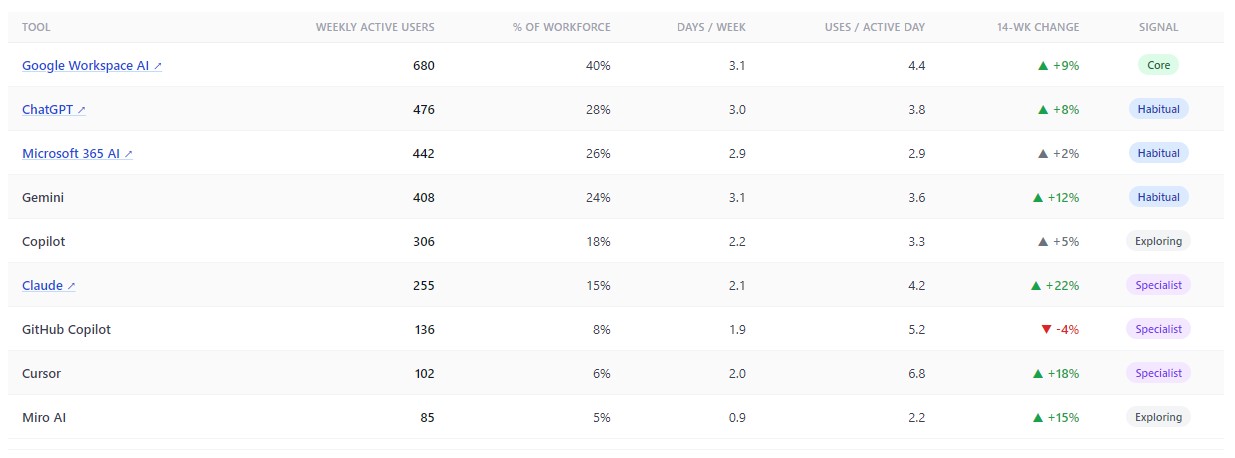
Worklytics AI adoption measurement reads weekly activity from each connected tool and lists the tools in one table: weekly active users (people who used the tool at least once in the past seven days), share of the workforce, days used per week, and uses per active day (how many times a person uses the tool on the days they use it). The sample report below shows the format with nine tools, from Google Workspace AI at 40% of the workforce each week down to Miro AI at 5%.
A second view shows how people spread across those tools: the median number of tools per active employee, and the share of active employees who use only one.
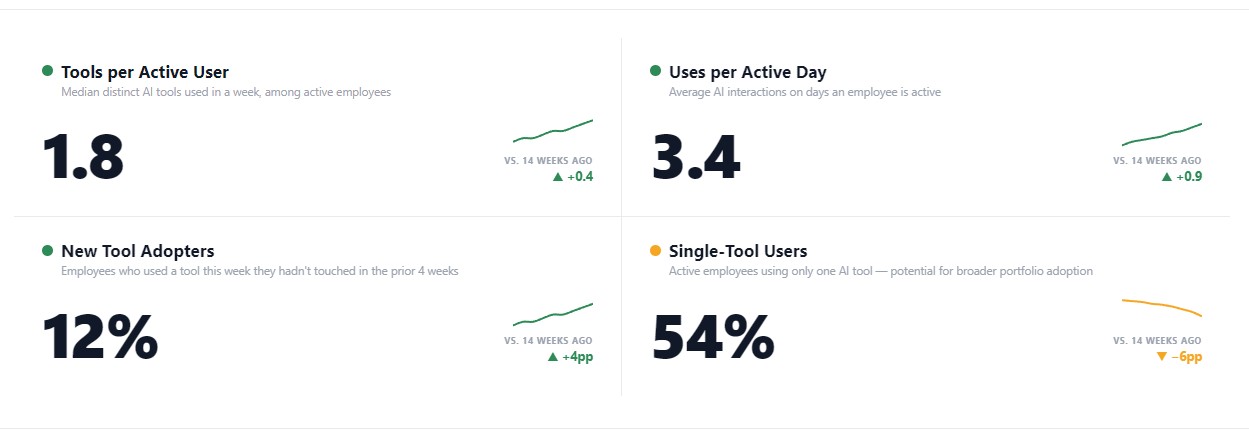
When several tools are paid for but most active people use only one, the extra tools serve a minority, and Step 8 tests that. For now, record each tool's owner, billing source, seats bought, and weekly active users. Then compare three lists: the finance ledger, your login system's app list, and the usage records. A tool that has active users but is missing from the other two lists is being paid for outside central budgets, through a team card or a free plan, so chase it first.
Use one unit, dollars per calendar month, and mark each figure as invoiced or estimated. The formula depends on how the tool bills.
| Billing type | Dollars per month equal | Example |
|---|---|---|
| Seats | Seats bought × price per seat | Microsoft 365 Copilot costs $30 per user per month when paid yearly. 500 seats is $15,000 a month. |
| Credits | Credits used above the included amount × price per credit | GitHub Copilot Business includes 1,900 AI credits per user. Credits beyond the pool cost $0.01 each. |
| Tokens | Tokens by type × rate per token, or the dollar figure from the vendor cost report | The Claude Cost API groups dollars by workspace. The OpenAI Costs API groups them by project, line item, or API key. |
| Mixed | Seat cost + usage cost | GitHub Copilot Business is $19 per user per month plus any credits beyond the pool. |
Tokens are the reason depth of use matters for cost: reading a large codebase into a prompt takes far more tokens than asking a short question.
Mixed billing is where totals drift. GitHub replaced request-based billing with AI credits on June 1, 2026, and code completions stay free. A developer who mainly accepts completions costs the seat price. One who runs chat and agent tasks can pass the included pool. GitHub's usage metrics API now returns AI credits consumed per user, so that difference can be pulled by user.
A promotion made this harder to read. GitHub gave existing customers promotional included usage of $30 per Business seat and $70 per Enterprise seat for June, July, and August, against standard amounts of $19 and $39. When the promotion ended, included usage per seat fell, so a team that stayed inside its pool in August can show overage in September with no change in behavior. Credits can be pooled across the organization, so check credits per user instead of waiting for an overage line.
Claude Enterprise is priced per seat plus usage, and Anthropic says Claude Code and Cowork consume tokens at a significantly higher rate than standard chat. A seat count would miss growth that comes from that usage. Worklytics builds the monthly estimate from seat licensing plus token use by surface, priced at per-token rates. The sample report below shows the format: Claude spend over six months, split into Claude.ai, Claude Cowork, and Claude Code.

Treat these figures as estimates and settle the final number against each invoice every month. Record the gap. A gap that keeps growing means a rate or a contract term is missing from the model.
A total tells finance what was spent. A split by team tells leaders who spent it and whether that matches where the work happens.
Each vendor can split only its own spend. Claude Enterprise added usage and cost by SCIM group in July 2026, meaning the user groups IT already manages, and GitHub lets admins set budgets by cost center. Neither can show how Engineering's Claude spend compares with its Copilot spend or with Sales' ChatGPT spend.
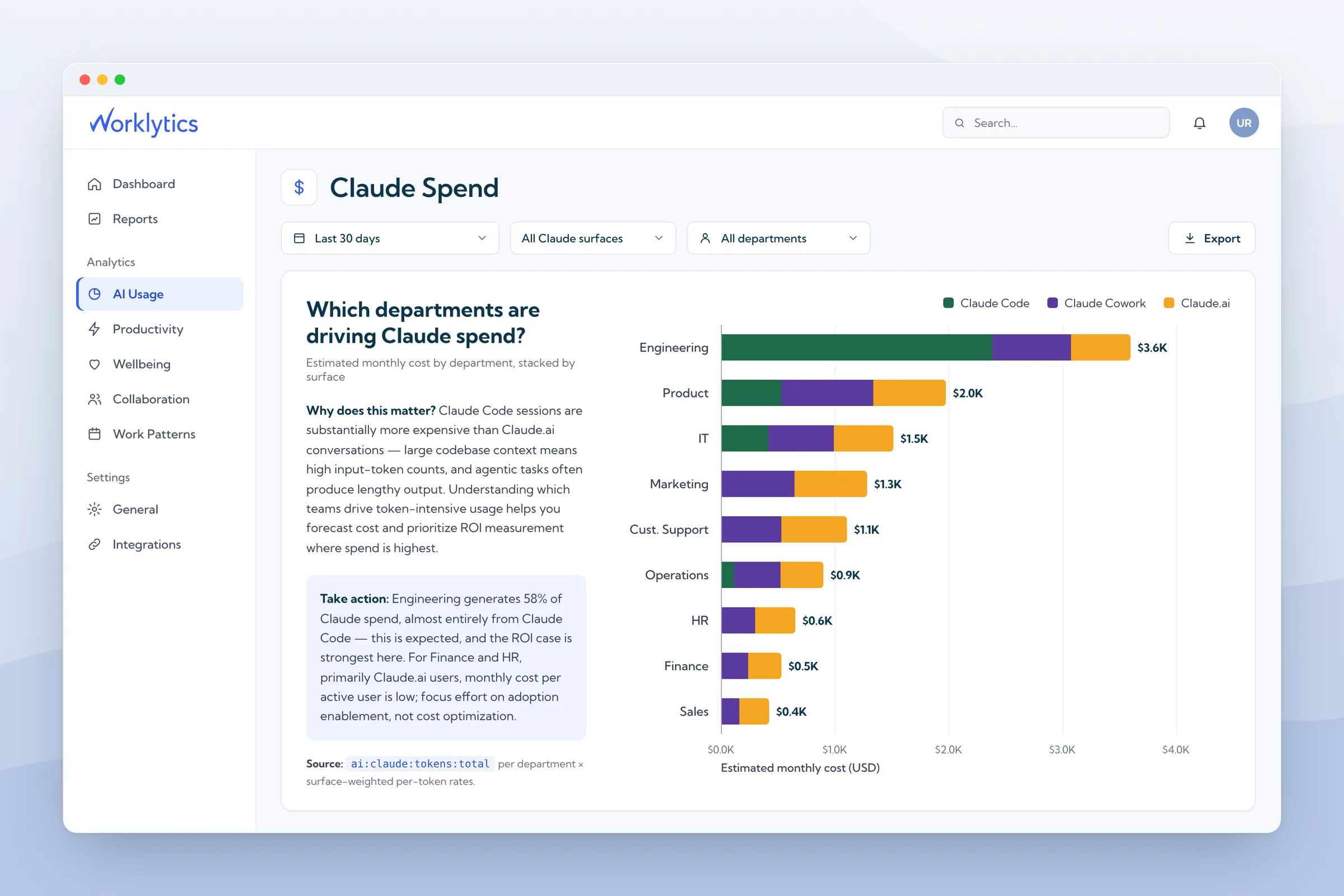
Worklytics matches each user in each tool to your team structure, so one report shows spend by department across every tool. The sample report below shows the format, with each department's estimated monthly AI cost and share of the total.
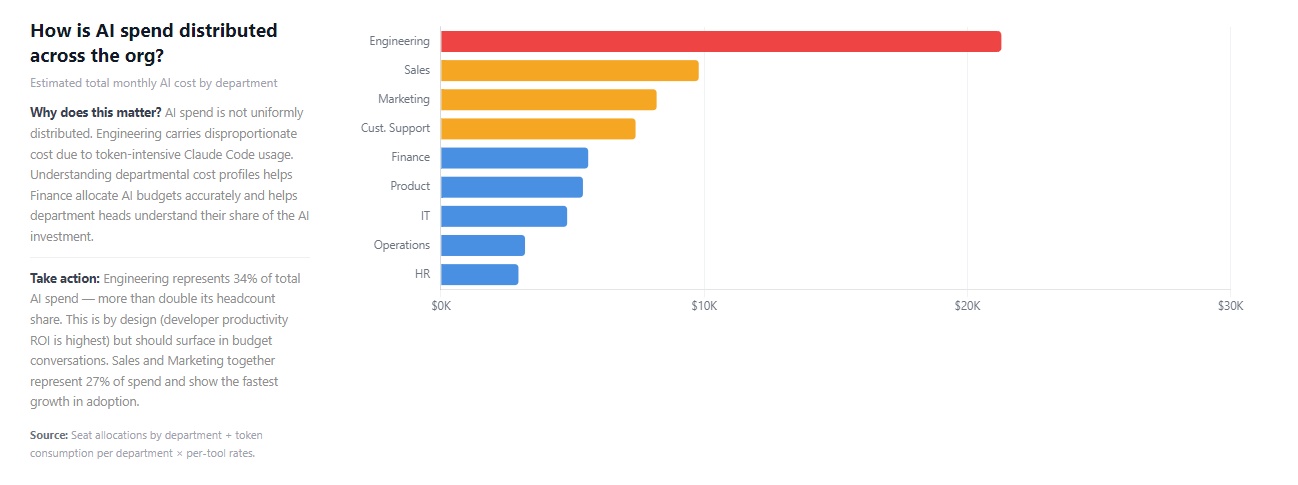
Use the view to ask two questions of every department: does its share of spend match its share of headcount, and does its output (Step 7) justify the difference? Engineering often carries a larger share because coding tools use many tokens. Departments whose spend is growing and whose output is harder to measure need the closer look. Send each department head a one-line monthly statement with spend and active users.
Some spend cannot be tied to a team after the fact. Anthropic's cost report files default-workspace spend under a null workspace ID, and Console playground usage carries no API key. Create one workspace per team before you need the split, and track what remains as a shared line with a named owner. For per-user Claude Code cost, Anthropic points to its Claude Code Analytics API rather than a split by API key.
Divide each tool's monthly cost by its weekly active users to get cost per active user, then count the seats nobody used.
Vendor reports make this hard to compare. Microsoft counts an enabled user as active after any intentional Copilot action, such as submitting a prompt, in the window you pick, from 7 to 180 days, so a 180-day view counts someone who tried Copilot once five months ago. Its active users rate, which is active users divided by enabled users, inherits that window. Use one window for every tool: weekly active users.
Worklytics reports weekly active users for every tool in the same format, with licensed seats beside them. Its own Claude Enterprise renewal guide uses weekly active seats above 60% of licensed seats as the bar for renewing as is.
Here is the arithmetic, using the sample report below. It shows 500 licensed Microsoft 365 Copilot seats and 442 weekly active users. That leaves 58 idle seats, which is $1,740 a month at the $30 list price, or $20,880 a year.
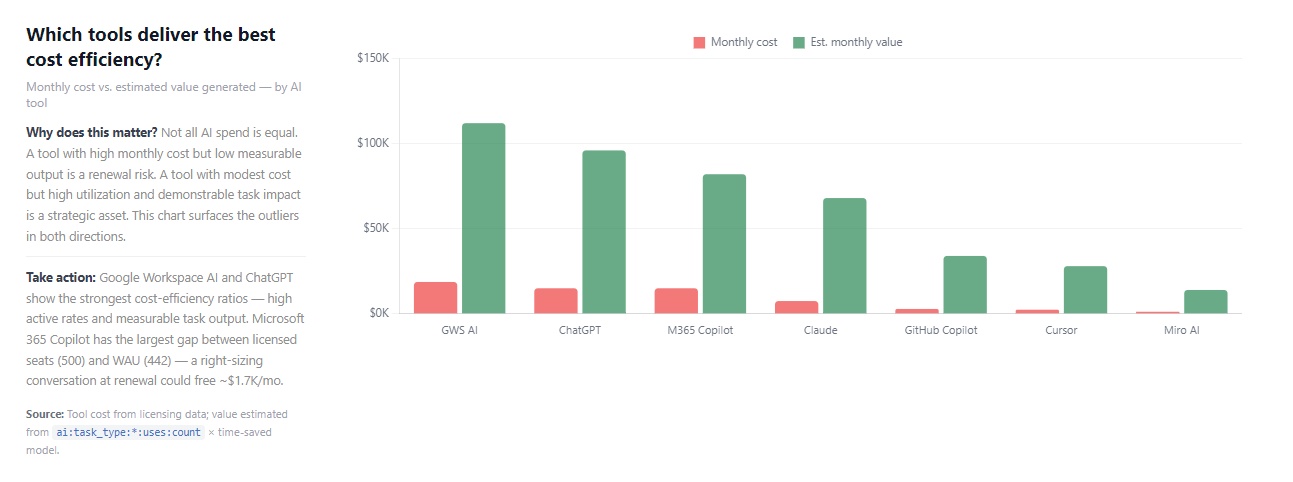
A department view of the same kind, built for ChatGPT, shows which departments hold seats but show low weekly activity. The sample assumes $30 per seat.

Idle seats were 11.6% of the Copilot line in that example. Where a department holds paid seats but shows low weekly activity, as HR and Operations do in the ChatGPT sample, the fix is training first, then a smaller seat count at renewal if activity stays under the bar. This guide to exporting and analyzing Microsoft 365 Copilot usage data shows how Worklytics breaks Copilot adoption down by department, team, and manager.
Active users show who showed up. Depth of use shows what they did, and it predicts the bill for token-priced tools and the renewal for seat-priced tools.
Vendors measure depth in different ways. ChatGPT workspace analytics defines power users as the top 20% of message senders with 75 or more messages a week and three or more tools a month. Microsoft reports average prompts per active user. Neither compares across tools.
Worklytics engagement measurement uses one scale for every tool: days used per week, uses per active day, and tokens per active user per week, plus the type of work being done, such as coding, research, analysis, summarization, drafting, or email.
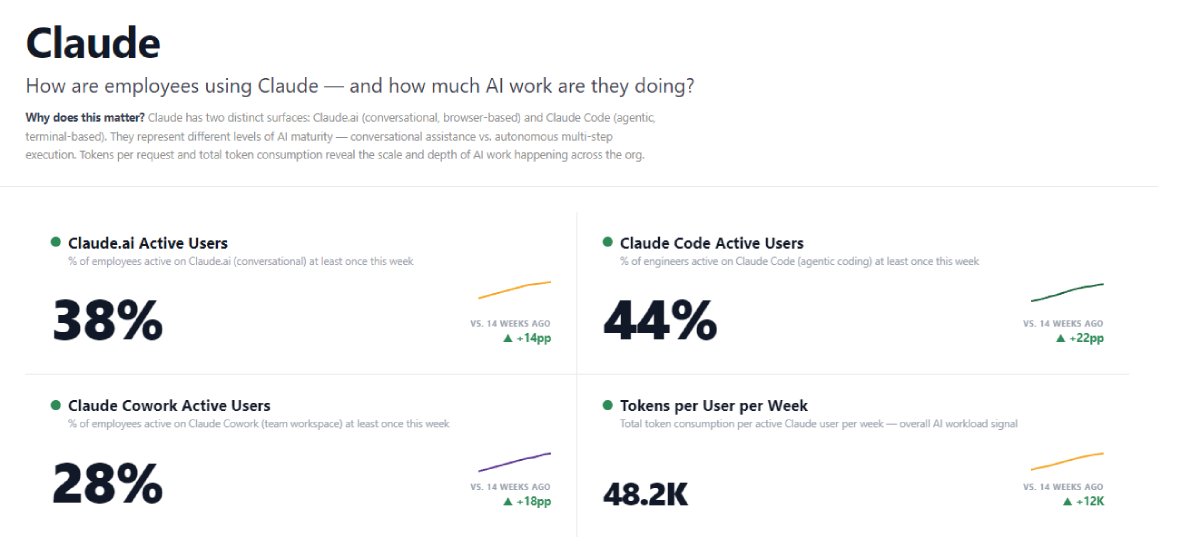
The sample Claude report below shows the format: the share of employees using Claude.ai weekly, the share of engineers using Claude Code, and tokens per active user per week (48.2K in the sample). On a token-billed plan, tokens per user per week is the early warning on cost, because it climbs before the invoice does.
Seat-based plans need a different depth signal. The sample ChatGPT report measures sessions per active user (4.2) and messages per session (6.8). Those two numbers separate a thinking partner from a search box: a user with 2 sessions of 12 messages gets more from a seat than one with 8 single-message lookups.

Depth can also separate teams on identical seats. The sample GitHub Copilot report shows the median share of code written with Copilot for each engineering team, from 7% for DevOps to 26% for the offshore team, a 3.7 times spread.
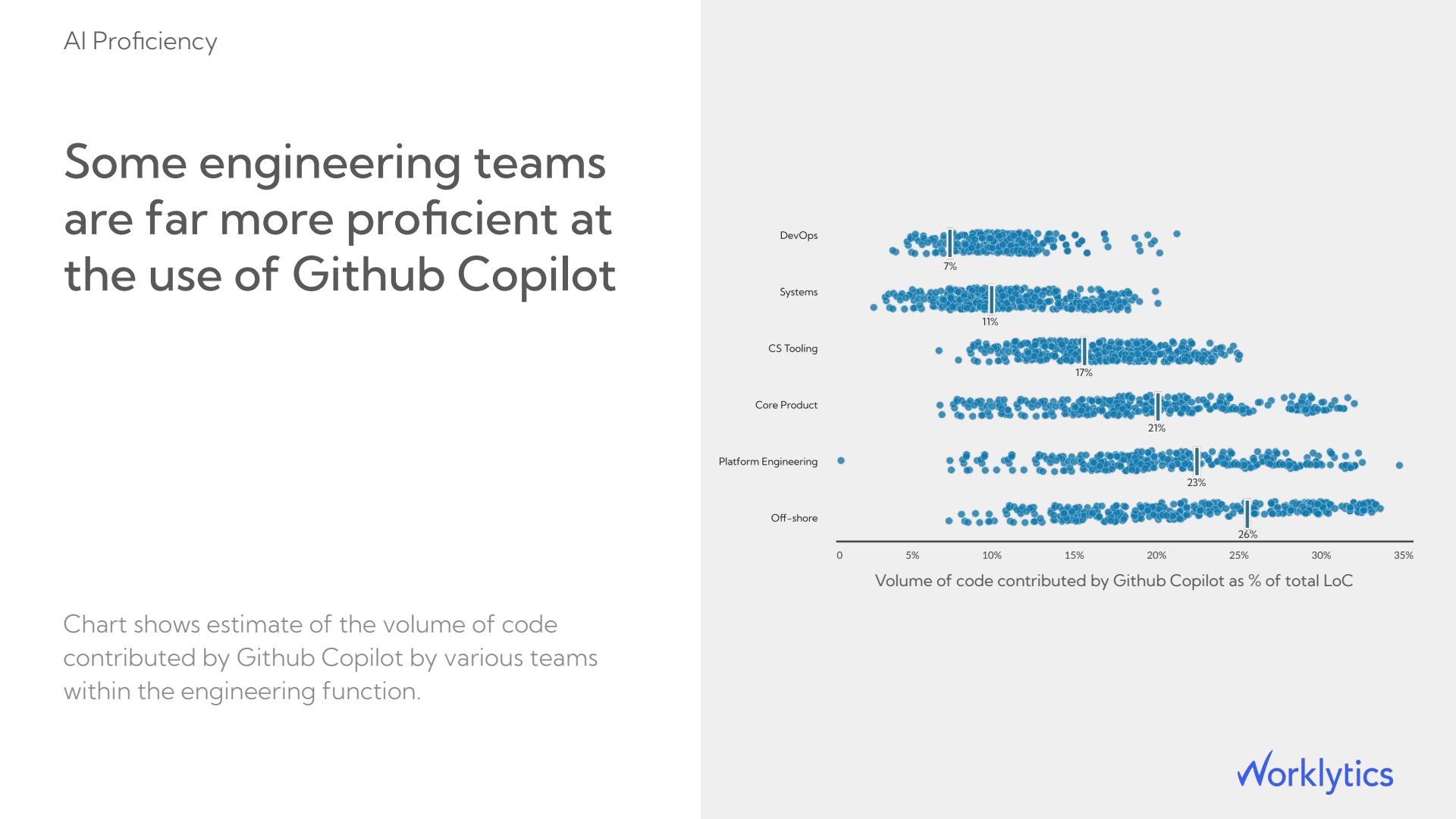
If teams on one seat price differ that much, the price says little about the value each team gets. Low-end teams need training or fewer seats, and the top team shows what good use looks like. The guide to tracking Claude Code usage across an engineering org covers the same depth measures for Claude.
Estimate hours saved by task type, then divide monthly spend by those hours to get the cost per hour saved.
Vendors rarely report time saved, and the few that do cover only their own tool. Claude's analytics page, for example, includes an estimated time saved figure, but only for Claude.
Worklytics productivity measurement sorts AI activity into task types, multiplies the uses by typical time per task and the hourly rate of the people involved, and applies the same method to every tool. It then checks the estimate by comparing output between high-adoption and low-adoption teams. The sample report below shows the format: 1,240 hours saved per week across the organization, a median of 1.5 hours per active user per week, and $2.4M in annualized value.

The math on one seat, using the sample's 1.5 hours a week: that is about 6.5 hours a month. Spread over a $30 seat, it is about $4.60 per hour saved. Break-even is seat cost divided by loaded hourly cost, which is pay plus benefits and overhead per working hour. With example inputs of a $30 seat and a $50 loaded hourly cost, a seat pays for itself after 36 minutes of saved time a month.
Because break-even sits under an hour a month, saved time rarely decides whether to keep a seat. Use decides: whether the seat is active (Step 4) and, for token-priced tools, whether the tokens produce output (Step 7).
Saved hours turn into money only when the time goes to other work or avoids a hire. The sample's $2.4M is estimated value, not cash, so keep it in a separate column from invoiced spend.
Compare output per active user across tools and against low-AI baselines, then confirm the output stays in place.
Claude Enterprise's own Claude Code dashboard reports cost per commit (a saved change to code), which helps, but it cannot compare Claude Code with Copilot or Cursor on the same team. Worklytics AI impact measurement links usage to output measures such as merged pull requests, so one method applies to every tool. A pull request is a bundle of code changes sent for review.
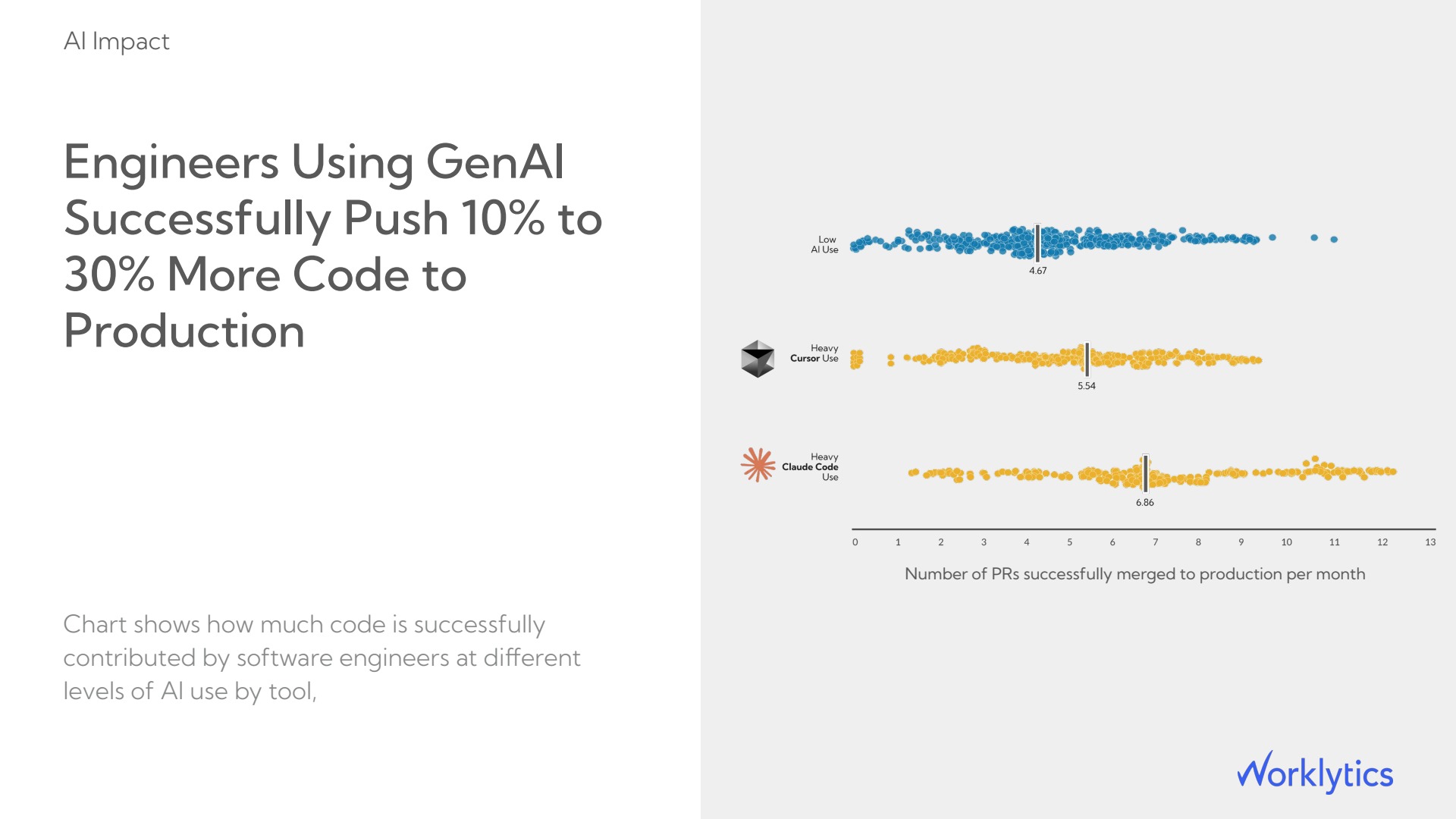
The first sample view compares pull requests merged per month by engineers with low AI use (median 4.67), heavy Cursor use (5.54), and heavy Claude Code use (6.86).
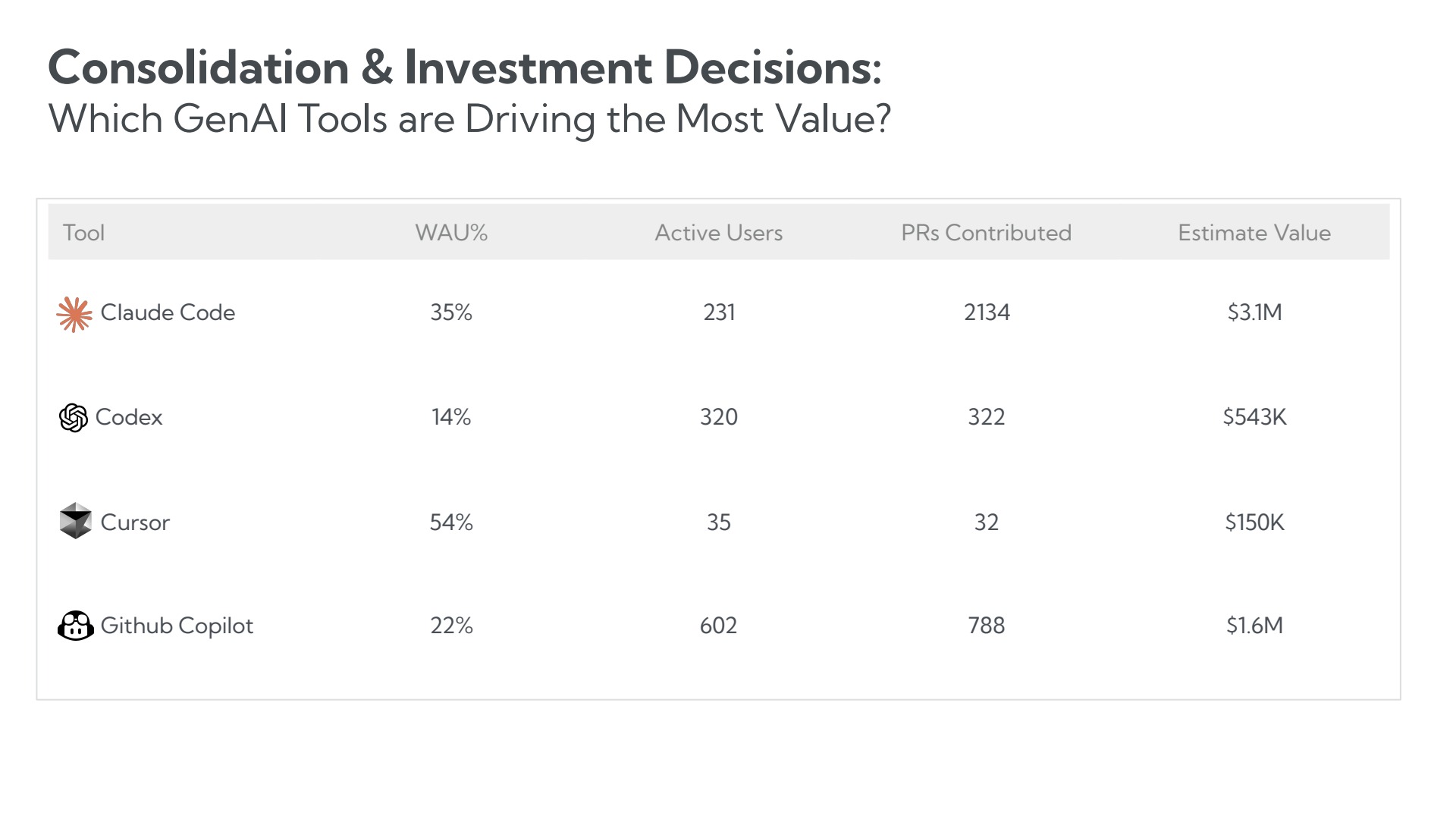
A second sample view lines up four coding tools. Dividing its pull requests by its active users gives 9.2 for Claude Code, 1.3 for GitHub Copilot, 1.0 for Codex, and 0.9 for Cursor.
Read comparisons like these as leads, not proof. The counts link pull requests to tools, and heavy users choose their own tools. Then check that the output stays in place. A third sample view tracks pull requests reverted (undone after merging) per month before and after a Claude Code rollout, so any rise in reverts shows up next to the rollout marker.
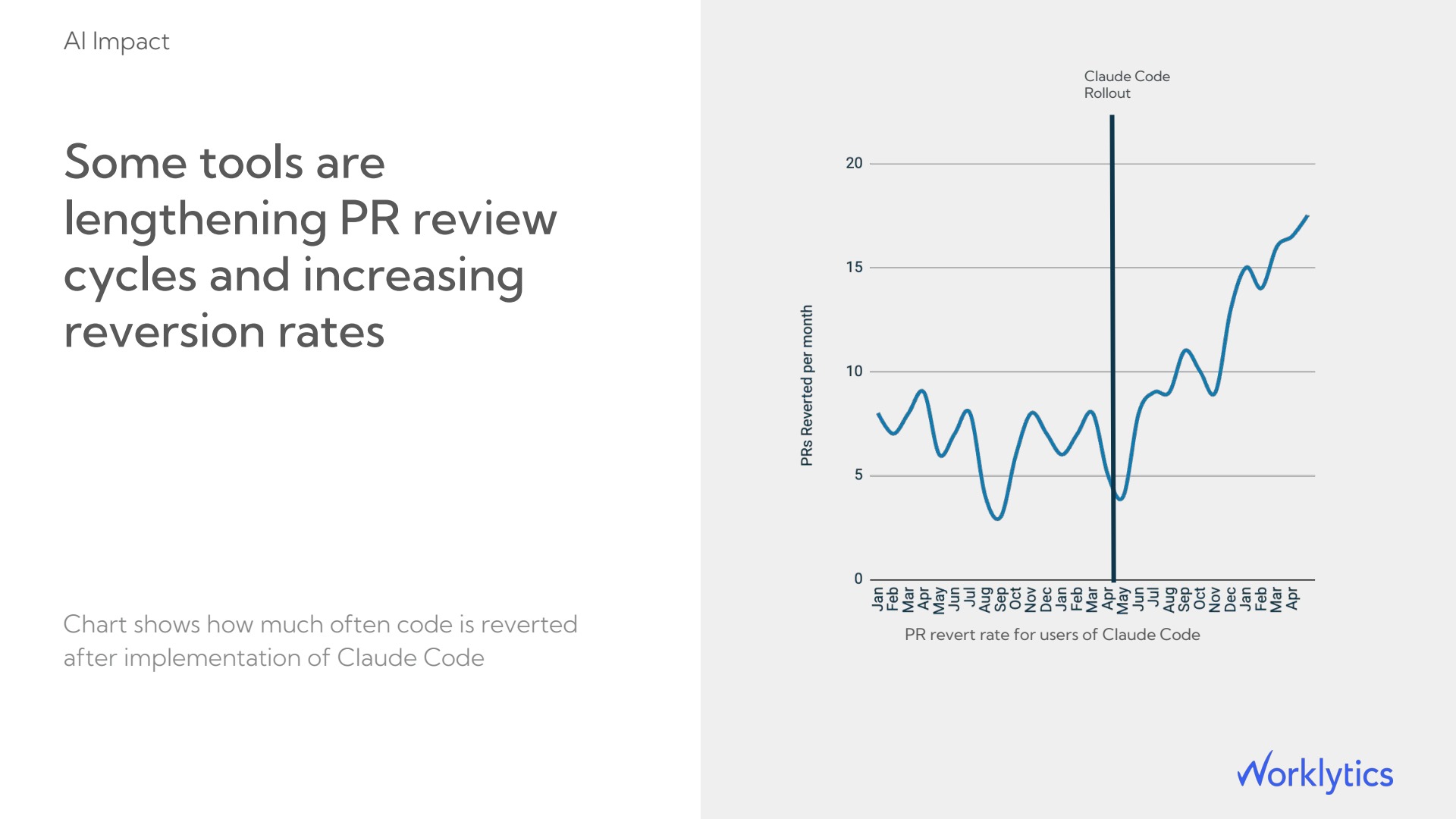
When reverts rise with spend, plain cost per pull request flatters the tool. Use spend divided by pull requests that stay merged, which means merged minus reverted.
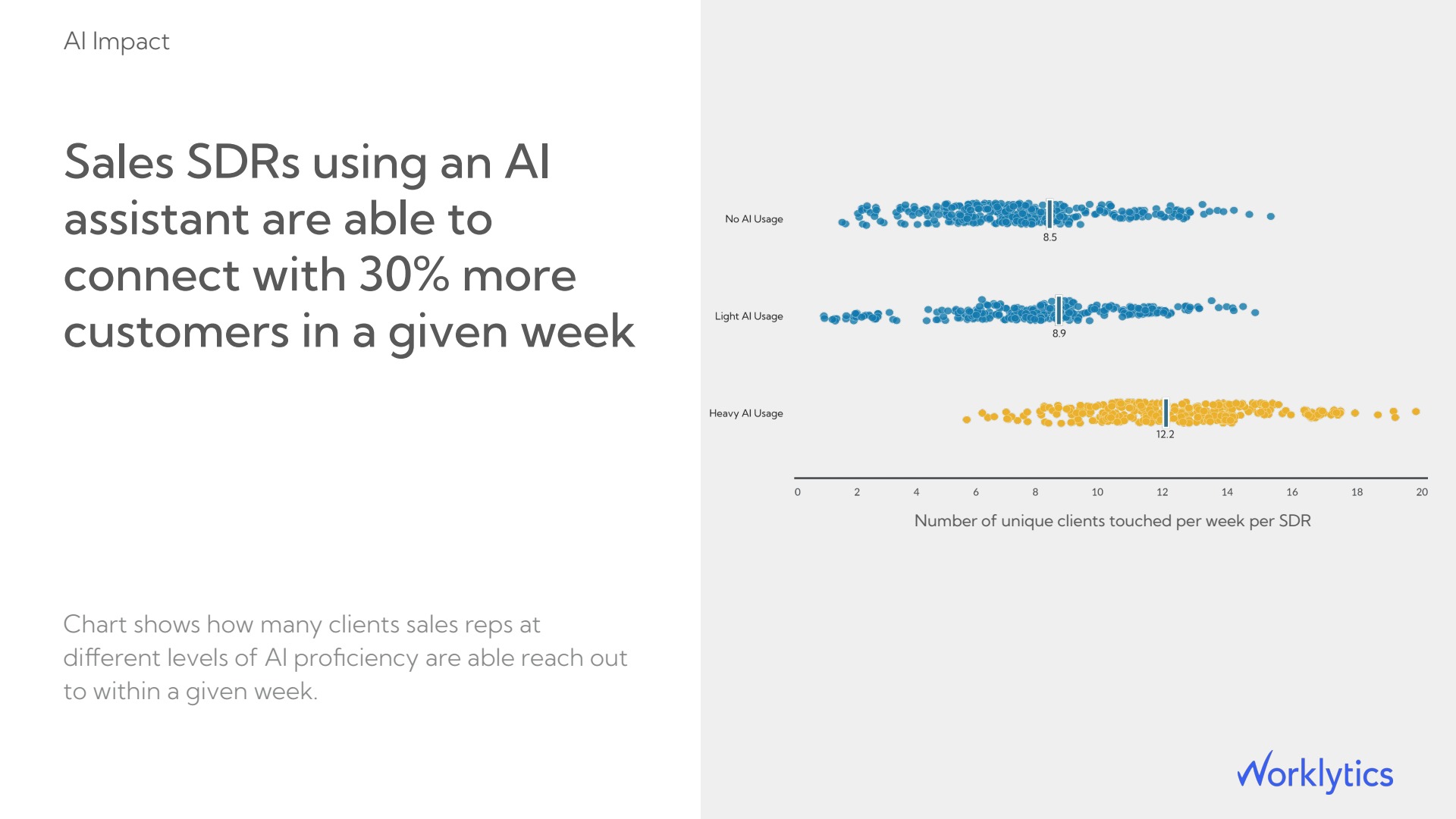
Teams without code need an output they already count. The sample view for sales development reps counts unique clients reached per week, with medians of 8.5 for no AI use and 12.2 for heavy AI use. Pick one output for each team before you compare spend, and keep it fixed so before-and-after comparisons stay valid.
Sort tools by how often and how deeply each team uses them, then apply one rule to each group.
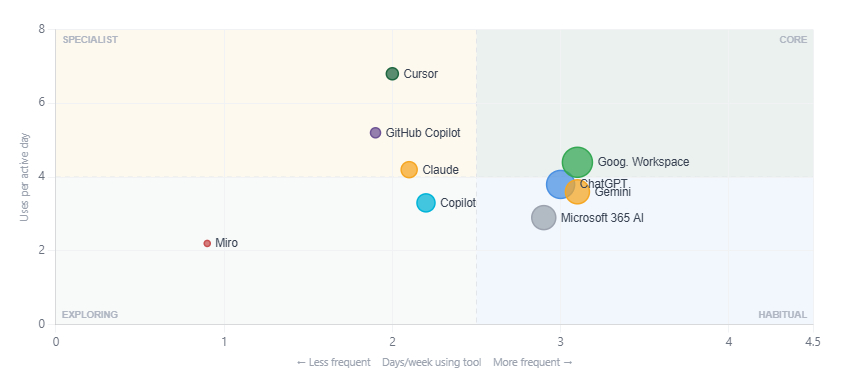
Worklytics plots each tool by days used per week and uses per active day and labels it core, habitual, specialist, or exploring. In the sample chart, the dividing lines sit at 2.5 days a week and 4 uses per active day.
| Group | Plain meaning | Spend decision |
|---|---|---|
| Core | Used most days, with many uses per day | Renew and plan for growth |
| Habitual | Used most days, with lighter use | Renew, and check overlap with core tools |
| Specialist | Deep use by one or two teams | Limit seats to those teams |
| Exploring | Light and irregular use | Set an end date and a keep-or-drop test |
In the sample, Google Workspace AI is core. ChatGPT, Gemini, and Microsoft 365 AI are habitual. Claude, GitHub Copilot, and Cursor are specialist. Copilot and Miro AI are exploring. The same table adds each tool's 14-week change in weekly users, which shows whether a tool is gaining or losing people.
A team view shows where tools overlap. In the sample, Customer Support uses six AI tools, each between 1.2 and 3.1 days a week, while Cursor and GitHub Copilot show use only in Engineering and IT.
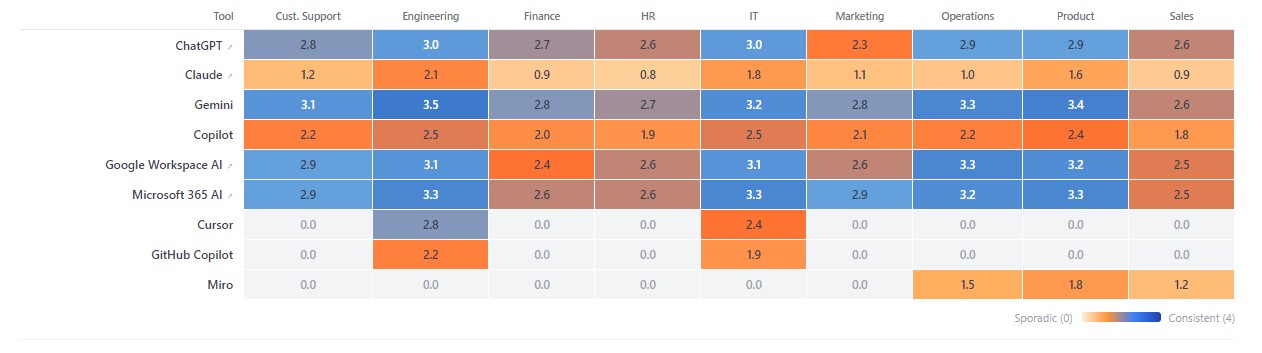
Six tools at similar frequency means none is primary. Keep the one with the most days per week and the lowest cost per active user, then check whether the others do work it cannot. Give specialist tools seats only in the teams that use them. Review the exploring group first, because a tool nobody relies on costs the least to drop, then the specialist seat lists, and leave core tools for last.
Review one page every month on a fixed cut-off date, using usage metadata only.
Set the cut-off at the third business day of the month. The slowest sources need that long: Microsoft's Copilot report arrives up to 48 hours after each day ends, and Claude Enterprise spend data runs one day behind. Keep each vendor's own alerts as the early warning. Claude Enterprise notifies admins at 75% and 90% of an organization spend limit, and GitHub admins can set budgets by user, cost center, and enterprise. The monthly page explains why the numbers moved. Keep the review to three questions:
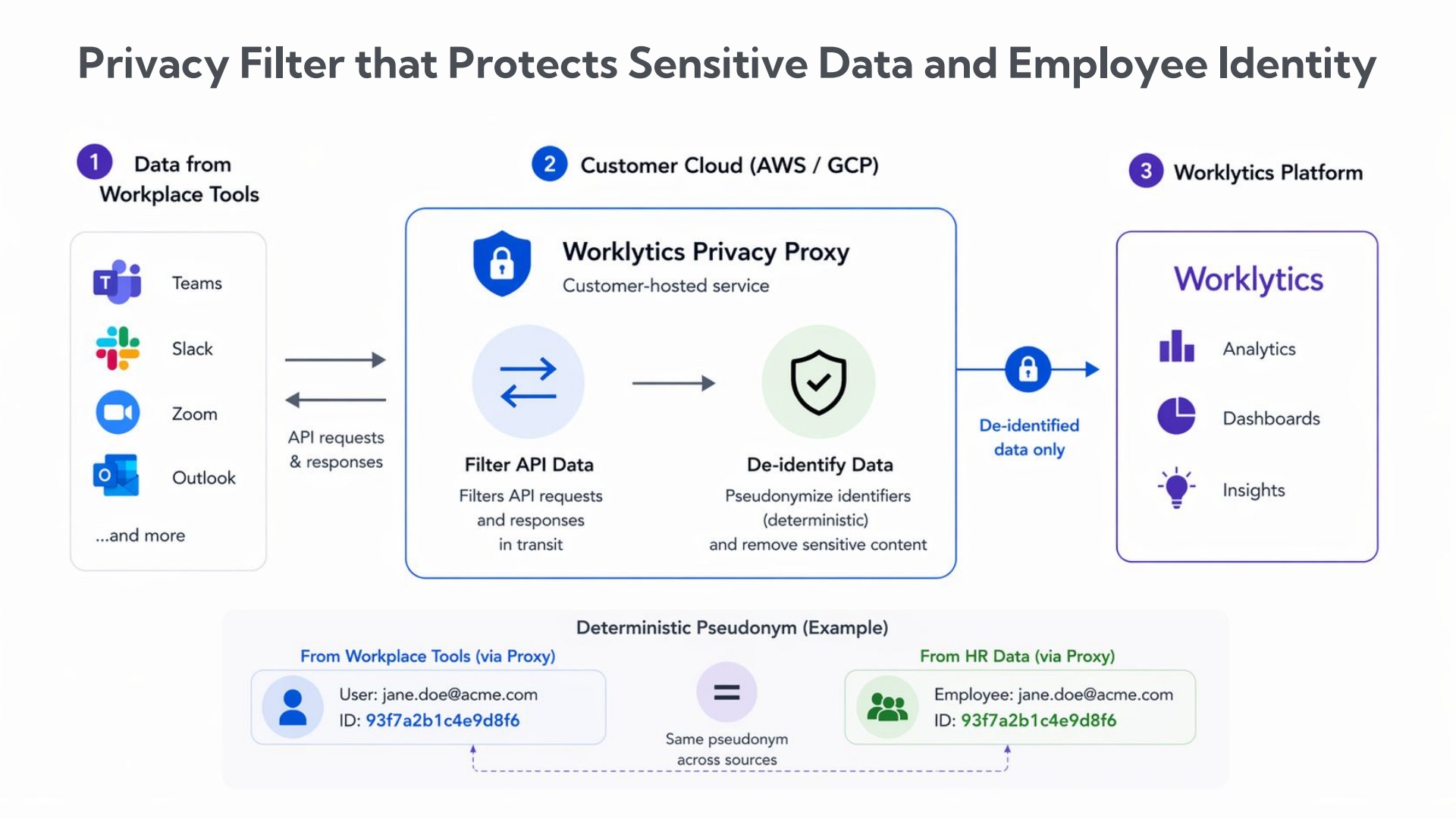
Splitting spend by team needs a link between each tool's user list and HR data, which raises a privacy question. Worklytics answers it with an open-source privacy proxy that runs in the customer's own cloud. The proxy swaps each person's identifier, such as an email address, for the same stand-in code in every source, so records still match across tools, and only this de-identified data reaches the platform. Worklytics reads usage metadata, such as how often a tool is used and by which team, and never the content of prompts or outputs. Worklytics' security and privacy design has the detail.
To see these numbers for your own Claude, OpenAI, and Copilot tools, start with Worklytics. Most organizations see their first AI adoption metrics within a week of setup.
Convert each bill to dollars per month, split the total by team, then divide it by weekly active users and by output. The three vendors report in different units and places, so a tool such as Worklytics that reads usage from Claude Enterprise, ChatGPT, and both Copilots and matches it to your team structure removes the manual joins. Add raw API spend from the Claude and OpenAI cost reports.
It is a tool's monthly cost divided by the number of people who used it in the past week. Use the same weekly window for every tool, because vendors define active differently. A rising figure means seats are going unused or token use is growing faster than adoption.
Yes. Spend, seat use, and depth of use come from usage metadata. ChatGPT workspace analytics does not expose message text or file contents, and Worklytics reads only metadata such as how often a tool is used and by which team.
Since June 1, 2026, every Copilot plan bills in AI credits at $0.01 each. Business seats include 1,900 credits, Enterprise seats include 3,900, and code completions do not use credits. Track credits consumed per user through GitHub's usage metrics API, not seat counts alone.
Worklytics' Claude Enterprise renewal guide uses weekly active seats above 60% of licensed seats as its bar for renewing with confidence. Treat that as a starting point, adjust it after two months of your own data, and compare departments, because an average hides teams with seats and no habit.
Monthly, on a fixed cut-off such as the third business day, because the slowest vendor report arrives up to 48 hours after each day ends. Use each vendor's spend alerts between reviews.