AI adoption in companies surged to 72% in 2024, up from 55% in 2023, making measurement of generative AI usage a critical priority for IT procurement managers. (Worklytics) With GitHub Copilot alone growing from a curiosity to a mission-critical tool in under two years, organizations need robust dashboards to track which departments are using AI, how often, what AI agents they're leveraging, and with what measurable impact. (Worklytics)
This comprehensive buyer's guide evaluates three leading AI usage dashboard platforms across nine critical criteria: data sources, real-time refresh capabilities, privacy controls, departmental drill-down features, Copilot+ readiness, SOC 2 coverage, pricing for 1,000 seats, and extensibility options. By examining screenshots, feature matrices, and cost-per-employee calculations, IT leaders can quickly shortlist the right platform to bridge the gap between lofty AI promises and tangible business outcomes. (Worklytics)
| Platform | Best For | Key Differentiator | Starting Price (1,000 seats) |
|---|---|---|---|
| Worklytics | Enterprise AI adoption measurement | Anonymization engine + benchmark library | Contact for pricing |
| ControlUp AI Report | Windows endpoint AI readiness | DEX management integration | Contact for pricing |
| GitHub Native Reports | GitHub Copilot usage tracking | Built-in Copilot Business integration | $19/user/month |
Measuring AI adoption has become crucial as organizations discover significant usage disparities across departments and employee tenure. Engineering and Customer Support departments typically see 80% of staff actively using AI, while other departments lag significantly behind. (Worklytics) In Sales organizations, 90% of frontline representatives use AI-driven CRM assistants, but only 40% of Sales managers do, creating a management visibility gap that impacts coaching and strategy.
Employee tenure also plays a critical role in AI adoption patterns. Research shows that 85% of employees hired in the last 12 months use AI weekly, compared to only 50% of those with 10+ years at the company. (Worklytics) This generational divide requires targeted measurement and intervention strategies to ensure organization-wide AI proficiency.
High adoption metrics serve as the necessary foundation for achieving downstream benefits from AI investments. (Worklytics) As teams become more proficient with tools like GitHub Copilot, studies show that up to 20% of final codebases can come from AI assistance, with developers selectively curating what to keep for maximum productivity gains.
The breadth of data sources determines how comprehensive your AI usage visibility will be. Leading platforms should connect to collaboration tools, development environments, productivity suites, and AI-specific platforms to provide a complete picture of organizational AI adoption.
Timely data refresh enables proactive management of AI adoption initiatives. Real-time or near-real-time updates allow IT leaders to identify usage drops, celebrate adoption wins, and adjust training programs based on current patterns.
With AI usage data containing sensitive information about employee productivity and work patterns, robust privacy controls are essential. Look for platforms offering data anonymization, aggregation capabilities, and compliance with GDPR, CCPA, and other data protection standards.
Granular departmental analysis helps identify adoption gaps and success stories. The ability to segment usage by team, department, or role uncovers specific areas needing attention or best practices worth replicating. (Worklytics)
With Microsoft's Copilot+ initiative expanding across Windows 11 devices, platforms should be prepared to track usage across the expanding Microsoft AI ecosystem. This includes compatibility with Windows 11 environments and integration with Microsoft's AI tools.
Enterprise security requirements demand SOC 2 Type II compliance for any platform handling employee usage data. This certification ensures proper security controls for data processing, storage, and transmission.
Clear pricing models help IT procurement managers budget accurately for organization-wide deployments. Understanding cost-per-employee calculations enables better ROI planning and vendor comparison.
The ability to extend platform capabilities through APIs, webhooks, or third-party integrations ensures the dashboard can evolve with changing AI tool landscapes and organizational needs.
Industry benchmarking capabilities help organizations understand their AI adoption performance relative to peers, enabling data-driven improvement strategies.
Why Choose Worklytics: Worklytics specializes in workplace insights by leveraging existing corporate data to deliver real-time intelligence on how work gets done, including comprehensive AI adoption measurement. (Worklytics) The platform analyzes collaboration, calendar, communication, and system usage data without relying on surveys, making it ideal for organizations seeking privacy-first AI adoption analytics.
Key Strengths:
Advanced Analytics Capabilities:
Worklytics offers sophisticated AI adoption measurement through four new work models: Workday Intensity, Work-Life Balance, Manager Effectiveness, and Team Health. (Worklytics) These models help organizations understand how hybrid work has changed the shape of the workday and how AI tools impact work intensity and productivity patterns.
Enterprise Integration:
The platform includes a pipeline that connects to existing data warehouses or visualization tools, enabling seamless integration with enterprise analytics stacks. (Worklytics) This extensibility ensures that AI adoption insights can be incorporated into broader business intelligence initiatives.
ROI Measurement:
Worklytics provides comprehensive ROI analysis for AI investments, particularly GitHub Copilot deployments. The platform tracks how AI adoption translates to measurable productivity gains, helping justify continued investment and expansion. (Worklytics)
Pricing: Contact Worklytics for enterprise pricing based on organization size and feature requirements.
Why Choose ControlUp: ControlUp specializes in Digital Employee Experience (DEX) management and has expanded into AI usage reporting as part of their unified platform approach. (ControlUp) Their strength lies in endpoint management and Windows environment optimization.
Key Strengths:
Windows 11 Migration Insights:
ControlUp's research reveals that of the 82% of enterprise devices not yet running Windows 11, 88% are ready for migration, 1% can be upgraded to meet requirements, and 11% need full replacement. (ControlUp) This data is crucial for organizations planning Copilot+ deployments.
Limitations:
Pricing: Contact ControlUp for pricing information based on endpoint count and feature requirements.
Why Choose GitHub Native: For organizations primarily focused on GitHub Copilot usage tracking, GitHub's native reporting provides direct integration with Copilot Business plans and eliminates the need for third-party analytics platforms.
Key Strengths:
Usage Analytics:
GitHub's native reporting helps organizations make informed decisions about Copilot seat assignment by providing detailed usage analytics. (GitHub) This includes tracking which developers are actively using Copilot and how frequently they engage with AI-powered code suggestions.
Limitations:
Pricing: Included with GitHub Copilot Business at $19 per user per month.
| Feature | Worklytics | ControlUp | GitHub Native |
|---|---|---|---|
| Data Sources | 25+ collaboration tools | Windows endpoints + apps | GitHub Copilot only |
| Real-Time Refresh | Yes | Yes | Limited |
| Privacy Controls | Advanced anonymization | Standard DEX privacy | GitHub's privacy model |
| Departmental Drill-Down | Comprehensive | Limited to IT/endpoint data | Development teams only |
| Copilot+ Readiness | Platform agnostic | Windows 11 focused | GitHub specific |
| SOC 2 Coverage | Yes | Yes | GitHub's compliance |
| Benchmark Library | Industry benchmarks | DEX benchmarks | None |
| API/Extensibility | Full API access | ControlUp ecosystem | GitHub API |
| Multi-AI Tool Support | Yes | Limited | No |
Successful AI adoption measurement requires tracking specific metrics that indicate both breadth and depth of usage. Key metrics include Light vs. Heavy Usage Rate, which distinguishes between occasional users and power users who have integrated AI into their daily workflows. (Worklytics)
AI Adoption per Department reveals significant variations in usage patterns across organizational functions. Understanding these differences helps identify departments that may need additional training or support to reach optimal AI utilization levels. (Worklytics)
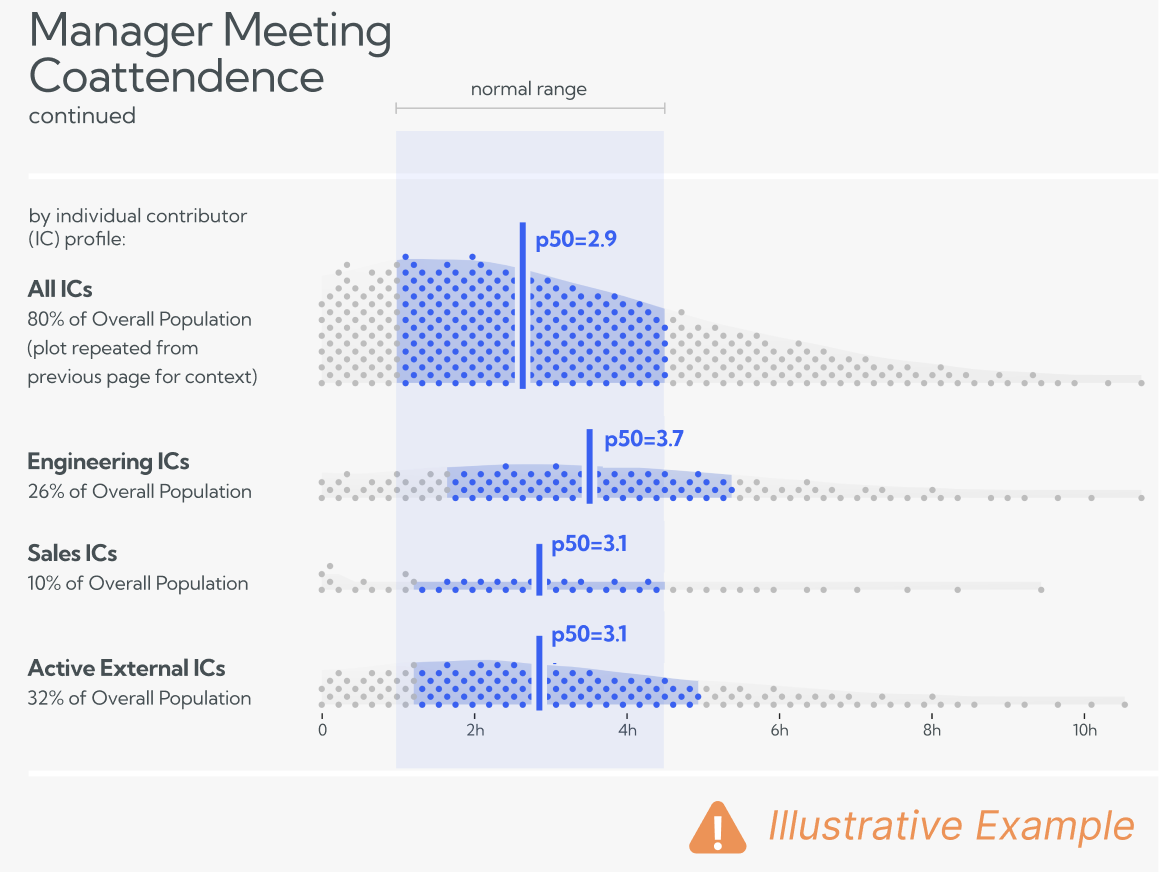
Manager Usage per Department is particularly critical, as management adoption often drives team-wide acceptance and proper implementation of AI tools. The gap between frontline and management usage can indicate training needs or change management challenges. (Worklytics)
New-Hire vs. Tenured Employee Usage patterns provide insights into how organizational culture and training programs impact AI adoption. The significant difference between recent hires and long-term employees suggests the need for targeted change management strategies. (Worklytics)
Organizations face several key challenges when implementing AI tools across their workforce. Understanding these challenges helps inform dashboard selection and measurement strategies. (Worklytics)
Employee resistance often stems from fear of job displacement or skepticism about AI effectiveness. Dashboards that show positive productivity impacts and peer usage patterns can help overcome this resistance by providing concrete evidence of AI benefits.
Many employees lack the skills needed to effectively use AI tools. Usage dashboards can identify which teams need additional training and track the effectiveness of training programs over time.
Integrating AI tools into existing workflows can be challenging. Platforms that track usage patterns across multiple tools help identify integration bottlenecks and optimization opportunities.
Demonstrating clear return on investment for AI initiatives requires comprehensive measurement of both usage and productivity outcomes. Advanced analytics platforms provide the data needed to calculate meaningful ROI metrics. (Worklytics)
GitHub Copilot has evolved from a curiosity to a mission-critical tool, with more than 1.3 million developers now on paid plans and over 50,000 organizations issuing licenses. (Worklytics) Measuring Copilot success requires tracking both adoption metrics and productivity outcomes.
High adoption metrics serve as the necessary foundation for achieving downstream benefits from Copilot investments. Organizations typically segment usage by team, department, or role to uncover adoption gaps and identify areas needing additional support. (Worklytics)
As teams become more proficient with Copilot, the benefits compound significantly. Studies demonstrate that up to 20% of final codebases can come from Copilot suggestions, with developers selectively curating AI-generated code to maximize productivity gains. (Worklytics)
Beyond productivity metrics, Copilot significantly impacts developer satisfaction and engagement. Research shows that 60-75% of developers report that Copilot makes coding more enjoyable, while 87% say it saves mental energy on repetitive tasks. (Worklytics)
Worklytics offers enterprise pricing based on organization size and feature requirements. The platform's comprehensive data integration and advanced analytics capabilities typically justify higher per-seat costs through improved AI adoption outcomes and detailed ROI measurement.
ControlUp's pricing model focuses on endpoint management with AI reporting as an additional capability. Organizations already using ControlUp for DEX management may find incremental AI reporting costs attractive compared to standalone analytics platforms.
GitHub Copilot Business at $19 per user per month provides basic usage reporting as part of the Copilot subscription. For organizations focused solely on GitHub Copilot measurement, this represents the most cost-effective option, though with limited analytical depth.
When evaluating costs, consider implementation time, training requirements, and ongoing management overhead. Platforms with better integration capabilities and user-friendly interfaces may offer lower total cost of ownership despite higher licensing fees.
Define specific AI adoption goals before selecting a dashboard platform. Whether focusing on increasing usage rates, improving productivity outcomes, or identifying training needs, clear objectives guide platform selection and measurement strategies.
Implement robust privacy controls from the beginning. Platforms with built-in anonymization and aggregation capabilities help ensure compliance with data protection regulations while still providing actionable insights.
Select platforms that can grow with your AI adoption initiatives. As organizations expand their AI tool portfolio, dashboard capabilities should scale to accommodate new data sources and measurement requirements.
Choose platforms that provide actionable insights rather than just raw data. The ability to identify specific improvement opportunities and track progress over time is more valuable than comprehensive but unusable analytics.
The AI landscape continues evolving rapidly, making platform extensibility and adaptability crucial selection criteria. Organizations should prioritize platforms that can accommodate new AI tools and measurement requirements as they emerge.
Robust API access and integration capabilities ensure that your analytics platform can connect to new AI tools as they're adopted. This flexibility prevents the need for platform migration as your AI ecosystem expands.
Evaluate vendor roadmaps to ensure alignment with your organization's AI strategy. Platforms with clear development plans for emerging AI measurement needs provide better long-term value.
As AI adoption matures, industry benchmarks will become increasingly sophisticated. Platforms with strong benchmark libraries and comparative analytics capabilities will provide ongoing value as measurement standards evolve.
Selecting the optimal AI usage dashboard depends on your organization's specific needs, existing technology stack, and AI adoption maturity. Worklytics offers the most comprehensive solution for organizations seeking detailed AI adoption analytics across multiple tools and departments. (Worklytics)
ControlUp provides value for organizations already invested in their DEX management platform and primarily concerned with Windows endpoint AI readiness. GitHub's native reporting serves organizations focused exclusively on Copilot usage measurement with basic analytical needs.
The key is matching platform capabilities to your measurement objectives while ensuring scalability for future AI adoption initiatives. Consider starting with a pilot program to evaluate platform effectiveness before committing to organization-wide deployment.
Regardless of platform choice, the critical factor is beginning measurement immediately. As AI adoption accelerates across industries, organizations with robust measurement capabilities will be better positioned to optimize their AI investments and achieve sustainable competitive advantages through improved productivity and innovation.
Worklytics provides comprehensive analytics across 25+ collaboration tools with advanced privacy controls and machine learning data processing. ControlUp focuses on Digital Employee Experience (DEX) management with unified platform capabilities for desktop and app monitoring. GitHub Native offers built-in Copilot usage tracking specifically for organizations with Copilot Business plans, including seat assignment insights and cost estimation.
Pricing varies significantly across platforms based on features and data sources included. GitHub Native usage tracking is included with Copilot Business subscriptions at no additional cost. Worklytics and ControlUp offer enterprise pricing models that typically scale with seat count and feature requirements. Contact vendors directly for accurate 1,000-seat pricing as costs depend on specific integration needs and data sources.
According to Worklytics research, high adoption metrics are necessary for achieving downstream benefits of GitHub Copilot. Key metrics include active user percentage, code acceptance rates, productivity improvements, and usage segmentation by team, department, or role to identify adoption gaps. Organizations should track both quantitative usage data and qualitative developer satisfaction to ensure successful implementation across their 1.3+ million developer user base.
Privacy controls vary significantly between platforms. Worklytics emphasizes privacy-first analytics with data anonymization and aggregation capabilities. ControlUp provides enterprise-grade security through its unified DEX platform. GitHub Native keeps usage data within the GitHub ecosystem, which may appeal to organizations already using GitHub Enterprise. Evaluate each platform's specific privacy certifications, data residency options, and compliance frameworks against your organization's requirements.
Yes, integration capabilities differ by platform. Worklytics offers a pipeline that connects to existing data warehouses and visualization tools, supporting over 25 collaboration platforms with machine learning-powered data cleaning and standardization. ControlUp ONE provides a unified platform approach that may reduce the need for multiple integrations. GitHub Native integrates seamlessly within the GitHub ecosystem but may require additional tools for broader organizational analytics.
AI adoption in companies surged to 72% in 2024, up from 55% in 2023, making measurement a critical priority for IT procurement managers. With tools like GitHub Copilot growing from curiosity to mission-critical status in under two years, organizations need visibility into usage patterns, ROI, and adoption gaps. Proper measurement helps optimize license allocation, identify training needs, and demonstrate value to stakeholders while ensuring compliance and security across generative AI implementations.