TL;DR:
Google Workspace (Google Calendar) and Microsoft 365 (Outlook) both include native calendar analytics features like Google Time Insights and Microsoft Viva Insights, designed to help users understand their schedules.
Google Calendar Time Insights provides a personal dashboard showing how your time is spent across categories like meetings, focus time, and 1:1s. Microsoft Viva Insights offers similar personal metrics for Outlook users, helping employees reflect on their work patterns and improve habits.
However, these tools are mainly individual-focused. Google’s insights are private by default, and Microsoft’s manager-level insights are limited. Neither platform makes it easy for HR or leadership to analyze meeting patterns across teams or the entire organization.
In short, native calendar analytics support personal time management, not organization-wide visibility. For team-level and company-wide insights, you need a platform like Worklytics, which aggregates data across groups to identify trends and risks at scale.
Before we move on to Worklytics, let’s clearly pinpoint the gaps in native analytics that many organizations face:
It’s clear that native calendar analytics are not designed to be full-fledged management tools – they’re personal productivity aids. To transform meeting data into something like an “early warning system” for burnout or a strategic guide for improving team performance, we need to aggregate and analyze data in more sophisticated ways. That’s where Worklytics distinguishes itself. Let’s explore how Worklytics works and the rich meeting efficiency insights it unlocks for leaders.
Worklytics is a people analytics platform purpose-built to turn work data (like calendars, emails, chat, and more) into meaningful insights. In meetings, Worklytics functions as a supercharged layer on top of your calendars – whether your company uses Google Calendar, Outlook, or a mix of collaboration tools. It’s not here to replace Google or Outlook (you’ll still schedule meetings as usual).
Crucially for HR leaders, Worklytics aggregates data at the team and organizational level – not at the individual employee level for surveillance. It’s designed with privacy in mind, using measures like pseudonymization and grouping.
So what kind of insights does Worklytics actually provide? Let’s look at some key features and metrics relevant to meeting efficiency that set Worklytics apart from basic calendar analytics:
Worklytics measures meeting effectiveness across teams, helping leaders understand not just how many meetings exist, but how well those meetings are run. Instead of relying on subjective feedback, it analyzes meeting hygiene signals such as meeting duration, frequency, density, and whether meetings consistently end on time or run late.
By breaking meetings down by size, type, and hygiene quality, Worklytics surfaces patterns that directly impact effectiveness. Teams dominated by large meetings often experience slower decision-making and diluted accountability, while meetings that routinely run over their scheduled time signal poor agenda discipline or unclear facilitation. Excessive 1:1 volume can indicate managerial load, but when paired with frequent overruns, it may also reflect misaligned expectations or unresolved issues.
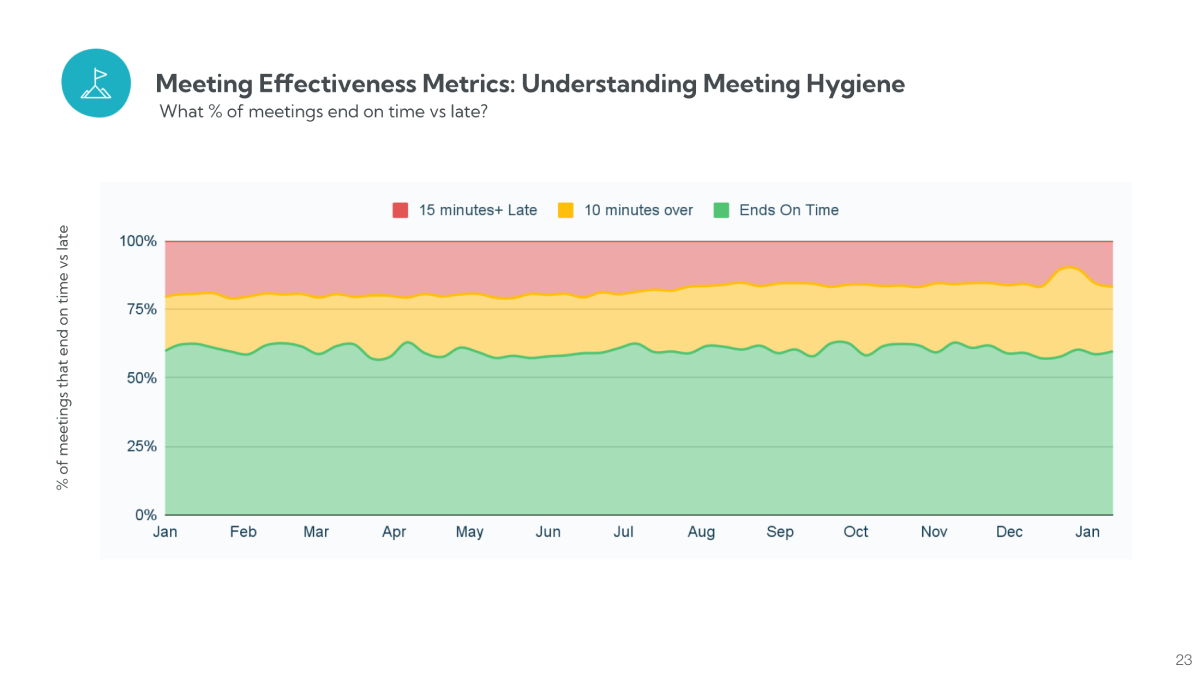
Worklytics also ties meeting hygiene to business impact by estimating the cost of meetings using salary-based calculations. Meetings that start late, end late, or lack clear structure carry a measurable financial cost without delivering proportional value. This reframes meeting effectiveness as a performance and investment problem, allowing leaders to identify where better meeting hygiene can unlock time, reduce waste, and improve execution.
Worklytics goes beyond volume by surfacing behavioral signals that indicate whether meetings are effective. It analyzes attendance and RSVP patterns, recurring meeting stability, and scheduling behavior, which helps reveal which meetings people don’t value even if they still exist on the calendar.
It also measures meeting fragmentation and uninterrupted focus blocks, since scattered meetings typically reduce deep work capacity. If teams consistently fail to get long focus blocks, the inference is that productivity loss is structural, not individual, and requires policy-level changes like meeting-free windows or protected focus hours.
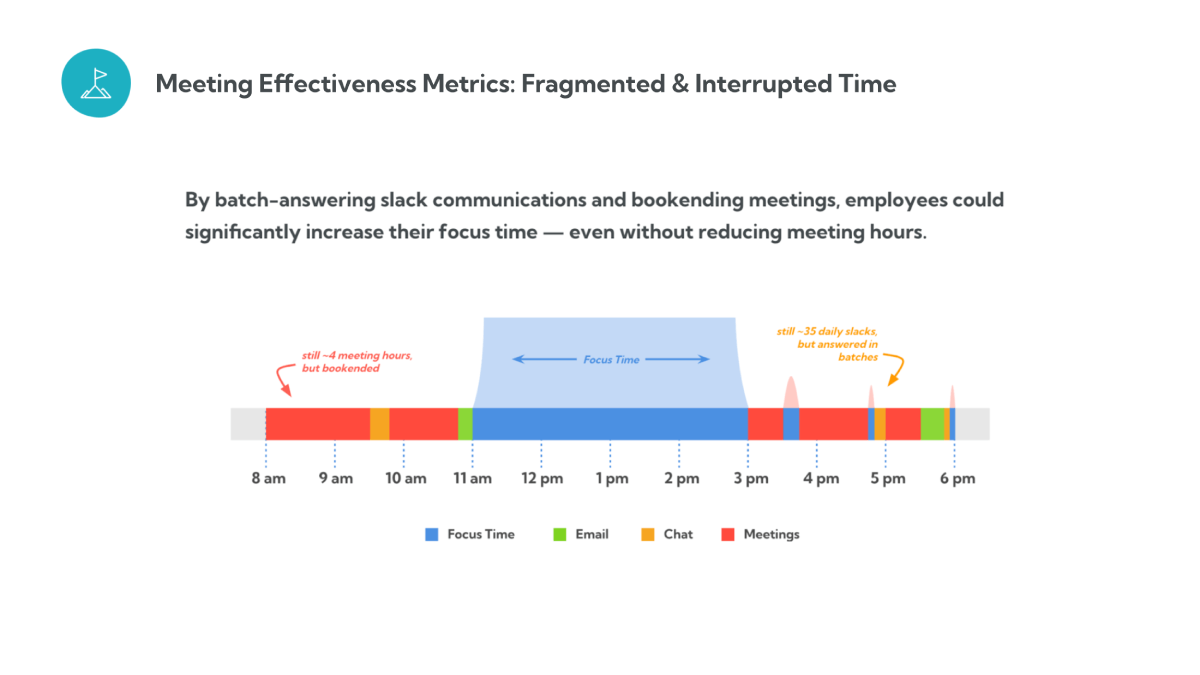
These signals help leaders fix meeting culture using evidence, not opinion, because the system points to patterns that repeatedly correlate with low-value meeting behavior.
Worklytics quantifies the balance between collaboration time and focus time, showing whether teams are spending too much of the week in meetings at the expense of execution. When collaboration dominates, the inference is that the organization may be over-coordinating, which often slows delivery and increases stress even when teams are “busy.”
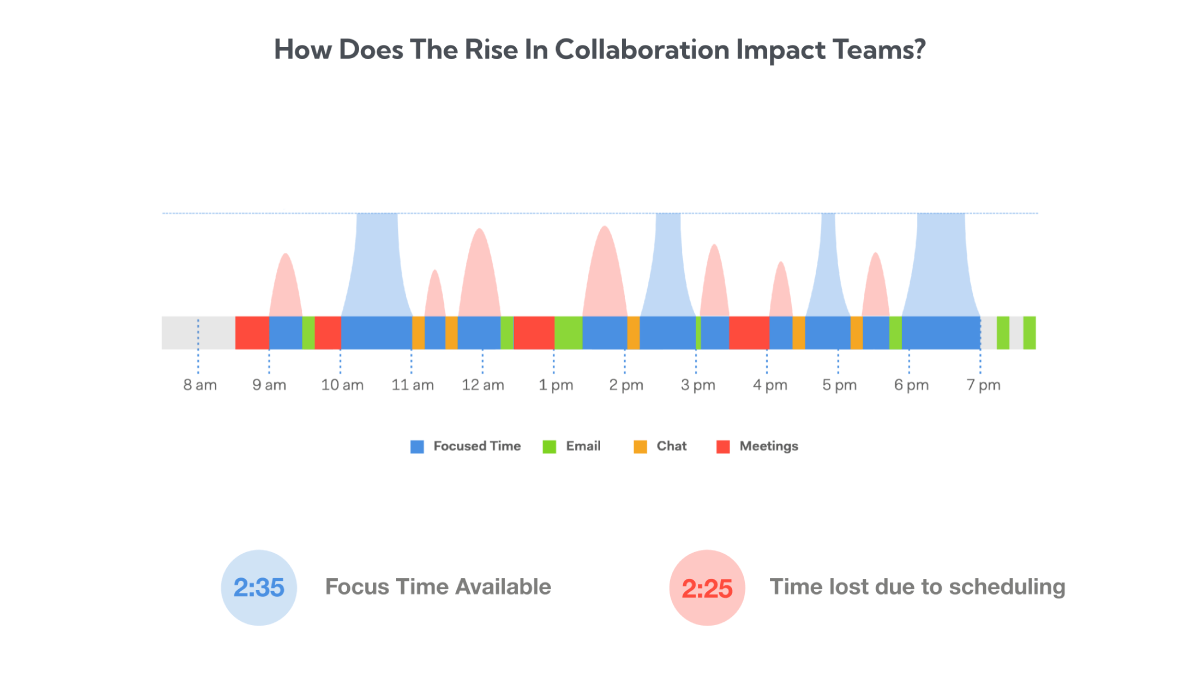
Because Worklytics tracks this over time, it also helps validate interventions like meeting reduction policies or async-first communication norms. Native tools may show an individual’s focus time, but Worklytics shows which teams are systematically deprived of it, which is essential for leadership decisions.
Worklytics surfaces burnout risk indicators like after-hours meetings, weekend work patterns, and back-to-back meeting schedules. These patterns matter because they often show workload pressure before employees formally report burnout, making the platform an early warning system rather than a retrospective report.
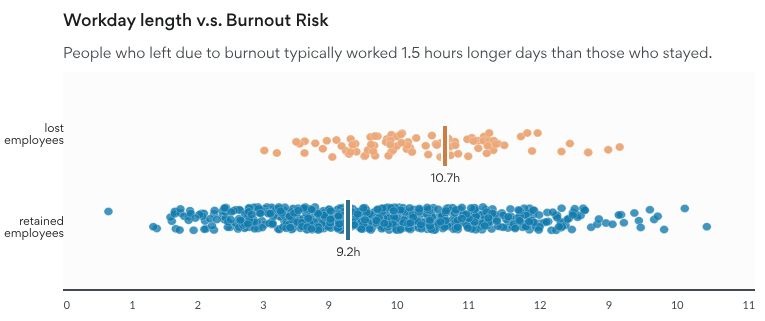
It also tracks meeting fatigue signals such as consecutive meeting hours and lack of breaks, which helps organizations redesign norms (buffers between meetings, no-meeting lunch windows, protected recovery time). The inference is simple: if the work pattern consistently removes recovery time, burnout risk becomes predictable, not surprising.
Overall, Worklytics links productivity and well-being through work patterns, enabling leaders to identify pressure points and act with confidence. Native tools cannot provide the same insight because they lack cross-team aggregation, cross-tool context, and organization-level visibility.
A key advantage of Worklytics is that it uses calendar and collaboration patterns to surface managerial behaviors that often influence team performance. Manager effectiveness is usually measured through surveys or reviews, but those are lagging indicators, so Worklytics adds behavioral metrics that show how managers actually operate day to day.
Worklytics can help HR evaluate manager engagement through signals like:

These metrics give HR and senior leaders early visibility into team health. If attrition or disengagement rises in a division, Worklytics can reveal whether manager behaviors like inconsistent check-ins or boundary violations are contributing factors, enabling proactive intervention instead of reacting after performance drops.
Worklytics also supports engagement initiatives because engagement is tied to support and connectedness. When teams show low manager interaction or weak cross-team collaboration, it often signals silos or disengagement, so improving these behaviors can directly strengthen retention.
Meetings are an unavoidable part of collaborative work, but inefficiency is not. The real opportunity is removing waste, such as unnecessary attendees, outdated recurring meetings, and overly long sessions that drain energy without adding value. Native calendar analytics help individuals understand their own schedules, but that visibility alone is not enough for organizations trying to improve productivity and workplace health at scale.
The difference between Worklytics and native tools comes down to depth and scope. Native analytics show what is happening on an individual calendar, while Worklytics explains why those patterns exist and how they affect teams and the organization. This matters because meeting data only becomes useful when it can be analyzed, benchmarked, and acted on collectively.
With Worklytics, meeting data becomes a strategic input. Leaders can validate burnout concerns with evidence, evaluate whether hybrid or productivity policies are working, and measure the impact of changes like no-meeting days or AI adoption over time instead of relying on intuition.
A: Google/Outlook insights are personal-only (you can only see your own data). Worklytics provides team and org-level dashboards with many more metrics, across multiple tools, not just calendars.
A: Worklytics tracks meeting efficiency metrics like meeting hours, meeting size, recurring meetings, overlaps, 1:1 vs group time, focus time, and after-hours meetings—plus deeper patterns across teams.
A: No. Worklytics shows aggregated and anonymized insights, not individual activity or meeting content. Managers see trends (team-level), not personal details.
A: Worklytics helps identify issues like too many meetings, low focus time, or after-hours work, so teams can make changes (ex: meeting-free time) and track improvement over time.
A: Worklytics integrates with Google Calendar and Microsoft Outlook/365, plus tools like Slack, Teams, Zoom, Jira, Asana, GitHub, and more.