Quick answer: Start with customer support and marketing and sales. Most of their work is writing, research and repeat questions. Slow replies and drafts hold up customers and other teams. Engineering and IT are often ahead already, so support them. Put finance, operations and HR second. Put legal and compliance last, and start narrow. To choose for your own company, rank departments by value, then check readiness and risk. Value is the AI-friendly hours people still spend without AI, weighted by how much slow turnaround holds up others.
You cannot roll out AI to every department at once, so the order matters. This guide gives a default order. Gives a criterion for you to decide which rollout order is applicable for your organization. It is written for HR, IT and operations leaders who set the rollout.
The default order is a judgment. It comes from what each department does all week and where slow turnaround holds up other teams. It is not the result of a department-level study. The surveys cited here report AI use by industry and job level, not by department. The criteria section shows how to replace the judgment with your own numbers.
These criteria fit any size or industry. Every input comes from your own people, tools and numbers.
Turnaround time is how long work takes from arrival to being finished and handed on. A customer waiting for a reply is one example. The finance team closing the month is another. A role group is a set of employees who do the same kind of job in a department. Outbound sales reps, account executives and support agents are examples.
The nine criteria fall into three groups. Value ranks departments. Readiness sets timing. Risk sets how to start.
The table lists what to record. The five steps below show the order of work. Step 1 finds criterion 1. Step 2 uses criteria 1 to 4 to rank departments. Step 3 scores criteria 5 to 8. Step 4 sets criterion 9. Step 5 turns the scores into a decision. The table shows where criteria 2 to 4 come from. The section "Find the numbers in your own data" shows how to pull them.
For each role group, ask the department head for the 10 tasks the group repeats most. Ask for the weekly hours one person spends on each. A task is AI-friendly if it passes at least 4 of these 5 tests:
Add the weekly hours of the tasks that pass. That sum is the group's AI-friendly hours per person. Task-level usage data shows which tasks teams already hand to AI.

Value = AI-friendly hours per person × employees in the role group × share not yet using AI × importance. Use criteria 1 to 4. Work it out for each role group. Add the results for the department.
An hour saved is worth more where customers or other teams are waiting. Look for waits caused by drafting, summarizing or looking things up. AI shortens those waits. A faster draft does not shorten a wait for sign-off.
Score criteria 5 to 8 with the 0, 1 or 2 rules in the table. The total is 0 to 8.
Gallup's May 2026 tracking calls manager support the strongest driver of widespread adoption. In organizations that have adopted AI, some employees strongly agree their manager actively supports AI use. They are 1.7 times as likely to use it a few times a week or more. Only 36% of employees in those organizations strongly agree their manager does. If the manager is not on board, fix that first. For training, see role-based AI training.
Criterion 8 matters because time can just move. Suppose a team writes drafts twice as fast, but approvers still review one a day. The team gains nothing.
Take the higher of the data level and the wrong-answer level.
Skipping a department does not remove the risk. People may use unapproved tools on their own. That is shadow AI.
If two departments tie, pick the one with more newer or less experienced staff. The customer support study described below found the biggest gains there. The scores and cutoffs are rules of thumb, not research findings. Adjust them when you see your own spread.
The numbers are invented to show the arithmetic. They are not data from any company.
Operations has more than three times the employees of customer support, yet it ranks last. Little of its work is AI-friendly. Almost nothing waits on it. Its readiness is 3 of 8, so it prepares first.
Score by role group: outbound reps, account executives and field reps spend very different time on these tasks.
Finance. Tasks: summarizing contracts and invoices, drafting variance explanations, cleaning data exports, answering policy questions. Turnaround: days to close the books, which every team waits on. A person checks every number against its source. Risk is medium, so use approved tools and written data rules.
Operations. Tasks: summarizing requests, drafting standard procedures, filling forms, answering repeat internal questions. Turnaround: days a request waits before someone acts. Operations varies between companies, so run the task test before ranking it.
HR. Tasks: policy questions, job descriptions, training material, survey-comment summaries. Turnaround: time to answer an employee question, and time to a first job description draft. Keep candidate screening out of early pilots. It is high-risk.
Legal and compliance handle privileged and confidential material. Mistakes cost the most. Contracts waiting for review can hold up sales and finance, so the turnaround score is high. Risk sets the pace anyway. Start with one narrow, approved use, such as summarizing internal documents. A person reviews every output.
Work away from a desk comes last, as a separate project. Run the task test on each role. Little of the week is spent in tools AI can reach, so AI-friendly hours will be low.
Four inputs come from your own people. HR gives headcount. Each manager gives a task list. Finance gives cost per hour. Each department head gives the turnaround answer. The adoption gap and the depth of use come from usage metadata. That is a record of which AI tool was used on which days, grouped by team. It holds no prompt or output content.
List the role groups. Take the departments from HR. Split each into role groups. In sales, score outbound reps, account executives and field reps separately.
Pull weekly use for each group. Weekly use is the share of people who used an AI tool on at least one day in a week. Average it over the last 4 full weeks. Collect it from every AI tool you pay for. Departments often use different tools: a team on ChatGPT shows nothing in a Copilot report. See one view across Claude, Copilot and Gemini. Compare groups on the same AI adoption metrics.

Find the gap. Subtract weekly use from 100%. That is the share not yet using AI. A group far below your top group has a big gap.

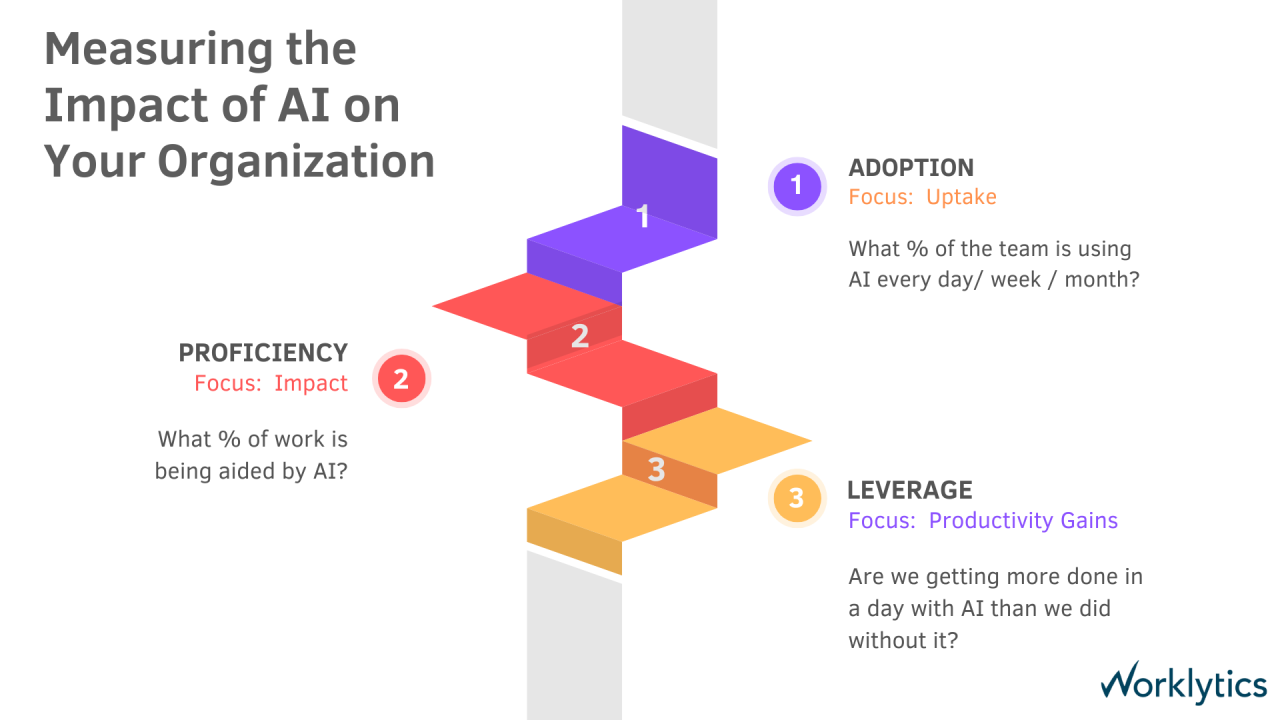
Read the depth of use. Count the days a week people use AI. Note how much they do on those days. Many people using AI once a week for one task is a different problem from fewer people using it daily for many tasks. The AI maturity curve moves from adoption to proficiency to productivity gains.

Score and re-score. Enter the numbers in the criteria table. Run them again after each round, because gaps move.
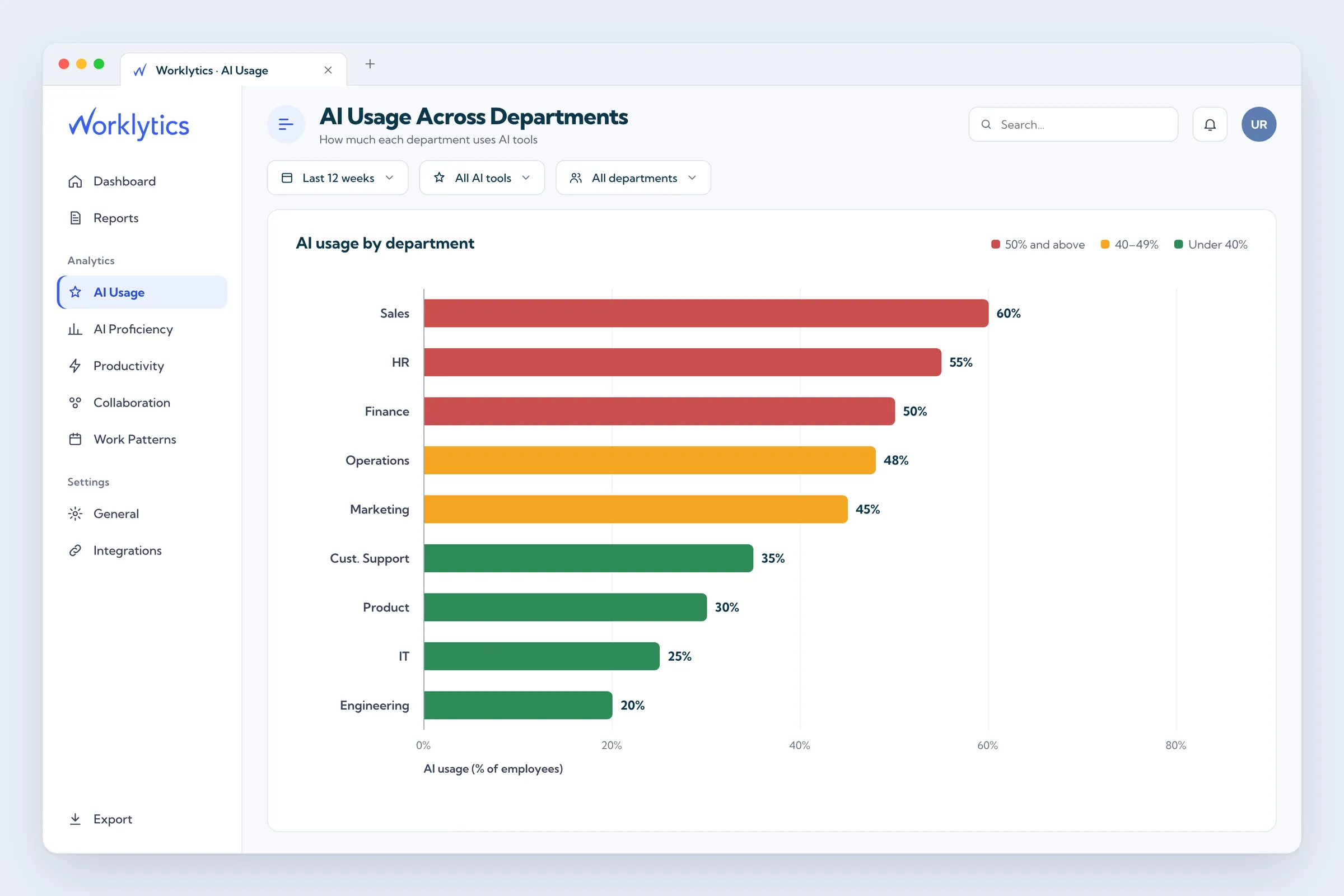
Worklytics is one tool that can cover pulling weekly use, finding the gap and reading the depth of use. It reads usage metadata from tools such as Microsoft Copilot, ChatGPT, Gemini, Claude and Slack. It reports that data by team and role. Its usage view shows:
It reports at group level from anonymized, aggregated data. No one person's activity is shown. It can also compare your rates with similar companies.
What it does not show. It reads metadata only. It cannot show what the work contained or whether the output was good. It sees only the tools connected to it. Judge turnaround against numbers each department already tracks, such as time to first reply or days to close the books.
The default order is judgment. It comes from the makeup of each department's work. One field study backs customer support. The rest rests on reasoning about tasks, turnaround and risk.
Departments are not uniform. A sales department holds outbound reps and account executives whose work differs. Split large departments by role before you compare them.
Usage is not value. A department can use AI daily and still wait just as long for work to move on. Judge a pilot on the turnaround number you chose, not on logins.
Small teams are noisy. Two people starting or stopping use moves a five-person team by 40 points.
Customer support and marketing and sales are the usual first picks. Most of their work is writing, research and repeat questions. Slow replies and drafts hold up customers and other teams. Engineering and IT are often ahead already. Finance, operations and HR come second. Legal and compliance come last. Confirm the order with the criteria in this guide.
Rank departments by value: AI-friendly hours per person, times employees in the role group, times the share not yet using AI, times importance. Then score readiness from 0 to 8 and set the risk level. Start now where readiness is 5 or more and risk is low or medium.
Not by headcount alone. Headcount matters only if the work is AI-friendly and people are not already using AI. In this guide's made-up example, operations has more than three times the employees of customer support. It still ranks last. Little of its work is AI-friendly, and it is not ready.
Tasks that pass at least 4 of 5 tests. Text, numbers or code go in and come out. The team repeats the task weekly. A person can check the result in a few minutes. A wrong first draft costs little. The material sits in a tool AI can reach. Examples: drafting replies, summarizing tickets or calls, first drafts of emails and proposals, and answering repeat internal questions.
Engineering and IT are often ahead already. Gallup finds daily AI use of 42% in the technology industry as of May 2026. Gallup measures industries, not departments. If your engineers already use AI weekly, support them with approved tools. Ask their heaviest users to coach other teams.
Not first. Policy questions, job descriptions and training material fit AI. Hiring uses are high-risk. The EU AI Act lists AI that filters job applications or evaluates candidates as high-risk. Start HR in the second group, with uses that do not involve hiring decisions.
Use usage metadata: which AI tool was used on which days, grouped by department, with no prompt or output content. Weekly use is the share of people who used an AI tool on at least one day in a week. Average it over the last 4 full weeks. Combine every tool the company pays for. Then departments on different tools can be compared.
To see these numbers for your own departments, Worklytics' AI adoption page shows what it reports by team and role. You can also request a demo there. It shows how much AI is used and where. Whether the work improved still takes your managers' input.