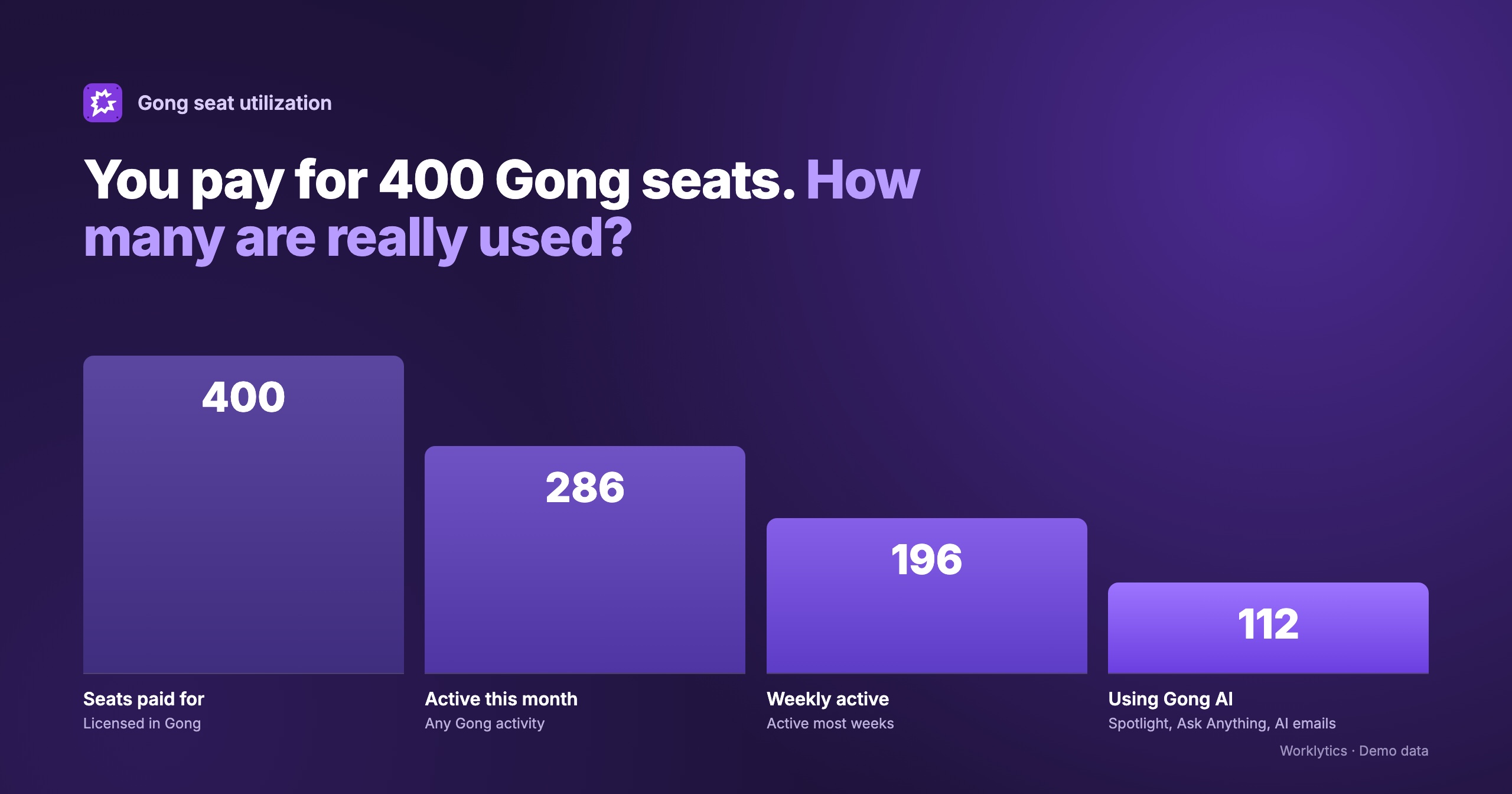
To track Gong usage, start with Gong's own Feature utilization report, which shows per-person activity and seat utilization for a team and time period. To see adoption by team over time, compare Gong with your other AI tools, and connect usage to how your sales org actually works, you need to bring Gong activity data together with the rest of your work data.
Gong has grown from call recording into a revenue platform with a long list of AI agents. Most companies pay for Gong per seat, so sales leaders, RevOps and enablement teams usually ask the same three questions: who is actually using it, which teams are getting value from it, and are we paying for seats nobody opens? We covered the same question for engineering teams in tracking Codex usage.
Gong is a revenue intelligence platform. It records and transcribes customer calls, imports emails and meetings, and turns those conversations into deal, coaching and forecasting insights.
The AI layer has expanded quickly. Gong's help center groups its AI agents into four areas:
Call Spotlight, the call summary with key points and next steps, is the AI feature most reps meet first. Access to agents depends on the seat a user has, according to Gong's agent documentation.
Seat cost. Gong is licensed per seat, and the utilization report lists separate seat columns for Forecast, Engage and Enable. An unused seat is pure cost.
Uneven adoption. One team may review calls and coach every week while another only lets Gong record in the background. The tool is the same, but the value is very different.
Coaching and enablement. Gong is only as useful as the listening, feedback and scorecards that happen on top of the recordings. Usage data tells enablement where coaching is actually happening.
AI rollout. If you are paying for Gong's AI agents, you want to know whether reps use them or ignore them.
Gong offers more built-in usage reporting than many tools. There are four places to look.
Tech admins and business admins can generate a utilization report from Admin center > Settings > Reports > Utilization. You pick a team and a timeframe, and Gong emails a CSV with one row per team member. It covers:
Gong notes the report includes both mobile and browser activity, and that recent activity may not appear until the "Data valid until" date shown when you generate it. People without an admin role can download a smaller version from the Team page.
Anyone with the "Export reports to CSV" permission can export team stats from Insights > Team. The exports include call activity, interaction stats (talk ratio, question rate), topics, trackers, scorecards, coaching received and a standard Gong usage report. You can include the management hierarchy and compare the last three weeks or three months.
The Gong data cloud shares Gong data into your warehouse (Snowflake, BigQuery, Databricks, S3 or Redshift). It is a separate offering, is set up by a tech admin, and refreshes once a day.
Gong's public API lets you retrieve daily user activity, along with calls, users and other data, within published rate limits.
Gong's reports answer "what did each person do in Gong during this period?" well. They leave several questions open.
Adoption by team over time. The utilization report is a snapshot for a chosen period, emailed as a CSV. Building a trend by team means exporting repeatedly and stitching files together, unless you invest in the data cloud and your own BI.
Comparison with other AI tools. Your sellers may also use ChatGPT, Claude, Copilot or Gemini, and Salesforce Agentforce in the CRM. Gong only reports on Gong, so you cannot see whether a team that ignores Gong's AI is using a different assistant instead.
Link to how work gets done. Gong does not show whether teams that coach heavily in Gong also have healthier meeting loads, more customer time or more focus time. That needs collaboration data from calendar, email and chat.
For the wider picture, see our guide to sales productivity analytics.
Seat value across the stack. A "Utilized" flag tells you a seat is not empty. It does not tell you whether that seat is worth more than a seat in another sales tool.
To get a reliable team-level view:
Gong itself holds sensitive content: call recordings, transcripts and emails. Measuring adoption does not require any of it. Counting how often someone listened to a call or filled a scorecard is activity metadata, which is a very different thing from reading what was said on the call.
When you set up usage reporting, keep the two apart. Usage analytics should work on activity counts and events, report at team level, and never pull recordings or transcripts. That makes the program easier to explain to sellers, works councils and legal.
Worklytics treats Gong as an embedded AI tool in a sales context and connects to it in one of two ways. The two paths are mutually exclusive: if the bulk data export is installed, Worklytics uses it, otherwise it uses the Activity Metrics API.
Activity Metrics API (daily aggregates). Worklytics receives per-person daily activity counts that arrive already summarized to the day: calls as host, calls attended, feedback given, requested and received, own and others' calls listened to, calls shared internally and externally, scorecards filled and received, and comments given and received. On this path Worklytics reports active days, whether Gong was used, and days since last use. It does not produce an interaction count.
Bulk data export (per-event). Worklytics receives one event per action: listening to a call, giving or requesting feedback, filling a scorecard, giving a comment, sharing a call internally or externally, and submitting a forecast. On this path a "use" is an individual event the person performed, so Worklytics produces a real per-event use count. Activity a person only receives (for example, someone else listening to their call) is not counted as their own use. Freshness depends on your export schedule.
Two things to keep in mind. Worklytics measures use of Gong's AI features as well as core Gong activity, so you can see which teams actually use Gong's AI and not only who records calls. And because Gong is a sales tool, its numbers are best read alongside other sales-effectiveness metrics.
What Worklytics adds is context. Gong activity sits in the same AI adoption dashboard as your other AI tools, broken down by team and role, so you can see which departments have stalled. Worklytics analyzes usage metadata only, never the content of prompts, outputs or calls, and links AI usage to collaboration and productivity signals from the rest of your stack. The fields collected are listed in the Worklytics Data Inventory.
See how Gong fits alongside your other AI tools, by team, without touching call content. Book a demo.
Tech and business admins can generate Gong's Feature utilization report from Admin center > Settings > Reports > Utilization. It emails a CSV with one row per team member, including days using Gong, seat status and a "Last used Gong" date. Non-admins can export a smaller usage report from Insights > Team.
Yes, partly. Gong's utilization report includes columns for call spotlights, "ask anything" questions, AI Theme Spotter, Assistant chats and AI follow-up emails. Gong does not publish a single AI usage metric, so treat these as feature-level counts rather than one adoption score.
Start with the "Utilized" column and the "Last used Gong" date in the utilization report. A seat can count as utilized just because calls were recorded, so also look at active days and actions like listening, feedback and scorecards before deciding a seat is earning its cost.
Gong's reports cover one chosen period per export, with an option to compare the last three weeks or months. For a continuous trend by team, you need to load the data somewhere, either through the Gong data cloud and your own BI, or through a platform like Worklytics that groups Gong activity by your HR org structure.
No. Adoption is measured from activity metadata, such as how many calls a person listened to or how many scorecards they filled. Worklytics does not collect call recordings, transcripts or email content from Gong.