To check Rovo usage in your company, open Atlassian Administration and select Rovo > Rovo trends. It shows users with AI enabled, active users, Rovo interactions and agent activity by app, and you can export it as a CSV. For per-event detail, such as who started a chat with a Rovo agent or created an agent, use the organization audit log. To see adoption by team over time and compare Rovo with your other AI tools, you need to bring that activity together with your HR data.
Rovo is Atlassian's AI across Jira, Confluence and the rest of the Atlassian suite: search, chat and agents that work on your team's pages and issues. That makes it easy to switch on and hard to measure. The questions leaders ask are the usual ones: who is actually using it, which teams get value from it, and is usage growing or fading after launch? We answered the same questions for Google Workspace in how to track Gemini usage and for engineering teams in tracking Codex usage.
Rovo is Atlassian's AI layer. Employees use it in three main ways.
AI features inside Jira and Confluence, such as AI-generated answers, can also show up in Atlassian's Rovo reporting.
Adoption is uneven. Rovo is built into tools people already open every day, so some teams use it constantly while others never try it. The license is the same, but the value is very different.
Chat and agents are different signals. A person who asks Rovo a quick question and a team that runs an agent inside every Jira workflow are both "using Rovo," but they get very different things from it.
Training needs targets. Usage data tells you which teams have stalled, so enablement goes where it is needed.
Rovo is one tool among several. Most companies also pay for ChatGPT, Claude, Copilot or Gemini. Knowing how Rovo compares helps decide where to invest.
Atlassian gives admins two native sources: Rovo trends and the organization audit log.
Organization admins on Atlassian Cloud Standard, Premium or Enterprise plans can open Atlassian Administration, select the organization, then select Rovo > Rovo trends (Atlassian Support). The default period is the last 4 weeks, each metric shows the change from the prior period, and the data refreshes every 48 to 72 hours.
The Adoption tab shows:
The Agents tab shows active agents, agent runs (by people or automations), agents created, and agent usage over time by app.
To export, select the download icon, then Export. Atlassian emails you when the CSV is ready. Note that Rovo trends can include AI features that do not use Rovo credits, so for credit consumption use Insights > Platform usage instead.
For per-event detail, Rovo activity appears in the organization audit log (audit log activities). Rovo user actions include starting a chat with a Rovo agent, creating, updating or deleting an agent, and creating a definition. Rovo admin actions include bookmark changes and third-party connector changes.
In Atlassian Administration, select Insights > Audit log. You can filter the log and select Export log to get a CSV of up to 10,000 activities from the past 180 days (export audit logs), or pull events through the organizations REST API. How long activity stays available depends on your plan: 180 days without Atlassian Guard and 365 days with it (audit log availability).
Rovo trends answer "how much Rovo, and in which apps?" well. They leave several questions open.
Adoption by team over time. Rovo trends report totals for the organization, not usage by department or manager. Building a trend by team means exporting regularly and joining the files to your HR data yourself.
Comparison with other AI tools. Your employees may also use ChatGPT, Claude, Copilot or Gemini. Atlassian only reports on Rovo, so you cannot see whether a team that ignores Rovo uses a different assistant instead.
Habit versus a single try. Active users counts anyone who used Rovo once in the period. It does not show how many days a week people come back.
Link to how work gets done. Rovo trends do not show whether teams that use Rovo heavily also have different meeting loads, focus time or collaboration patterns. That needs collaboration data alongside the AI data.
History. Audit log events age out after 180 or 365 days depending on your plan, so year-over-year comparisons need the data stored somewhere else.
To get a reliable team-level view:
Rovo works on your team's pages, issues and tickets. Measuring adoption does not need any of that content. Counting how often a team started a chat with a Rovo agent is usage metadata, which is very different from reading what they asked. Keep the two apart: usage analytics should work on counts and events, report at team level, and never pull prompts or responses. That makes the program easier to explain to employees, works councils and legal.
Worklytics treats Rovo as an embedded AI tool and reads Rovo agent events from the Atlassian organization audit log, through the Atlassian Organization connector. It captures:
Each event carries the action type, the timestamp and the person who performed it. A use is a distinct Rovo agent event, and Worklytics counts these events, the days on which they happened, and whether Rovo was used in the period.
This is not the same number as Atlassian's Rovo interactions. Atlassian counts each time Rovo's model is asked to generate content, while Worklytics counts agent chat-start and agent lifecycle events. So Worklytics reflects engagement with agents rather than the depth of each conversation, and the two figures are not directly comparable. Where a Rovo event includes message content, Worklytics turns it into keyword and category signals for classification and does not store it verbatim.
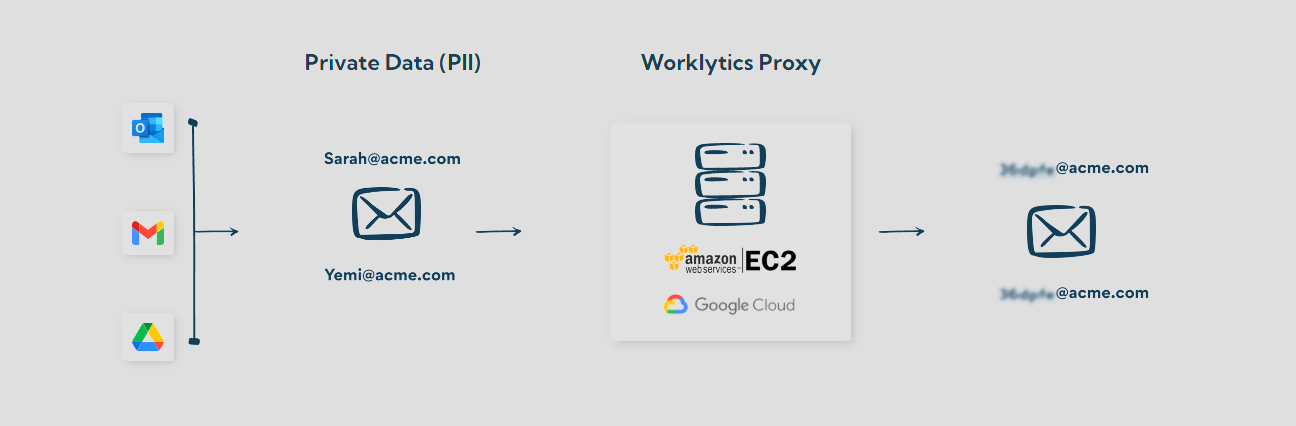
What Worklytics adds is context. Rovo sits in the same AI adoption dashboard as your other AI tools, broken down by team and role from your HR data, so you can see which departments have stalled and track progress over time. Personal identifiers are pseudonymized (hashed with SHA-256) before analysis, and results are only shown for groups above a minimum size (typically 5 to 8 people). Peer benchmarking, available in beta, compares your AI adoption with similar organizations. The fields collected are listed in the Worklytics Data Inventory.

In Atlassian Administration, select your organization, then Rovo > Rovo trends. The Adoption tab shows users with AI enabled, active users and Rovo interactions by app, and the Agents tab shows agent runs and agents created. You need to be an organization admin on a Standard, Premium or Enterprise plan.
Atlassian defines Rovo interactions as the number of times Rovo's large language model was asked to generate AI content in the period. That can include chat responses, AI-generated answers and automations with Rovo agents.
Yes. In Rovo trends, select the download icon, then Export, and Atlassian emails you a CSV. For per-event data, export the organization audit log as a CSV (up to 10,000 activities from the past 180 days) or use the organizations REST API.
Not natively. Rovo trends report at the organization level and by app. To see usage by department or manager, join Rovo activity to your HR org structure, either in your own warehouse or with a platform like Worklytics that does it for you.
No. Adoption is measured from usage metadata, such as when a chat with an agent started and who started it. Worklytics does not store Rovo message content verbatim and reports only at group level.
Rovo trends tell you how much Rovo your company uses. Worklytics shows how that compares with your other AI tools, which teams have stalled, and how adoption changes over time, without reading any content. Next step: see how Worklytics measures AI adoption.