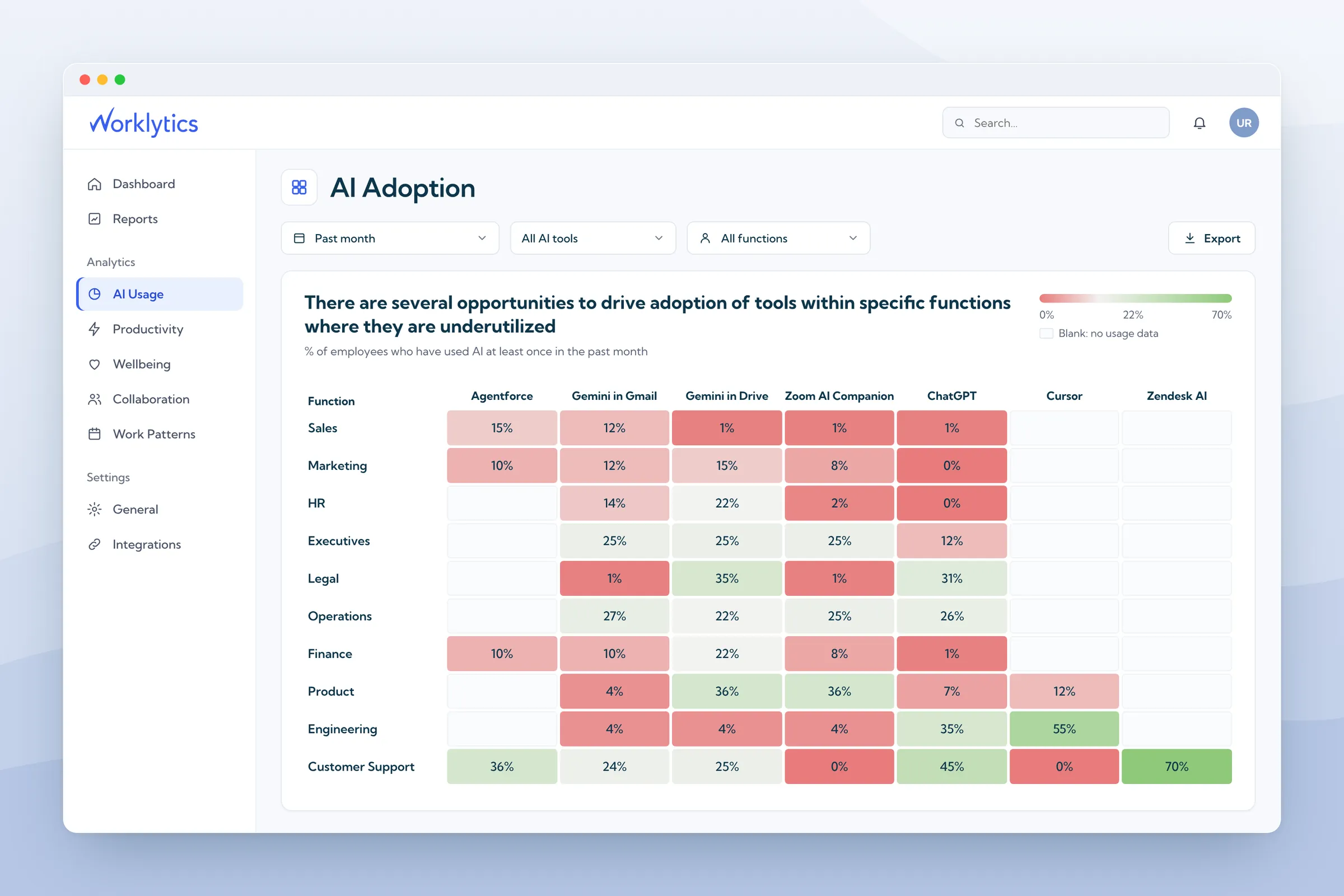
The answer: IT owns the tools, access, and usage data. HR owns whether people change how they work. Neither can tell you alone whether AI adoption is working.
The reason: IT data shows who has a license. HR data shows managers, roles, and time at the company. Adoption only makes sense when both are read together.
The evidence: Gallup’s April 2026 survey found that 78% of employees who strongly agree their manager supports AI use are frequent users. For everyone else it is 44%. A license count cannot show that.
The fix: Agree who collects and who acts on each measure, and put usage data and people data in one shared view. Worklytics is built to provide that view, and it never reads what people type into AI tools.
In the AI adoption HR vs IT debate, most advice says the two should share ownership. That leaves out which numbers each team owns. AI adoption means how much, and how well, people actually use AI at work. This guide splits the work, shows what each team’s data misses, and names the measures that need both.
Gartner’s August 2026 research says chief human resources officers (CHROs) and chief information officers (CIOs) should share ownership of five areas. These include AI ethics, building skills, and redesigning jobs. It predicts that 30% of organizations will form combined HR and IT teams by 2029. BCG’s June 2026 survey of 11,749 workers found that a clear strategy raised measurable business results by 25 points. Better tools without that strategy raised them by only about 5.
Who owns which part, in our view. This is a recommendation, not survey data.
Most rows in that table cannot be read from one system. A single tool’s admin console shows use of that tool only, while manager, role, and time at the company sit in HR systems.
Worklytics is one way to join them. It combines usage from AI tools such as ChatGPT, Gemini, Claude, and Copilot with data from HR systems such as Workday. It then shows the result for teams. IT sets up the connections with DataStream, and HR reads the results in Worklytics HR analytics.
IT usually starts with the vendor’s own dashboard. Microsoft’s Copilot Dashboard counts someone as an active user if they took at least one Copilot action in the last 28 days. So one prompt a month and daily use look the same in the main number. It also covers only Microsoft’s own Copilot tools. Work done in ChatGPT, Gemini, Claude, or Cursor never shows up. Worklytics has a guide to the Copilot Dashboard for teams that start there.
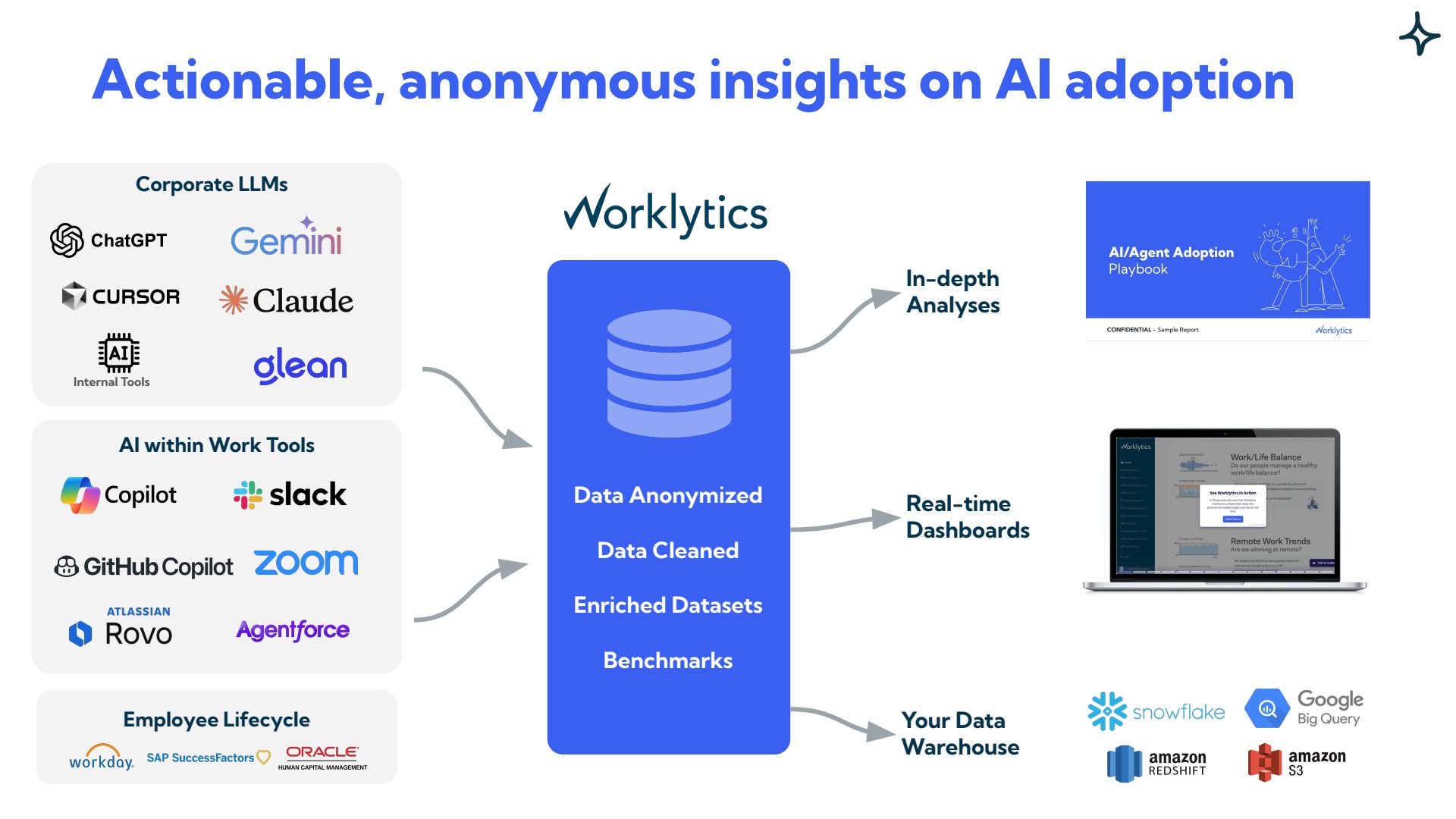
Counts say how many people use AI. They do not say how deeply. Worklytics AI adoption tracking covers all of those tools. It shows how many tools each active person uses and how often they use AI on days they use it. It also shows how many use only one tool. In the illustrative sample below, 54% of active people use only one tool.
Usage data can also show why some people use AI more than others. The Worklytics illustrative sample report lists what changes the odds of heavy use (at least 5 times a week). Most of its 11 factors are about people and roles. Three are about which tools people can use. Here are four of the people factors:
A company-wide average hides differences like these. Gallup’s April 2026 survey of 23,717 US workers found a similar spread by job level. It found that 67% of leaders, 52% of managers, and 46% of staff without direct reports use AI a few times a week or more. Worklytics runs an analysis of what drives AI use on team-level data, so HR can choose which groups to coach first.

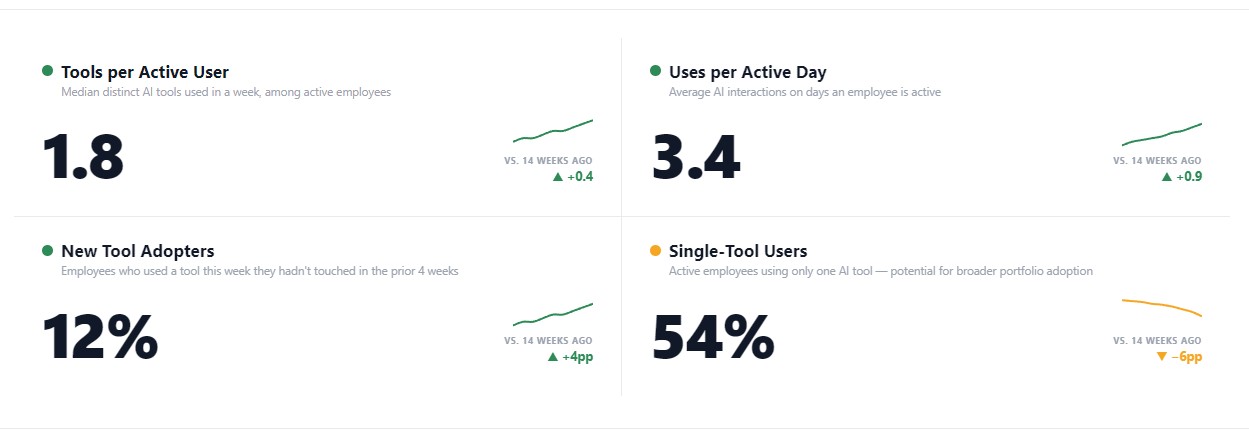
In the sample, a manager’s own AI use is the biggest single factor. Gallup found the same pattern. Among employees who strongly agree their manager actively supports AI use, 78% use it a few times a week or more. Among everyone else, 44% do. The Worklytics sample shows it in usage data too. When a manager rarely uses AI, the typical team’s adoption is 20.5%. When the manager is a heavy user, it is 37%.
A license report lists people one by one. It does not group usage by manager. Worklytics manager effectiveness analytics does. It groups usage by each manager’s team, so HR can see which teams have a manager who sets the example and which need coaching. That turns a 16.5 point gap into a short list of teams to start with. See also how leaders model AI use.
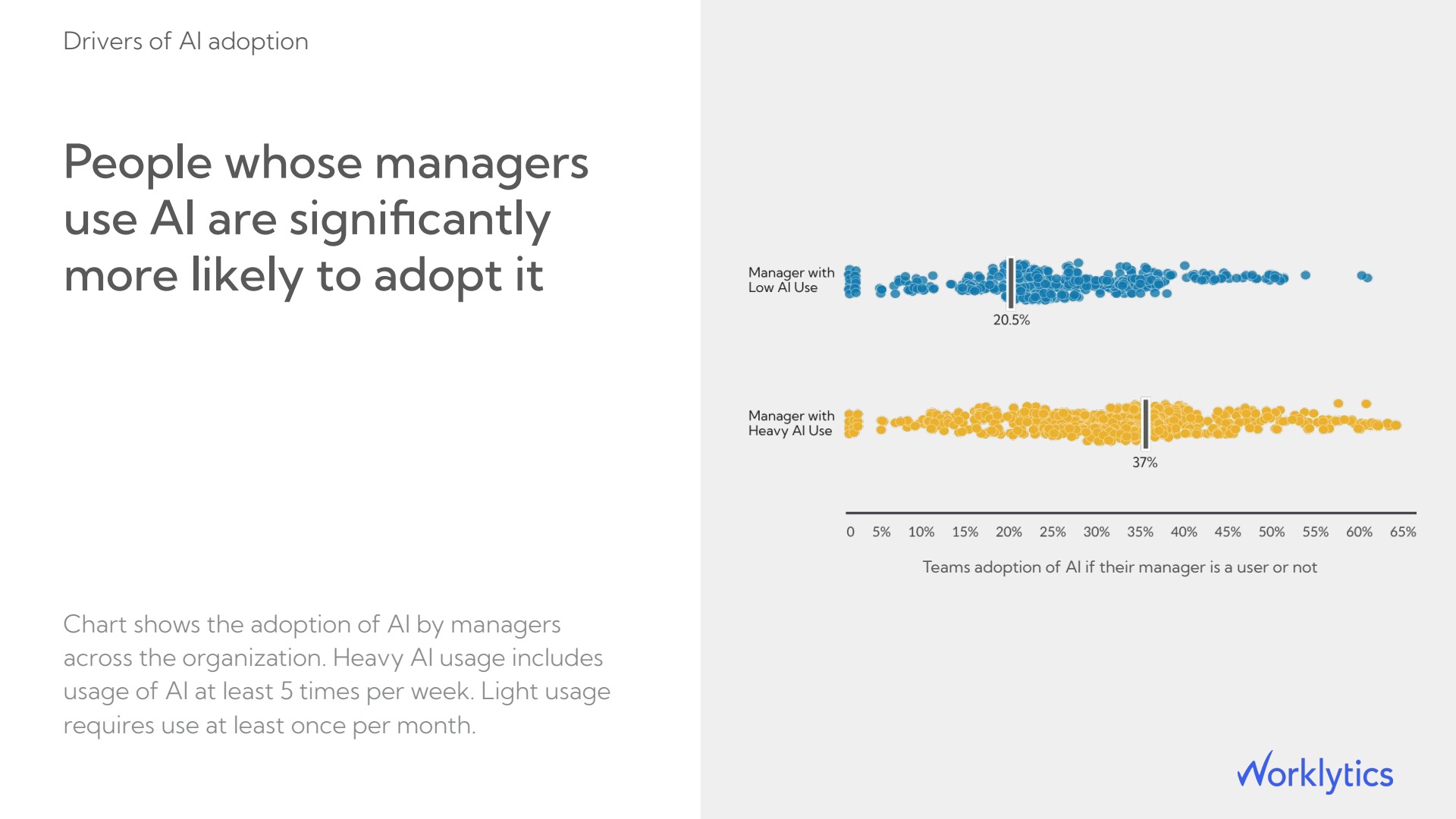
More AI use is not always good news. Harvard Business Review reported a study by Aruna Ranganathan and Xingqi Maggie Ye. It followed about 200 employees at a US technology company from April to December 2025. After adopting AI, people worked faster, took on more tasks, and worked more hours of the day, often without being asked. An IT dashboard would count that team as a success.
Worklytics well-being analytics track workday length, after-hours work, and focus time for teams. The chart below is not about AI use. It shows why workday length is worth watching. In the illustrative sample, people who left because of burnout typically worked days 1.5 hours longer than those who stayed (10.7 hours versus 9.2). If a team’s AI use and workday length are both rising, check its workload before you praise its adoption.

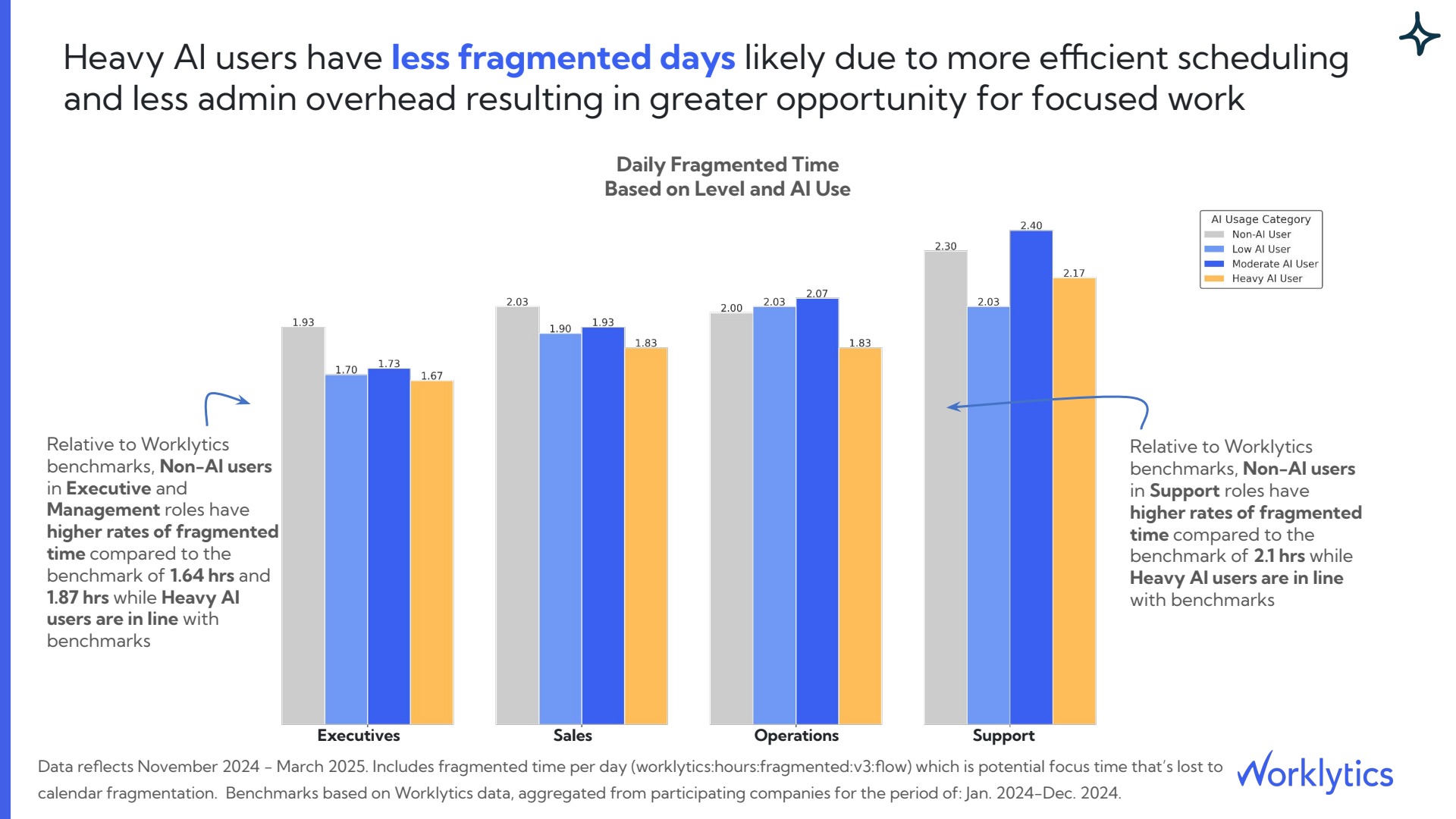
BCG’s survey also found that 42% of regular frontline AI users say they save a full workday or more each week. But 66% report limited or no guidance on what to do with that time. Worklytics productivity analytics measure fragmented time (stretches of the day too short for focused work) by AI usage level. In the illustrative sample, heavy AI users have less of it than non-users in all four groups. For executives it is 1.67 hours a day against 1.93. But moderate users in Support have more of it (2.40 hours) than non-users (2.30). Some AI use does not guarantee better days.
Adoption is only the first step, so connect usage to results. In the illustrative sample, a typical support rep who does not use AI closes 6 tickets a week. A light user closes 7.2 and a heavy user closes 10.5, about 75% more than non-users.
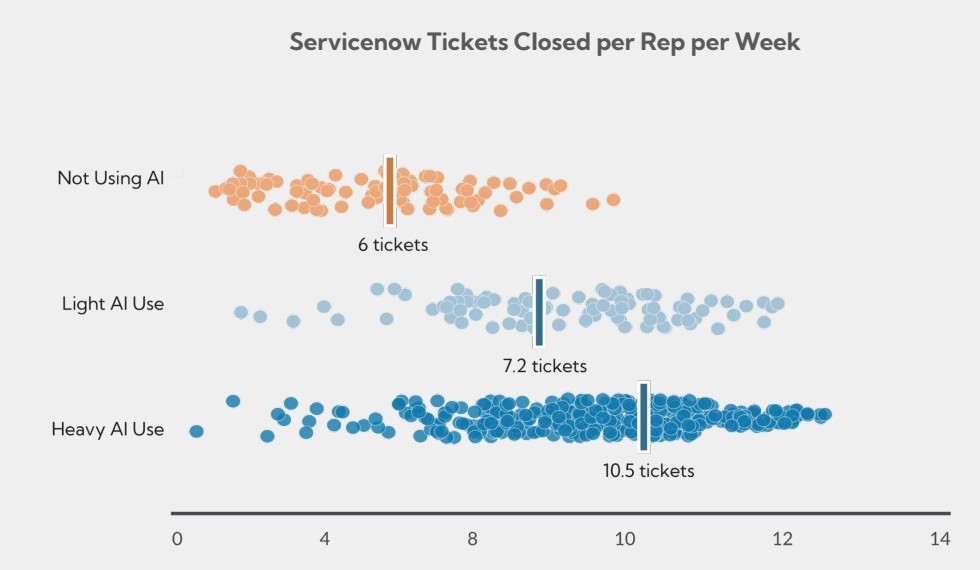
This shows a link, not proof of cause, so compare people in the same role. Early adopters may already be stronger performers. Worklytics connects AI use to results such as support tickets closed, and it estimates time saved. The illustrative sample shows 1,240 hours a week across the company, or 1.5 hours for a typical active user. The free AI ROI calculator gives a rough dollar figure before you connect any data. More measures are in Worklytics’ guide to which AI adoption metrics matter.

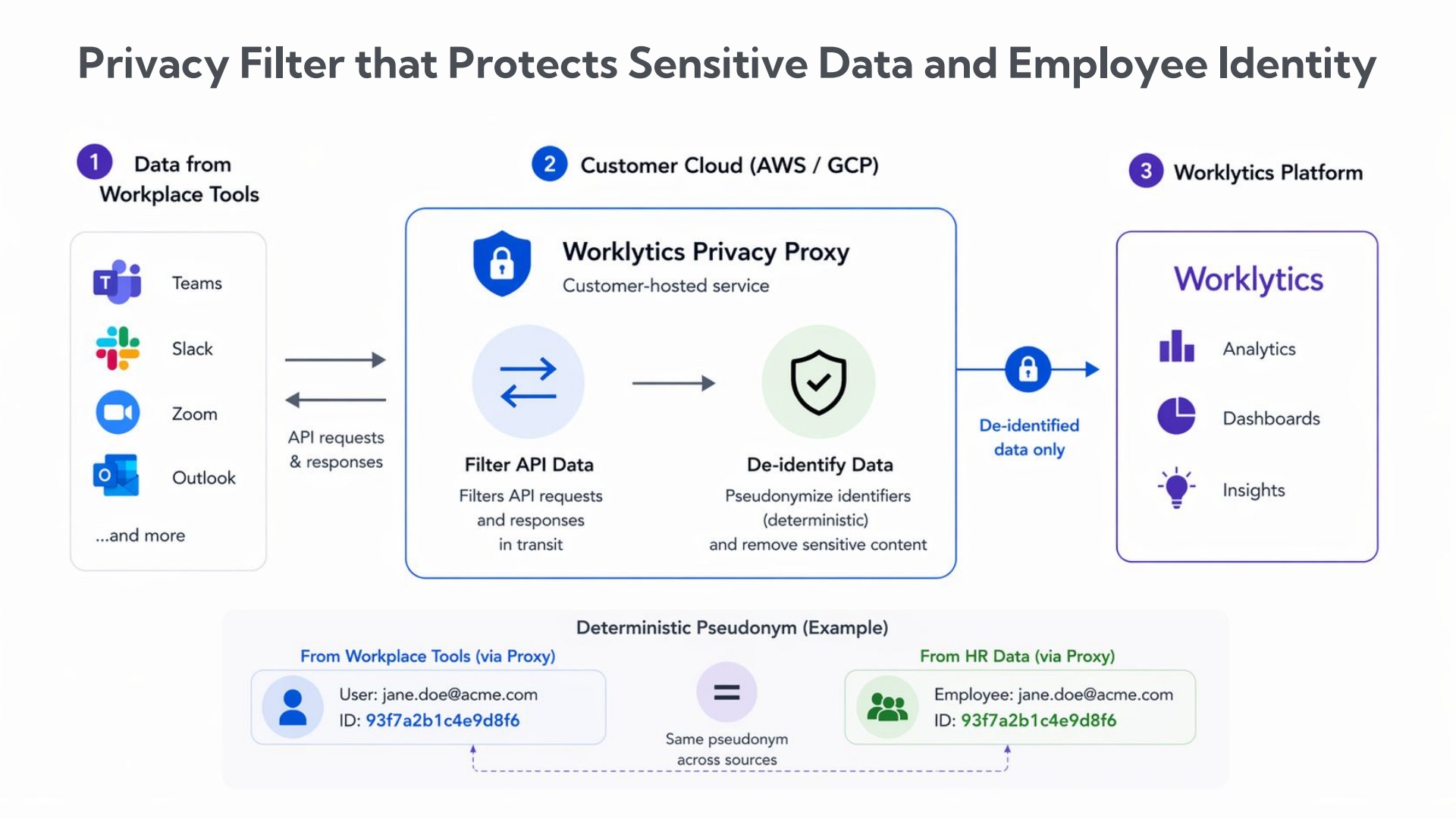
Putting HR data next to usage data raises a fair question: who can see what? A few rules help. Report by team, not by person. Set a minimum team size. Leave message content out. Worklytics is built this way. It looks only at records of when and how often tools are used. It never looks at what people type or write. It reports only for teams of 8 or more people. See also its guide to tracking AI use without invading privacy.
A privacy filter that runs in the customer’s own cloud account replaces names with codes before the data reaches Worklytics. The same code is used for a person’s tool data and HR data, so the two can be matched without revealing who anyone is.
Neither HR nor IT can tell whether AI adoption is working from its own data alone. Request the sample report to see the shared view, or book a demo to see it with your own data. The charts show patterns across groups. They do not prove that AI caused a change, so check them against conversations with managers.
Neither owns it alone. IT owns access, security, and usage data. HR owns coaching, training, and job design, which decide whether people use the tools. Gartner recommends shared ownership.
IT should collect usage, access, and security data. HR should own what the data says about managers, time at the company, workload, and focus time. Business leaders own results, with HR. Worklytics produces one shared report.
They count licenses and active users, and one action in 28 days is enough in Microsoft’s Copilot Dashboard. They miss how deeply people use AI, other vendors’ tools, manager influence, workload, and results.
Add manager AI use, time at the company, role, workday length, after-hours work, focus time, and results such as tickets closed. Review them by team, never by individual. Worklytics reports all of these at team level.
Yes. Worklytics looks only at records of when and how often tools are used, never at what people type or write. Results appear for teams of 8 or more people, and a privacy filter replaces names with codes.