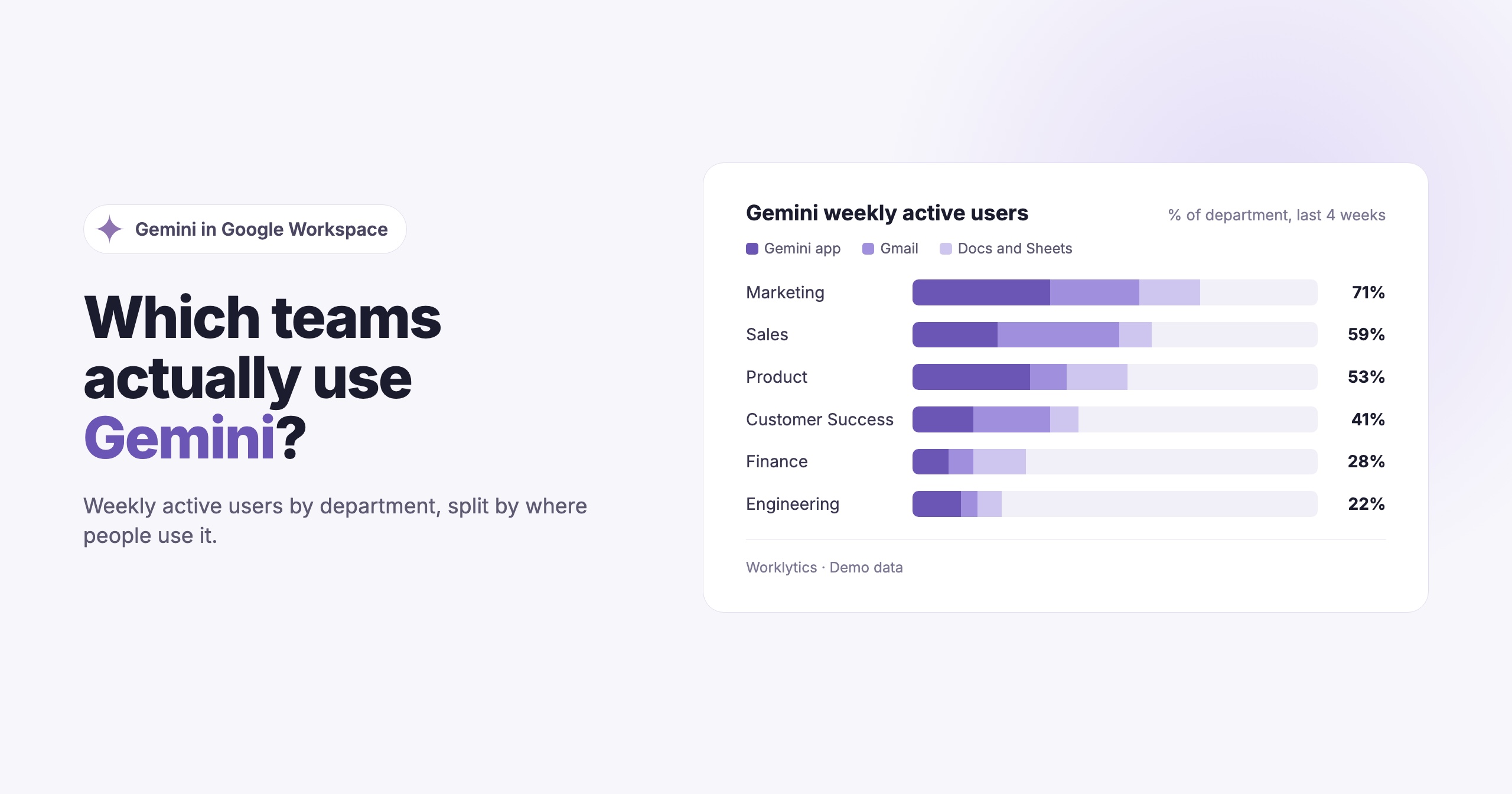
To track Gemini usage in your company, start with the Gemini reports in the Google Admin console, which show active users, usage by app and a usage level for each person over the past 28 days. For per-event detail, use the Gemini for Workspace audit log. To see adoption by team over time and compare Gemini with your other AI tools, you need to bring that activity together with your HR data and the rest of your AI stack.
Gemini now sits inside the tools your employees already use every day: Gmail, Docs, Sheets, Slides, Drive and Meet, plus the standalone Gemini app. That makes it easy to switch on and hard to measure. The questions leaders ask are the usual ones: who is actually using it, which teams get value from it, and is usage growing or fading after launch? We covered the same questions for engineering teams in tracking Codex usage.
There are two ways employees use Gemini at work.
Google counts both in its admin reporting, and lists the Workspace editions that include Gemini reporting (Business, Enterprise and Education editions among them) in its Gemini usage help article.
Adoption is uneven. Because Gemini is built into apps people already open, some teams use it every day while others never click the button. The license is the same, but the value is very different.
Embedded and chat use behave differently. A person who accepts a Gmail suggestion and a person who runs research in the Gemini app are both "Gemini users," but they are getting very different things from it.
Training needs targets. Usage data tells you which teams have stalled, so enablement goes where it is needed.
Gemini is one tool among several. Most companies also pay for ChatGPT, Claude or Copilot. Knowing how Gemini compares helps decide where to invest.
Google gives admins two native sources: the Gemini reports and the Gemini audit log.
Admins find these under Menu > Generative AI > Gemini reports, according to Google's help article. There are two views.
Org-level usage can be filtered by organizational unit, group and the last 7, 28 or 90 days. It shows:
User-level usage covers the past 28 days and shows, for each person, active days, usage by app and an overall usage level (High, Medium, Low or Zero). Both views can be downloaded.
Google notes that the reports include only active usage, such as prompting the Gemini app, asking Gemini to draft or summarize, or accepting a Gemini suggestion. Reports can take 2 to 3 days to show the latest data, and organizational changes can take up to 72 hours to appear.
For per-event detail, admins with the Audit & Investigation privilege can open Menu > Reporting > Audit and investigation > Gemini for Workspace log events. Each event records the app, the action, the feature source, the actor and an event category that separates active actions (such as generate, summarize and conversations) from inactive ones. Inactive events do not count toward active usage. Results can be exported to Sheets or CSV, up to 100,000 rows.
Google made these logs available through the Admin SDK Reporting API in July 2025, so they can be pulled into your own tools. Google keeps Gemini log events for 6 months.
Google's reports answer "how much Gemini, and in which apps?" well. They leave several questions open.
Adoption by team over time. The user-level report is a rolling 28-day window, and the org-level view goes back 90 days. Organizational units and groups often do not match how your company is really organized. Building a long-term trend by department means exporting regularly and joining the files to your HR data yourself.
Comparison with other AI tools. Your employees may also use ChatGPT, Claude or Copilot. Google only reports on Gemini, so you cannot see whether a team that ignores Gemini is using a different assistant instead.
Link to how work gets done. Gemini reports do not show whether teams that use Gemini heavily also have different meeting loads, email volume or focus time. That needs collaboration data alongside the AI data.
History beyond six months. Audit events age out after 6 months, so year-over-year comparisons need the data stored somewhere else.
To get a reliable team-level view:
Gemini works on some of your most sensitive content: email, documents and meeting notes. Google states in its Generative AI Privacy Hub that interactions with Gemini stay within your organization and that Workspace does not use customer data to train models without permission.
Measuring adoption does not need any of that content. Counting how often someone used Gemini in Docs is usage metadata, which is very different from reading what they wrote. Keep the two apart: usage analytics should work on counts and events, report at team level, and never pull prompts or responses. That makes the program easier to explain to employees, works councils and legal.
Worklytics treats the Gemini app as a conversational AI tool and Gemini inside Gmail, Docs, Sheets, Slides, Drive and Meet as embedded AI. It connects to Gemini in one of two ways, and the two are mutually exclusive: the bulk import is used only when the Audit Log connector is not installed.
Workspace Audit Log API (per-event). Worklytics receives one record per Gemini action, with metadata only and no content: the app where it happened (Gmail, Docs, Sheets, Slides, Drive, Meet, Chat, Classroom, Keep, Vids and the Gemini app), the action and feature, whether it succeeded, and whether Google categorized it as active or inactive. Usage is reported per app, plus a combined Gemini total. Data arrives daily with the usual audit-log latency of about a day, and history covers roughly the last 180 days.
Bulk usage import (per-person summary). A periodic file of per-person usage counts for Gmail, Docs, Sheets, Slides, Drive, Meet and the Gemini app, plus overall usage and active days. Worklytics spreads these counts into a per-weekday average. App coverage is narrower than the audit log, and freshness depends on your export schedule.
On the audit log path, a "use" is an active, user-initiated Gemini action. Worklytics excludes anything Google marks as inactive, plus passive Gmail signals such as automatically suggested replies and snippet summaries. Being offered a suggestion does not count; the person has to act on it. That makes Worklytics counts more conservative than a raw tally of audit events, and lets it report per-day activity and per-app breakdowns rather than a single 28-day figure.
What Worklytics adds is context. Gemini activity sits in the same AI adoption dashboard as your other AI tools, broken down by team and role, so you can see which departments have stalled and track progress over time. Worklytics analyzes usage metadata only, never the content of prompts or outputs, and links AI usage to collaboration and productivity signals from the rest of your stack. You can also export the data to your own warehouse, as covered in how to export and analyze Gemini usage data. The fields collected are listed in the Worklytics Data Inventory.
In the Google Admin console, go to Menu > Generative AI > Gemini reports > User-level usage. It shows each person's active days, usage by app and an overall usage level for the past 28 days, and you can download the table. The Org-level usage report shows active users and adoption per app.
The Gemini for Workspace log events show the app, the action, the feature source, the user and an event category that separates active from inactive actions. Admins with the Audit & Investigation privilege can search them under Reporting > Audit and investigation, and the same data is available through the Admin SDK Reporting API. Google keeps these events for 6 months.
No. Google's Gemini reports include only active usage, such as prompting the Gemini app, asking Gemini to draft or summarize, or accepting a suggestion. Worklytics applies a similar rule and also leaves out passive Gmail signals such as automatically suggested replies.
Google's reports filter by organizational unit or group and cover up to 90 days. For a continuous trend by department, you need to store the data and join it to your HR org structure, either in your own warehouse or through a platform like Worklytics that does this for you.
No. Adoption is measured from usage metadata, such as which app an action happened in and whether it was active. Worklytics does not collect prompts, responses, emails or document content from Gemini.