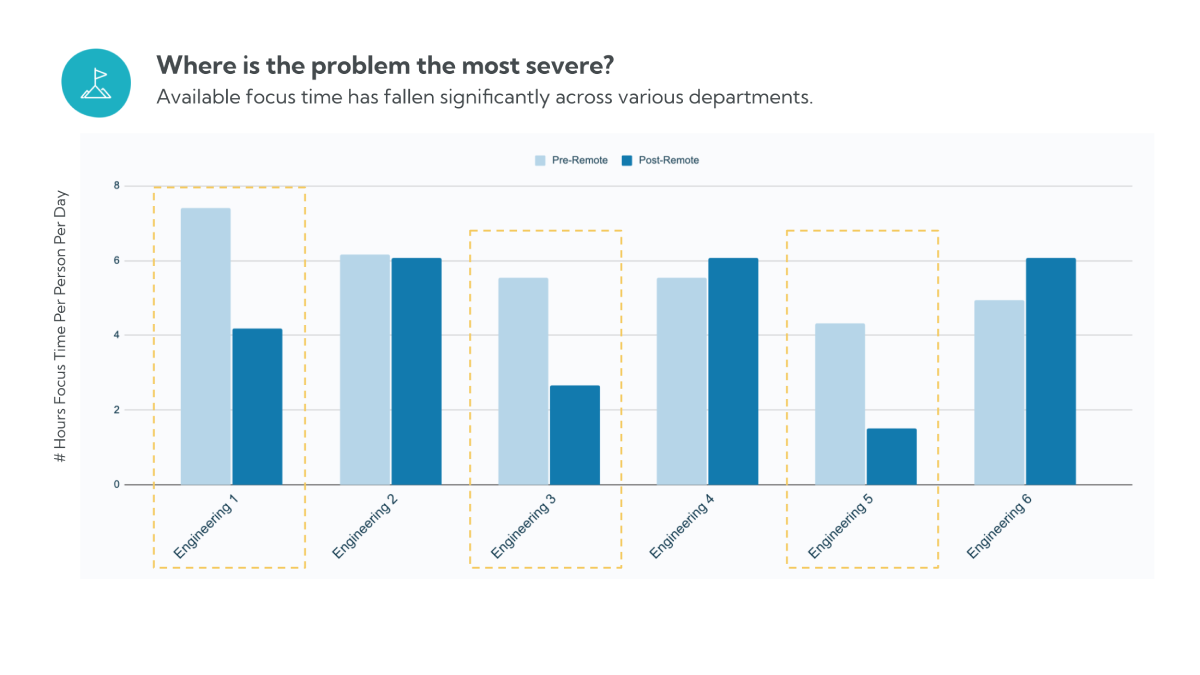
Virtual meetings did not just replace in-person meetings. They landed on top of an always-on workday where coordination happens continuously across email, chat, and ad hoc calls.
Microsoft’s Work Trend Index special report describes an “infinite workday” pattern based on aggregated Microsoft 365 signals, including high daily message volume, frequent interruptions, and a surge in ad hoc meetings.
A few numbers from those findings are particularly useful for anyone trying to figure out how to make virtual meetings more effective:
This matters because “more meetings” is not the only problem. Meeting frequency itself can be a driver of lower perceived effectiveness and lower well-being, even when meeting duration is not necessarily the main culprit.
Improving meeting effectiveness requires more than facilitation skills; it requires feedback loops. Worklytics provides visibility into meeting frequency, duration, and focus impact so leaders can identify overload patterns and redesign meeting systems based on data.
At the same time, video calls introduce real fatigue mechanisms. Four drivers of “Zoom fatigue” are sustained close-up eye contact, the cognitive load of interpreting video cues, reduced mobility, and the effect of constant self-view, along with practical fixes like reducing window size, hiding self-view, and taking audio-only breaks.
All of that leads to a simple conclusion: effective virtual meetings require explicit design. And to improve meeting effectiveness, you need measurement and feedback loops, which is exactly where Worklytics fits: it is designed to measure and benchmark meeting patterns and related productivity drivers without analyzing work content.
If you want effective virtual meetings for remote teams, start by defining “effective” in observable terms. When attendees perceive meetings as effective, they are more likely to attend and engage positively, and they can benefit.
To design effective virtual team meetings, focus on four foundations that you can actually audit.
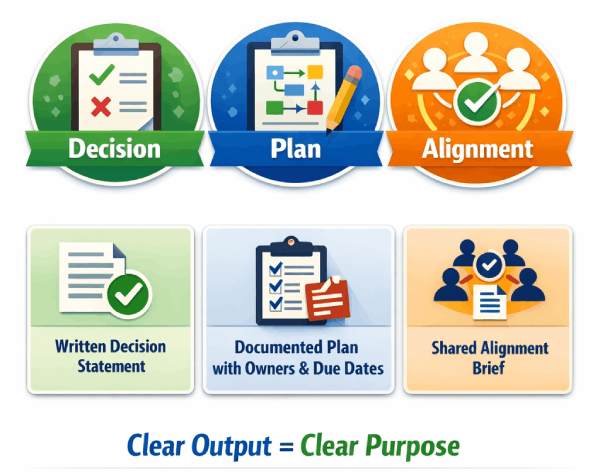
The first foundation of effective virtual meetings is a clearly defined output. Worklytics recommends a simple framework: every meeting should exist to produce one primary outcome, either a Decision, a Plan, or Alignment, each tied to a concrete artifact such as a written decision statement, a documented plan with owners and due dates, or a shared alignment brief.
If you cannot name the output in advance, the meeting has no definition of success. That is how recurring meetings persist without resolution. Clarity of output forces clarity of purpose.
The second foundation is participant relevance and role clarity. Research consistently shows that perceived meeting effectiveness is strongly influenced by relevance, participation quality, and meeting size. Agendas and post-meeting summaries are positively associated with effectiveness, while larger meeting sizes are often negatively correlated with it.
In practice, invite only those who meet one of three criteria:
Everyone else receives the summary.
The third foundation is leadership behavior. Evidence reviews demonstrate that facilitator behavior significantly affects meeting effectiveness. Effective leaders:
Virtual meetings amplify weak facilitation. Process discipline is not optional; it is structural.
The fourth foundation is follow-through. Post-meeting summaries are repeatedly associated with higher perceived effectiveness in remote meeting research. A meeting without documented outcomes is incomplete.
However, documentation alone is not enough. Real effectiveness shows up in downstream work patterns. Are meetings reducing ambiguity, or are they increasing fragmentation?
This is where measurement becomes essential. Worklytics helps validate whether improved meeting practices are actually reducing meeting overload and protecting focus time at the team level.
By tracking meeting load, meeting frequency, and focus block availability, organizations can confirm that meetings are producing outcomes rather than simply consuming time.

When people ask how to lead effective virtual meetings, they are usually asking about facilitation under constraints: time, attention, and social cues.
Research consistently shows that leader behavior significantly influences meeting effectiveness. Practical, evidence-aligned behaviors include:
These behaviors can be operationalized into a simple facilitator script:
Structure reduces ambiguity and accelerates closure.
Psychological safety does not emerge automatically in virtual meetings. Evidence suggests that small talk and light, appropriate humor can increase satisfaction and perceived effectiveness. Even brief informal interaction before the agenda correlates with stronger meeting outcomes.
A practical implementation is a two-minute arrival buffer at the start of the meeting. Invite a lightweight prompt, then clearly transition into the structured agenda. The signal is intentional: connection first, execution second.
Interruptions create hidden costs. Research on interrupted work shows that although people may complete tasks faster after interruption, they report higher stress, frustration, time pressure, and effort.
This explains why back-to-back virtual meetings degrade effectiveness. They force participants into accelerated processing that accumulates cognitive strain.
Leaders must actively monitor meeting cadence. Worklytics supports this by surfacing team-level meeting load and focus-time impacts. When recurring meetings fragment uninterrupted work blocks, the data makes the structural issue visible, allowing leadership to redesign cadence and protect deep work windows.
The research on video effectiveness is mixed and context-dependent. Video is not universally beneficial; its value varies by task type and interaction needs.
A practical policy framework:
Intentional standards prevent unnecessary cognitive load while preserving effectiveness where video adds value.
Meeting leadership improves when accountability exists. Traditional methods include performance evaluations and surveys. However, surveys capture perception, not structural behavior.
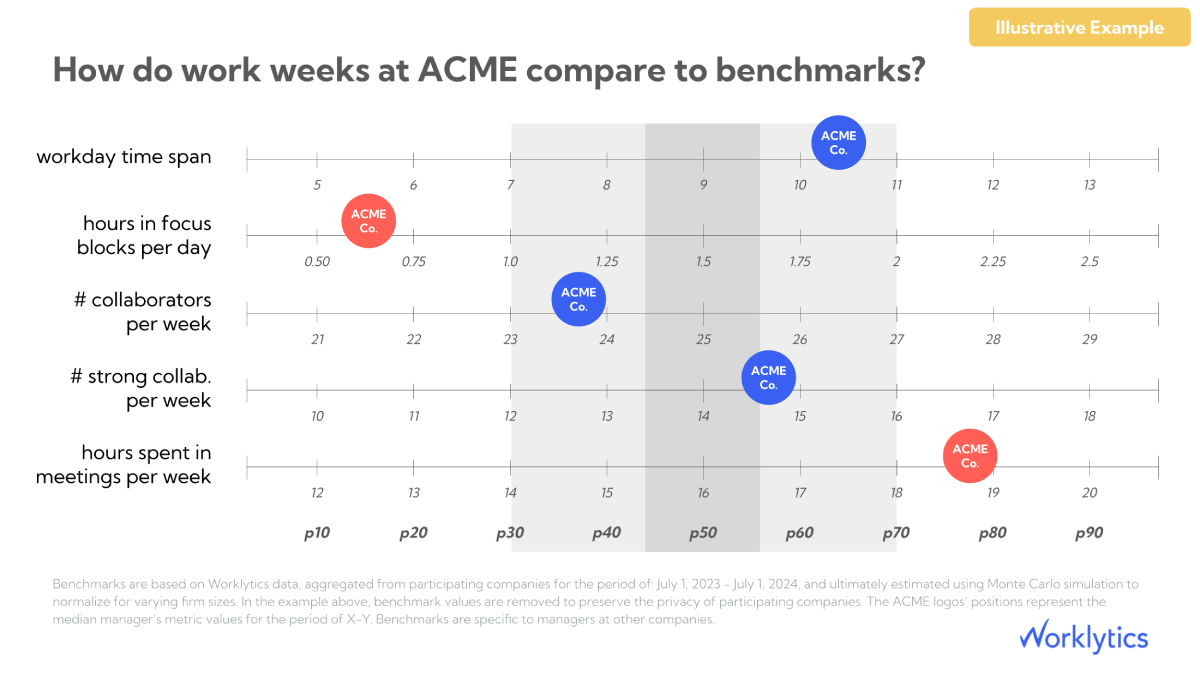
For a more operational approach, Worklytics provides benchmarked dashboards and trend data across meeting metrics, including meeting load, size, and focus-time impact. Leaders can test changes and verify whether adjustments improve meeting effectiveness over time.
Measurement turns facilitation from a soft skill into a performance discipline.
Improving facilitation skills creates isolated improvements. Achieving organization-level meeting effectiveness requires instrumentation and a feedback loop. Without measurement, meeting reform remains anecdotal and temporary.
Worklytics is designed to operationalize meeting effectiveness by providing real-time visibility into collaboration patterns while maintaining privacy protections. It unifies data across tools such as email, Zoom, Slack, Jira, and Salesforce so leaders can evaluate meeting behavior within the broader collaboration system.
Effective redesign starts with diagnosis. Worklytics provides meeting metrics that expose structural drivers of inefficiency:
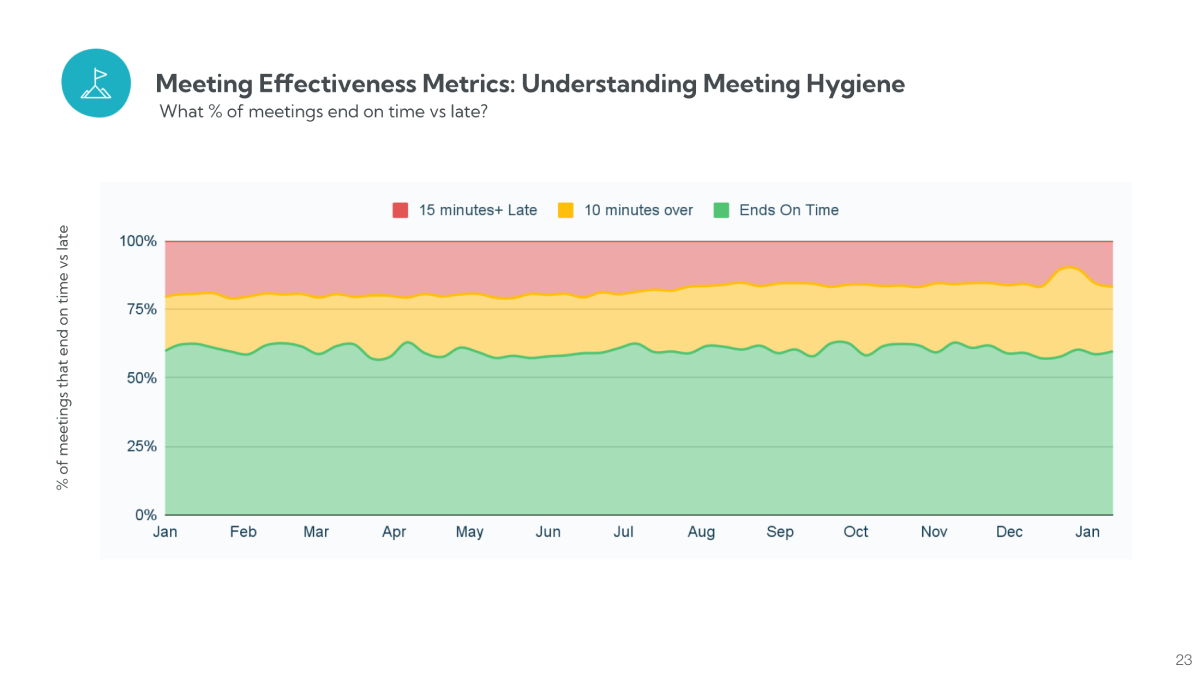
These metrics shift the discussion from opinion to evidence.

Measurement alone is insufficient. Improvement requires comparison and iteration.
Worklytics reporting includes:
This enables controlled experimentation. Leaders can adjust meeting rules, reduce recurring cadence, or modify attendance norms and then verify whether meeting effectiveness improves.
Measurement must not erode employee trust. Worklytics addresses this by using a proxy architecture that anonymizes data at the source and analyzes metadata rather than work content.
Its framework emphasizes measurement without surveillance. Metrics are aggregated, and message or document content is not analyzed. This makes organization-wide meeting analysis feasible without compromising psychological safety.
Even well-designed meeting principles fail without structured execution. Behavioral change does not scale through guidelines alone. Teams revert to default habits unless improvements are measured, reinforced, and made visible. A time-bound rollout creates accountability, reduces reform fatigue, and proves whether changes are producing measurable gains in meeting effectiveness.
To connect strategy with execution, apply a structured 30-day rollout:
Measure time in meetings, meeting size, meeting length, quality proxy, and focus impact in Worklytics.
Cancel or convert the bottom 20 percent of recurring meetings that do not produce Decision, Plan, or Alignment artifacts.
Train facilitators on structured opening, timeboxing, summarization, and start/end punctuality. Enforce output-based meeting standards.
Use Worklytics to compare deltas, focusing on increased focus-time availability and reduced multitasking during meetings. Share results transparently to reinforce behavioral change.
If you want to see what Worklytics reporting looks like, you can reference the Worklytics sample meeting effectiveness report page and the support article listing Worklytics meeting effectiveness metrics.
Reduce meeting frequency before shortening duration. High meeting frequency is more strongly linked to reduced effectiveness and well-being. Use Worklytics to baseline meeting load and eliminate recurring meetings that do not produce a Decision, Plan, or Alignment output.
Establish defined collaboration overlap hours and keep recurring meetings within that window whenever possible. Use Worklytics to identify teams with excessive after-hours load or fragmented focus time, then rebalance schedules across regions.
Adopt fatigue controls such as smaller video windows, hidden self-view, and short audio-only breaks. Pair these norms with Worklytics’ meeting quality indicators to detect multitasking patterns that signal attention loss.
Make the working document the agenda and require a written summary after the meeting. Worklytics helps detect when meeting size or duration increases without improved outputs, reinforcing smaller, outcome-driven meetings.
Clarify decision rights in advance and close with a written decision record. Worklytics can surface recurring meetings with high load and large attendance that often correlate with stalled decisions.
Use structured airtime, timeboxes, and focused facilitation. Then measure whether engagement improvements translate into better focus time and reduced overload using Worklytics collaboration metrics.