AI tools have rapidly transformed how people work. Tasks that once demanded hours of manual effort now take minutes. AI has streamlined workflows and removed much of the repetitive, hard work that used to weigh teams down.
Yet this progress raises an important question:
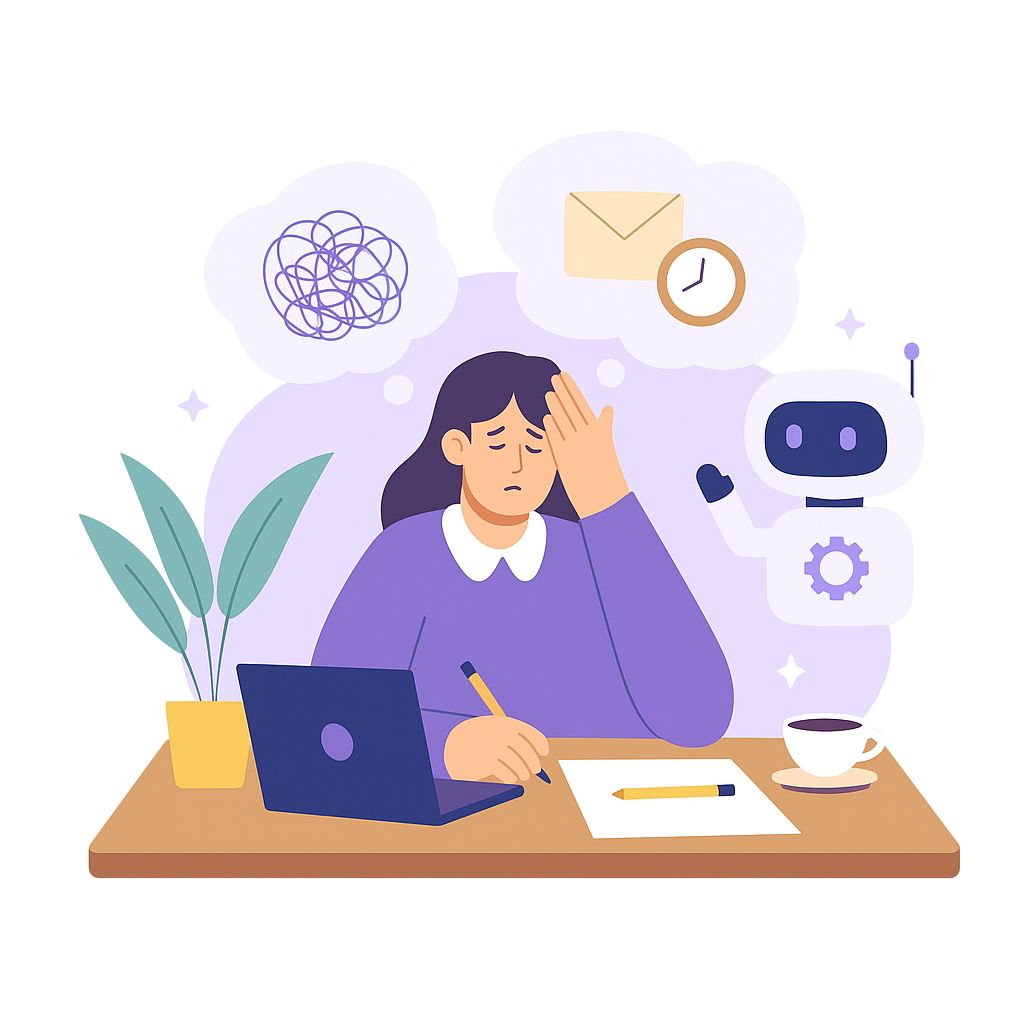
If AI can eliminate so much of the hard work, does it also reduce burnout?
Or are we simply replacing one kind of workload with another that is less physical but equally mentally draining? Understanding that balance is essential to knowing whether AI truly supports well-being or simply shifts the source of stress.
When employees describe the routine pressures that wear them down during a normal workweek, they rarely point to a single catastrophic issue. Instead, they talk about the constant micro-frictions that build pressure throughout the day. These are the tasks that interrupt focus, prolong workflows, and force people to mentally juggle too many steps at once. Common examples include:
AI assistants already show measurable improvements in each of these areas. Tools that automatically generate summaries, create first draft versions of content, transcribe conversations, and pull data from several systems can reduce task time by several minutes per instance. These time savings look small at the individual level but they compound across dozens or hundreds of tasks per week. At scale, organizations see hours of regained capacity for each employee.
The effect is not only operational. Removing small but frequent points of friction reduces the background load on a worker’s cognitive system. Instead of carrying a constant sense of rush or disorganization, employees gain more control over how their day unfolds. This tends to lower stress levels and helps people stay in a more focused, calm state as they move through their workflow.
The OECD reports that both workers and employers often see positive impacts of AI on performance and some working conditions when deployed well, while noting that risks must be actively managed. That duality is the theme of responsible adoption. You can review the findings in the OECD’s AI and Work program and its multi-country survey summary, which highlight benefits alongside caution about job loss concerns.
They can. In organizations that pair AI with thoughtful work design, burnout risks drop in three practical ways:
But AI will not reduce burnout if a company installs tools and keeps the same norms. AI can make work faster. Faster work without redesign can end up being more work. In those cases, three failure patterns show up:
If leadership simply adds tasks because AI shaved minutes off an activity, the day expands rather than lightens. And if AI creates the expectation of an immediate response at any hour, employees are pushed to work nights and weekends.
Microsoft’s Work Trend Index shows late-night logins and after-hours communication rising among knowledge workers in multiple markets, a pattern that correlates with fatigue when boundaries are unclear.
Leaders do not need long lists of initiatives. Most of the impact comes from four clear design choices that change how teams work every day.
1) Redesign the work, not just the tasks.
Decide which steps can be automated, which can be eliminated, and which still require deep human attention. Ensure time saved is time banked, not time refilled. Commit to a target of reduction in hands-on time of a team’s heaviest recurring workflows and track it.
2) Protect focus time in the calendar.
If AI takes notes and drafts follow-ups, halve the frequency or length of status meetings. Enforce blocks of focus time in team calendars at predictable hours. Give people permission to mute notifications during those windows.
3) Set boundaries for after-hours work.
Use delayed send by default and schedule cross-time-zone collaboration during agreed overlap hours. Make a clear rule that after-hours messages are for true urgency only. Back the rule with manager modelling.
Burnout drivers can be tracked with simple operational and sentiment data. None of these indicators require invasive monitoring. They only require consistent measurement and clear definitions.
These are leading indicators. If they move in the right direction, you create conditions where the WHO definition becomes less likely to describe your team: chronic stress that is not successfully managed. Revisit that definition here if you need a refresher on the symptoms and scope: WHO on burnout.
Even well-intentioned automation can erode healthy work patterns if left unchecked. These guardrails keep efficiency gains from turning into overwork or unnecessary complexity.
These principles echo what large-scale surveys and occupational health guidance make plain: hours, intensity, and perceived control drive fatigue and risk.
AI is a powerful lever, but it is not a wellness program. It reduces burnout by removing waste, protecting deep work, and restoring control over time. It increases burnout when it accelerates the pace without changing expectations. Leaders control the difference.
AI can streamline work, but leaders still need to see how daily behavior is shifting. Worklytics provides a full, privacy-safe view of collaboration patterns so you can guide AI adoption toward healthier and more sustainable productivity.
Worklytics analyzes meeting patterns at scale, allowing you to pinpoint where time is being drained.
This gives leaders evidence to redesign calendars and free up time for deep work.
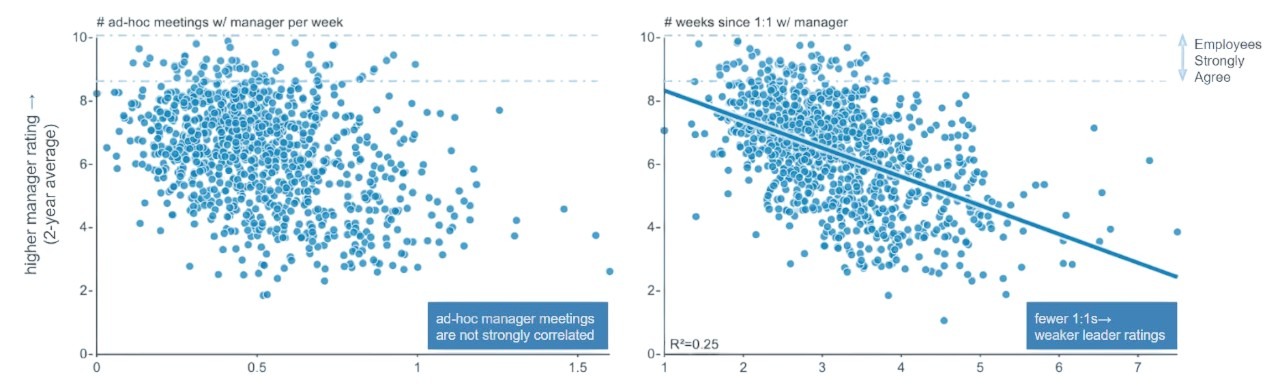
Worklytics reveals how much uninterrupted time employees actually have, not just what is planned on the calendar.
With these insights, you can protect productivity windows and reduce the cognitive fatigue created by constant context switching.

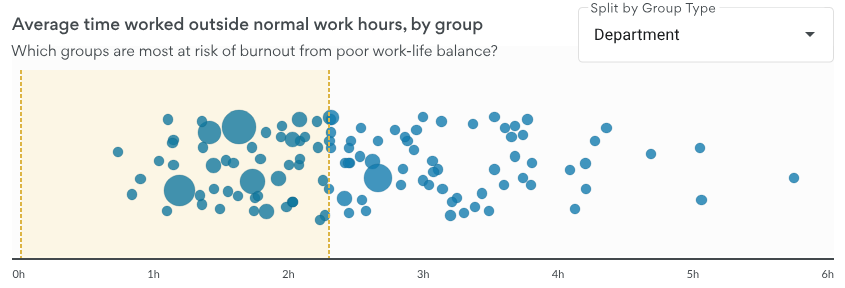
Even well intentioned teams can slip into evening or weekend activity. Worklytics surfaces these patterns early.
This helps leaders enforce boundaries, adjust workloads, and reinforce healthier norms.

Worklytics helps you identify when communication volume is drowning teams instead of supporting them.
You can target the exact friction points causing burnout rather than guessing.
AI creates new opportunities for async communication, but only if teams actually adopt it. Worklytics shows you the real behavior change.
This ensures your AI investments are translating into practical, scalable ways of working.
Worklytics connects with calendars, email, and collaboration systems to give leaders a single, objective view of work patterns.
You get actionable insight without surveillance.

Worklytics turns complex behavior data into simple dashboards tailored to each leadership level.
Everyone has the information needed to take timely and effective action.
Worklytics shows how AI tools are influencing work patterns in real time.
Start your Worklytics assessment to turn these insights into healthier, more sustainable performance.
Use Worklytics to track how AI adoption is shaping work patterns, from collaboration load to focus time. Measure burnout risk, productivity gains, and AI usage trends across teams. Start your Worklytics assessment to turn insights into healthier, more sustainable performance.