Quick answer: Meeting effectiveness comes down to three questions. Are people spending a reasonable amount of time in meetings, are the right people in the room, and do meetings end in clear decisions and action? The 12 metrics below measure each of these. Most can be tracked automatically from calendar and collaboration data, so you can set benchmarks and see what is actually working instead of guessing.
Meetings are where a lot of real work gets coordinated, and also where a lot of time quietly disappears. When calendars fill up, focus time shrinks, decisions slow down, and people burn out. Most teams try to fix this with opinions and one-off rules, like a no-meeting Friday, without ever checking whether it worked.
A better approach is to measure. The metrics below use calendar and collaboration signals to show how much time meetings cost, who is involved, and whether that time turns into outcomes. Each one comes with a healthy range so you have something to aim for, and a note on how to measure it.
You do not need all twelve on day one. If you track only five, track these:
The rest add depth once you have the basics in place.
These are useful for setting context and for benchmarking your own numbers against outside research.
The metrics fall into three plain groups. Time and load tells you how heavy the meeting habit is. The right people tells you whether the room is the right size and the right mix. Outcomes and follow-through tells you whether that time actually moved anything forward. Work through them in that order, because fixing load is easy, fixing outcomes is where the real gains are.
The simplest and most revealing metric. Total meeting hours per person per week shows how much of the workweek is spoken for before anyone does focused work.
For knowledge workers, meeting time above roughly 10 hours a week tends to track with lower focus time, longer workdays, and weaker engagement scores. How to measure it: sum scheduled meeting time per person from calendar data, then report the average and the share of employees in each threshold, not just the company mean. Averages hide the overloaded few.
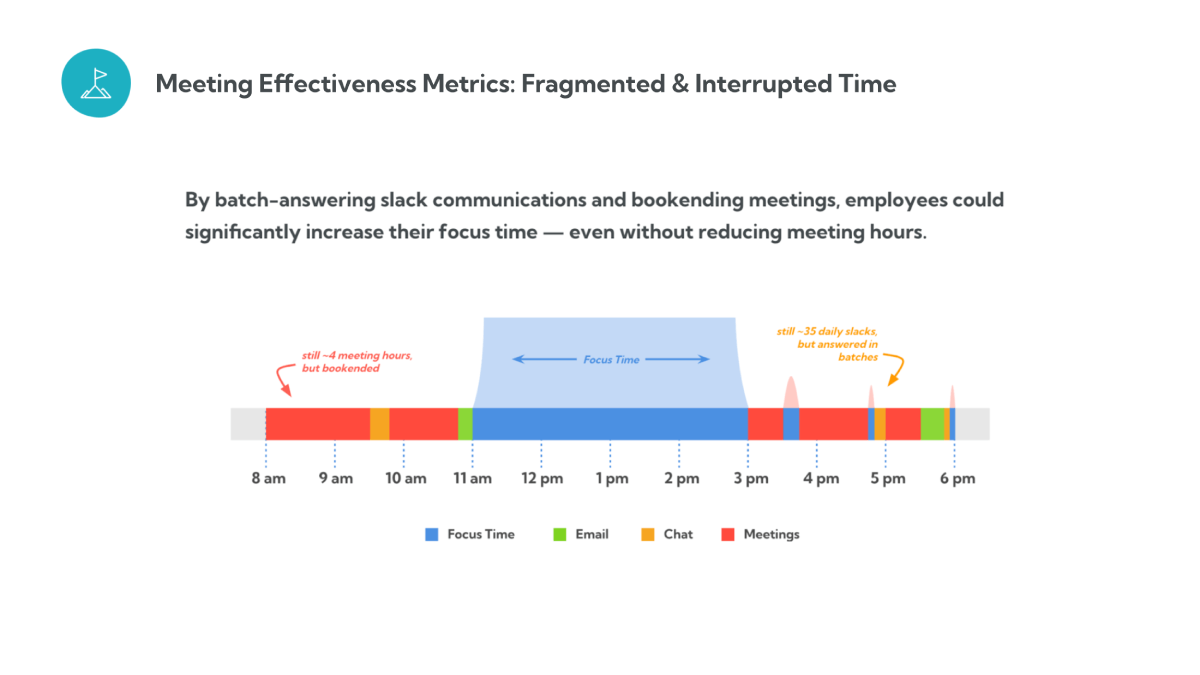
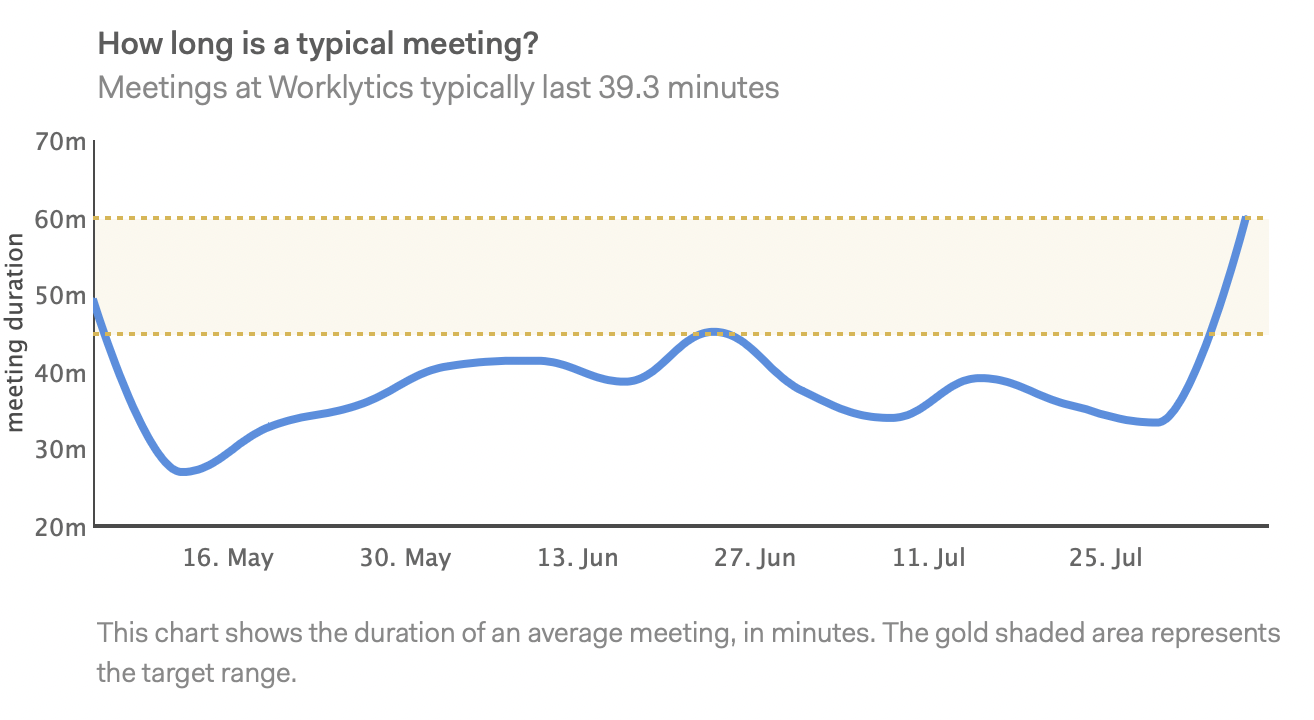
Length shapes both cost and focus. Long meetings are expensive and easy to coast in. Very short meetings are efficient but can chop the calendar into pieces too small to do real work between them.
How to measure it: look at the distribution of meeting durations, and compare the share of time in 15 to 30 minute meetings against 60-plus minute meetings. A calendar dominated by hour-long blocks is worth a second look.
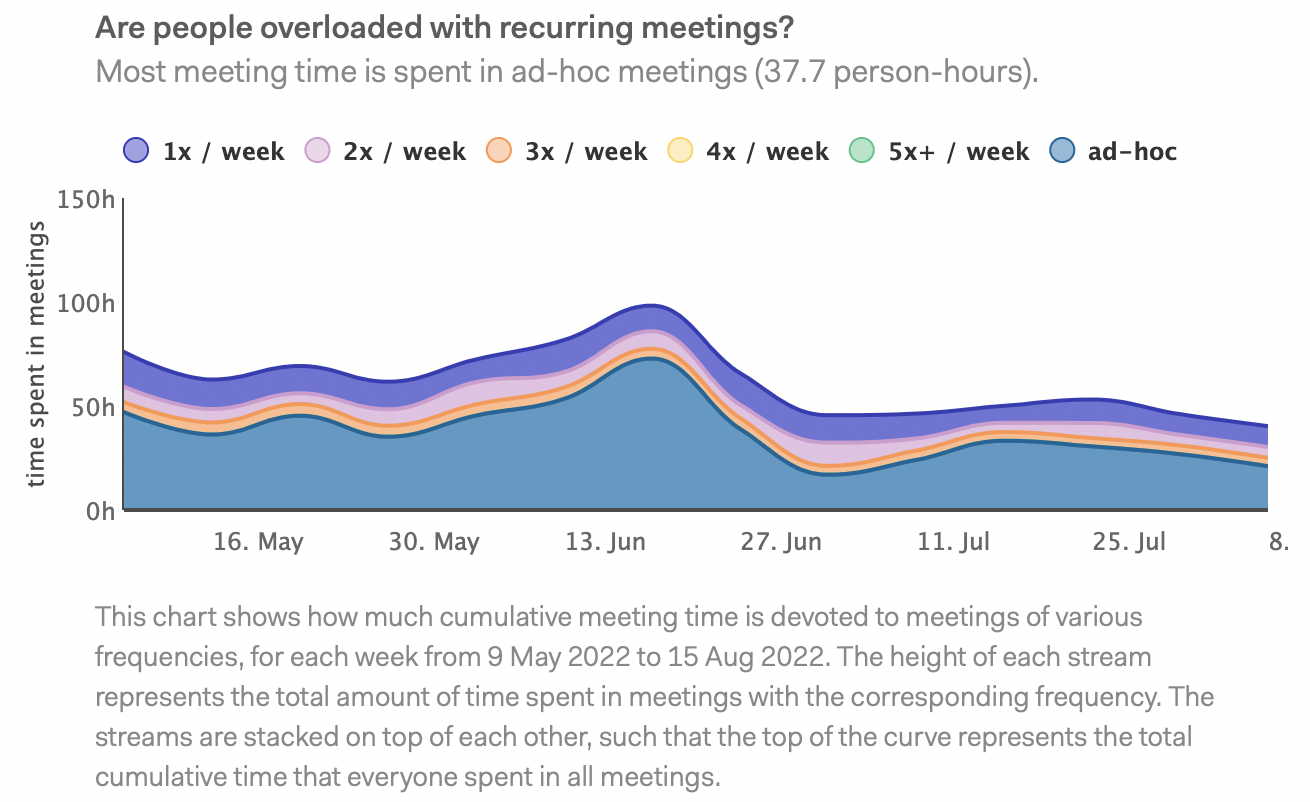
Recurring meetings are useful until they are not. Many outlive their purpose and keep running out of habit, which is especially common in remote and hybrid teams that add standing syncs to stay coordinated.
How to measure it: tag recurring series in calendar data and calculate the share of total meeting hours they take. A quarterly review of every recurring series, asking whether it still earns its slot, keeps this number honest.
Time is easier to act on when it has a dollar figure attached. Meeting cost estimates the loaded salary cost of everyone in the room for the length of the meeting.
How to measure it: multiply attendee count by average loaded hourly cost by duration. You do not need exact salaries, band averages are enough to rank meetings from cheapest to most expensive and start trimming the top of the list.
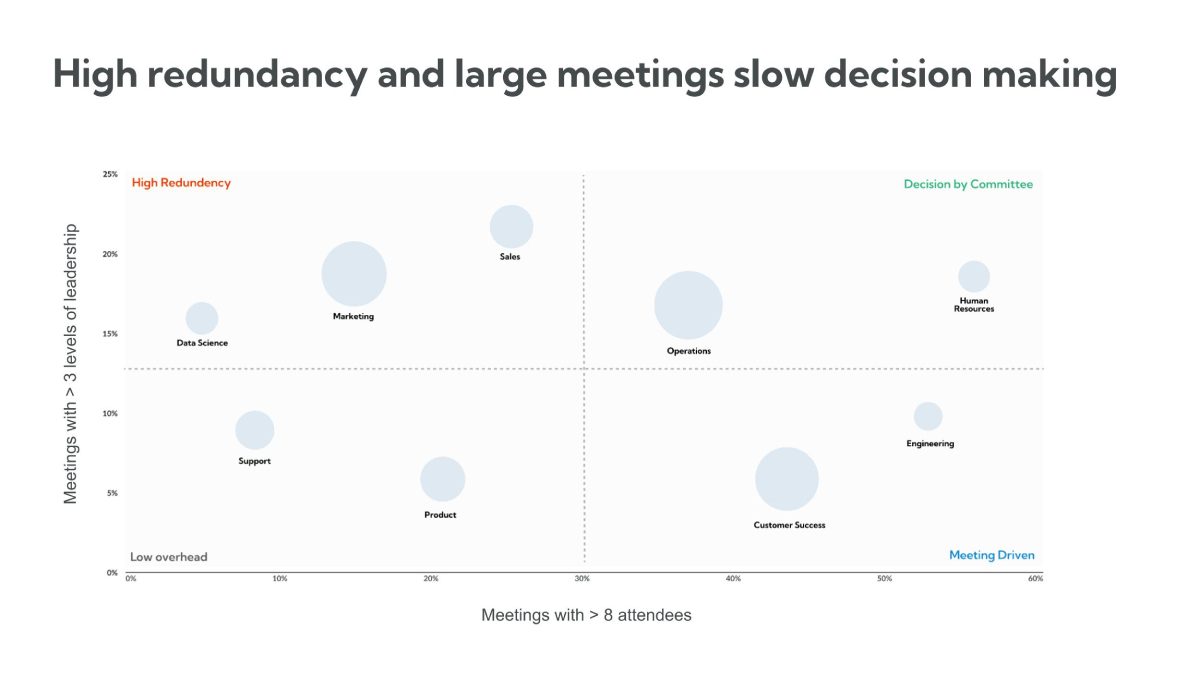
Bigger meetings feel inclusive but usually mean less participation per person and slower decisions. Research points to a sweet spot of roughly 3 to 8 people for working meetings.
How to measure it: track the distribution of attendee counts, and flag large meetings that recur. Large, frequent meetings are the first place to look for optional invites.
A packed invite list is not the same as the right room. The question that matters is how many attendees actually needed to be there.
How to measure it: combine accept and decline data with a simple post-meeting prompt asking whether attendance was necessary. Even a light quarterly survey on this surfaces meetings that should shrink.
Meetings with a real agenda start faster and stay on track. What matters is not just having an agenda but whether it frames the decision to be made.
How to measure it: track the share of meetings with an agenda attached to the invite. It is a rough proxy, but a low number is a reliable sign of meetings that drift.
In most large meetings a few people do most of the talking. When the same voices dominate week after week, quieter contributors disengage and useful input gets missed.
How to measure it: speaking-time data from Zoom or Teams shows how talk time is distributed and how concentrated it is among the top speakers. This is one of the clearer early signals of an inclusion problem.
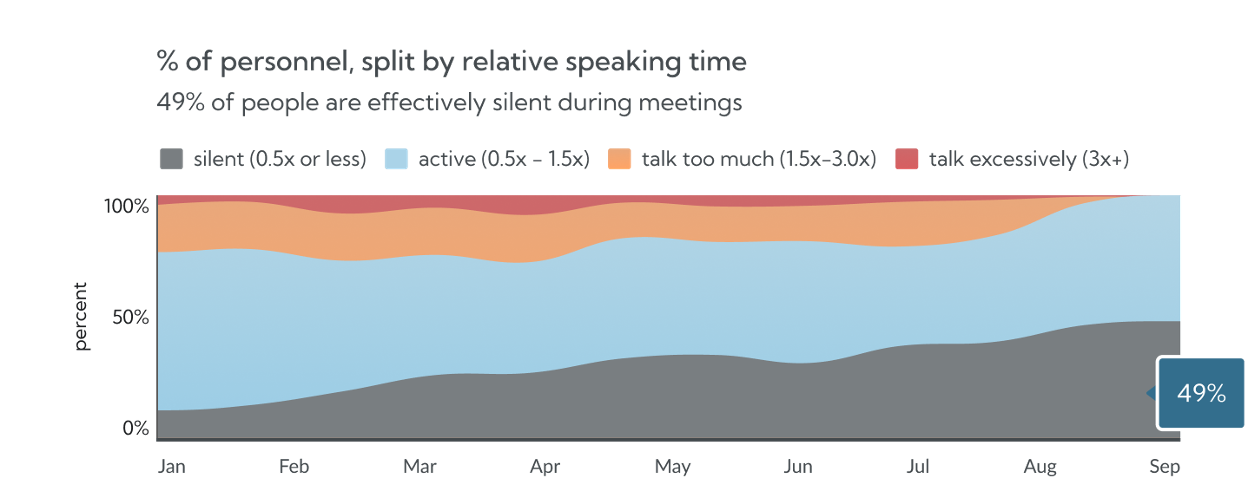
A meeting that produces decisions but no follow-through is a meeting that will be held again. Action item completion is the clearest outcome metric there is.
How to measure it: pull action items from meeting notes or a task tool and check completion against deadlines. A low completion rate usually points to unclear owners or meetings that generate discussion but not decisions.
Closely related, but broader. Did the meeting reach the decision it was called to make, or did it end with more meetings?
How to measure it: a one-line post-meeting prompt (did we decide what we came to decide?) is enough to separate decision meetings from update meetings that could have been a message.
Two related signals. How much of the meeting day is spent on camera, and how often people are doing other work during calls.
How to measure it: calculate the share of meeting hours on video-enabled calls, and look at concurrent activity in Slack, Teams, or email during scheduled meeting windows as a proxy for attention. High multitasking in a recurring meeting is a strong hint it should be shorter, smaller, or async.

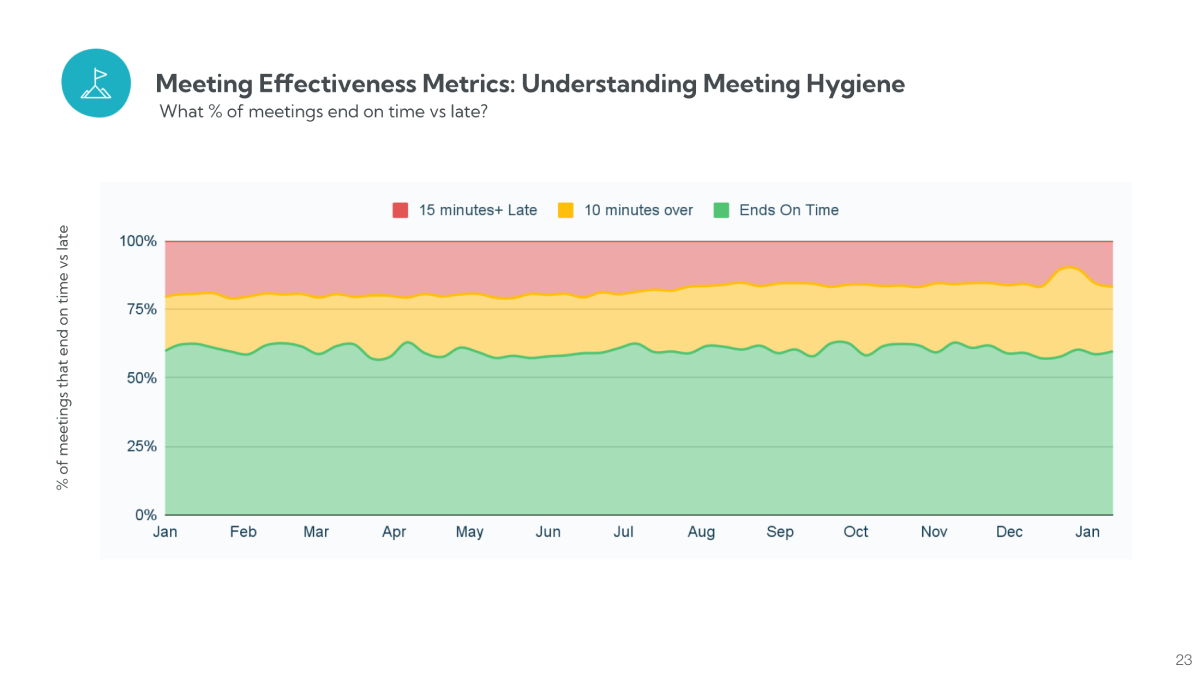
Small habits add up. Meetings that start late and run over push into focus time and into the next meeting, creating a chain reaction across the day.
How to measure it: compare scheduled times against actual start and end times from Zoom or Teams logs. Chronic overruns in a specific recurring meeting are usually a scoping problem, not a discipline problem.
The 12 above can be tracked with calendar data and a light survey. If you run a workplace analytics platform such as Worklytics, a few deeper signals become possible because they need data joined across many people and tools. They are not required to get started, but they answer questions the basic metrics cannot.
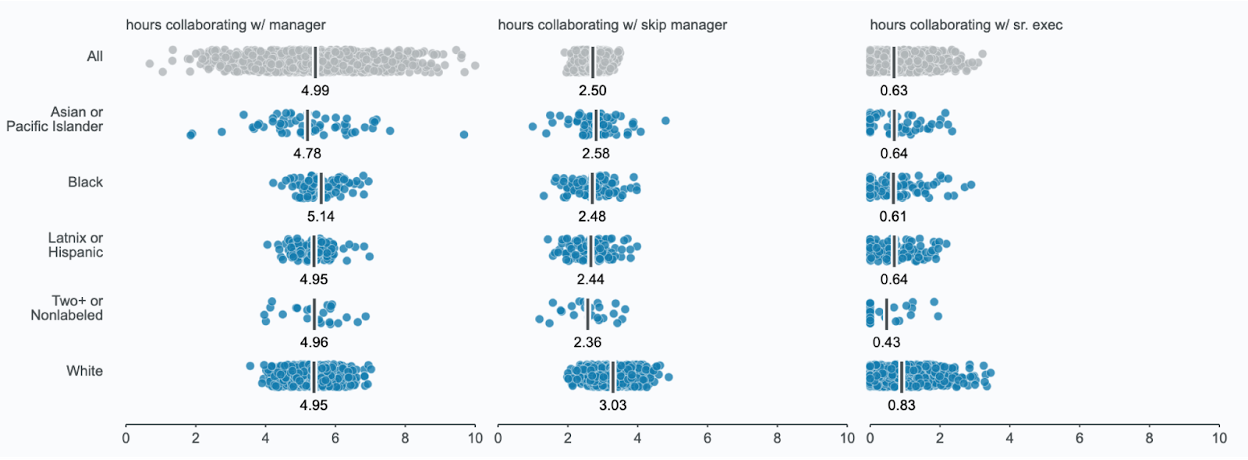
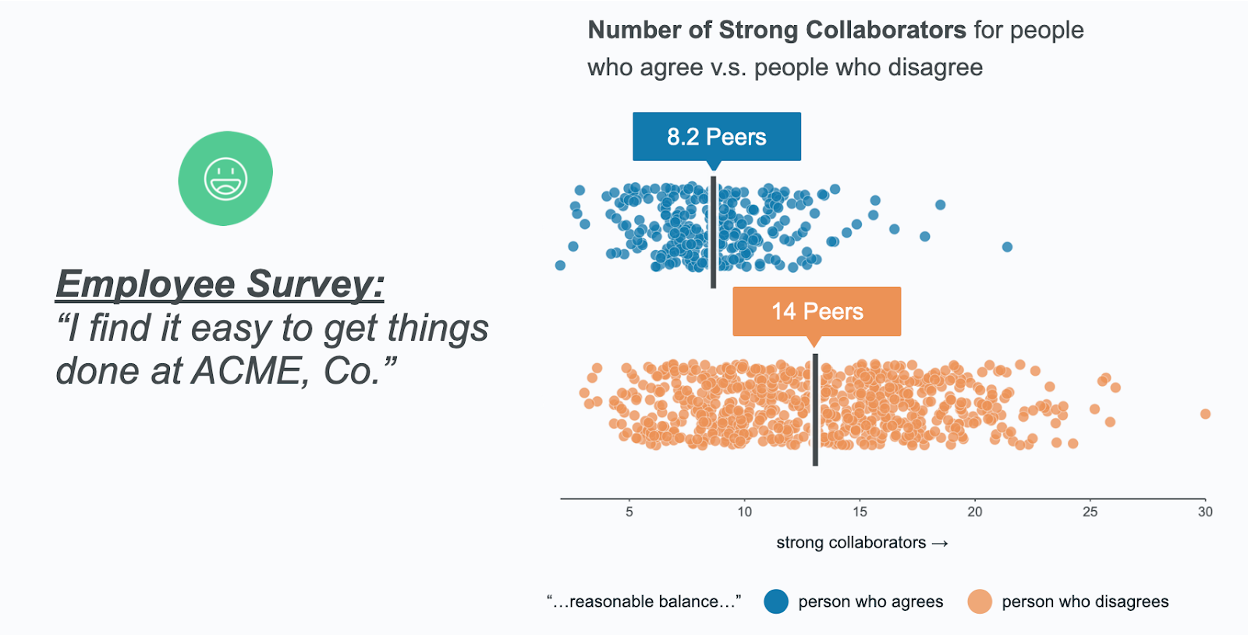
An honest note: these signals describe patterns, not intent. They can tell you that a team is overloaded or that one voice dominates, but not why. Use them to ask better questions, not to score individuals. Aggregated, team-level views keep the focus on the system rather than surveillance of any one person.
Once you track several metrics, it helps to roll them into a single meeting effectiveness score so trends are easy to follow over time. A simple version weights outcomes most heavily, since they matter most:
The exact weights matter less than picking a formula and keeping it stable, so the score is comparable month to month. Track it by team, not just company-wide, so you can see where meeting culture is healthy and where it needs attention.

A quick reference for the load and structure metrics. Treat these as starting points and adjust to your own baseline.
| Metric | Healthy zone | Red flag |
|---|---|---|
| Meeting load | 4 to 8 hrs/week (IC) | 12+ hrs/week (burnout risk) |
| Recurring share | Under 50% | 70%+ (calendar on autopilot) |
| Meeting size | 2 to 6 participants | 8+ with unclear roles |
| Meeting length | 25 or 50 min defaults | Mostly 60+ min blocks |
| Decision redundancy | Direct stakeholders only | Multiple overlapping VPs |
| Hygiene | On-time, no overrun | Chronic late starts and overruns |
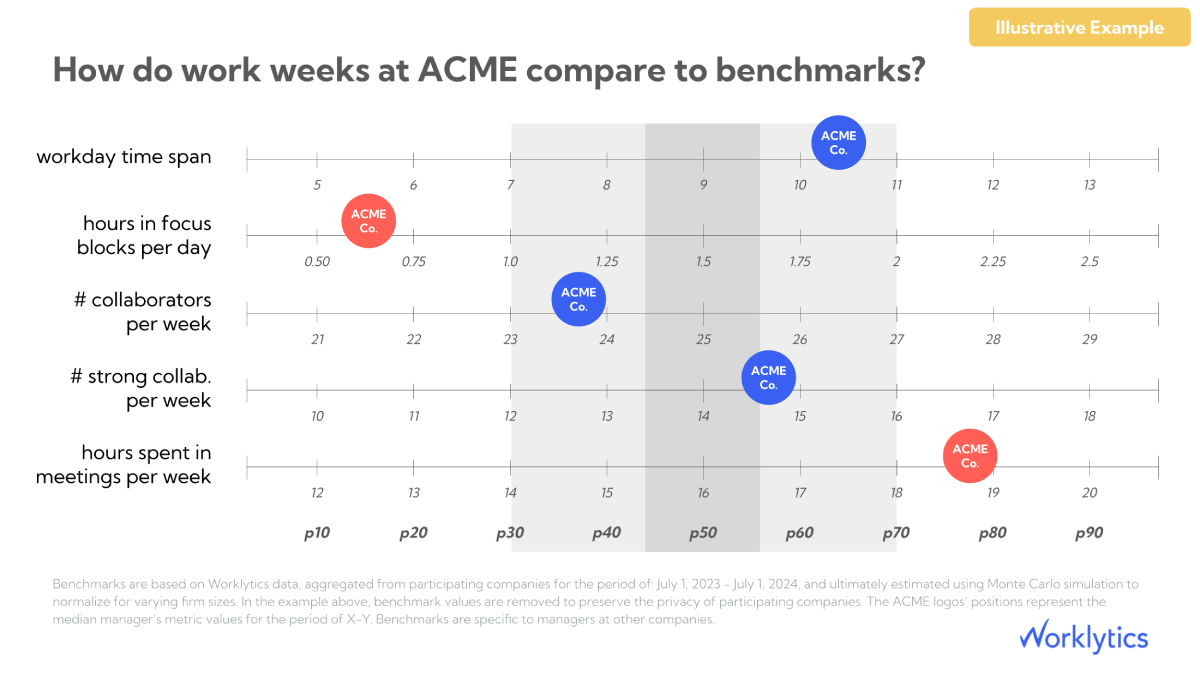
Measure it across three dimensions: time (meeting load, length, recurring share), people (meeting size, attendance quality, participation balance), and outcomes (action item completion and decisions reached). Most of the time and people metrics come straight from calendar and conferencing data. Outcomes usually need a short post-meeting prompt or action-item tracking.
For individual contributors, 4 to 8 hours a week is a healthy range. Between 8 and 12 hours is a watch zone. Above 12 hours a week, sustained, focus time and engagement tend to suffer. Managers will naturally sit higher, so benchmark by role rather than one company-wide number.
Default to 25 or 50 minutes rather than 30 or 60, so people get a break between calls. Match length to purpose: quick coordination can be 15 minutes, while a working session or decision meeting may need 45 to 50. Long hour-plus blocks should be the exception, not the norm.
Roughly 3 to 8 people for working meetings, with 2 to 6 ideal for most. Past 8 participants, individual participation drops and decisions slow down. If a meeting needs more people, it is often really an update that could be shared async.
The same metrics apply, and calendar plus conferencing data makes them easier to track when work is distributed. Two things matter more in hybrid settings: recurring meeting share, which tends to balloon as teams over-coordinate, and inclusion, since remote and junior employees are more easily left out of key meetings. Speaking-time data helps surface participation gaps you cannot see in a room.
Start with five: meeting load, focus time, recurring share, attendance quality, and action item completion. These cover cost, focus, and outcomes without overwhelming anyone. Add depth later with size, hygiene, video load, and participation balance.
Mostly, yes. Load, length, size, recurring share, hygiene, and video usage all come from calendar and conferencing data with no survey needed. Outcomes like decisions reached and whether attendance was necessary are the parts where a short prompt still helps, because intent is hard to read from data alone.
There is no universal number, so set your own baseline first, then aim to improve it. A low completion rate is usually a sign of unclear owners or fuzzy decisions rather than lazy follow-up, so it points you toward better meeting design.
Pick three metrics, not twelve. Meeting load, recurring share, and action item completion give you a fast read on whether meetings are too heavy, too automatic, and whether they lead anywhere. Set a baseline, share it with teams, and revisit in a quarter.
Worklytics measures most of these automatically from Google Calendar, Outlook, Zoom, and Teams, using aggregated, team-level data rather than individual tracking. If you want to see your own numbers without building it by hand, the meeting effectiveness solution is a good place to start, or you can read how Worklytics works.