The AI skills gap is the distance between the AI tools a company pays for and how well its people actually use them. You close it by finding the teams where AI use is shallow, training them on their real work, and measuring whether their use gets deeper.
The gap is wide. IBM Institute for Business Value research cited by IBM found that only 25% of workers regularly use AI in their jobs, even though 86% of CEOs believe their employees have the skills to work with it. In the World Economic Forum's Future of Jobs Report 2025, 63% of employers named skills gaps as the biggest barrier to transforming their business, and 85% said they plan to prioritize upskilling.
This guide covers why the gap matters, its root causes, and a five-step plan to close it. For which skills to teach, see the essential skills for working with AI agents. For realistic timelines, see how long it takes to build AI skills. For the measurement itself, see how to measure AI skills across your workforce.
Why does the AI skills gap matter so much? Simply put, failing to close this gap results in missed opportunities and increased competitive risk. AI can significantly boost efficiency, innovation, and decision-making. Companies that train their workforce to use AI will gain those advantages, while those that do not risk falling behind.
Organizations with AI-trained staff capture these efficiency gains, while untrained teams continue to spend time on repetitive, manual tasks.
Bridging the AI skills gap is also essential for getting a strong return on investment. Many companies are investing heavily in AI, but without proper training, the technology often remains underutilized.
There’s also a talent angle. Today’s employees want to work for companies that help them grow their skills and stay future-ready. Employers that offer AI training and career development attract and retain talent more effectively because people feel supported and valued. Ignoring skill development, on the other hand, can lead to lower morale and higher turnover.
What are the underlying reasons so many organizations face an AI learning gap? Understanding these root causes helps identify effective solutions. Key contributors include:
1. Insufficient Training and Upskilling
Without formal training, employees are left to figure things out on their own. Even when training exists, it may not be effective. People cannot acquire AI skills if training is too generic, too infrequent, or not supported by management.
2. Rapid Technological Change
AI technology is advancing at a fast pace, with new tools and features emerging every few months. This makes it difficult for employees and even learning teams to stay current.
A best practice from a year ago might already be outdated.
Without ongoing learning programs, workers inevitably fall behind as the technology evolves.
3. Lack of Clear Use Cases
Some companies take a “technology-first” approach, buying AI tools before defining how they will actually be used. Employees may hear that AI is being introduced, but aren’t shown specific, practical ways to use it in their daily work. When employees don’t see the “why” or “how” behind a tool, adoption slows, and learning stalls.
4. Cultural Resistance and Fear
Human factors also play a major role. Some employees are hesitant to use AI because they fear job loss or doubt the accuracy of AI-generated outputs.
Others simply don’t trust systems they don’t understand.
When employees lack reassurance or clear communication, these fears can prevent engagement. Surveys show that job-loss anxiety and lack of confidence in understanding AI are common reasons for resistance. When AI is viewed as a threat rather than a support tool, learning opportunities are missed.
5. Limited Leadership Support
Frontline workers often take cues from leaders. When managers don’t encourage AI use or fail to show its benefits, employees are less likely to engage with it. Strong leadership support has been shown to improve adoption. Without visible leadership backing, enthusiasm and participation tend to drop.
6. Resource and Tool Gaps
Smaller organizations and those with limited budgets may face challenges such as a lack of funding for training or limited access to modern AI tools and data. Without access to sandbox environments or practice tools, learning stays theoretical instead of practical.
In summary, the AI skills gap exists not because workers are unwilling to learn, but because of organizational gaps such as limited training, unclear strategies, cultural barriers, and lack of resources. The good news is that many of these issues can be addressed. By focusing on continuous learning, supportive leadership, and access to practical tools, companies can create an environment where employees can build confidence and grow their AI skills.
A common version of the AI skills gap is a leader whose team is ahead of them. The fix is the same as for anyone else: pick two or three recurring tasks from your own week, use AI for them every day for a month, and ask the heaviest AI users on your team to review how you work. Leaders who use AI visibly also speed up adoption below them.
To keep up with AI’s rapid evolution, organizations need to build a culture of continuous learning. This means moving beyond one-time workshops and making skill development an ongoing part of daily work.
1. Structured Training Programs
Offer formal AI training for all employees. Include workshops on key tools, such as CRM assistants or AI coding partners, and supplement with online courses. Create learning paths for each role to build basic AI fluency.
2. Micro-Learning
Provide short lessons that fit into daily routines, like weekly tips, short videos, or brief team demos. Regular small updates help employees stay current and reinforce learning.
3. Hands-on Practice
Give employees a safe space to use AI tools. Set up test environments, pilot projects, or short challenges where they can experiment and learn through practice.
4. Certifications
Use internal badges or verified certifications to track progress. Link these credentials to career goals so employees see clear value in developing AI skills.
5. Integration into Work Culture
Include AI in regular training and internal discussions. Encourage employees to share how they use AI tools through company channels such as Slack or Teams.
Continuous learning requires some investment but helps organizations stay adaptable and ready for new technologies. As AI evolves, regular learning keeps skills current and relevant.
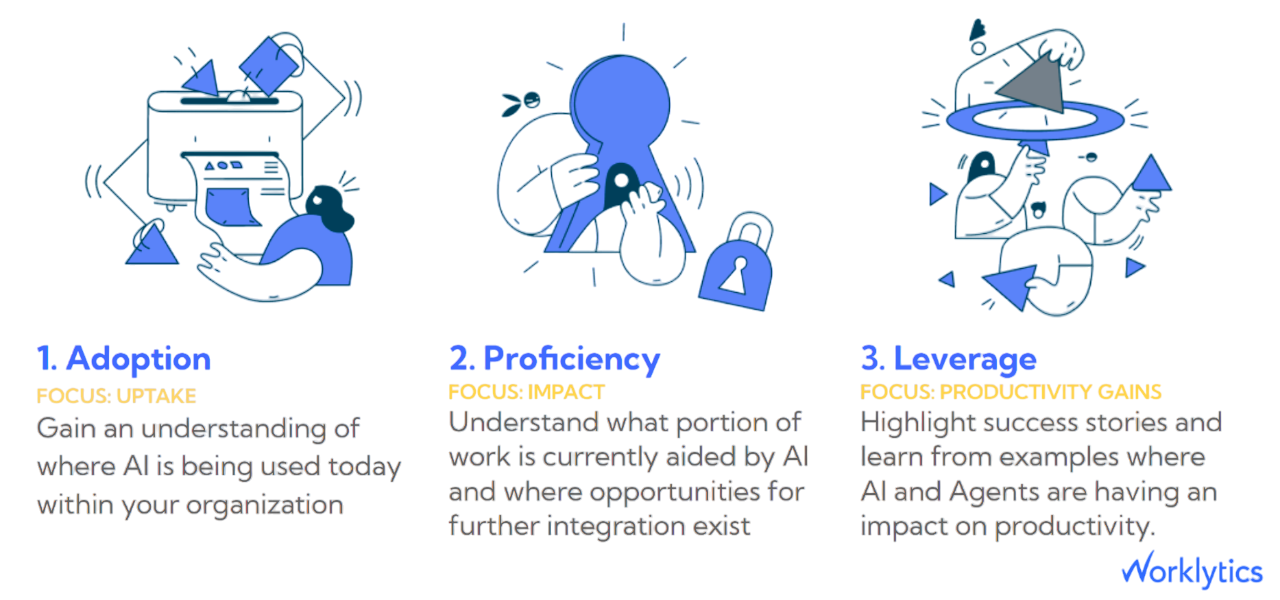
Closing the AI skills gap begins with measurement. Without accurate data, it is difficult to know whether AI adoption efforts are effective or where training should be focused. Worklytics provides clear visibility into how employees use AI tools and how those tools influence performance. By analyzing real work patterns, organizations can identify gaps, measure progress, and build targeted learning strategies.
Worklytics captures real patterns of AI engagement from most commonly used AI Agents employees use every day, including GitHub Copilot, ChatGPT (Teams/Enterprise), Claude Enterprise, Microsoft Copilot, Google Gemini, Cursor, Moveworks, and Windsurf. It reveals how teams interact with AI tools, how frequently they use them, and which roles are benefiting most. These insights create a true picture of AI integration across the business, showing where adoption is strong and where additional training or enablement may be needed.
Worklytics connects with a broad ecosystem of AI platforms and collaboration tools to provide a unified view of how your teams use AI in daily work. Some example integrations include:
Because these integrations span both AI tools and everyday work systems, Worklytics can show how AI usage aligns with collaboration, project workflows, and communication patterns. Leaders can see, for example, which teams use Copilot in GitHub & Microsoft apps, how often ChatGPT is leveraged by support teams, or whether AI adoption is consistent across Slack and Asana.
This deep integration ensures you’re not just measuring AI in isolation: you see how it fits into real work, giving you more precise insights to guide training, tool rollouts, and performance improvements.
Within the data, Worklytics can identify high-performing teams that effectively use AI and those that need more guidance. Power users can act as internal mentors, helping others adopt AI tools more confidently. Teams with low adoption can receive targeted training to remove barriers and improve engagement.

Worklytics combines AI usage data with calendar, email, and project tool signals, so you can compare how work patterns change between high-adoption and low-adoption teams over the same period. That gives you evidence about where AI use is changing how work gets done, instead of relying on anecdotes.
Quantifying the return on AI investments is key to sustaining adoption. Worklytics shows which tools and training programs actually move adoption and depth of use, and links AI usage to productivity signals from the rest of your tech stack. That lets you judge which investments are paying off and where to spend next.
Beyond whether people use AI at all, Worklytics shows how often teams use it and which kinds of work they use it for, such as coding, research, analysis, summarization, and drafting. Tracking that over time shows whether a team's use is still basic or getting deeper, and where more enablement would help.
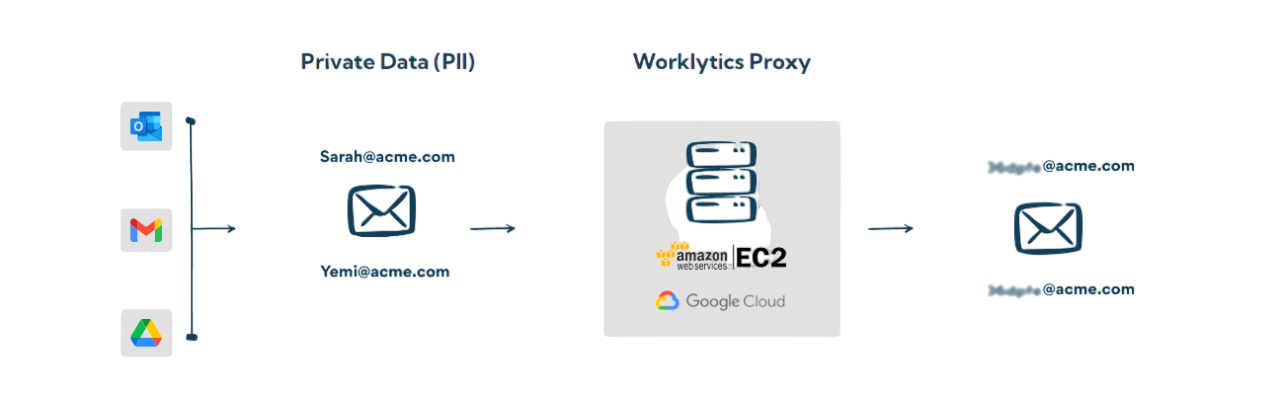
Worklytics is built for privacy. It analyzes usage metadata, never the content of prompts, messages, or documents. Personal identifiers are pseudonymized (hashed with SHA-256) before analysis, and results are only shown for groups above a minimum size (typically 5 to 8 people). Insights support teams; they are not used to watch individuals.
In conclusion, Worklytics serves as a powerful ally in reducing the AI learning gap. By providing visibility into work patterns and AI usage, it supports a data-driven upskilling strategy.
Organizations can target their training efforts, foster peer learning by identifying champions, and continuously iterate on their adoption initiatives.
With solutions like Worklytics, companies can confidently drive data-driven upskilling and AI adoption, transforming the abstract goal of “closing the AI skills gap” into a measurable, achievable journey.
Bridging the AI skills gap isn’t a one-time task; it’s an ongoing commitment. But with the right approach and tools like Worklytics, it’s a commitment that will pay dividends in productivity, innovation, and growth for years to come.
For the skills themselves, read essential AI skills for working with AI agents. For timelines, see how long it takes to build AI skills in an organization.
The AI skills gap is the difference between what AI tools can do for an organization and how well its people use them. It shows up as licenses that sit unused, shallow use limited to simple questions, and uneven adoption between teams.
IBM Institute for Business Value research found that only 25% of workers regularly use AI in their jobs, while 86% of CEOs believe their employees have the skills to work with it. In the World Economic Forum's Future of Jobs Report 2025, 63% of employers named skills gaps as the biggest barrier to business transformation.
Start by measuring AI use by team to see where the gap really is. Then train those groups on their own day-to-day tasks, use high-adoption teams as peer mentors, and re-measure every few weeks to check that usage is getting deeper.
Leaders close the gap the same way their teams do: by using AI on their own recurring work every day. Picking two or three tasks, practicing for a month, and asking the team's strongest AI users for feedback works better than a one-off executive briefing.
Surveys measure confidence, not skill. A more reliable approach uses AI tool usage data, aggregated by team, to track how many people use AI, how often, and for what kinds of work, and then compares those patterns across teams over time.