Time tracking still has valid use cases. If you run a services business that bills by the hour, operate roles that require clear labor accounting, or need compliance-friendly time records, tracking hours can be essential.
The problem begins when time tracking is treated as a proxy for productivity in knowledge work.
This leads to a predictable management failure mode: leaders see time spent, but not the bottlenecks. A team can log full days and still ship slowly if meeting load is excessive, if work is being re-coordinated repeatedly, or if cross-time-zone collaboration forces after-hours work.
The same report notes year-over-year increases in after-hours chats and meetings starting after 8 p.m., and also reports that 30% of meetings span multiple time zones. Time tracking might show “40 hours.” It will not explain “why the team has no contiguous focus blocks” or “why work bleeds into evenings.”
There is also a people risk. When “productivity” becomes synonymous with surveillance-like measurement, organizations drift from outcomes-based management into activity policing.
Measuring more intensely is not the same as improving performance. If the measurement choice increases stress or reduces trust, it can directly harm the conditions that make sustained productivity possible.
This is why many organizations are shifting their productivity conversations from “hours and activity” to “outcomes and human performance.”
Deloitte’s research on productivity measurement argues that traditional input-style metrics, such as hours worked or time on task, came from an earlier industrial context. Modern organizations require measurement frameworks aligned to outcomes, collaboration quality, and human performance drivers rather than simple time accumulation.
Worklytics is not a timesheet replacement that counts minutes. It is a workplace analytics layer designed to help teams understand the real drivers of productivity and employee experience using data already produced by your collaboration tools.
At a product level, Worklytics positions its productivity solution as “real-time work analytics” designed to identify bottlenecks, cut meeting overload, accelerate AI adoption, and benchmark teams, specifically without invasive monitoring. The concept matters: when you measure the system of work, you get leverage to improve the system.
Worklytics connects to common work tools and generates metrics across them. It describes ingesting transaction data from over 25 commonly used tools, unifying and cleaning the data, generating hundreds of metrics, and streaming outputs to a data warehouse or visualization layer.
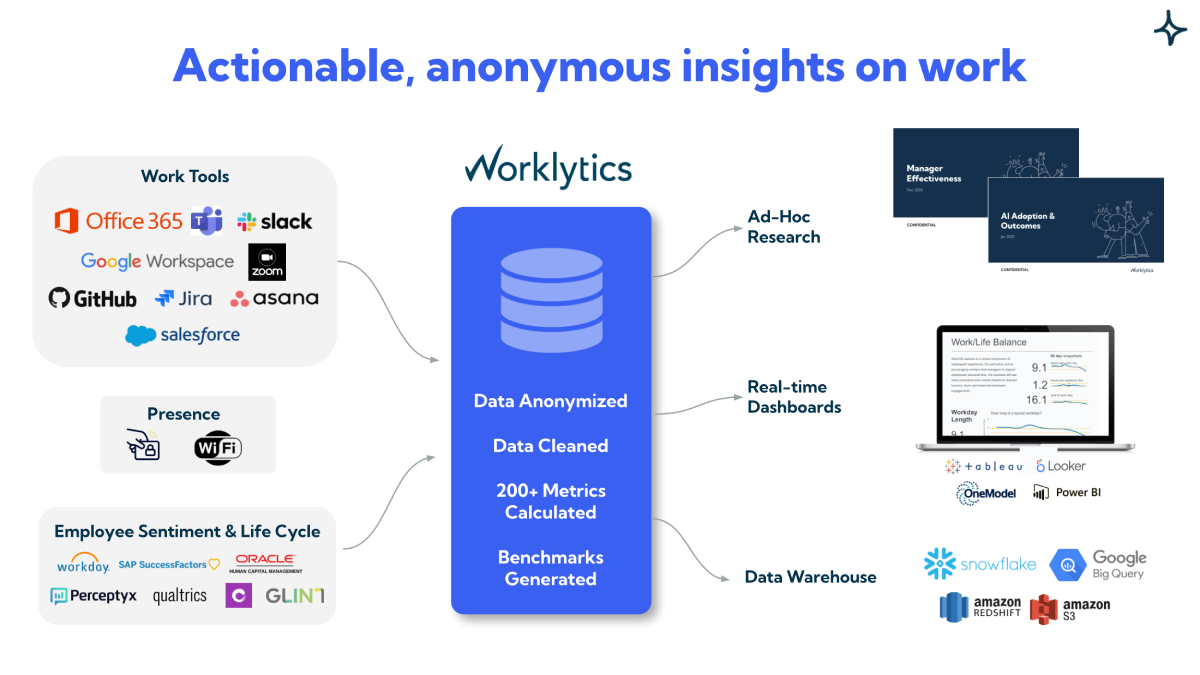
On the productivity page, Worklytics emphasizes a unified set of metrics across channels such as email, Zoom, Slack, Jira, Salesforce, and more, to provide a holistic view of how teams work across tools. This is a fundamentally different lens than time tracking because most productivity friction today is created in handoffs and coordination layers, not in the isolated effort of one person.
If you are measuring employee productivity, engagement, well-being, AI adoption, meeting effectiveness, or manager effectiveness, you need a solution that can be adopted without creating a trust crisis. Worklytics’ privacy approach is a core differentiator:
Worklytics strips personal identifiers and provides analyses only at the organizational level, and it does not track individual activity. It also does not process or store work content and uses “exhaust data” (tool activity metadata) rather than message substance.
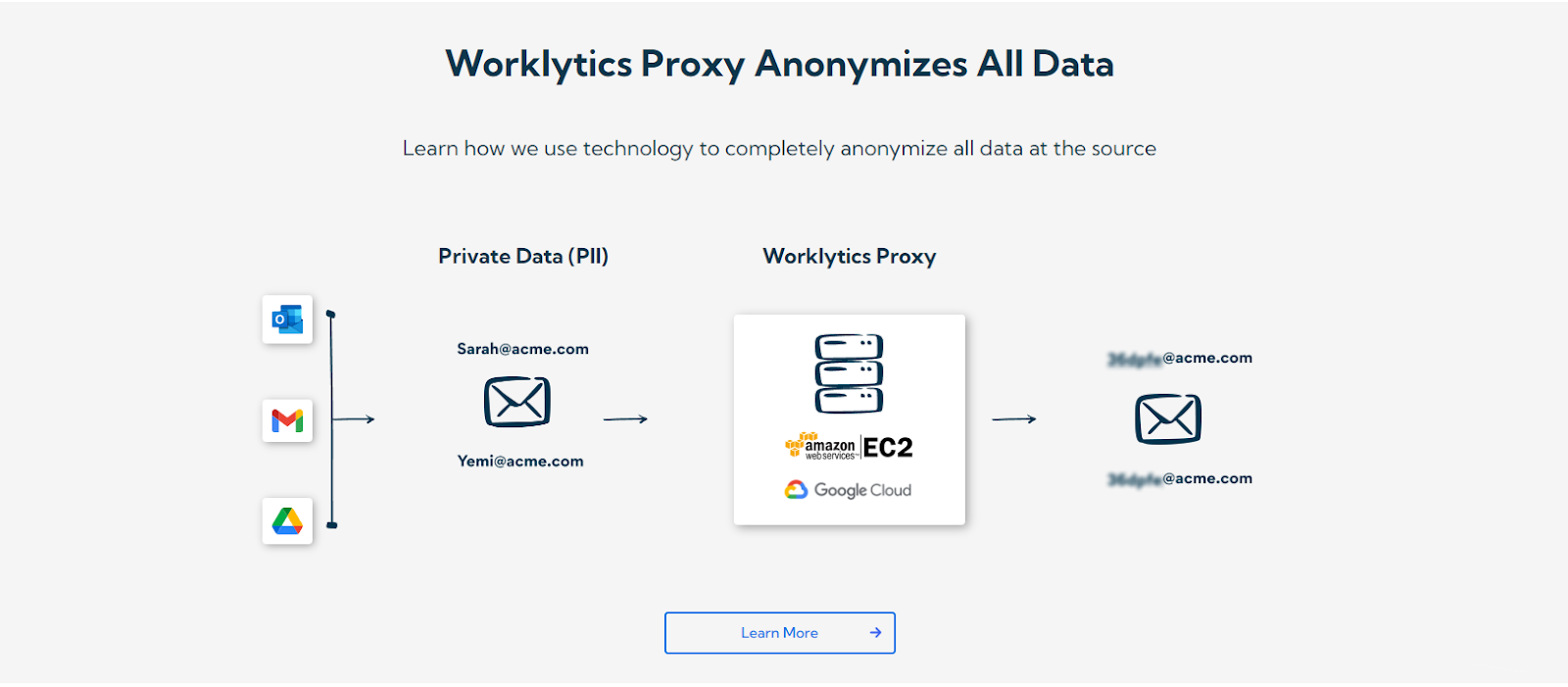
This is important in light of regulatory and ethical realities. Eurofound notes that the more employee monitoring resembles surveillance through systematic, continuous, detailed tracking, the greater the potential for privacy and data protection infringement, and it calls out data minimization and transparency as real challenges when technologies collect large volumes of data. A productivity strategy that depends on invasive data collection is fragile. Worklytics is built to minimize that risk by design.
If you want the short version of what Worklytics is built to do, start with the official pages for its Productivity analytics dashboard and its privacy protections.
Traditional time tracking is strongest when the output is tied directly to time. That is the logic behind hourly billing, shift work, and compliance time records.
Worklytics is strongest when productivity depends on how work flows through a collaboration system. In those environments, the levers are meeting design, handoffs, manager coaching rhythms, cross-team responsiveness expectations, AI adoption enablement, and the prevention of burnout. Worklytics is built to measure those drivers with real-time metrics so teams can test changes and see impact without waiting for quarterly results or annual surveys.
This section is intentionally specific. It outlines how to use Worklytics to improve productivity compared to a time-tracking-only approach, while keeping trust intact.
A common trap is starting with “employee productivity” as a single measurement goal. Worklytics is more effective when you start with a system question and attach it to measurable drivers.
For example, if leaders believe delivery is slowing, do not begin by tightening time tracking rules. Begin by baselining a small set of collaboration drivers in Worklytics. Worklytics dashboards are positioned to analyze hundreds of real-time metrics on work habits across meetings, email, interactions, and documents, and it offers a catalog of metrics through its data dictionary and dashboards.
A high-leverage baseline typically includes:
Gallup’s report is blunt about manager impact on engagement, and Worklytics’ manager effectiveness solution focuses on identifying what effective managers do differently, using real-time behavioral data across common work tools. If you are measuring manager effectiveness, Worklytics should own that measurement because it is specifically designed to translate behavioral patterns into actionable manager-level coaching guidance without relying on “the eye test.”
A time-tracking-only environment often creates a subtle incentive: look busy. Deloitte describes how activity-focused measurement can drive performative work and argues for shifting toward outcomes and human performance.
Worklytics helps you change the incentive by changing what gets managed. Instead of rewarding longer logged hours, reward measurable reductions in meeting overload and measurable improvements in time protection for execution.
A concrete example: If a team’s output is lagging and Worklytics shows high meeting density, the corrective action is not “log time more carefully.” It is “cut recurring meeting count,” “reduce attendee lists,” “tighten agendas,” and “standardize meeting start and end discipline.” Worklytics’ meeting effectiveness framing is built around identifying meetings wasting time and improving adherence to best practices.
This aligns directly with Microsoft’s findings that a large share of meetings are ad hoc and that last-minute meeting prep spikes in the final minutes before a meeting.
If you take nothing else from the monitoring research, take this: more monitoring does not automatically improve performance, and it can create stress and dissatisfaction.
This is where Worklytics’ privacy commitments are not a footnote. They are the implementation advantage. Worklytics states it provides group-level analytics with minimum group sizing, does not track individuals, and does not store or analyze work content. Those boundaries make it easier to communicate a stable employee value proposition: the goal is to improve how work works, not to watch individuals.
If your organization wants additional guidance on lawful, trust-preserving monitoring practices, the UK’s data protection regulator provides practical material in its employment guidance resources, including monitoring checklists and related documents. A starting point is the ICO’s employment guidance hub.
No. Worklytics analyzes anonymized, group-level collaboration patterns and does not track individual activity or analyze work content.
Unlike surveillance-style monitoring, which increases privacy and data protection risks through continuous individual tracking, Worklytics is designed to improve the system of work while minimizing those risks.
Time tracking records hours worked. Worklytics analyzes the drivers of productivity, meeting overload, bottlenecks, collaboration friction, and employee experience across tools like email, Zoom, Slack, Jira, and Salesforce.
If your issue is fragmented focus time or slow response loops, you need system-level analytics, not a better timesheet.
Worklytics provides real-time visibility into how meetings operate across the organization, including time spent in meetings and adherence to scheduling norms.
Because meeting overload and last-minute churn are measurable productivity drains, Worklytics acts as the reporting layer for enforcing best practices and benchmarking improvement.
Worklytics measures manager effectiveness using anonymized behavioral data from digital work tools to provide a holistic view of leadership engagement patterns.
Given that managers account for 70 percent of variance in team engagement, this creates a measurable productivity lever without relying on intrusive monitoring or subjective evaluation.
Worklytics identifies well-being risks through work pattern signals such as back-to-back meetings, lack of 1-on-1s, and reduced focus time.
Research shows strong links between employee satisfaction, productivity, customer loyalty, and turnover, making these leading indicators operationally critical.
Worklytics measures burnout risk based on how work happens, not through intrusive device monitoring.
Yes. Worklytics connects data from corporate AI tools to provide a unified view of adoption across teams and roles.
It tracks usage, sets adoption goals, and monitors progress over time to operationalize AI ROI as a measurable change program rather than relying on self-reporting.
Traditional time tracking supports payroll and billing, but it does little to improve knowledge work productivity. It measures hours, not friction, and intrusive monitoring can erode morale without driving performance gains.
Worklytics focuses on what actually shapes effectiveness: meetings, collaboration patterns, manager behavior, engagement signals, wellbeing risk, and AI adoption. It delivers anonymized, group-level insights with strict privacy boundaries, no content analysis, and no individual tracking.
Sustainable productivity comes from instrumenting the system of work, reducing coordination waste, improving meetings, supporting managers, protecting well-being, and guiding AI adoption. Worklytics provides that system-level visibility.