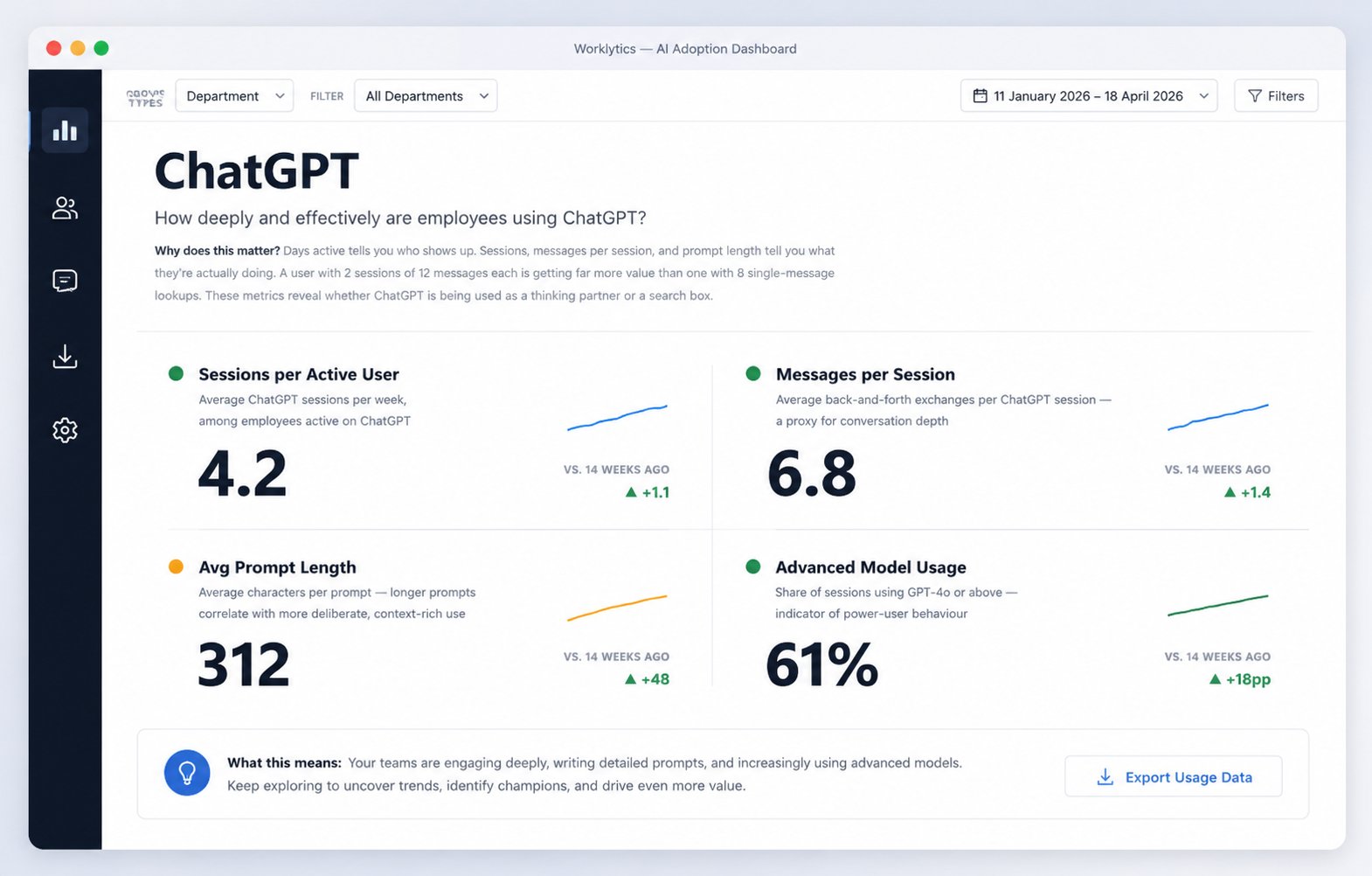
TLDR
A ChatGPT Enterprise contract is typically priced per seat, which means every inactive license is a quantifiable waste line in your budget. The ChatGPT admin console shows you headline numbers, but a dashboard you cannot query is a report, not a dataset. Exporting the underlying data is what turns "we have 2,000 seats" into answers to the questions your CFO and CIO actually ask: which departments activated, whether usage is deepening or plateauing after the initial novelty period, and whether the people using ChatGPT most are the ones whose work benefits most from it.
There is also a structural reason exports matter more for AI tools than for most SaaS.
AI adoption is uneven by nature.
OpenAI's own analytics define power users as the top 20 percent of users by message activity who use three or more ChatGPT tools, which implies the other 80 percent are getting a fraction of the value from the same license cost. You cannot manage that skew from a summary dashboard. You need row-level data you can segment by team, tenure, and role, and that requires getting the data out.
OpenAI splits its data access into two deliberately separate products, and understanding the split saves you weeks of chasing the wrong API. The Compliance API vs User Analytics comparison in OpenAI's help center is the canonical reference, but the practical distinction is this:
Workspace analytics is the aggregated layer. It covers seat allocation, activation rates, weekly active users, message volume trends, and usage mapped to models, GPTs, tools, and projects. It exists for adoption reporting, and it exports as CSV.
The Compliance API is the raw layer. It returns time-stamped records of conversations, uploaded files, GPT configurations, memories, and workspace users. OpenAI has since folded it into a broader Compliance Logs Platform that delivers immutable, append-only JSONL log files with minutes-level latency, plus newer log categories including admin audit events, user authentication, and Codex usage. It exists for eDiscovery, DLP, and SIEM integration, not for adoption dashboards.
The inference to draw: if your goal is measuring adoption and ROI, workspace analytics is your starting point and the Compliance API is overkill that drags legal and security review into the project. If your goal is auditability or data loss prevention, the reverse is true.
The export flow lives inside the admin console. From the Analytics section, select Export data, choose a Data type (Users, GPTs, or Projects), pick a preset date range or set custom dates, then select Generate CSV. The file generates on demand rather than on a schedule, which matters for anyone planning recurring reporting: there is no native way to have this CSV land in your warehouse every Monday, so someone has to click the button, or you have to build around the gap.
Two operational details change how you should schedule your pulls. First, workspace analytics is not real-time. OpenAI refreshes data every 1 to 24 hours, typically within 6 to 12 hours, with data availability targeted at up to 48 hours. Exporting Monday morning for a report covering last week risks missing the final day or two of activity, so pull midweek for the prior full week. Second, the Filter by Group dropdown respects both SCIM-managed groups and groups created in the ChatGPT UI, which means the quality of your group hygiene upstream directly determines whether your exports can be segmented by department at all.
Access is also worth planning. OpenAI added an Analytics Viewer role that grants read-only access to workspace analytics, so department leaders and AI program managers can pull their own numbers without holding full admin permissions. Use it. Centralizing exports through one admin creates a bottleneck that quietly kills reporting cadences.
The Compliance API requires an API key provisioned by your workspace owner, and access is scoped at the workspace level rather than per user. The platform supports two access patterns: the Compliance Logs Platform for append-only log events suited to auditing, and the stateful API for querying workspace state at the moment of the request. Logs arrive as time-windowed JSONL files, a format chosen because compliance tooling ingests line-delimited JSON natively.
Before you build against it, be clear about what you are signing up for. The Compliance API returns conversation content, including prompts and outputs. The moment you pipe that into your own storage, you own the retention, access control, and privacy obligations for employee conversation data. In most organizations that triggers works council consultation in Europe, legal review everywhere, and a legitimate employee trust question. This is why the sensible default for adoption measurement is metadata only: message counts, timestamps, tool types, and user identifiers tell you everything you need about adoption patterns without your analytics team ever being able to read what an employee asked ChatGPT. Worklytics documents this approach in its guide to tracking ChatGPT Enterprise adoption without storing personal data.
The CSV exports answer the first-order question of who used ChatGPT and how much. They stop short in four specific places, and each gap follows from what the export is not designed to contain.
No organizational context. The Users export identifies people, not org structure beyond your groups. To answer "how does Engineering compare to Finance," you have to join the export against your HRIS data yourself, keep that join current as people move teams, and handle the identity matching when the email in ChatGPT does not match the email in Workday. Worklytics' walkthrough on tracking ChatGPT Enterprise usage by department without extra instrumentation covers why this join is the step most internal projects stall on.
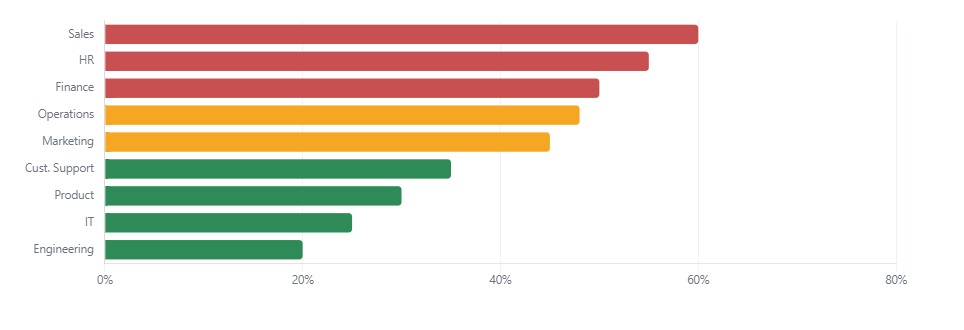
Once usage data is joined to org structure, adoption gaps become visible by department. Illustrative example from a Worklytics sample report.
No cross-tool view. Your organization almost certainly runs more than one AI tool. ChatGPT exports say nothing about Copilot, Gemini, Claude, or Cursor, so a team that looks inactive in your ChatGPT CSV may simply be doing the same work in a different tool. Vendor-by-vendor reporting systematically misreads substitution as non-adoption.
No work classification. A message count treats a one-line "rewrite this email" the same as a forty-turn debugging session. Without classifying activity into work categories, you cannot say which workflows AI is actually accelerating, only that messages were sent.
No outcome linkage. Usage data alone cannot tell you whether adoption improved anything. That requires correlating AI activity with collaboration and output signals over time, which is analytics work, not export work.
Once the data is out, resist the urge to chart everything. Four metrics carry most of the decision weight, and each maps to a specific action.
Activation rate (active users divided by licensed seats) is your license reallocation signal. Seats inactive after 60 days should move to waitlisted teams before renewal, because renewal negotiations price on total seats, not active ones.
Weekly active usage frequency distinguishes habit from experimentation. A user who sends messages five days a week has integrated the tool into their workflow. A user who spikes once a month is still deciding. The trend line matters more than the level: flattening WAU three months post-rollout is the earliest reliable signal that your enablement program has reached its ceiling.
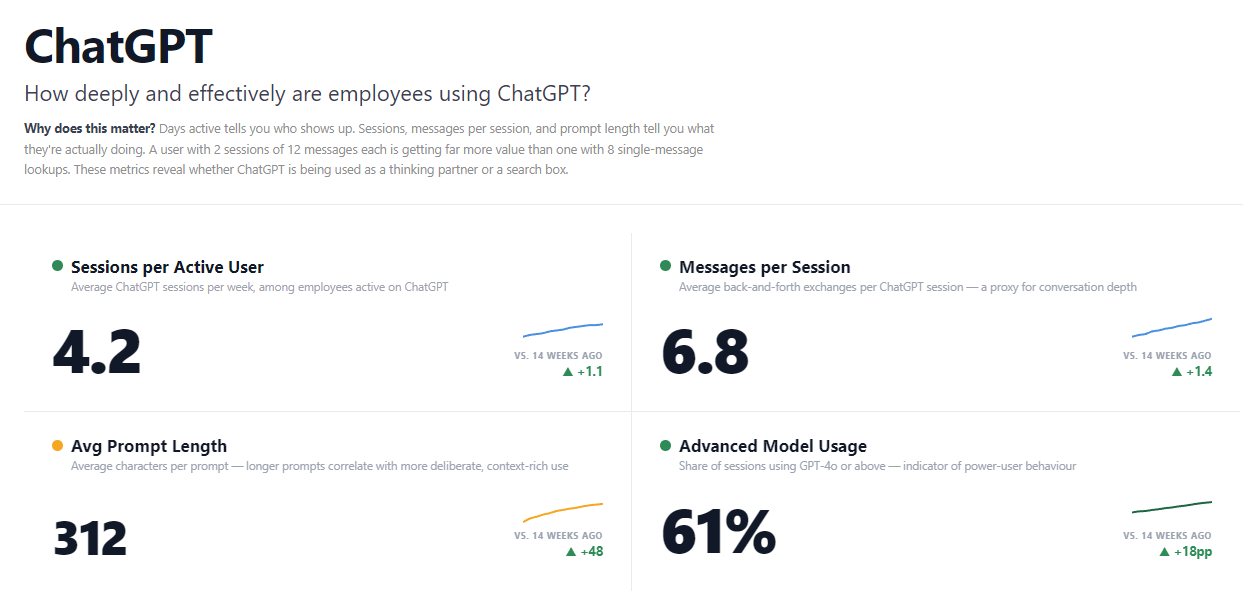
Depth metrics for ChatGPT in Worklytics: a user running two 12-message sessions is getting far more value than one running eight single-message lookups.
Power-user distribution tells you where expertise concentrates. If your top 20 percent of users cluster in two teams, those teams hold the prompt patterns and workflows the rest of the org needs, which makes them your internal training resource. Uneven distribution is not a problem to fix, it is an asset to spread.
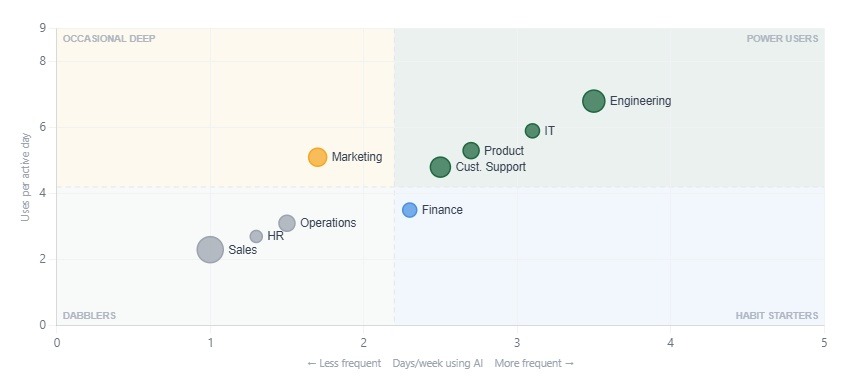
Engineering and IT sit in the power-user quadrant while Sales and HR remain dabblers. Each quadrant calls for a different enablement play.
Category mix over time shows whether usage is deepening. Early adoption skews toward drafting and summarization because those require no workflow change. A shift toward analysis, research, and coding indicates employees are trusting the tool with harder work. Worklytics automatically classifies AI activity into these categories (coding, research, analysis, summarization, drafting, and email creation), which is the piece raw message counts cannot give you. Its guide to building a ChatGPT usage dashboard shows what this looks like assembled.
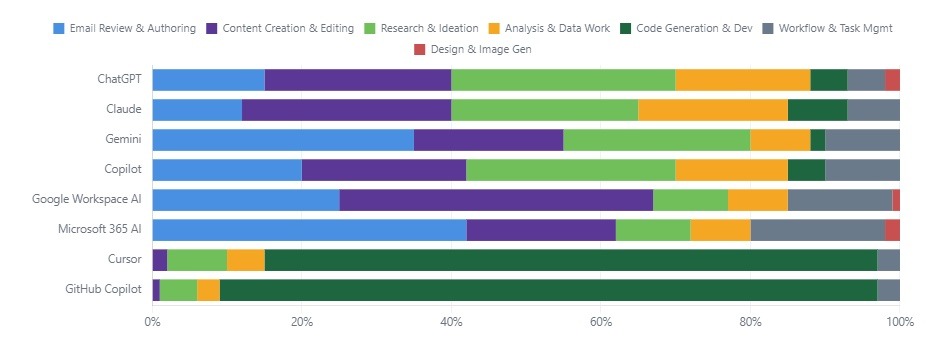
Work classification across the full AI stack: ChatGPT skews toward research and content creation while Cursor and GitHub Copilot are almost entirely code generation. This is the view native vendor exports cannot produce.
Everything above can be built by hand: scheduled CSV pulls, an HRIS join, a warehouse model, a BI dashboard, and a re-run every time OpenAI changes an export column. Worklytics MeasureAI exists because most teams that start that build do not want to maintain it. It connects to ChatGPT Enterprise alongside Copilot, Gemini, Slack, Zoom, and coding assistants like Cursor and Claude Code, then delivers activation rates, weekly active usage, power-user distribution, laggard identification, and productivity correlation in one view, with team-level joins to your HRIS handled for you. You can also export the processed data back out to your own warehouse or BI tools, so adopting it does not lock your data in.
Two specifics from Worklytics deployments are worth knowing when you plan a rollout. Most organizations see their first metrics within a week of setup, but meaningful trend data takes about 30 more days to accumulate, so start measurement before your enablement push, not after, or you lose your baseline. And Worklytics analyzes usage metadata only, reporting at the team level without touching prompt or output content, which is what gets these programs through works council and privacy review. Industry peer benchmarking, letting you compare your adoption curve against similar organizations, ships in summer 2026.
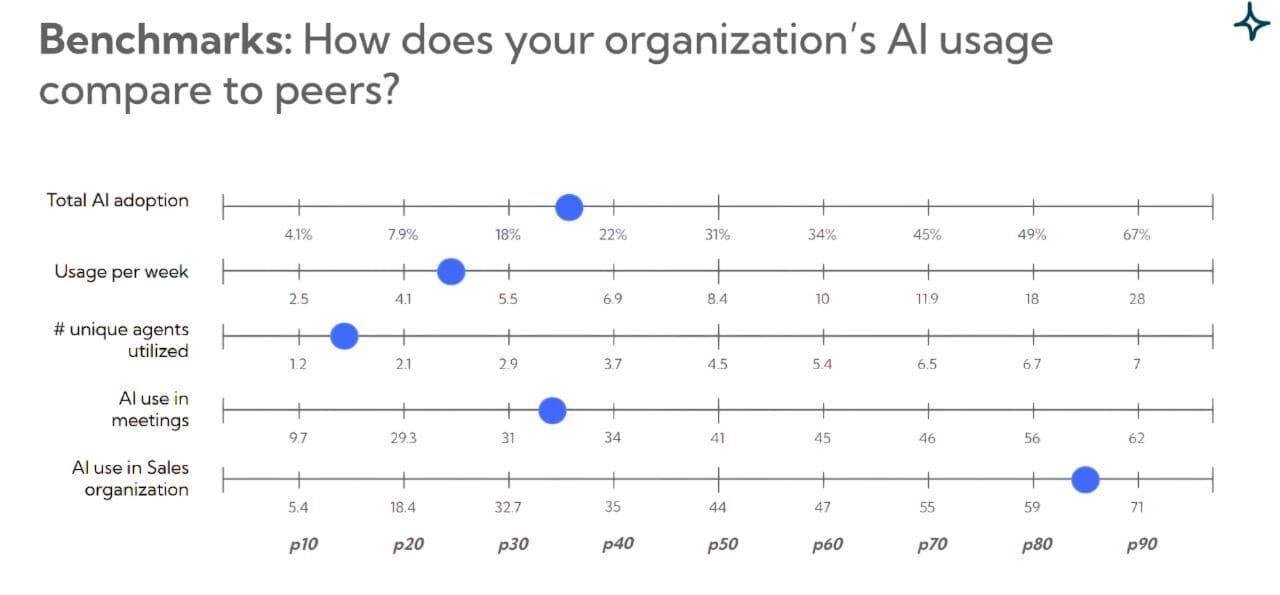
Peer benchmarking places each metric on a percentile scale, so "is 22 percent adoption good" gets an answer grounded in comparable organizations rather than guesswork.
The same platform extends past AI adoption: if you are measuring employee productivity, engagement, meeting effectiveness, or manager effectiveness, Worklytics applies the identical privacy-first, metadata-only model to collaboration data across your stack, so AI measurement becomes one lens in a broader workplace analytics program rather than a standalone project.
Can I export individual conversations from ChatGPT Enterprise?
Yes, through the Compliance API, which returns conversation content as JSONL logs. It requires workspace-owner provisioning and is built for eDiscovery and DLP use cases. For adoption measurement, use the workspace analytics CSV exports instead; they contain usage metrics without conversation content and carry far lighter privacy obligations.
How current is the exported data?
Workspace analytics refreshes every 1 to 24 hours, typically within 6 to 12 hours, and OpenAI targets data availability within 48 hours. The Compliance Logs Platform operates at minutes-level latency. Schedule weekly CSV pulls at least two days after the period you are reporting on.
Can I schedule automatic CSV exports?
No. CSV generation in the admin console is on-demand only. Recurring pipelines require either a person clicking the export each cycle or a platform like Worklytics that maintains the connection continuously.
Who can access workspace analytics without being a full admin?
The Analytics Viewer role grants read-only dashboard access, designed for department leaders and AI program managers who need numbers but should not hold administrative permissions.
How do I measure ChatGPT usage by department?
Either maintain SCIM-managed groups in your identity provider so the Filter by Group option segments correctly, then join exports to your HRIS manually, or use Worklytics, which performs the org-structure join automatically and reports at the team level.
Does exporting usage data violate employee privacy?
Metadata exports (counts, frequencies, timestamps) are broadly defensible when reported at team level. Conversation content exports via the Compliance API are a different category and warrant legal review, retention policy, and typically employee notification before you build anything on them.