See which teams use OpenAI Codex, how much, and what it produces: tokens, credits, code committed and commits. Worklytics turns OpenAI's Enterprise APIs into team-level adoption, output and cost metrics, without storing a single prompt.


The problem
OpenAI's own analytics show Codex activity for the workspace. They can't tell you which teams get value, how Codex changes delivery, what it costs per team, or how it compares with Claude Code, Cursor and GitHub Copilot.
Usage and cost are not tied to your HR structure, so you cannot see which departments, managers or locations justify their seats.
A quick fix and a long agent run look the same in a usage total. They need different responses.
If you also run Claude Code, Cursor or GitHub Copilot, there is no single view of your AI coding tools.
A vendor dashboard cannot show how much of the working day involves AI, or how it changes focus time, meetings and output.
See who adopts Codex and why, what it changes in the engineering week, and what it costs by team.
What Worklytics adds
OpenAI reports on its own product. Worklytics connects Codex to your org structure, your other AI coding tools and the engineering work itself.
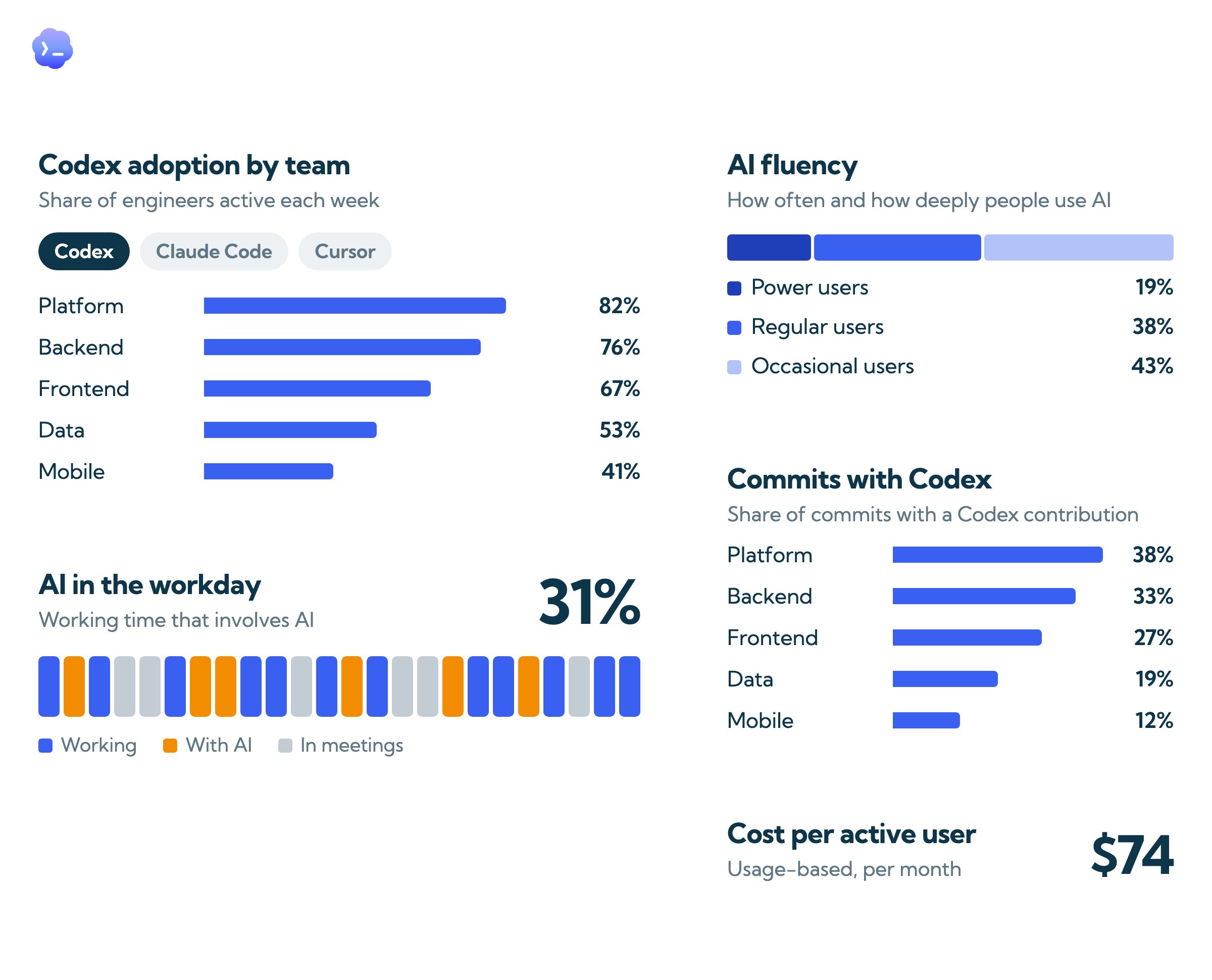
Active users, days used and sessions for Codex by team, manager, location and tenure, from your HR data.
Compare each team with the rest of your organization and with peer companies (benchmarks in beta).
Fluency goes beyond logins: how often and how intensively people use AI, and AI penetration, the share of available working time that involves AI.
See which teams have made AI part of daily work and which are still experimenting, and track movement after training.
Lines of code added and committed, and the share of commits with a Codex contribution, by team.
Shows whether Codex use is turning into shipped code, not just prompts.
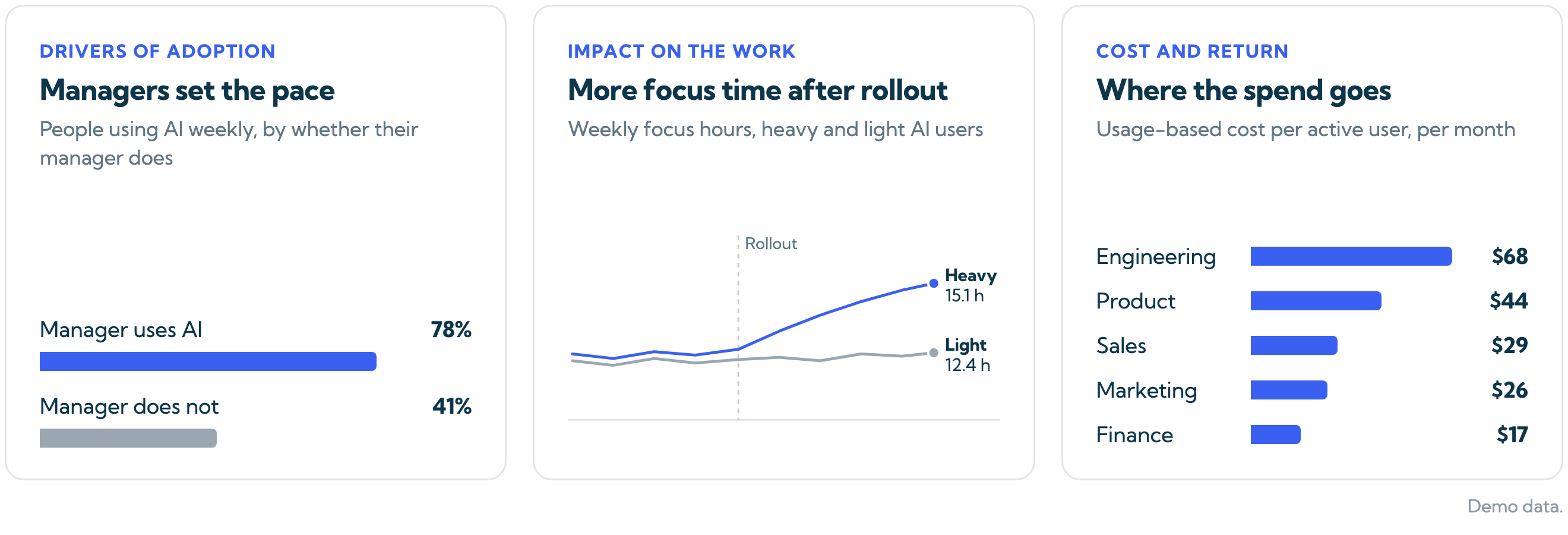
Find what predicts AI use in your organization: whether a person's manager uses AI, tenure, role and team norms.
Aim enablement where it will move adoption most, starting with managers.
Compare heavy and light Codex users, before and after rollout, on pull request throughput, review cycle time, focus time and meeting load.
Shows whether AI is changing the work itself, not just adding another tool.
Tokens, credits and usage-based cost for Codex by team and per active user, next to licensed seats.
See where spend goes and what it returns before you renew or consolidate tools.
Worklytics vs. native analytics
OpenAI's admin analytics cover activity inside its own products well. These are the gaps for teams that run more than one AI tool or need to connect AI use to the work.
| Capability | Native Workspace | Worklytics |
|---|---|---|
| Seat activation & weekly active users | ✓ | ✓ |
| Sessions & messages/session, 14-week trend | Partial | ✓ |
| Usage-based cost by department and per active user | ✗ | ✓ |
| Code output by team | ✗ | ✓ |
| Cross-tool view (Claude Code, Cursor, GitHub Copilot) | Codex only | All AI tools unified |
| Department segmentation without SCIM | Requires SCIM | ✓ |
| Impact on focus time, meetings, collaboration and output | ✗ | ✓ |
| AI penetration of the working day | Not available | By team, trended |
| User-level pseudonymization (no raw data) | Basic aggregation | SHA-256, minimum group sizes |
How it works
Worklytics reads Codex activity through OpenAI's Enterprise Compliance API and the Codex Enterprise Analytics API. No agent, no SDK and no code changes, and nothing is written back to your workspace.
Personal identifiers are hashed with SHA-256 before analysis, and results are shown only for groups above a minimum size. Prompt and response text is never stored. With the Worklytics proxy, this happens before data leaves your environment.
Connect your HRIS, calendar or GitHub to see Codex use by team and next to pull requests, reviews, meetings and focus time. Codex works on its own too.
Adoption, fluency, task, impact and cost views come pre-built. Most teams see metrics within a week of setup, with trends building over the following 30 days.
Privacy & Compliance
Worklytics measures AI use without reading employee content. It connects through admin-level APIs only, is audited annually against the SOC 2 standard, and is privacy-first by design.


The data is already there. Worklytics connects through read-only APIs and gives IT, HR and leadership pre-built views, each with a clear action to take.