
Understanding the impact, token Token spend shows what you're paying. Proficiency scores show what you're getting. Worklytics tracks everything so you can tell the difference between adoption and actual AI fluency.,
The problem
OpenAI's native Workspace Analytics covers seat activation and aggregate tokens. It skips the questions that matter at renewal: which departments generate ROI, whether prompt quality is improving, and whether your $30-per-seat spend is spread across the org or sitting with 10 power users.
Token spend is not broken down by team. You cannot tell which departments justify their seat allocation before renewal.
Single-word queries and 12-message deep-work sessions look identical in seat activation data. They need different fixes.
If your org runs Copilot or Gemini alongside ChatGPT, there is no unified view. Three dashboards for one AI strategy.
Native export windows cap your history, making it impossible to measure training impact against your pre-rollout baseline.
Knowing your team has access to ChatGPT is not the same as knowing they are using it well. These metrics cut through the noise, tracking how often employees engage, how deeply they interact, and whether they are graduating to more powerful models. Together, they give you a clear, evidence-based picture of whether AI is becoming a real part of how your organization works.
Average ChatGPT sessions per week, among employees active on ChatGPT
Average back-and-forth exchanges per ChatGPT session — a proxy for conversation depth
Average characters per prompt — longer prompts correlate with more deliberate, context-rich use
Share of sessions using GPT-4o or above — indicator of power-user behaviour
How worklytics is better in value
Understanding more about usage provides A deeper understanding of AI utilization creates opportunities to enhance effectiveness and professional proficiency.
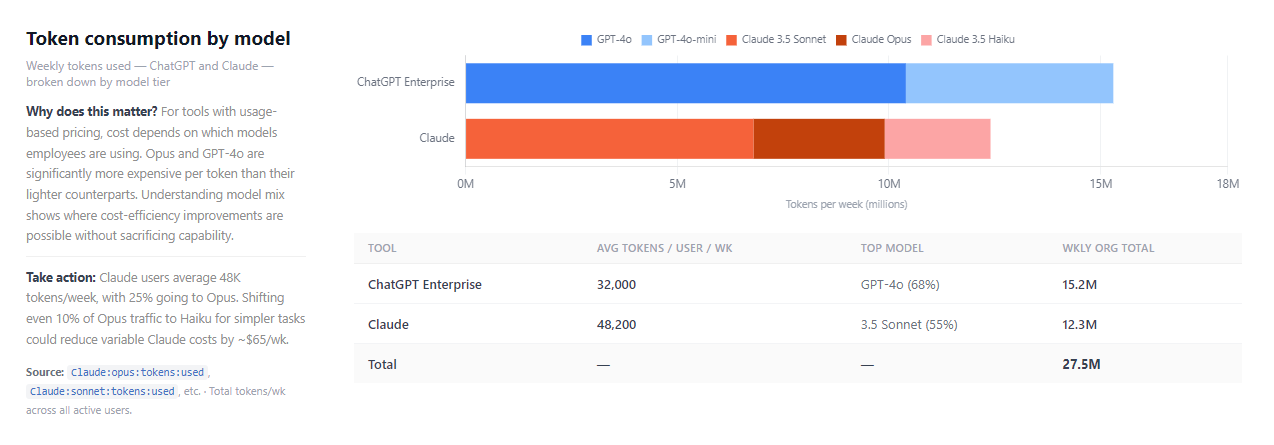
Input and output tokens per active user per week, trended over 14 weeks and estimated to a monthly dollar figure per department based on seat allocation.
A high output-to-input ratio means substantive answers, not quick lookups. Useful before renegotiating tier pricing.
Sessions per week and messages per session on the same 14-week trend line. When both rise, training is working. When sessions rise but depth doesn't, it's a prompt-quality problem.
Current: 6.8 messages/session, up 1.4 over 14 weeks. Prompt workshops focused on multi-turn techniques tend to double this within four weeks.
Average characters per prompt over time. Prompts under 50 characters are keyword searches. Over 200 they include role, constraints, and context — a reliable signal that someone knows what they're doing.
At 312 chars average, there's still room. The fastest lever is surfacing prompt templates from your own power users, not generic training.
GPT-4o, GPT-4o mini, GPT-4, and GPT-3.5 as a stacked share of sessions, week by week. Shows whether your org is drifting toward better models or defaulting to whatever opened first.
39% of sessions still on older models. Setting GPT-4o as the org default in Workspace settings is a five-minute fix with immediate effect on output quality.
A scatter of sessions per week vs. messages per session, one dot per department. Separates high-frequency short sessions (quick lookups) from infrequent long ones (extended work) — two different problems, two different responses.
Engineering: 9.2 msg/session. Sales: 4.1 at high frequency. A 30-minute use-case session for Sales has a different ROI than a workshop for Engineering.
Estimated monthly spend by department, based on seat allocation at $30/user. Departments with seats but low weekly-active counts are visible here — before they show up as waste at renewal.
Engineering and Sales account for 42% of spend and show strong utilization. HR and Operations have seats going unused — a targeted session before renewal could fix that.
Worklytics vs. native analytics
OpenAI shipped a refreshed Workspace Analytics dashboard in March 2026. It covers the basics well. Here’s where the gaps remain for teams running more than one AI tool or needing cross-function visibility.
| Capability | Native Workspace | Worklytics |
|---|---|---|
| Seat activation & weekly active users | ✓ | ✓ |
| Sessions & messages/session, 14-week trend | Partial | ✓ |
| Token usage & cost by department | ✗ | ✓ |
| Prompt length trending | ✗ | ✓ |
| Cross-tool view (Copilot, Gemini, GitHub Copilot) | ChatGPT only | All AI tools unified |
| Department segmentation without SCIM | Requires SCIM | ✓ |
| Correlation with HRIS, calendar, or Git | ✗ | ✓ |
| Historical data beyond current month | Limited exports | Full history |
| User-level pseudonymization (no raw data) | Basic aggregation | Hash at source |
How it works
Worklytics pulls from ChatGPT Enterprise audit logs through a read-only API integration. No agent to install, no SDK, no code changes on your side. IT sign-off is straightforward because nothing writes to your environment.
User identifiers are pseudonymized before they leave your environment. Worklytics receives usage signals — sessions, message counts, token volumes, model choices — never names, email addresses, or conversation content.
When you connect Workday, Google Calendar, or GitHub alongside ChatGPT, cross-signal patterns emerge: which teams using AI more are also shipping faster, or whether high-AI-adoption groups have shed recurring meetings. Single-tool deployments work fine without this.
Token usage, session depth, prompt quality, model mix, department patterns, and license utilization — each arrives configured, with a specific recommended action, not just a number. Most teams reach their first insight within a week of connection.
Privacy & Compliance
Worklytics tracks AI usage without ever reading employee content. We connect to admin-level APIs only — GDPR compliant, SOC 2 Type II audited, and privacy-first by design.


The audit logs are already there. Worklytics connects in 48 hours and gives IT, HR, and leadership six pre-built views — each with a specific action to take, not just a number to look at.



