
To track Glean usage in your company, start with Glean Insights, the admin dashboard that shows how many employees have signed up (coverage), how many signups are monthly active (activity) and how many monthly users come back every week (stickiness), with views by department and manager. For per-event detail, use the Glean Customer Event logs. To compare Glean with your other AI tools and see whether it changes how teams work, you need to bring that activity together with your HR data and the rest of your AI stack.
Glean sits across the tools your employees already use: search over company knowledge, the Glean Assistant for chat, and agents that run tasks. That makes it easy to roll out and harder to measure well. The questions leaders ask are the usual ones: who is actually using it, which teams get value from it, and is usage growing or fading after launch? We answered the same questions for Google Workspace in how to track Gemini usage.
Glean is an enterprise search and assistant platform. Employees use it in three main ways.
Glean Insights reports on all three, which is why usage can look very different depending on which number you read.
Adoption is uneven. Signing up for Glean is easy. Making it a weekly habit is not, and some teams get there while others stop after a few searches.
Search and chat are different signals. A person who runs a quick search and a person who uses the Assistant to draft a report are both "active," but they get very different value.
Training needs targets. Usage data tells you which departments have stalled, so enablement goes where it is needed.
Glean is one tool among several. Most companies also pay for ChatGPT, Claude, Copilot or Gemini. Knowing how Glean compares helps decide where to invest.
Glean gives admins two native sources: the Insights dashboard and the Glean Customer Event logs.
"Glean Insights" is the adoption and usage dashboard in the Glean admin console. Only people with the Insights Moderator role can open it: select your profile in the lower-left corner, then Insights. The Overview tab answers four questions: how healthy adoption is, how many users are active, what they are doing, and who the most active users are (Glean docs).
Three health metrics sit at the top:
Glean counts a person as active if they take an information-seeking or information-curation action, such as a search, a Glean Assistant message, expanding an AI answer, using AI summarization, engaging with Gleanbot, or viewing autocomplete results and announcements. Viewing the home page does not count. Monthly active users cover a trailing 28 days, weekly active users a trailing 7 days and daily active users the previous day (UTC). Insights refreshes daily and guarantees data for the last 270 days.
The Overview also shows total searches, total Glean Assistant interactions and total agent runs, plus an "All signed up users" table with each person's active days, Assistant interactions, searches, agent runs and MCP calls. You can download that table as a CSV.
The Departments and Managers views show coverage, activity and stickiness for each department or manager's organization, plus how many people in each group use search, the Assistant and agents. Department names come from the org chart your admins provide. Departments with fewer than 5 employees are combined into one row, and filters use each person's current department, not past ones.
Insights also has tabs for agents, LLM usage and MCP servers, and an Insights chat that answers adoption questions in plain language.
For per-event detail, Glean writes a stream of Glean Customer Event (GCE) logs that records actions such as searches, result clicks, chats, feedback and autocomplete requests. By default the logs go to a storage bucket in your Glean project. Exporting them to your own warehouse, such as BigQuery, is not enabled by default, so you set that up with your Glean account team.
Glean Insights answers "how much Glean, and where?" well. It leaves several questions open.
Comparison with other AI tools. Your employees may also use ChatGPT, Claude, Copilot or Gemini. Insights only reports on Glean, so you cannot see whether a team that ignores Glean uses a different assistant instead.
Link to how work gets done. Insights does not show whether teams that use Glean heavily also have different meeting loads, focus time or collaboration patterns. Evaluating Glean's effect on team collaboration needs collaboration data alongside the AI data.
Org changes over time. Department filters use each person's current department, so a reorg rewrites the history you see. A long-term trend by team means storing the data yourself.
Passive signals. Some actions that count toward Glean's active users are light, such as viewing autocomplete results. That is fine for adoption, but it can overstate how many people use Glean for real work.
History beyond 270 days. Insights only guarantees the last 270 days, so year-over-year comparisons need the data stored somewhere else.
To get a reliable team-level view:

Glean works on some of your most sensitive content: documents, tickets, chats and search queries. Measuring adoption does not need any of it. Counting how often a team searched or ran an agent is usage metadata, which is very different from reading what they searched for. Keep the two apart: usage analytics should work on counts and events, report at team level, and never pull query text or answers. That makes the program easier to explain to employees, works councils and legal.
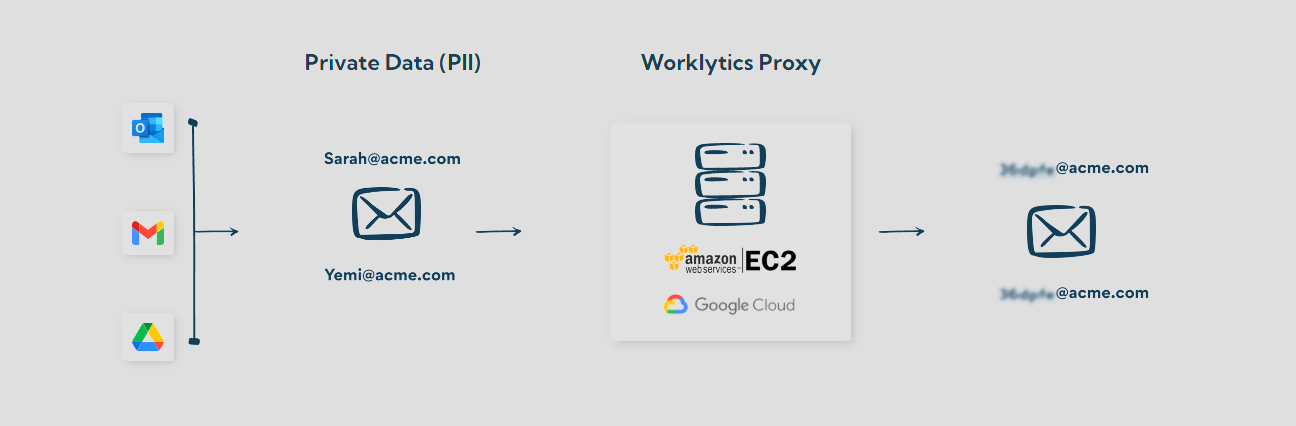
Worklytics treats Glean as a conversational AI tool and connects to it in one of two ways. What it sees depends on which one you enable.
Glean Customer Events Log (per event). One record per user action. Worklytics counts deliberate actions as uses: searches and result clicks, chats, AI summaries and answers, votes and feedback, MCP tool calls, actions and workflows. It leaves out per-keystroke autocomplete and UI telemetry such as page views. From these events it reports use counts, active days and days since last use, and LLM-call events give total LLM tokens used. Search queries and result titles are digested or redacted for privacy.
Glean Insights API (daily summary). Glean's own daily per-person summaries: searches, chats, active sessions, AI answers, summarizations, agent runs and days active, plus Assistant and agent usage. Here a use is a day Glean marks the person as active, so individual actions cannot be separated.
This makes Worklytics stricter than Glean's active-user count in one way: someone Glean marks active only from passive signals, such as viewing autocomplete results, may not register a Worklytics use. Worklytics also reports active days per ISO week plus a rolling 28-day view, in each employee's local time zone.
What Worklytics adds is context. Glean sits in the same AI adoption dashboard as your other AI tools, under one comparable definition of AI usage with active days de-duplicated across tools. Usage is broken down by team and role from your HR data, and linked to collaboration metrics such as focus time and fragmented hours, so you can see whether heavy Glean teams work differently. Personal identifiers are pseudonymized (hashed with SHA-256) before analysis, and results are only shown for groups above a minimum size (typically 5 to 8 people). The fields collected are listed in the Worklytics Data Inventory.

Glean Insights is the admin dashboard in Glean that reports adoption and usage. It shows coverage (signups out of employees), activity (monthly active users out of signups) and stickiness (weekly out of monthly active users), plus searches, Assistant interactions, agent runs and views by department and manager. Only users with the Insights Moderator role can open it.
Glean counts a person as active if they take an information-seeking or curation action, such as a search, a Glean Assistant message, an AI summary, a Gleanbot interaction or viewing autocomplete results. Monthly active users cover the last 28 days and weekly active users the last 7 days, not counting the current day.
Yes. The Departments and Managers views in Glean Insights show coverage, activity, stickiness and search, Assistant and agent users for each department or manager's organization. They use your current org chart, so past reorgs are not reflected, and departments under 5 people are grouped together.
Yes. The All signed up users table in Insights downloads as a CSV with each person's active days, searches, Assistant interactions, agent runs and MCP calls. For per-event data, use the Glean Customer Event logs, which you can load into a warehouse such as BigQuery with help from your Glean account team.
Glean Insights does not include collaboration data, so you need to join Glean usage to meeting, focus time and messaging patterns by team. Worklytics does this by putting Glean usage next to your other AI tools and collaboration metrics, at group level only.
Glean Insights tells you how much Glean your company uses. Worklytics shows how that compares with your other AI tools, which teams have stalled, and how heavy Glean teams work differently, without reading any content. Next step: see how Worklytics measures AI adoption.