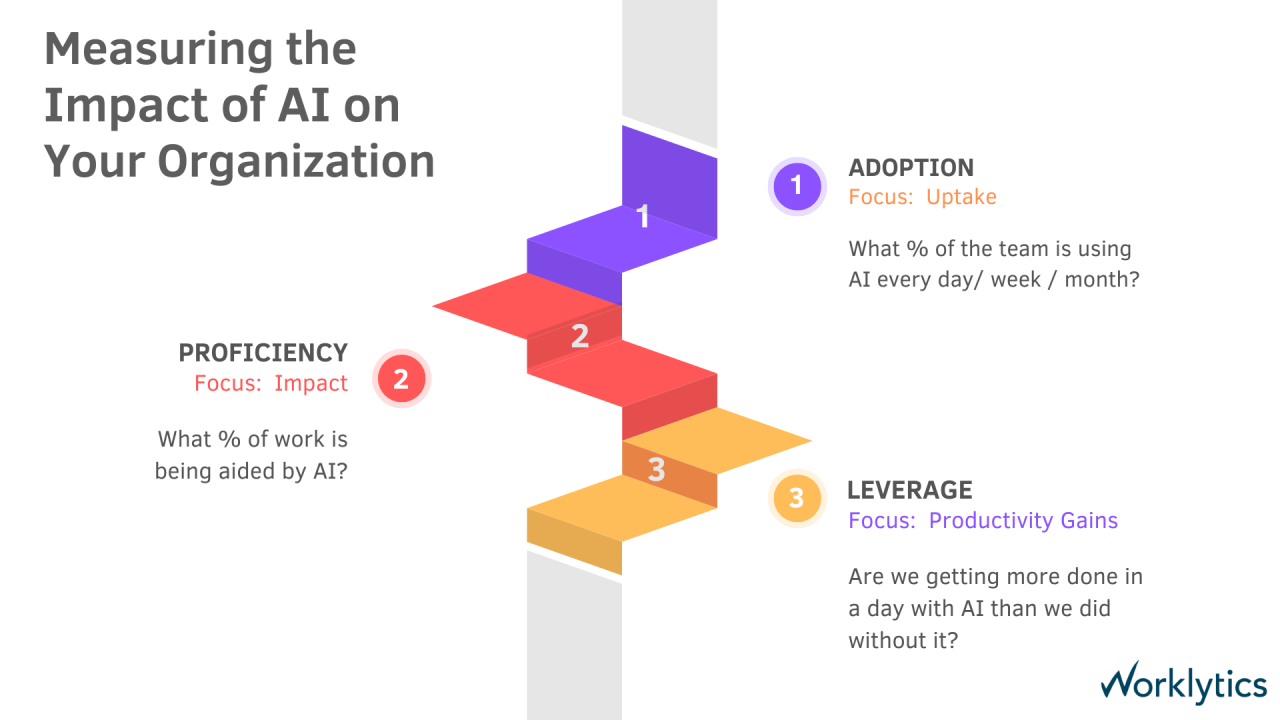
A good AI adoption strategy names the business outcome you want, the people who need to use AI to get there, and the one metric that tells you each step is working. The simplest way to run it is a 30/60/90-day plan: get a baseline and launch in the first month, close the gaps in the second, and prove value in the third.
Most companies have the tools already. Few have the results. In McKinsey's 2026 State of AI survey, nearly nine in ten respondents said their organization uses AI in at least one business function, but only about 6% were "high performers" that attribute 5% or more of EBIT to AI (McKinsey, The state of AI in 2026). The difference is rarely the model. It is whether people use AI in their real work, and whether leaders can see it.
This guide gives you the 30/60/90-day plan, the metric to watch in each phase, and the foundations that make enterprise AI adoption stick. If you want the obstacles first, read our guide to the top AI adoption challenges and how to overcome them.
| Phase | Goal | Metric to watch | Example target |
|---|---|---|---|
| Days 1 to 30 | Set a baseline and launch | Activation rate: share of licensed employees who used AI at least once | 50% of licensed employees active by day 30 |
| Days 31 to 60 | Enable teams and close gaps | Weekly active usage by team, and which teams lag | Every team at 40% or more weekly active users |
| Days 61 to 90 | Prove value and decide what to scale | AI workflow penetration (share of the workday in which people use AI) and the day-1 KPI | A measurable move on the day-1 KPI in high-use teams |
The example targets are examples only. Set your own from your baseline.
The first month is about knowing where you start. Without a baseline you cannot show progress later.
Metric to watch: activation rate. This is the share of licensed employees who have used an AI tool at least once. A low activation rate after 30 days usually means access, awareness or policy problems, not a problem with the tool.
In month two, the question changes from "did people try it?" to "do people keep using it?".
Metric to watch: weekly active usage by team. Look for teams where activation was high but weekly use dropped. That pattern usually means people tried the tool and did not find a use for it in their daily work.
Month three is about evidence. Leaders will ask whether the spend is paying off, and you should be able to answer with data.
Metric to watch: AI workflow penetration and the day-1 KPI. AI workflow penetration is the share of the workday in which people use an AI tool. It shows whether AI has become part of daily work or stays an occasional extra. For the ROI side, follow our guide on how to measure AI ROI, which walks through a simple formula with a worked example.
After day 90, repeat the cycle with the next set of use cases and teams.
The 30/60/90-day plan runs on four foundations. Each one below is something to have in place before or during the first month.
Every successful AI adoption strategy starts at the top. Leadership buy-in is the foundation that supports all other efforts. When CEOs and senior executives champion AI, they set a clear vision that AI is central to the company’s future.
Without executive sponsorship, many AI projects stall in pilot mode and never scale. Studies show that a lack of strategic alignment and support is a major reason why a high percentage of AI initiatives never reach production. Executive leaders need to participate actively – prioritizing AI in strategy discussions, allocating resources, and modeling a culture that embraces innovation.
AI runs on data – and the quality, accessibility, and organization of that data can make or break your AI efforts. Data readiness refers to having the necessary data infrastructure and practices in place so that AI algorithms can effectively learn and generate valuable insights.
It involves breaking down data silos across departments, ensuring data is accurately labeled and enriched, and establishing robust data governance (security, privacy, compliance).
To bolster data readiness, companies should invest in modern data architecture (data lakes or lakehouses, real-time pipelines), data integration tools to unify disparate sources, and data cleaning/master data management to improve quality.
A strong data foundation not only enables AI to function effectively but also builds trust in AI outputs, paving the way for broader adoption.
Having scalable technology infrastructure is another strategic pillar for AI adoption. Adopting MLOps practices (Machine Learning Operations) is equally essential – this means establishing pipelines and tools to reliably move AI projects from development to production, monitor model performance, and update models as data or business conditions change.
Seamless Integration
Don’t overlook integration and architecture: an AI solution must connect seamlessly with your enterprise systems (CRM, ERP, customer-facing apps, etc.) to deliver value. For instance, if you build a predictive analytics model, ensure you have the APIs and workflow changes to embed those predictions into decision-making processes.
Security & Compliance
Planning for security and compliance at scale is another key aspect. As AI usage grows, so do concerns such as data privacy and AI ethics, which your infrastructure and governance should address.
In short, treat AI platforms as a core part of your enterprise architecture. With the right foundations in place, you can accelerate AI deployments from small experiments to enterprise-wide services without losing momentum.
Even the best AI strategy will falter without an enabled and empowered workforce. Workforce enablement is about preparing your people – both technically and culturally – to leverage AI effectively.
On the skills front, this may involve upskilling programs and training initiatives so that employees (from software engineers to analysts and business managers) understand how to use AI tools in their roles.
Many organizations are implementing AI academies, workshops, or certification programs on topics like data science, machine learning basics, and prompt engineering for generative AI.
Equally important is change management and culture. Leadership should communicate clearly how AI will benefit the organization and its people – for example, automating drudge work so teams can focus on higher-value tasks – to create a positive narrative and reduce fear.
Moreover, adjusting performance metrics and incentives may be necessary: if you want employees to use an AI tool, make sure they’re recognized for improvements that result from it.
In essence, workforce enablement ensures that AI isn’t seen as an imposed technology from “on high,” but as a welcomed enhancement to people’s work.
Even a good plan runs into obstacles: no clear direction, an AI skills gap, employee fears, shadow AI, data that is not ready, and ROI that is hard to prove. We cover each one, with a sourced data point and a concrete fix, in our guide to the top AI adoption challenges and how to overcome them. The plan above is designed to catch most of them early, because each phase has a metric that shows where adoption is stalling.
Every phase of the plan depends on one thing: seeing how AI is actually used. Surveys and license counts do not tell you which teams use AI every week and which never started.
Worklytics uses existing corporate data to measure AI adoption across your organization. It connects to the AI tools your teams already use, such as Microsoft Copilot, Gemini, ChatGPT Enterprise, Claude, GitHub Copilot, Cursor and Slack, and gives you one view of adoption across all of them.


Worklytics is privacy-first. It analyzes usage metadata from admin APIs, aggregated at team level, and never the content of prompts or AI responses.
An AI adoption strategy works when it is specific: a few use cases, an owner for each, and a metric for every phase. Start with a baseline and activation in the first 30 days, close the gaps team by team in the next 30, and show the business result by day 90. Then repeat. If you can see how AI is used across your organization, you can steer each step instead of guessing.
For the end state this plan builds toward, see what it means to be an AI-first organization.
An AI adoption strategy is a plan for getting employees to use AI tools in their real work so the business gets measurable value. It names the target outcomes, the teams and use cases to start with, the policy and training needed, and the metrics that show progress. A good one is short enough to run in phases, such as a 30/60/90-day plan.
In the first 30 days, pick use cases, record baseline KPIs, publish a use policy and track activation. In days 31 to 60, break usage down by team, train lagging teams and recruit power users as champions. In days 61 to 90, compare high-use and low-use teams on your KPIs and decide what to scale.
Start with activation rate, the share of licensed employees who used AI at least once. Then track weekly active usage by team, depth of use per active user, and the business KPI you chose for each use case. Together they show whether people use AI, keep using it, and get results from it.
You can usually see clear adoption patterns within 90 days if you measure from day one. Broad, lasting adoption across a large company takes longer, because each new team and use case goes through the same baseline, enablement and value steps. Running the plan in repeated 90-day cycles keeps progress visible.
The strategy is the plan you follow: goals, phases and metrics. Challenges are the obstacles that slow the plan down, such as an AI skills gap, employee fears or shadow AI. Our guide to the top AI adoption challenges covers each obstacle with data and a concrete fix.