Quick answer:
Most engineering leaders can say how many GitHub Copilot or Cursor seats they bought. Far fewer can say how many hours those seats give back. That gap matters because developer intuition about AI is unreliable. In a 2025 randomized trial, METR found experienced developers were 19 percent slower on real tasks while believing AI had made them 20 percent faster. The takeaway is not that AI coding assistants fail. It is that time saved has to be measured, not felt.
So do they really save time? Sometimes yes, sometimes no, and a single average hides both. The only way to know for your team is to measure it. This guide breaks that into four layers you can instrument now: adoption, engagement, productivity, and impact. Each answers a different question, and skipping any one produces a number you cannot defend to finance.
Assistant vendors report suggestion acceptance rates, and teams often treat a high rate as proof of savings. Acceptance only shows a developer kept a suggestion. It says nothing about whether the code survived review, needed rework, or replaced work that was already fast.
In GitHub and Microsoft's controlled study, developers finished a single bounded task, writing an HTTP server, 55.8% faster with Copilot. On large production repositories, METR measured a slowdown instead. The difference is task complexity, codebase familiarity, and review overhead, none of which a license dashboard captures.
Writing new code is also a minor part of the day. Independent research puts hands-on-keyboard coding near 15 percent of a developer's time, rising to roughly a third once testing and debugging are counted. A tool that halves coding time can still leave the workday almost unchanged, which is why delivery research from DORA looks at flow and stability rather than editor speed. Measuring time saved means measuring the whole workflow, not the autocomplete.
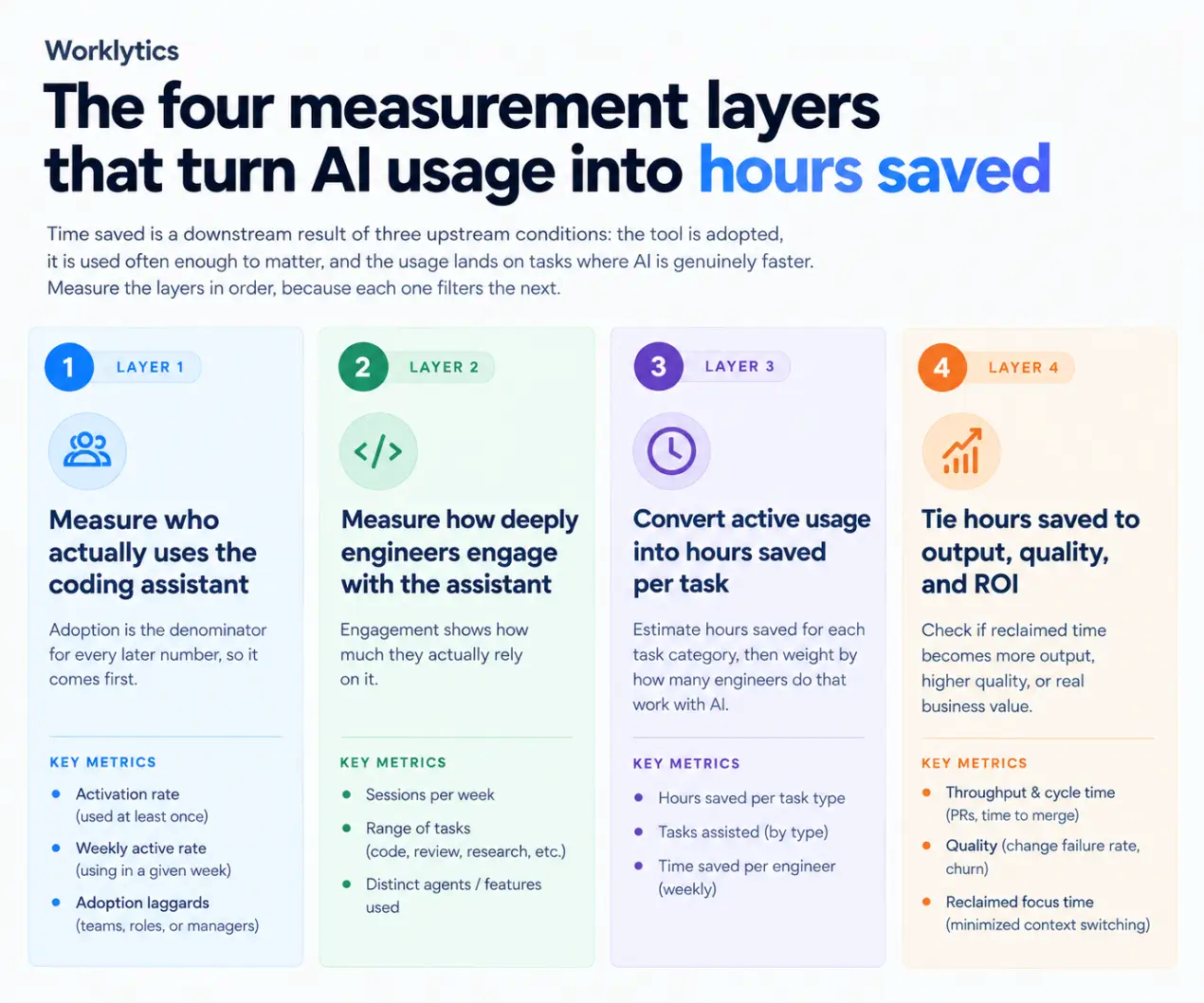
You cannot go straight from seats purchased to hours saved. That number is wrong until you remove three things hiding inside it: engineers who never use the tool, users who barely use it, and saved time that gets absorbed back into meetings. Measuring in four steps strips out each one in turn, so the figure that remains is defensible.
Time saved is a downstream result of three upstream conditions: the tool is adopted, it is used often enough to matter, and the usage lands on tasks where AI is genuinely faster. Measure the steps in order, because each one filters the next.
You cannot average time saved across a team when half the seats are idle. Adoption is the denominator for every later number, so it comes first.
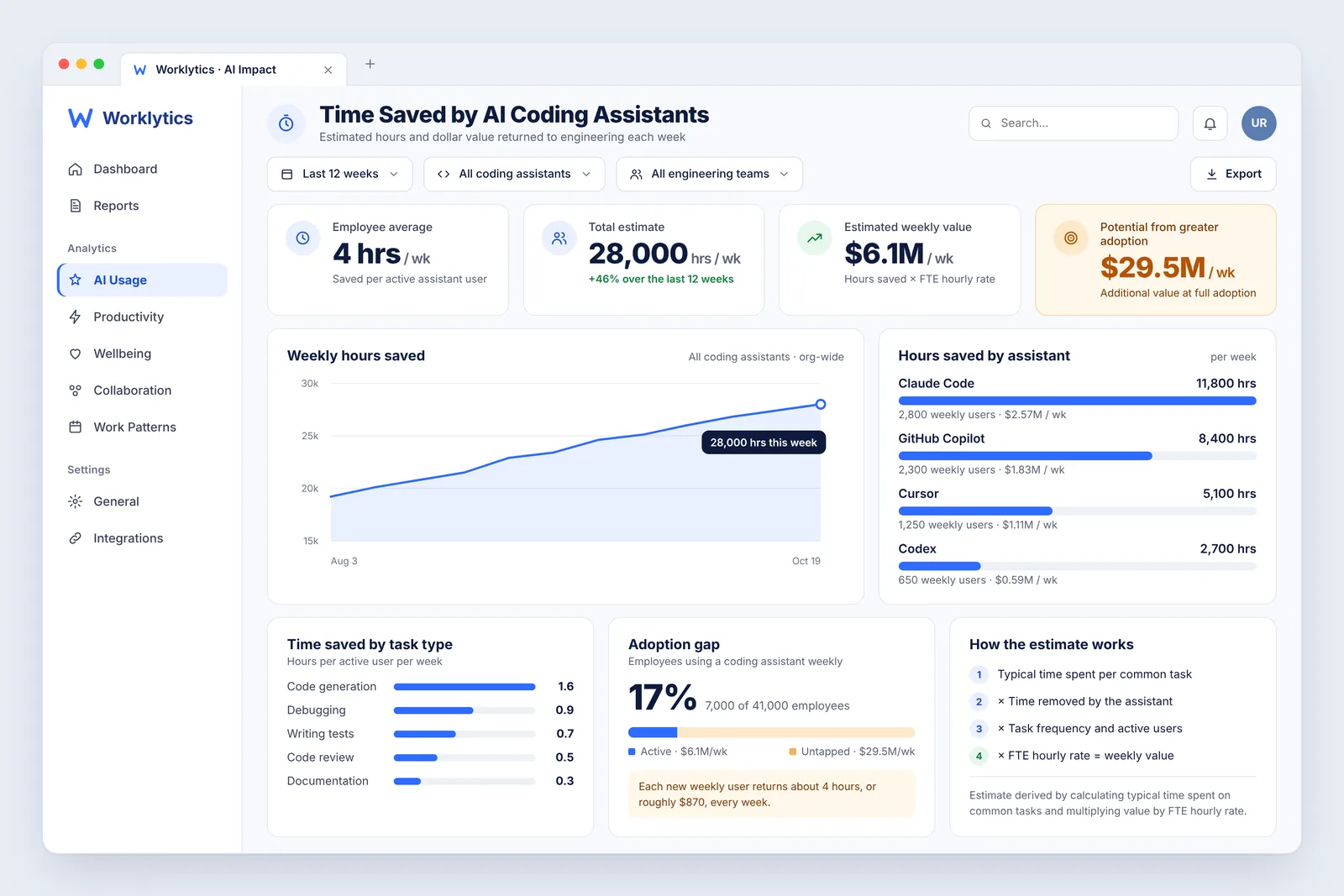
Worklytics builds these from tool telemetry and classifies each action against the work that could plausibly use AI, so adoption is measured against opportunity rather than raw logins. The sample scorecard below pairs unused capacity with its estimated annual value.

Reading adoption this way changes the first question. It is no longer whether anyone uses the tool, but how much automatable engineering work is still done by hand. That figure is the ceiling on time you can still save.
Adoption tells you the tool is open. Engagement tells you whether it is doing real work. Two engineers can both be weekly active while one accepts a single autocomplete and the other delegates whole refactors to an agent. Only the second saves meaningful time.
Depth shows up in three signals: sessions per week, the range of tasks handed to the assistant, and the number of distinct agents or features used. Rising breadth is usually the clearest sign that savings are compounding, because it means engineers trust the tool beyond autocomplete. Absolute numbers are hard to judge without a reference point, which is where peer benchmarks matter.
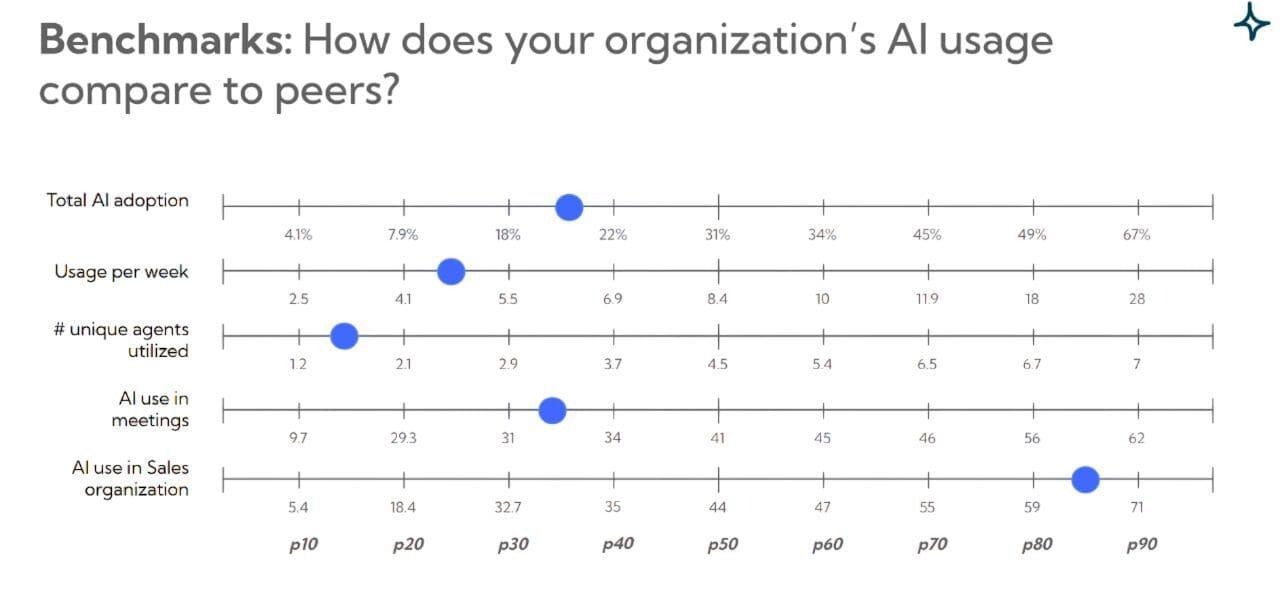
In these illustrative benchmarks, median weekly usage sits near 6.9 sessions per active user and the median team uses fewer than four distinct agents, so an organization at the 80th percentile pulls far more from the same licenses. Worklytics tracks this engagement next to adoption, and the same platform measures engagement, meeting effectiveness, and manager effectiveness across the wider organization, so engineering AI use can be compared to how the rest of the company works.
This is the layer where time saved becomes a number. The method is to estimate hours saved for each task category, then weight each category by how many engineers actually do that task with AI.
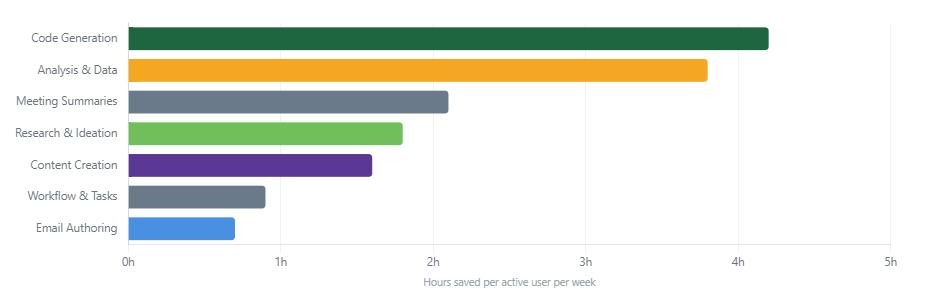
In this Worklytics sample, code generation returns the most time at about 4.2 hours saved per active user each week, followed by analysis and data work at 3.8 hours. The categories fall off quickly after that, which is the practical case for measuring by task rather than quoting one blended figure. A team that mostly uses AI for email and summaries cannot expect the code-generation number, and a single average hides that.
To reach a defensible weekly figure, multiply each category's per-user saving by its weekly active users, sum the categories, then divide by headcount for a per-engineer average. Worklytics productivity measurement produces this by joining assistant telemetry with work-pattern data such as focus time and collaboration load, so the hours are grounded in observed behavior rather than a survey. Pairing the two also catches the failure the METR trial exposed, where felt speed and real speed diverge.
Hours saved matter only if they convert into something the business can see. The final layer checks whether reclaimed time becomes more output, higher quality, or healthier work, or whether it quietly disappears.
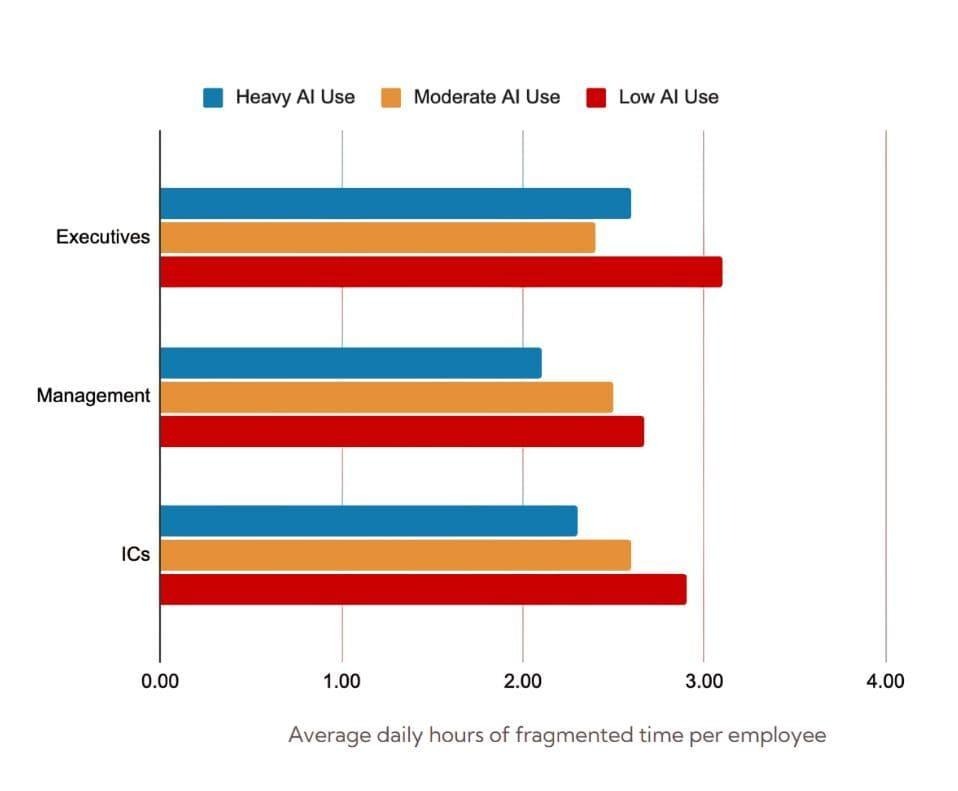
This view shows heavier AI users holding less fragmented time than low users in the same role, the pattern that separates real leverage from busywork. Worklytics impact measurement connects assistant usage to these outcomes and to well-being signals such as after-hours work, because time saved that is reabsorbed into longer days is not a gain. The ROI calculation follows directly: multiply the per-engineer hours saved from Layer 3 by loaded hourly cost, scale by active headcount, and net out license spend.
Run the four layers as one recurring measurement rather than a one-off audit. The sequence below keeps the number honest as adoption shifts.
Worklytics runs all four layers in one place, joining assistant telemetry with collaboration and focus-time data. Book time through the Worklytics Measure AI dashboard to see the adoption, engagement, productivity, and impact views on your own data. As the METR result shows, the value of measuring is precisely that the answer is often not the one people expect.
Sometimes, but not by default. Controlled research runs from a 55.8 percent speedup on a bounded task to a 19 percent slowdown on large production repositories, and developers routinely misjudge which case they are in. AI saves time when usage lands on high-leverage tasks such as code generation and when the saved hours are not reabsorbed into meetings, which is why it has to be measured rather than assumed.
It depends on the task. In Worklytics sample reporting, code generation saves about 4.2 hours per active user each week and analysis about 3.8 hours, while lighter tasks such as email save under an hour. Controlled studies range from a 55.8 percent speedup on bounded tasks to a measured slowdown on large repositories, so the honest answer is that you have to measure your own teams rather than quote a single figure.
No. Acceptance rate shows a developer kept a suggestion, not that it saved time or survived review. Treat it as an engagement signal and pair it with cycle time, rework, and observed hours saved before drawing conclusions.
Allow 3 to 6 months. Early weeks reflect experimentation, and workflows need time to mature before the trend in hours saved and cycle time stabilizes.
Yes. Assistant telemetry combined with work-pattern data such as focus time, collaboration load, and delivery metrics gives an observed measure that does not depend on self-report, which the METR trial showed can be off by nearly 40 points: a believed 20 percent speedup against a measured 19 percent slowdown.
Multiply per-engineer hours saved per week by loaded hourly cost, multiply by active headcount and weeks, then subtract license spend. Grounding the hours-saved input in observed data rather than estimates is what makes the result defensible.
Time saved is not a vendor statistic to adopt, it is a measurement to run. Adoption sets the ceiling, engagement shows whether the tool does real work, productivity converts usage into hours, and impact proves the hours reached the business. No single layer is enough on its own, and the honest version of the number will sometimes be lower than the pitch. Worklytics brings the four together on your own telemetry so the figure holds up in a budget review. Start with the Worklytics Measure AI dashboard.